







Last year I tried to make a Home Automation timer using my Pi to turn a light socket on and off - the idea being to make a security device that would come on and off at random times during the evening to simulate someone being in a room. Unfortunately it wasn't very successful, because of the inability to control mains voltage with a PiFace - see my earlier attempts here. For the last year I've been looking for something that I could hook my Pi up to to control a domestic mains switch (240v in the UK) and found this from CPC - the ENERGENIE - ENER002-2PI - RF CONTROLLED MAINS SOCKETS, FOR RPI (see http://cpc.farnell.com/energenie/ener002-2pi/rf-controlled-mains-sockets-for/dp/SC13490.
This kit comprises a couple of remote controlled sockets that you plug into the wall, and then a header board for the Pi which connects to the socket using RF, and allows you to switch them on and off with Python. Its pretty straightforward, as I decided to do the following.
- Create a configuration file with
- Start Time
- End Time
- Maximum Sleep
- Minimum Sleep
- Timer Status (On/Off)
- Socket Status (On/Off)
I can then have a script which ran continuously with the following logic
- Read the Configuration file
- If within the Start/End period toggle the switch on/off depending on current state
- if outside the Start/End period turn the switch off
- Sleep for a random period of minutes within the Minimum/Maximum period defined above
Controlling the Switch
The switch comes with links to example code at http://www.farnell.com/datasheets/1860522.pdf, which shows how to turn the switch on and off - essentially it sets a bunch of GPIO states. I've attached a sample of one of the scripts I use (i.e. to turn a switch off)
Continuous Monitor
In order to have a continuous process I wrote a script that runs 'for ever' and then defined it in /etc/rc.local as shown below. If this file (i.e. rc.local) doesn't exist you can create it in the /etc directory - it will get processed every time the Pi is booted up, Make sure you give it appropriate permissions if its not already there (e.g. sudo chmod 777 /etc/rc.local)
My rc.local file looks like this. Note the call to run the script is sudo python <script_name> - don't forget to put sudo in or the file wont get run because of permission issues. I'm piping output to a file so that I can keep an eye on what its doing.
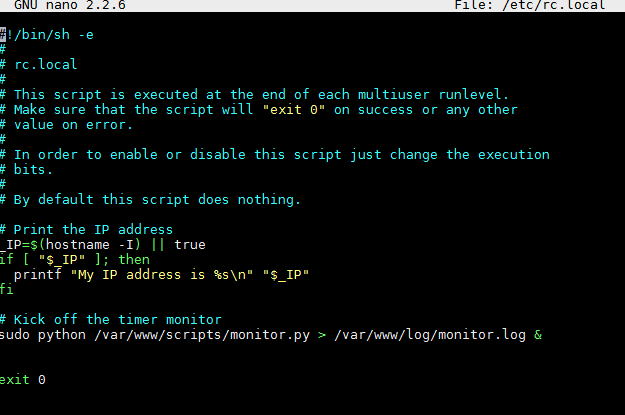
The monitor itself is fairly straightforward. It needs to be able to read/write to a file, perform date/time calculation and call scripts to turn the switch on and off. The code is shown below - the comments would help to explain what's going on.
I'm not the worlds most experienced python coder, so comments on how to improve the code are welcomed !
import json
import time
from random import randint


import datetime
import socket2_on
import socket2_off


nowTime = time.strftime("%H:%M")


def timeDiff(time1,time2):
    timeA = datetime.datetime.strptime(time1, "%H:%M")
    timeB = datetime.datetime.strptime(time2, "%H:%M")
    newTime = timeA - timeB
    return newTime.seconds/60


def logit(msg):
  print time.strftime("%H:%M:%S") + " : " + msg


# loop for ever, checking every 5 seconds
while True:
  #print "Current time : " + nowTime


  # Get the configuration values in json format
  json_data=open('/var/www/config.json')
  data = json.load(json_data)
  # pprint(data)
  start = data["config"]["start"]
  finish = data["config"]["finish"]
  timerStatus = data["config"]["timerStatus"]
  switchStatus = data["config"]["switchStatus"]
  minSleep = data["config"]["minSleep"]
  maxSleep = data["config"]["maxSleep"]

  json_data.close()


  # Some info
  #print "Start = " + start + ", Finish = " + finish + ", Timer = " + timerStatus + ", Switch = " + switchStatus


  # Only continue if the timer is On
  if timerStatus == "on":

       # Determine how long the timer should ruun for (i.e. from start to finish)
       duration = timeDiff(finish,start)

       # Get the difference between now and the start - if this is less than the duration then we are in the timer period
       # (if no is less than the start time it returns a hgh value is it compares to yesterday ...)
       elapsedFromStart = timeDiff(nowTime,start)

       # If we are in the timer period, toggle the switch
       if elapsedFromStart < duration:

            logit(str(elapsedFromStart) + " minutes into a duration of " + str(duration) + " until the timer period ends at " + finish)

            if switchStatus == "on":
                 logit("Turning switch Off ..");
                 socket2_off.turnOff();
                 data["config"]["switchStatus"] = "off"
            else:
                 logit("Turning switch On ..");
                 socket2_on.turnOn();
                 data["config"]["switchStatus"] = "on"


            # update the json file with the switch status
            #print data
            with open('/var/www/config.json', 'w') as outfile:
                 json.dump(data, outfile)
       else:
            logit("Outside timer period which doesnt start until " + start);
            logit("Turning switch Off ..");
            socket2_off.turnOff();
            data["config"]["switchStatus"] = "off"

          # update the json file with the switch status
            #print data
            with open('/var/www/config.json', 'w') as outfile:
                 json.dump(data, outfile)
   else:
       logit("Timer is turned off")

  # Sleep for a random number of seconds within parameters defined
  sleepMins = randint(int(minSleep), int(maxSleep))
  sleepSecs = sleepMins * 60
  logit("Sleeping for " + str(sleepSecs) + " seconds (" + str(sleepMins) + " minutes) ...")
  time.sleep( sleepSecs )
Top Comments