



element14 Community
element14 Community
    Register Log In
  • Site
  • Search
  • Log In Register
  • Community Hub
    Community Hub
    • What's New on element14
    • Feedback and Support
    • Benefits of Membership
    • Personal Blogs
    • Members Area
    • Achievement Levels
  • Learn
    Learn
    • Ask an Expert
    • eBooks
    • element14 presents
    • Learning Center
    • Tech Spotlight
    • STEM Academy
    • Webinars, Training and Events
    • Learning Groups
  • Technologies
    Technologies
    • 3D Printing
    • FPGA
    • Industrial Automation
    • Internet of Things
    • Power & Energy
    • Sensors
    • Technology Groups
  • Challenges & Projects
    Challenges & Projects
    • Design Challenges
    • element14 presents Projects
    • Project14
    • Arduino Projects
    • Raspberry Pi Projects
    • Project Groups
  • Products
    Products
    • Arduino
    • Avnet & Tria Boards Community
    • Dev Tools
    • Manufacturers
    • Multicomp Pro
    • Product Groups
    • Raspberry Pi
    • RoadTests & Reviews
  • About Us
  • Store
    Store
    • Visit Your Store
    • Choose another store...
      • Europe
      •  Austria (German)
      •  Belgium (Dutch, French)
      •  Bulgaria (Bulgarian)
      •  Czech Republic (Czech)
      •  Denmark (Danish)
      •  Estonia (Estonian)
      •  Finland (Finnish)
      •  France (French)
      •  Germany (German)
      •  Hungary (Hungarian)
      •  Ireland
      •  Israel
      •  Italy (Italian)
      •  Latvia (Latvian)
      •  
      •  Lithuania (Lithuanian)
      •  Netherlands (Dutch)
      •  Norway (Norwegian)
      •  Poland (Polish)
      •  Portugal (Portuguese)
      •  Romania (Romanian)
      •  Russia (Russian)
      •  Slovakia (Slovak)
      •  Slovenia (Slovenian)
      •  Spain (Spanish)
      •  Sweden (Swedish)
      •  Switzerland(German, French)
      •  Turkey (Turkish)
      •  United Kingdom
      • Asia Pacific
      •  Australia
      •  China
      •  Hong Kong
      •  India
      • Japan
      •  Korea (Korean)
      •  Malaysia
      •  New Zealand
      •  Philippines
      •  Singapore
      •  Taiwan
      •  Thailand (Thai)
      • Vietnam
      • Americas
      •  Brazil (Portuguese)
      •  Canada
      •  Mexico (Spanish)
      •  United States
      Can't find the country/region you're looking for? Visit our export site or find a local distributor.
  • Translate
  • Profile
  • Settings
Raspberry Pi
  • Products
  • More
Raspberry Pi
Blog PiFace Shim
  • Blog
  • Forum
  • Documents
  • Quiz
  • Events
  • Polls
  • Files
  • Members
  • Mentions
  • Sub-Groups
  • Tags
  • More
  • Cancel
  • New
Join Raspberry Pi to participate - click to join for free!
Featured Articles
Announcing Pi
Technical Specifications
Raspberry Pi FAQs
Win a Pi
GPIO Pinout
Raspberry Pi Wishlist
Comparison Chart
Quiz
  • Share
  • More
  • Cancel
Group Actions
  • Group RSS
  • More
  • Cancel
Engagement
  • Author Author: mcb1
  • Date Created: 20 Feb 2015 8:53 AM Date Created
  • Views 835 views
  • Likes 3 likes
  • Comments 2 comments
Related
Recommended
  • b+
  • piface_digital
  • gpio
  • a+
  • piface_shim
  • rpi
  • clearance
  • stacking_header
  • pi2

PiFace Shim

mcb1
mcb1
20 Feb 2015

GPIO Access

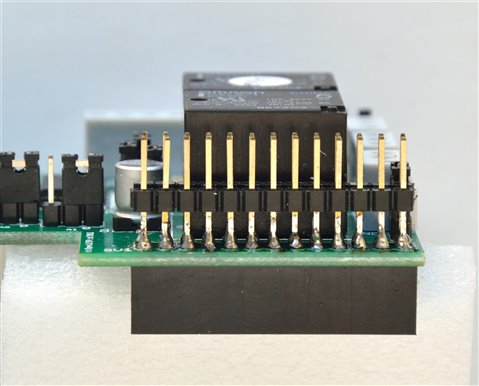
For some time now anyone with a Raspberry Pi and an add-on board has struggled with access to the unused GPIO pins.


Back when the PiFace Digital was first released, I suggested this as an option.

http://www.element14.com/community/roadTestReviews/1452

image

     photo source    3 minions (me, myself and I)


While it suited at the time, adding the single row headers is not something that everyone can tackle, and access is only when you use that modified board.


Shortly afterwards the PiRack appeared.

PI RACK


  imageimage

     photo source    3 minions (me, myself and I)


It allowed multiple PiFace Digitals (and some others) but the footprint was rather large.


PiFace Shim

So when I strumbled across this (and I do mean stumble as it didn't appear in subsequent searches), I ordered two.

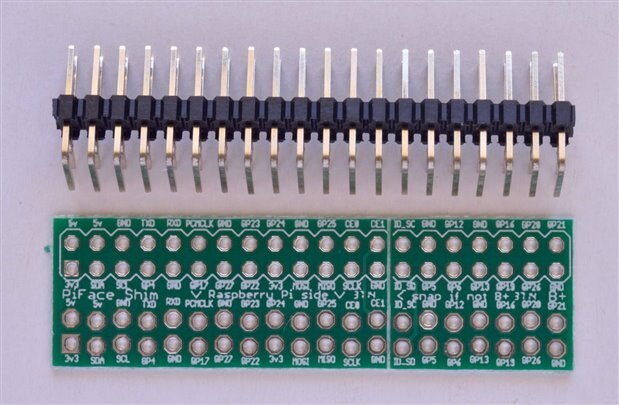
PiFace SHIM GPIO Duplication Board for Raspberry Pi

  image

          photo source    3 minions (me, myself and I)


It comes as a board and right angle header which you solder on.

If you simply want one or two GPIO, then you could forgo the 40 pin header and solder directly to the appropriate GPIO pins, or fit the number of pins required.


The design allows you to simply slip it over the GPIO pins then plug the add-on board on the original GPIO pins.

Access to all the GPIO is then available using the right angle header.


But I only have 26 pins on my RPi's. image

The manufacturer has wisely made it suitable for Model A, or B RPi with only 26 GPIO pins.

There is a break point (shown as a line across the board) which has been scored to assist snapping the board.


So problem solved ...or is it.? image

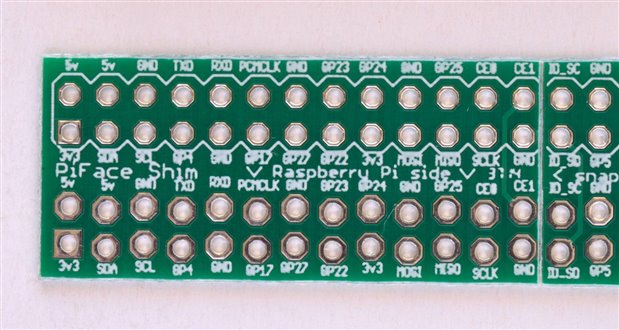
The holes that go over the GPIO have been staggered ever so slightly to ensure they make good contact.

  image

          photo source    3 minions (me, myself and I) note the lower two rows ARE staggered.


I've seen this trick on some FTDI sockets on Arduino, meaning you don't have to have the header pins fitted to reprogram it.


BUT do they really give a decent contact.? image

For many of the GPIO you are dealing with voltage and extremely small currents, so any 'poor' contact joint would not be a problem.


However the power pins could cause problems.

So just be careful about what you want to hook onto the side.

I would not recommend trying to power the RPi via the right angle connector.


Cases

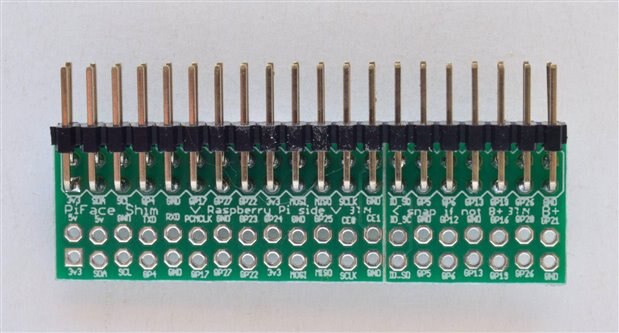
This solution certainly does give access, but depending on the case/enclosure, it might not fit.
 

image

          photo source    3 minions (me, myself and I)


Clearance

One of the other issues with the B+ and RPi2 is that the extra USB sockets get in the way of some of the add-on boards.


We discussed that here.

http://www.element14.com/community/message/120574/l/re-new-raspberry-pi-model-b#120574


As you can see in the discussion, some add-on boards used the taller socket.


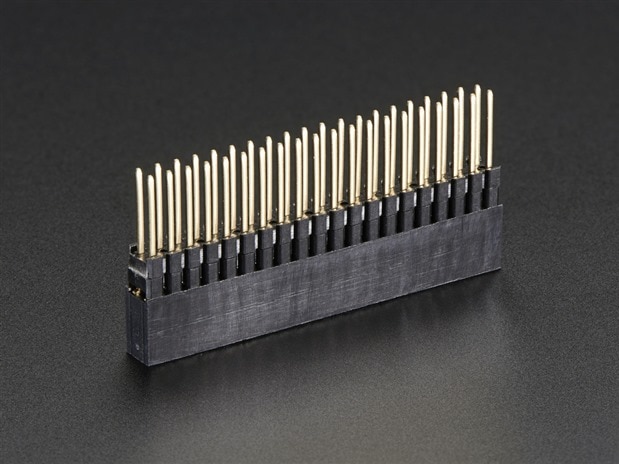
That got me thinking that if you soldered one of these.

https://www.adafruit.com/products/1979
 

image

     photo source    www.adafruit.com


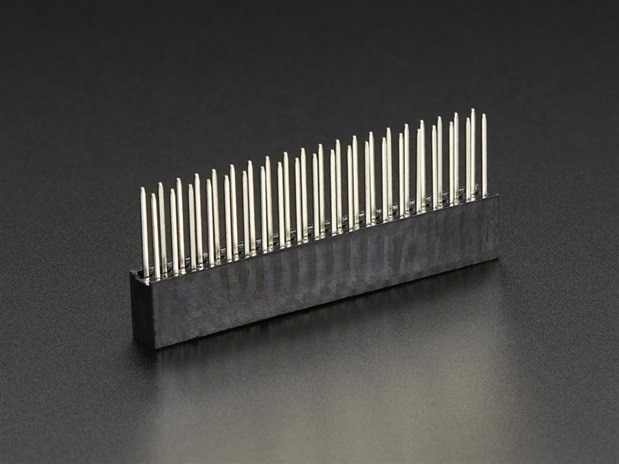
or one of these

https://www.adafruit.com/product/2223
 

image

     photo source    www.adafruit.com


( Sorry element14 you still only have the 2x13 pin versions despite the B+ being out for some time .... )


to the connector then you certainly would have a better connection, and you fix the clearance issue ...


Does it work.?

Well that is a good question, since I only have a 2x13 (26 pin GPIO) stacking header, I couldn't try it

However I do need to order some parts, so I'll be sure to include some in with the order.


Enjoy

Mark


  • Sign in to reply
  • mcb1
    mcb1 over 10 years ago in reply to DAB

    Thanks for the comment.


    It's mostly useful if you have add-on boards which don;t pass the GPIO on.

    But if you did want to swap RPi it does save undoing the cables/wiring.


    Mark

    • Cancel
    • Vote Up 0 Vote Down
    • Sign in to reply
    • More
    • Cancel
  • DAB
    DAB over 10 years ago

    Nice post Mark.


    If I get a RPi, I might have to look into these options if I need to expand the IO access.


    DAB

    • Cancel
    • Vote Up 0 Vote Down
    • Sign in to reply
    • More
    • Cancel
element14 Community

element14 is the first online community specifically for engineers. Connect with your peers and get expert answers to your questions.

  • Members
  • Learn
  • Technologies
  • Challenges & Projects
  • Products
  • Store
  • About Us
  • Feedback & Support
  • FAQs
  • Terms of Use
  • Privacy Policy
  • Legal and Copyright Notices
  • Sitemap
  • Cookies

An Avnet Company © 2025 Premier Farnell Limited. All Rights Reserved.

Premier Farnell Ltd, registered in England and Wales (no 00876412), registered office: Farnell House, Forge Lane, Leeds LS12 2NE.

ICP 备案号 10220084.

Follow element14

  • X
  • Facebook
  • linkedin
  • YouTube