



element14 Community
element14 Community
    Register Log In
  • Site
  • Search
  • Log In Register
  • Community Hub
    Community Hub
    • What's New on element14
    • Feedback and Support
    • Benefits of Membership
    • Personal Blogs
    • Members Area
    • Achievement Levels
  • Learn
    Learn
    • Ask an Expert
    • eBooks
    • element14 presents
    • Learning Center
    • Tech Spotlight
    • STEM Academy
    • Webinars, Training and Events
    • Learning Groups
  • Technologies
    Technologies
    • 3D Printing
    • FPGA
    • Industrial Automation
    • Internet of Things
    • Power & Energy
    • Sensors
    • Technology Groups
  • Challenges & Projects
    Challenges & Projects
    • Design Challenges
    • element14 presents Projects
    • Project14
    • Arduino Projects
    • Raspberry Pi Projects
    • Project Groups
  • Products
    Products
    • Arduino
    • Avnet & Tria Boards Community
    • Dev Tools
    • Manufacturers
    • Multicomp Pro
    • Product Groups
    • Raspberry Pi
    • RoadTests & Reviews
  • About Us
  • Store
    Store
    • Visit Your Store
    • Choose another store...
      • Europe
      •  Austria (German)
      •  Belgium (Dutch, French)
      •  Bulgaria (Bulgarian)
      •  Czech Republic (Czech)
      •  Denmark (Danish)
      •  Estonia (Estonian)
      •  Finland (Finnish)
      •  France (French)
      •  Germany (German)
      •  Hungary (Hungarian)
      •  Ireland
      •  Israel
      •  Italy (Italian)
      •  Latvia (Latvian)
      •  
      •  Lithuania (Lithuanian)
      •  Netherlands (Dutch)
      •  Norway (Norwegian)
      •  Poland (Polish)
      •  Portugal (Portuguese)
      •  Romania (Romanian)
      •  Russia (Russian)
      •  Slovakia (Slovak)
      •  Slovenia (Slovenian)
      •  Spain (Spanish)
      •  Sweden (Swedish)
      •  Switzerland(German, French)
      •  Turkey (Turkish)
      •  United Kingdom
      • Asia Pacific
      •  Australia
      •  China
      •  Hong Kong
      •  India
      •  Korea (Korean)
      •  Malaysia
      •  New Zealand
      •  Philippines
      •  Singapore
      •  Taiwan
      •  Thailand (Thai)
      • Americas
      •  Brazil (Portuguese)
      •  Canada
      •  Mexico (Spanish)
      •  United States
      Can't find the country/region you're looking for? Visit our export site or find a local distributor.
  • Translate
  • Profile
  • Settings
Raspberry Pi
  • Products
  • More
Raspberry Pi
Blog Raspberry Robosapian
  • Blog
  • Forum
  • Documents
  • Quiz
  • Events
  • Polls
  • Files
  • Members
  • Mentions
  • Sub-Groups
  • Tags
  • More
  • Cancel
  • New
Join Raspberry Pi to participate - click to join for free!
Featured Articles
Announcing Pi
Technical Specifications
Raspberry Pi FAQs
Win a Pi
GPIO Pinout
Raspberry Pi Wishlist
Comparison Chart
Quiz
  • Share
  • More
  • Cancel
Group Actions
  • Group RSS
  • More
  • Cancel
Engagement
  • Author Author: Former Member
  • Date Created: 10 Jan 2014 7:18 AM Date Created
  • Views 1626 views
  • Likes 0 likes
  • Comments 2 comments
Related
Recommended
  • raspberry
  • infrared
  • robosapienx
  • robosapien
  • robot
  • emotep
  • rpi
  • lirc

Raspberry Robosapian

Former Member
Former Member
10 Jan 2014


image


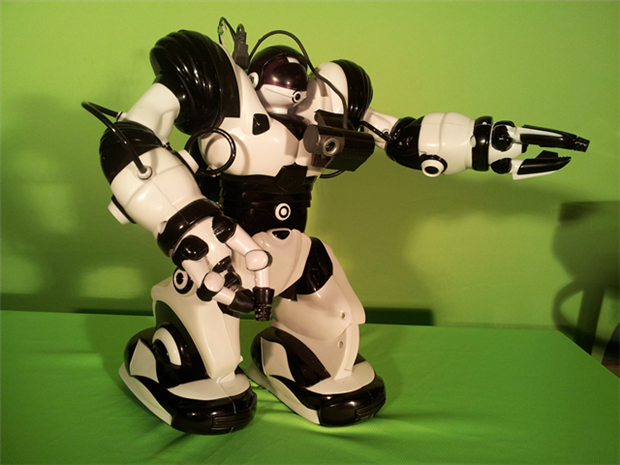
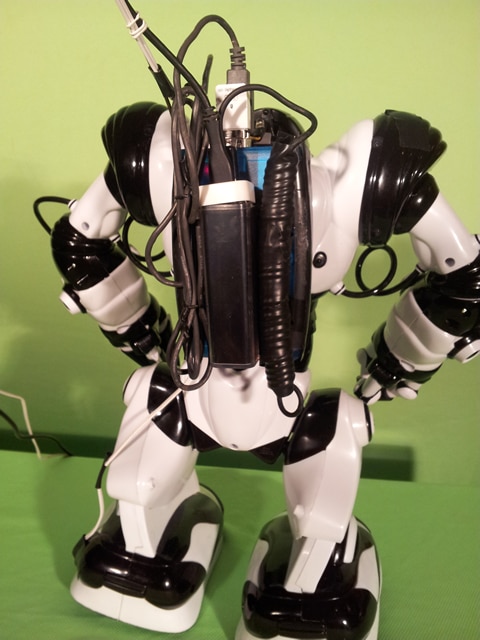
After building 1.0, and thumping the inz n outs using raw materials, I'm finding highjacking the Robosapien an easy thing to do. Here are some pics of the prototype rigging. The lobotomy is just an infrared interface, so he has what equates to a spinal tap, sending the same commands you could send from the remote control. The RPI is already driving( thanks to Gbot-1.0 software development), all I had to do was change the throttle controls to 'walk-forward, walk back' ect.


image


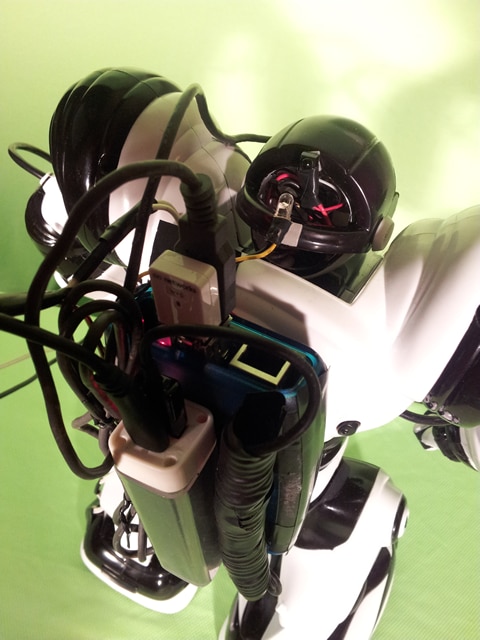
The only problem is, LIRC is hit and miss, but I'm tweaking it now, and getting near 95% of the commands sent to drive the limbs accurately.( sometimes he wont lift his arms) As for Power, I connected directly to the battery terminals in the feet, (I didn't want to start the project by ruining the controller board in a soldering mishap), and power it with an old PC ups. The RPI is powered with a portable cellphone battery recharger( I know right!) and it also powers the camera and wifi.

image

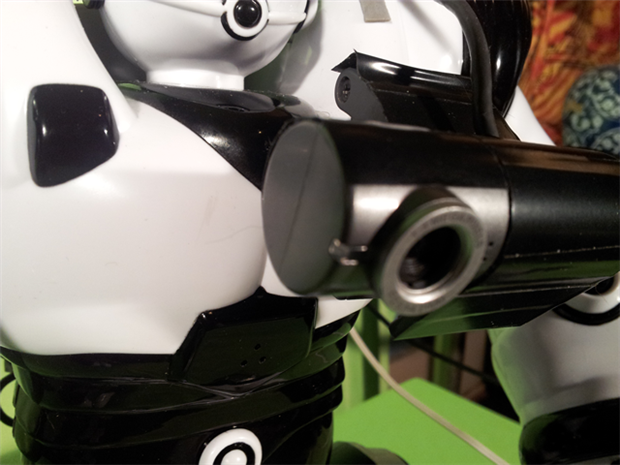
The camera is 1.5mp usb2.0. it's the fastest I had in my scrap bin. It looks strangely cool. Anyways.. gonna paint it all black.


image

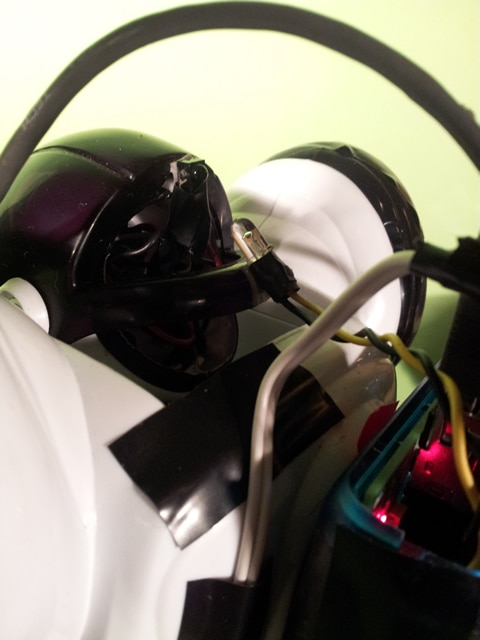
To make this work is very simple. Go get that old VCR out of the basement, and it's remote out of the kitchen drawer. Remove the IR receiver from the VCR and attach it in tandem( spliced) with the original Robosapien IR receiver mounted in the top of his head. Remove the transmitter LED from the VCR remote, and attach it to your RPI's GPIO.

I'm not versed in the in-s and outs of why this works, but it does. However, the VCR LED seems to only work when pointed at the original Robosapien receiver, and not the one that was in the VCR. what ever, it works! I suspect it has to do with timing technical mumbo jumbo that has less to do with making it work than knowing how it works.  As for the wiring and config, I fond an excellent doc that got me through it here:.

http://www.jamesrobertson.eu/blog/2013/may/19/2326hrs.txt

You dont need to program the controls. I found a nice file that works well enough to tweek here:

http://www.bookofthefuture.co.uk/wp-content/uploads/2013/11/lircd.conf_.zip

(copy this file to /etc/lirc folder.) You can tweek the delay and the frequency until you get 100% movement. Mine is set to frequency 38671 with GAP 1.

So, there are 4 things you must do

1 download the software noted on http://www.jamesrobertson.eu/blog/2013/may/19/2326hrs.txt

2. edit /etc/modules as described:   This will be the GPIO you decide to use. I used a 470k resister to protect my pi.

3. edit /etc/lirc/hardware.conf as described

4.save and edit http://www.bookofthefuture.co.uk/wp-content/uploads/2013/11/lircd.conf_.zip

(save it in /etc/lirc folder and change the frequency and GAP until you get full control)


I used python and imported os,system  then called irsend directly which is awkward but since I don't speak Cython, that's that!

TEST: it is pretty unlikely he will move the first time you transmit initially, so send the HIGH5 a few times, or send STOP and see if they eyes flash, then you know your freq is close enough to tweak  Remember, STOP and RESET are the best testbeds. Watch the eyes to see if your commands are being received, they will blink..


irsend SEND_ONCE Robosapien HIGH5

A list of things you can do with irsend :LIRC - Linux Infrared Remote Control
image

  • Sign in to reply
  • Former Member
    Former Member over 11 years ago

    Nice!

    I did something similar last year - build diary in these posts: Roboraspbian | Book of the Future

    • Cancel
    • Vote Up 0 Vote Down
    • Sign in to reply
    • More
    • Cancel
  • DAB
    DAB over 11 years ago

    Nice post.


    There are a lot of websites that can provide you with the IR control sequence for most remotes, but most use a similar encoding scheme.

    You might have to watch out for anyone using another remote to hijack your bot though. image


    DAB

    • Cancel
    • Vote Up 0 Vote Down
    • Sign in to reply
    • More
    • Cancel
element14 Community

element14 is the first online community specifically for engineers. Connect with your peers and get expert answers to your questions.

  • Members
  • Learn
  • Technologies
  • Challenges & Projects
  • Products
  • Store
  • About Us
  • Feedback & Support
  • FAQs
  • Terms of Use
  • Privacy Policy
  • Legal and Copyright Notices
  • Sitemap
  • Cookies

An Avnet Company © 2025 Premier Farnell Limited. All Rights Reserved.

Premier Farnell Ltd, registered in England and Wales (no 00876412), registered office: Farnell House, Forge Lane, Leeds LS12 2NE.

ICP 备案号 10220084.

Follow element14

  • X
  • Facebook
  • linkedin
  • YouTube