element14 Community
element14 Community
    Register Log In
  • Site
  • Search
  • Log In Register
  • Community Hub
    Community Hub
    • What's New on element14
    • Feedback and Support
    • Benefits of Membership
    • Personal Blogs
    • Members Area
    • Achievement Levels
  • Learn
    Learn
    • Ask an Expert
    • eBooks
    • element14 presents
    • Learning Center
    • Tech Spotlight
    • STEM Academy
    • Webinars, Training and Events
    • Learning Groups
  • Technologies
    Technologies
    • 3D Printing
    • FPGA
    • Industrial Automation
    • Internet of Things
    • Power & Energy
    • Sensors
    • Technology Groups
  • Challenges & Projects
    Challenges & Projects
    • Design Challenges
    • element14 presents Projects
    • Project14
    • Arduino Projects
    • Raspberry Pi Projects
    • Project Groups
  • Products
    Products
    • Arduino
    • Avnet & Tria Boards Community
    • Dev Tools
    • Manufacturers
    • Multicomp Pro
    • Product Groups
    • Raspberry Pi
    • RoadTests & Reviews
  • About Us
  • Store
    Store
    • Visit Your Store
    • Choose another store...
      • Europe
      •  Austria (German)
      •  Belgium (Dutch, French)
      •  Bulgaria (Bulgarian)
      •  Czech Republic (Czech)
      •  Denmark (Danish)
      •  Estonia (Estonian)
      •  Finland (Finnish)
      •  France (French)
      •  Germany (German)
      •  Hungary (Hungarian)
      •  Ireland
      •  Israel
      •  Italy (Italian)
      •  Latvia (Latvian)
      •  
      •  Lithuania (Lithuanian)
      •  Netherlands (Dutch)
      •  Norway (Norwegian)
      •  Poland (Polish)
      •  Portugal (Portuguese)
      •  Romania (Romanian)
      •  Russia (Russian)
      •  Slovakia (Slovak)
      •  Slovenia (Slovenian)
      •  Spain (Spanish)
      •  Sweden (Swedish)
      •  Switzerland(German, French)
      •  Turkey (Turkish)
      •  United Kingdom
      • Asia Pacific
      •  Australia
      •  China
      •  Hong Kong
      •  India
      •  Korea (Korean)
      •  Malaysia
      •  New Zealand
      •  Philippines
      •  Singapore
      •  Taiwan
      •  Thailand (Thai)
      • Americas
      •  Brazil (Portuguese)
      •  Canada
      •  Mexico (Spanish)
      •  United States
      Can't find the country/region you're looking for? Visit our export site or find a local distributor.
  • Translate
  • Profile
  • Settings
Raspberry Pi
  • Products
  • More
Raspberry Pi
Blog Review of new Raspberry Pi images
  • Blog
  • Forum
  • Documents
  • Quiz
  • Events
  • Polls
  • Files
  • Members
  • Mentions
  • Sub-Groups
  • Tags
  • More
  • Cancel
  • New
Join Raspberry Pi to participate - click to join for free!
Featured Articles
Announcing Pi
Technical Specifications
Raspberry Pi FAQs
Win a Pi
GPIO Pinout
Raspberry Pi Wishlist
Comparison Chart
Quiz
  • Share
  • More
  • Cancel
Group Actions
  • Group RSS
  • More
  • Cancel
Engagement
  • Author Author: fustini
  • Date Created: 3 Jul 2012 9:00 PM Date Created
  • Views 1731 views
  • Likes 1 like
  • Comments 5 comments
Related
Recommended
  • debian
  • raspberry_pi
  • rpi
  • xbmc
  • linux

Review of new Raspberry Pi images

fustini
fustini
3 Jul 2012

Howdy,


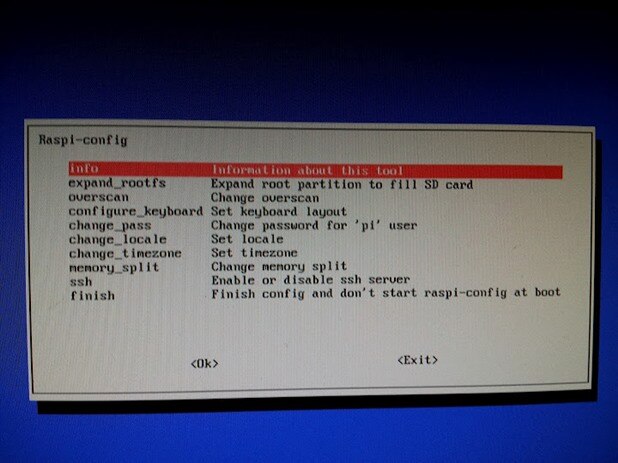
I had been using the current official Debian "squeeze" image (debian6-19-04-2012) for awhile now, so I decided to try out some of the newer images last weekend.  First off, I tried out the Debian "Wheezy" Beta image.  It includes a great configuration tool called raspi-config which runs at first boot:
image

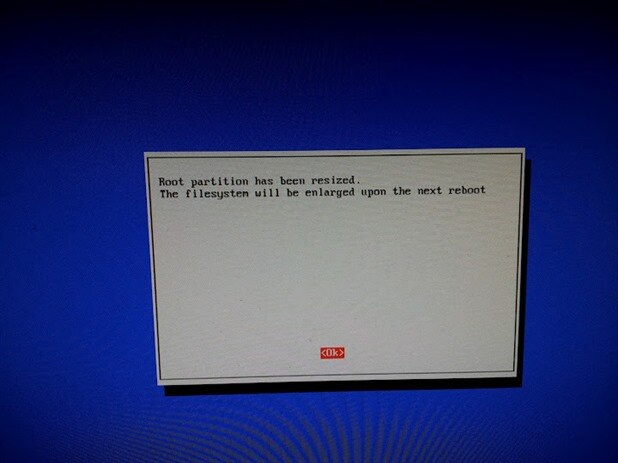
The expand_rootfs option will automatically expand the image to utilize the full size of your SD card.  I think this is really handy for novice users:
image

The overscan menu item was another handy feature for me.  I was able to quickly disable overscan so that the Pi would utilize the full real estate of my monitor (previously, I had to create config.txt in the boot partition and add that setting):

image

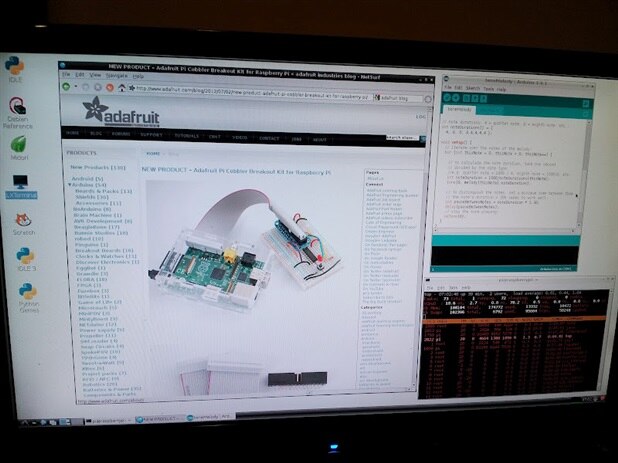
Here's a shot of the desktop once I've started LXDE via startx:
image

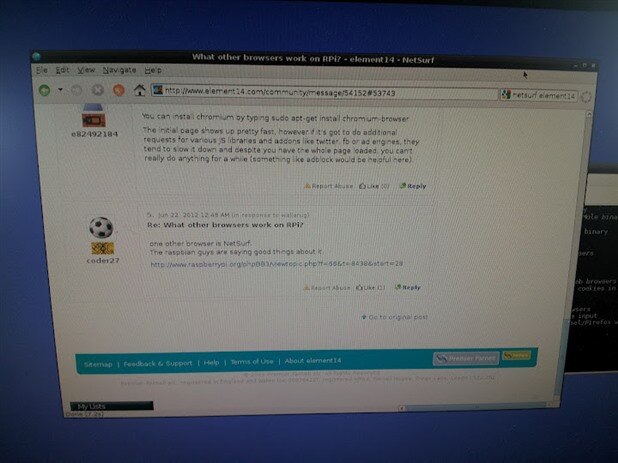
Hopefully you can tell, despite my poor attempt to photograph my monitor, that the browser isn't Midori.  This Debian "Wheezy" image includes another browser in addition to Midori called NetSurf.  I have to thank coder27 for bringing it to my attention:

image

It provides a much quicker experience than Midori.  However, it doesn't support JavaScript so some websites may not function correctly.  I think that visiting the "mobile" version of difficult websites may be a good workaround when possible.


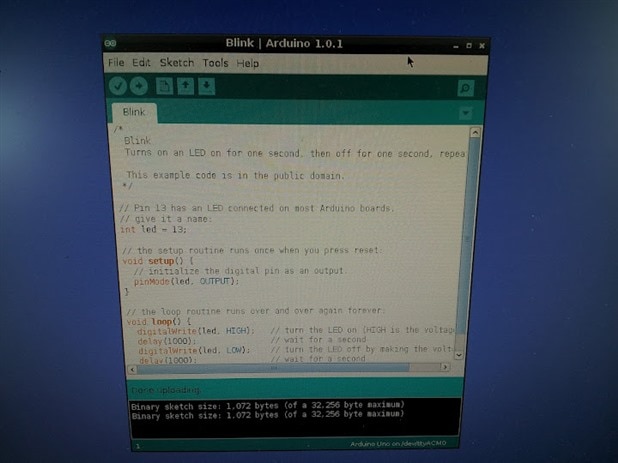
The highlight of the weekend was when I realized the Arduino IDE is in the Debian Wheezy repository.  I was able to easily install the arduino package via the typical sudo apt-get install arduino.  An Electronics category was then added to the LXDE program launcher menu sporting a lovely Arduino menu item. 


However, I did have to add my user, pi, to the group dialout and log back in.  After that, I connected my Arduino Uno to one of the Raspberry Pi's USB ports (my keyboard and mouse are connected to a hub so uses only 1 USB port).  And finally I launched the Arduino IDE and was able to upload one of the example sketches to the Uno:
image

I had read other posts about this on the web, but it was really quite eye opening to see in person that you don't need a "full" computer anymore to do Arduino projects!


coder27 also clued me into newer distribution called Raspbian:

image

Raspbian is an unofficial port of Debian Wheezy armhf with compilation settings adjusted to produce optimized "hard float" code that will run on the Raspberry Pi. This should provide significantly faster performance for applications that make heavy use of floating point arithmetic operations.


The port is necessary because the official Debian Wheezy armhf release is compatible only with versions of the ARM architecture later than the one used on the Raspberry Pi (ARMv7-A CPUs and higher, vs the Raspberry Pi's ARMv6 CPU).


Their official image hasn't been released yet, but there are a couple unofficial images.  I first tried out Pisces image which takes its name from the hostname of project leader Mike Thompson's Pi.  It has the LXDE desktop installed like the Foundation's Debian images.  It also has useful packages like NetSurf and Arduino available to install.  I didn't perceive improved speed due to usage of hardware floating point, but I didn't attempt to run any benchmarks yet.


What I most appreciated from Raspbian was the Pisces+MATE image.  As I learned, MATE is a fork of GNOME 2 for those that don't like the UI changes in GNOME 3 (that would be me).  I've been using GNOME on Linux as my primary desktop for 8 years, so I really felt at home when I booted this image:image
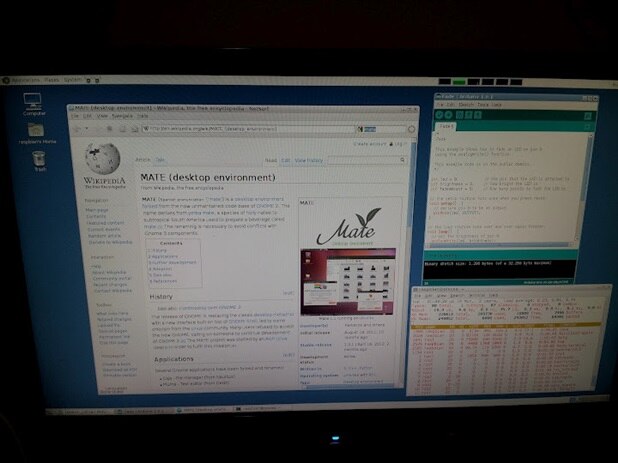
It's comorting to watch my Pi's vitals via the Indicator Applet just like I do on my workstation.  Although, it got me thinking the color for 'cache' on the memory indicator should really default to black, so novice users don't think that there's no free memory.


Finally, I thought I'd revisit XBMC, the Pi's de facto media center app, after checking out Liam Fraser's rough image back in May.  First, I tried out Raspbmc (Release Candidate 3):

image

The installation process was interesting.  I simply had to download a python installer script from their site.  I ran it and specified the device for my SD card, and it wrote a small image to it.  I booted the Pi with it and the installation process started up automatically and downloaded the rest of installation (this means your Pi has to be connected to the Internet). 


After this installation process, XBMC launched, and I found XBMC easy to use just like with Liam's older image.  It was simple to install the YouTube "add-on" via the menu system and watch clips from YouTube.   Other online service "add-on's" can be installed, too.  Audio and video files can also be accessed from the SD card, USB sticks/drives or network.  Unfortunately, I didn't have any files handy, so I'll have to try that later on.


There is another distribution focused on XBMC called OpenELEC.  I followed the instructions on the wiki, but I didn't have any luck with the 2012-June-23 image.  I installed it on an SD, and it did boot.  However, the OpenELEC splash screen would display followed by a blank screen.  I see there is now a July 2nd image, so I'll have to give OpenELEC a try again.


I'm very interested to find out what other distros/images folks are trying out on their Pi's.  Please leave a comment and let me know!


Thanks,

Drew

http://twitter.com/pdp7

  • Sign in to reply
  • fustini
    fustini over 13 years ago in reply to Former Member

    Raspbian Wheezy has their own repository where they've recompiled most of the Debian packages to take advantage of the Pi's hardware.  From their site:

    The initial build of over 35,000 Raspbian packages, optimized for best performance on the Raspberry Pi, was completed in June of 2012. However, Raspbian is still under active development with an emphasis on improving the stability and performance of as many Debian packages as possible.

    You can browse their repo here:


    http://www.raspbian.org/RaspbianRepository


    The official image from the Foundation (Raspbian Wheezy on http://www.raspberrypi.org/downloads) is a reasonably sized image.  If you are looking for smaller, then there are some more options under Unofficial Images at: http://www.raspbian.org/RaspbianImages


    I'm not sure about USB stick.  I believe the GPU is hard coded to look at the SD card for the boot partition.  I've seen discussion of some hacks but I'm not sure what the current state-of-the-art is, so to speak.

    • Cancel
    • Vote Up 0 Vote Down
    • Sign in to reply
    • More
    • Cancel
  • Former Member
    Former Member over 13 years ago

    Does the Raspian Wheezy OS give you access to the full repository of Debian packages ? Ubuntu too ?  I'm going to be wanting to install Teamviewer 7 (or something) to access the Pi from my PC over ethernet, and Samba to access network shares. I don't know if the ARM architecture means each package has to be specially rebuilt or whether that all happens at some lower common level.


    A quick run down of the installed packages would be good. 440 MB download implies quite a lot of stuff that I probably won't want. Is there a stripped down version that just gets you to the desktop ?


    Will it boot off a USB stick ?

    • Cancel
    • Vote Up 0 Vote Down
    • Sign in to reply
    • More
    • Cancel
  • fustini
    fustini over 13 years ago

    FYI - Raspbian "Wheezy" is now the officially recommended image by the Raspberry Pi Foundation:


    http://www.raspberrypi.org/archives/1605

    • Cancel
    • Vote Up 0 Vote Down
    • Sign in to reply
    • More
    • Cancel
  • fustini
    fustini over 13 years ago in reply to Montala

    Hi, actually saw you mention it in another thread today and thought I would like to try it.  I recently bought some more SD cards so I don't have to keep overwriting the one I'm using image

    • Cancel
    • Vote Up 0 Vote Down
    • Sign in to reply
    • More
    • Cancel
  • Montala
    Montala over 13 years ago

    Hi Drew,


    Nearly two weeks and now comments... so let me be the first!


    Have you (or anyone else for that matter, given Puppy a try yet? Although designated as alpha 3, it is stated to be virtually at beta level, and is certainly worth a look... do have a look at the 'config.txt' file first though!


    More details (and download links) can be found at: http://www.raspberrypi.org/phpBB3/viewtopic.php?f=52&t=10964


    It certainly surprised me! image

    • Cancel
    • Vote Up 0 Vote Down
    • Sign in to reply
    • More
    • Cancel
element14 Community

element14 is the first online community specifically for engineers. Connect with your peers and get expert answers to your questions.

  • Members
  • Learn
  • Technologies
  • Challenges & Projects
  • Products
  • Store
  • About Us
  • Feedback & Support
  • FAQs
  • Terms of Use
  • Privacy Policy
  • Legal and Copyright Notices
  • Sitemap
  • Cookies

An Avnet Company © 2025 Premier Farnell Limited. All Rights Reserved.

Premier Farnell Ltd, registered in England and Wales (no 00876412), registered office: Farnell House, Forge Lane, Leeds LS12 2NE.

ICP 备案号 10220084.

Follow element14

  • X
  • Facebook
  • linkedin
  • YouTube