element14 Community
element14 Community
    Register Log In
  • Site
  • Search
  • Log In Register
  • Community Hub
    Community Hub
    • What's New on element14
    • Feedback and Support
    • Benefits of Membership
    • Personal Blogs
    • Members Area
    • Achievement Levels
  • Learn
    Learn
    • Ask an Expert
    • eBooks
    • element14 presents
    • Learning Center
    • Tech Spotlight
    • STEM Academy
    • Webinars, Training and Events
    • Learning Groups
  • Technologies
    Technologies
    • 3D Printing
    • FPGA
    • Industrial Automation
    • Internet of Things
    • Power & Energy
    • Sensors
    • Technology Groups
  • Challenges & Projects
    Challenges & Projects
    • Design Challenges
    • element14 presents Projects
    • Project14
    • Arduino Projects
    • Raspberry Pi Projects
    • Project Groups
  • Products
    Products
    • Arduino
    • Avnet & Tria Boards Community
    • Dev Tools
    • Manufacturers
    • Multicomp Pro
    • Product Groups
    • Raspberry Pi
    • RoadTests & Reviews
  • About Us
    About the element14 Community
  • Store
    Store
    • Visit Your Store
    • Choose another store...
      • Europe
      •  Austria (German)
      •  Belgium (Dutch, French)
      •  Bulgaria (Bulgarian)
      •  Czech Republic (Czech)
      •  Denmark (Danish)
      •  Estonia (Estonian)
      •  Finland (Finnish)
      •  France (French)
      •  Germany (German)
      •  Hungary (Hungarian)
      •  Ireland
      •  Israel
      •  Italy (Italian)
      •  Latvia (Latvian)
      •  
      •  Lithuania (Lithuanian)
      •  Netherlands (Dutch)
      •  Norway (Norwegian)
      •  Poland (Polish)
      •  Portugal (Portuguese)
      •  Romania (Romanian)
      •  Russia (Russian)
      •  Slovakia (Slovak)
      •  Slovenia (Slovenian)
      •  Spain (Spanish)
      •  Sweden (Swedish)
      •  Switzerland(German, French)
      •  Turkey (Turkish)
      •  United Kingdom
      • Asia Pacific
      •  Australia
      •  China
      •  Hong Kong
      •  India
      •  Japan
      •  Korea (Korean)
      •  Malaysia
      •  New Zealand
      •  Philippines
      •  Singapore
      •  Taiwan
      •  Thailand (Thai)
      •  Vietnam
      • Americas
      •  Brazil (Portuguese)
      •  Canada
      •  Mexico (Spanish)
      •  United States
      Can't find the country/region you're looking for? Visit our export site or find a local distributor.
  • Translate
  • Profile
  • Settings
Raspberry Pi
  • Products
  • More
Raspberry Pi
Raspberry Pi Forum RPI 3 nousb
  • Blog
  • Forum
  • Documents
  • Quiz
  • Events
  • Polls
  • Files
  • Members
  • Mentions
  • Sub-Groups
  • Tags
  • More
  • Cancel
  • New
Join Raspberry Pi to participate - click to join for free!
Featured Articles
Announcing Pi
Technical Specifications
Raspberry Pi FAQs
Win a Pi
Raspberry Pi Wishlist
Actions
  • Share
  • More
  • Cancel
Forum Thread Details
  • Replies 32 replies
  • Subscribers 686 subscribers
  • Views 4011 views
  • Users 0 members are here
  • frontpage
  • raspberry_pi_space
Related

RPI 3 nousb

Former Member
Former Member over 10 years ago

I recently got a pi 3 with the 7" touch screen. I set it up with berryboot and installed jessie. I got to were I needed to use a keyboard and that is when I found out the usb ports didn't work.

I went through the following link to try to fix it but nothing there helped.

https://www.raspberrypi.org/forums/viewtopic.php?f=28&t=53832


I've tried keyboards and mice from working linux computers, I even tried a powered usb hub and nothing. I've tried running without the touch screen(via ssh) nothing is recognized.

I've tried power supplies from my other pi's with change. Do I need to post dmesg output? Is it possible I got a bum Pi?

-dan

  • Sign in to reply
  • Cancel
Parents
  • Robert Peter Oakes
    Robert Peter Oakes over 10 years ago

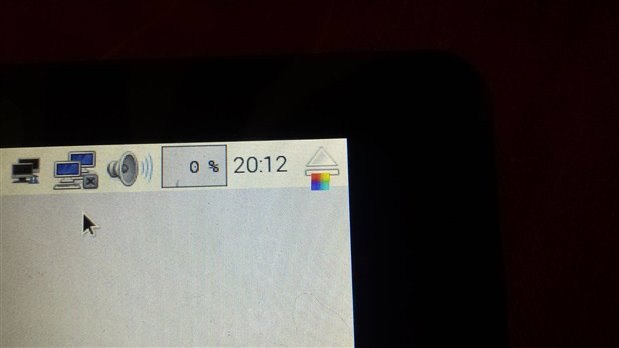
    If the PI thinks the volts is too low it will normally put up a small square rainbow icon in the top right corner of the screen. Are you getting this ??

    • Cancel
    • Vote Up 0 Vote Down
    • Sign in to reply
    • Cancel
  • Former Member
    Former Member over 9 years ago in reply to Robert Peter Oakes

    The first picture show the load of my pi 3 with touch screen and no usb or Ethernet hooked up. And the rainbow colored square showed up during this test.

    This was a quick test I did right after I got home from work so I may not be thinking clearly.So...now what else should I test?

    BTW that was a usb 2.1amp battery pack.


    image

    image

    • Cancel
    • Vote Up 0 Vote Down
    • Sign in to reply
    • Cancel
  • Former Member
    Former Member over 9 years ago in reply to Former Member

    I tested my power supplies they all ranged from 4.98-5.12 volts and I was still getting the rainbow square in upper right corner. I also found out that rebooting doesn't work when attached to the touch screen, shutting down and removing power is what it takes for updates to work.


    I checked 5v at the gpio header and found that I had 3.8 volts coming out of the lcd powering the pi.


    Next I'll test the pi 3 with a monitor and maybe test my other pi's with the touch screen.

    • Cancel
    • Vote Up 0 Vote Down
    • Sign in to reply
    • Cancel
  • rew
    rew over 9 years ago in reply to Former Member

    Glad to hear that my hunch at what was wrong was correct. :-) 


    Your "3.8V" measurement clearly indicates that your pi is not getting enough power.

    The rainbow square is clear indication that your pi is not getting enough power.


    Now there is only one "odd" measurement: You claim to have measured 4.98-5.12V on the power supplies. My guess is that you measured that without any load. Once the pi is connected, the voltage drops. With good power supplies only a little, with a bad power supply it might be a lot. Or you measured at the power supply side of the cable, and not at the pi-side of the cable. Actually measuring at the GPIO is a reasonable way of going about measuring the power supply voltage "under load of a pi". So IMHO the 3.8V is authoritative: there is something wrong with your power supply.


    And again: Double check the cable. For a lot of applications you can get away with very thin conductors in an USB cable. So many cables are manufactured with the cheapest/thinnest wires they can find. Those are not suitable for powering a 'pi.

    • Cancel
    • Vote Up 0 Vote Down
    • Sign in to reply
    • Cancel
  • clem57
    clem57 over 9 years ago in reply to rew

    rew

    You are correct. I will add, I bet the current is the key and is less than 2A. He should check the output rating on the device. It may be only 500 mA.

    Clem

    • Cancel
    • Vote Up 0 Vote Down
    • Sign in to reply
    • Cancel
  • Former Member
    Former Member over 9 years ago in reply to clem57

    The psu's I use for my pi's are 2.1amp. The voltage drop was from bad cables. I found one good cable that only dropped 0.05 volt. I also figured out that if voltage drops lower than 4.98 volts the usb ports shut off and don't work even if the voltage increases after the drop.

    I'm going to retest the pi 3 and lcd once my pi B is done reinstalling with the good cable. It's running at 428 mA while downloading.

    • Cancel
    • Vote Up 0 Vote Down
    • Sign in to reply
    • Cancel
  • Former Member
    Former Member over 9 years ago in reply to Former Member

    Testing the pi 3 with a monitor with what I thought was a good cable that worked with my other pi's dose not work with the pi 3.

    Voltage at the psu was 5.12 volts while voltage at the 5v on the gpoi was dropping down to 4.90 volts which is of course enough of a drop to kill the usb.

    My logitech wireless keyboard works with the others pi's with no problems.

    • Cancel
    • Vote Up 0 Vote Down
    • Sign in to reply
    • Cancel
Reply
  • Former Member
    Former Member over 9 years ago in reply to Former Member

    Testing the pi 3 with a monitor with what I thought was a good cable that worked with my other pi's dose not work with the pi 3.

    Voltage at the psu was 5.12 volts while voltage at the 5v on the gpoi was dropping down to 4.90 volts which is of course enough of a drop to kill the usb.

    My logitech wireless keyboard works with the others pi's with no problems.

    • Cancel
    • Vote Up 0 Vote Down
    • Sign in to reply
    • Cancel
Children
  • clem57
    clem57 over 9 years ago in reply to Former Member

    The Pi 3 was designed with a new power regulator. Wonder if this is a factor?

    Clem

    • Cancel
    • Vote Up 0 Vote Down
    • Sign in to reply
    • Cancel
element14 Community

element14 is the first online community specifically for engineers. Connect with your peers and get expert answers to your questions.

  • Members
  • Learn
  • Technologies
  • Challenges & Projects
  • Products
  • Store
  • About Us
  • Feedback & Support
  • FAQs
  • Terms of Use
  • Privacy Policy
  • Legal and Copyright Notices
  • Sitemap
  • Cookies

An Avnet Company © 2026 Premier Farnell Limited. All Rights Reserved.

Premier Farnell Ltd, registered in England and Wales (no 00876412), registered office: Farnell House, Forge Lane, Leeds LS12 2NE.

ICP 备案号 10220084.

Follow element14

  • X
  • Facebook
  • linkedin
  • YouTube