element14 Community
element14 Community
    Register Log In
  • Site
  • Search
  • Log In Register
  • Community Hub
    Community Hub
    • What's New on element14
    • Feedback and Support
    • Benefits of Membership
    • Personal Blogs
    • Members Area
    • Achievement Levels
  • Learn
    Learn
    • Ask an Expert
    • eBooks
    • element14 presents
    • Learning Center
    • Tech Spotlight
    • STEM Academy
    • Webinars, Training and Events
    • Learning Groups
  • Technologies
    Technologies
    • 3D Printing
    • FPGA
    • Industrial Automation
    • Internet of Things
    • Power & Energy
    • Sensors
    • Technology Groups
  • Challenges & Projects
    Challenges & Projects
    • Design Challenges
    • element14 presents Projects
    • Project14
    • Arduino Projects
    • Raspberry Pi Projects
    • Project Groups
  • Products
    Products
    • Arduino
    • Avnet & Tria Boards Community
    • Dev Tools
    • Manufacturers
    • Multicomp Pro
    • Product Groups
    • Raspberry Pi
    • RoadTests & Reviews
  • About Us
  • Store
    Store
    • Visit Your Store
    • Choose another store...
      • Europe
      •  Austria (German)
      •  Belgium (Dutch, French)
      •  Bulgaria (Bulgarian)
      •  Czech Republic (Czech)
      •  Denmark (Danish)
      •  Estonia (Estonian)
      •  Finland (Finnish)
      •  France (French)
      •  Germany (German)
      •  Hungary (Hungarian)
      •  Ireland
      •  Israel
      •  Italy (Italian)
      •  Latvia (Latvian)
      •  
      •  Lithuania (Lithuanian)
      •  Netherlands (Dutch)
      •  Norway (Norwegian)
      •  Poland (Polish)
      •  Portugal (Portuguese)
      •  Romania (Romanian)
      •  Russia (Russian)
      •  Slovakia (Slovak)
      •  Slovenia (Slovenian)
      •  Spain (Spanish)
      •  Sweden (Swedish)
      •  Switzerland(German, French)
      •  Turkey (Turkish)
      •  United Kingdom
      • Asia Pacific
      •  Australia
      •  China
      •  Hong Kong
      •  India
      • Japan
      •  Korea (Korean)
      •  Malaysia
      •  New Zealand
      •  Philippines
      •  Singapore
      •  Taiwan
      •  Thailand (Thai)
      • Vietnam
      • Americas
      •  Brazil (Portuguese)
      •  Canada
      •  Mexico (Spanish)
      •  United States
      Can't find the country/region you're looking for? Visit our export site or find a local distributor.
  • Translate
  • Profile
  • Settings
Raspberry Pi
  • Products
  • More
Raspberry Pi
Raspberry Pi Forum Help needed on Monitor settings problem
  • Blog
  • Forum
  • Documents
  • Quiz
  • Events
  • Polls
  • Files
  • Members
  • Mentions
  • Sub-Groups
  • Tags
  • More
  • Cancel
  • New
Join Raspberry Pi to participate - click to join for free!
Featured Articles
Announcing Pi
Technical Specifications
Raspberry Pi FAQs
Win a Pi
Raspberry Pi Wishlist
Actions
  • Share
  • More
  • Cancel
Forum Thread Details
  • Replies 9 replies
  • Subscribers 677 subscribers
  • Views 876 views
  • Users 0 members are here
  • raspberry_pi
Related

Help needed on Monitor settings problem

cityswift
cityswift over 13 years ago

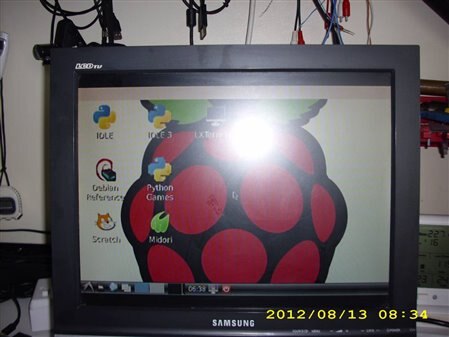
Hi I have just set up my new Pi B with Wheezy Linux and find that the HDMI output gives the correct picture on my 32" tv,  but when I use the RCA composite video output to feed the 15" LCDtv with 1024X768 resolution which I want to use on a permanent basis the picture is incorrectly sized and does not show the top and bottom of the raspberry logo and the text is faint. Is there a file somewhere that needs changing to give the correct size?    image

  • Sign in to reply
  • Cancel
  • GreenYamo
    GreenYamo over 13 years ago

    Hello,


    you need to play about with the config file, details are available here:


    http://elinux.org/R-Pi_Troubleshooting#Display


    Steve

    • Cancel
    • Vote Up 0 Vote Down
    • Sign in to reply
    • Cancel
  • cityswift
    cityswift over 13 years ago in reply to GreenYamo

    Hi Steve thanks for your reply. I have made the changes to the config.txt file as detailed in your link and saved it and then rebooted but there is no change to the display. There is a line in the file which states "overscan=0" and I assume this means overscan is off as opposed to "overscan=1" which would mean overscan is on. Can you confirm if that is the case? Thanks

    • Cancel
    • Vote Up 0 Vote Down
    • Sign in to reply
    • Cancel
  • wallarug
    wallarug over 13 years ago in reply to cityswift

    overscan=1 / overscan=0 is NOT a command in the config.txt file.


    disable_overscan=               (either 1 or 0, where 0=off and 1=on)


    ...is a command in the config.txt file.


    the other commands allowed in the file are:

    overscan_left=

    overscan_right=

    overscan_top=

    overscan_bottom=


    any value can go after "=" but note that the value is the number of pixels you want to increase (positive value) or decrease (negative value --> eg. = -30).

    disable_overscan must = "0" when using the above 4 commands.


    Fergus

    • Cancel
    • Vote Up 0 Vote Down
    • Sign in to reply
    • Cancel
  • wallarug
    wallarug over 13 years ago in reply to cityswift

    see: http://elinux.org/RPi_config.txt

    • Cancel
    • Vote Up 0 Vote Down
    • Sign in to reply
    • Cancel
  • cityswift
    cityswift over 13 years ago in reply to wallarug

    Hi thanks for your reply. iI have changed the config.txt file as detailed in these articles but it does not change my screen. image


    Message was edited by: David Tedd This picture shows my screen. Is this the best I can expect from the csv output of the Pi?

    • Cancel
    • Vote Up 0 Vote Down
    • Sign in to reply
    • Cancel
  • wallarug
    wallarug over 13 years ago in reply to cityswift

    cityswift wrote:


    Hi thanks for your reply. iI have changed the config.txt file as detailed in these articles but it does not change my screen. image


    Message was edited by: David Tedd This picture shows my screen. Is this the best I can expect from the csv output of the Pi?

    Yes, I believe that there is a resolution limit on the RCA socket output.  See this article: http://en.wikipedia.org/wiki/List_of_display_interfaces which says the maximum resolution with RCA composite is 720x576i@50Hz or 720x480i@ ~60hz.


    So the 1024x768 resolution is not possible on the RCA connector. (as far as I know).

    • Cancel
    • Vote Up +1 Vote Down
    • Sign in to reply
    • Cancel
  • cityswift
    cityswift over 13 years ago in reply to wallarug

    Thank you Fergus you have answered my query and the lack of VGA on Pi is a real pity as there are many of these monitors about which are now surplus.

    • Cancel
    • Vote Up 0 Vote Down
    • Sign in to reply
    • Cancel
  • wallarug
    wallarug over 13 years ago in reply to cityswift

    If you want to use a VGA monitor, you can buy a HDMI to VGA dongle.  The help wiki has a list of these that work.

    http://elinux.org/RPi_VerifiedPeripherals#HDMI-.3EVGA_converter_boxes

    • Cancel
    • Vote Up 0 Vote Down
    • Sign in to reply
    • Cancel
  • Former Member
    Former Member over 13 years ago in reply to cityswift

    Hi City. .

    I've made a tiny URL where folks can buy the vga to hdmi cables: http://tinyurl.com/9j9apyx

    Early on I had to do a search for hdmi to dvi and then realized there's always a way to connect "things". . .Best Peg (in the US)

    • Cancel
    • Vote Up 0 Vote Down
    • Sign in to reply
    • Cancel
element14 Community

element14 is the first online community specifically for engineers. Connect with your peers and get expert answers to your questions.

  • Members
  • Learn
  • Technologies
  • Challenges & Projects
  • Products
  • Store
  • About Us
  • Feedback & Support
  • FAQs
  • Terms of Use
  • Privacy Policy
  • Legal and Copyright Notices
  • Sitemap
  • Cookies

An Avnet Company © 2025 Premier Farnell Limited. All Rights Reserved.

Premier Farnell Ltd, registered in England and Wales (no 00876412), registered office: Farnell House, Forge Lane, Leeds LS12 2NE.

ICP 备案号 10220084.

Follow element14

  • X
  • Facebook
  • linkedin
  • YouTube