element14 Community
element14 Community
    Register Log In
  • Site
  • Search
  • Log In Register
  • Community Hub
    Community Hub
    • What's New on element14
    • Feedback and Support
    • Benefits of Membership
    • Personal Blogs
    • Members Area
    • Achievement Levels
  • Learn
    Learn
    • Ask an Expert
    • eBooks
    • element14 presents
    • Learning Center
    • Tech Spotlight
    • STEM Academy
    • Webinars, Training and Events
    • Learning Groups
  • Technologies
    Technologies
    • 3D Printing
    • FPGA
    • Industrial Automation
    • Internet of Things
    • Power & Energy
    • Sensors
    • Technology Groups
  • Challenges & Projects
    Challenges & Projects
    • Design Challenges
    • element14 presents Projects
    • Project14
    • Arduino Projects
    • Raspberry Pi Projects
    • Project Groups
  • Products
    Products
    • Arduino
    • Avnet & Tria Boards Community
    • Dev Tools
    • Manufacturers
    • Multicomp Pro
    • Product Groups
    • Raspberry Pi
    • RoadTests & Reviews
  • About Us
  • Store
    Store
    • Visit Your Store
    • Choose another store...
      • Europe
      •  Austria (German)
      •  Belgium (Dutch, French)
      •  Bulgaria (Bulgarian)
      •  Czech Republic (Czech)
      •  Denmark (Danish)
      •  Estonia (Estonian)
      •  Finland (Finnish)
      •  France (French)
      •  Germany (German)
      •  Hungary (Hungarian)
      •  Ireland
      •  Israel
      •  Italy (Italian)
      •  Latvia (Latvian)
      •  
      •  Lithuania (Lithuanian)
      •  Netherlands (Dutch)
      •  Norway (Norwegian)
      •  Poland (Polish)
      •  Portugal (Portuguese)
      •  Romania (Romanian)
      •  Russia (Russian)
      •  Slovakia (Slovak)
      •  Slovenia (Slovenian)
      •  Spain (Spanish)
      •  Sweden (Swedish)
      •  Switzerland(German, French)
      •  Turkey (Turkish)
      •  United Kingdom
      • Asia Pacific
      •  Australia
      •  China
      •  Hong Kong
      •  India
      • Japan
      •  Korea (Korean)
      •  Malaysia
      •  New Zealand
      •  Philippines
      •  Singapore
      •  Taiwan
      •  Thailand (Thai)
      • Vietnam
      • Americas
      •  Brazil (Portuguese)
      •  Canada
      •  Mexico (Spanish)
      •  United States
      Can't find the country/region you're looking for? Visit our export site or find a local distributor.
  • Translate
  • Profile
  • Settings
Raspberry Pi
  • Products
  • More
Raspberry Pi
Raspberry Pi Forum Got my Raspberry Pi, but...
  • Blog
  • Forum
  • Documents
  • Quiz
  • Events
  • Polls
  • Files
  • Members
  • Mentions
  • Sub-Groups
  • Tags
  • More
  • Cancel
  • New
Join Raspberry Pi to participate - click to join for free!
Featured Articles
Announcing Pi
Technical Specifications
Raspberry Pi FAQs
Win a Pi
Raspberry Pi Wishlist
Actions
  • Share
  • More
  • Cancel
Forum Thread Details
  • Replies 21 replies
  • Subscribers 679 subscribers
  • Views 2160 views
  • Users 0 members are here
  • raspberry_pi
Related

Got my Raspberry Pi, but...

Former Member
Former Member over 13 years ago

Got my Raspberry Pi...


Plugged in the card I got from Element14...plugged in power adapter I got from Element14...Raspberry Pi showed solid red light on. Is it supposed to?


Then...I plugged into my HDMI to my TV. TV was looking for something and never found it. Tried different settings. Nothing worked. Screen on TV never changed.


Suggestions welcome. Thanks for any help you can provide.

  • Sign in to reply
  • Cancel
Parents
  • Former Member
    Former Member over 13 years ago

    Dear Joel

    dont give up

    raspi is realy as simply as computer can be


    same issue i found on my first rpi start

    in case when my tv is not connected and switched on in time of startup

    yellow RCA conector is used for video output.

    can u utilize/test this (analog tv) video signal?


    in case that i dont connect rpi to net, only one red led light is also on.


    also try to verify content of sd card in another pc

    in official image you can find file issue.txt

    in latest includes "Raspberry Pi reference 2012-10-28 (armhf)"

    • Cancel
    • Vote Up 0 Vote Down
    • Sign in to reply
    • Cancel
  • Former Member
    Former Member over 13 years ago in reply to Former Member

    You know the basics already.

    At poweron, red should go on (indicating 3V3 is present and nothing more)

    green ok should start flashing when the os is loaded.

    If green shows no activity, problem can be supply, sd card or Pi itself.


    power can be checked by measuring the TP1 - TP2 voltage.

    It can be the power adapter or the cable between the adapter and the Pi who are responsable for the voltage being 2 low.

    The Pi has some polyfuses which also can be responsable for lower voltage readings.


    sdcard itself can be checked on a pc. You should be able to see the small fat32 boot partition and it's boot files. it's only 50 - 70MB in size.

    The larger linux root file partition is ext4 and can only be checked on a linux or mac system. (You have tools under windows to open ext4 partitions as well.)


    If you have another sdcard lying around, it might be worth to give that a try.

    Sometimes the sd card socket contacts give bad contact. A visual inspection of those can be usefull in such case.


    Don't connect any usb devices during your initial tests. Only start with those after you have seen the green light that indicates the sd card partitions are recognised.

    • Cancel
    • Vote Up 0 Vote Down
    • Sign in to reply
    • Cancel
  • Former Member
    Former Member over 13 years ago in reply to Former Member

    Got my digital multimeter first thing this morning. image


    Only solid red light shows up when Pi is plugged in.


    TP1-TP2 is 5.2...so that sounds right.


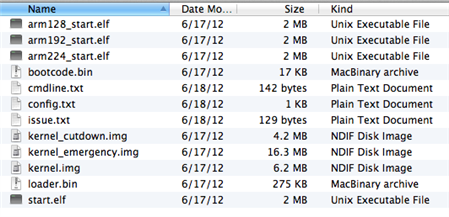
    Information on the card (as is shown on my Mac) is as follows:

    image

    What can/should I do next?

    • Cancel
    • Vote Up 0 Vote Down
    • Sign in to reply
    • Cancel
  • GreenYamo
    GreenYamo over 13 years ago in reply to Former Member

    Despite the card looking OK on the Mac, my money is on a corrupt SD card, this has happened a few times to my knowledge at least.

    Any chance you can borrow an SD card and image it yourself from one of the images on the Raspi site ?

    Solid red light seems to indicate that the Pi can't find a valid boot image. Could also mean the SD card isn't fully inserted.

    Like I say, seem to be a number of corrupt SD cards, what do the postal services do to them ?


    Steve

    • Cancel
    • Vote Up +1 Vote Down
    • Sign in to reply
    • Cancel
  • johnbeetem
    johnbeetem over 13 years ago in reply to Former Member

    Joel Heffner wrote:


    Got my digital multimeter first thing this morning. image


    Only solid red light shows up when Pi is plugged in.


    TP1-TP2 is 5.2...so that sounds right.


    Information on the card (as is shown on my Mac) is as follows...


    What can/should I do next?

    As Steve says, you could download a new SD card image, preferably to a different SD card.  This has the advantage that you'll be getting a newer version of the OS, which will most likely perform better.  OTOH, it's a long process and the whole point of buying a pre-loaded SD card is to avoid this.


    If you know someone nearby who has a RasPi you could try swapping SD cards and see which RasPis work with which cards.


    Otherwise, at this point I'm thinking your best bet is to send it back for a replacement.  You need to get an RMA (Return Materials Authorization) from the vendor's web site.  Since TP1-TP2 looks good and the SD contacts look good and the SD directory looks good, here are the most likely problems IMO:


    1.  The contents of an SD card file is corrupted.    Try is copying the files from the SD card to your Mac and see if you get any bad file errors.


    2.  An iffy solder joint has failed.  They do a quick go/no go RasPi test at the factory, but at this price range you're not going to get burn-in testing, so thermal cycling and/or transportation may have caused an iffy solder joint to fail.


    3.  An iffy PC board trace has failed.  A hair-line crack can survive initial testing, but fail after thermal cycling.


    RMAs help the manufacturer and designers to learn what's going wrong.  From the small number of problems people are reporting relative to the number of RasPis out there (I think well over 500K) I would guess that the yield is already pretty high, but that doesn't help if you're one of the unlucky ones either with the RasPi itself or the SD card.

    • Cancel
    • Vote Up +1 Vote Down
    • Sign in to reply
    • Cancel
  • fustini
    fustini over 13 years ago in reply to Former Member

    Hi - do you if you have a 512MB Pi?  If so, then the issue is that this pre-programmed card is too old based on your screenshot (June 17 kernel and firmware).


    Your profile shows USA so I assume you purchased from Newark element14.  I'd recommend you contact customer service and ask for a replacement:


    http://www.newark.com/jsp/bespoke/bespoke2.jsp?bespokepage=newark/en_US/custsrv/index.jsp


    The newer pre-formatted cards have July 15th kernel/firmware which is recent enough to boot the 512MB Pi.  Once you receive the replacement card, you can update it to the most recent firmware to enable the extra memory with these instructions: http://www.element14.com/community/groups/raspberry-pi/blog/2012/11/14/update-process-to-enable-to-full-512mb-ram


    Cheers,

    Drew

    • Cancel
    • Vote Up 0 Vote Down
    • Sign in to reply
    • Cancel
  • Former Member
    Former Member over 12 years ago in reply to fustini

    ooo maybe that's my problem then, the 'issue.txt' file on my sd card says:


    Raspberry Pi reference 2012-06-17

    Generated using spindle, http://asbradbury.org/projects/spindle/, e8c77c6, stage4-lxde-edu.qed


    but I have a 512Mb model B.


    I'll get a new distrib on it.


    Ta,

    Mark.

    • Cancel
    • Vote Up 0 Vote Down
    • Sign in to reply
    • Cancel
Reply
  • Former Member
    Former Member over 12 years ago in reply to fustini

    ooo maybe that's my problem then, the 'issue.txt' file on my sd card says:


    Raspberry Pi reference 2012-06-17

    Generated using spindle, http://asbradbury.org/projects/spindle/, e8c77c6, stage4-lxde-edu.qed


    but I have a 512Mb model B.


    I'll get a new distrib on it.


    Ta,

    Mark.

    • Cancel
    • Vote Up 0 Vote Down
    • Sign in to reply
    • Cancel
Children
No Data
element14 Community

element14 is the first online community specifically for engineers. Connect with your peers and get expert answers to your questions.

  • Members
  • Learn
  • Technologies
  • Challenges & Projects
  • Products
  • Store
  • About Us
  • Feedback & Support
  • FAQs
  • Terms of Use
  • Privacy Policy
  • Legal and Copyright Notices
  • Sitemap
  • Cookies

An Avnet Company © 2025 Premier Farnell Limited. All Rights Reserved.

Premier Farnell Ltd, registered in England and Wales (no 00876412), registered office: Farnell House, Forge Lane, Leeds LS12 2NE.

ICP 备案号 10220084.

Follow element14

  • X
  • Facebook
  • linkedin
  • YouTube