element14 Community
element14 Community
    Register Log In
  • Site
  • Search
  • Log In Register
  • Community Hub
    Community Hub
    • What's New on element14
    • Feedback and Support
    • Benefits of Membership
    • Personal Blogs
    • Members Area
    • Achievement Levels
  • Learn
    Learn
    • Ask an Expert
    • eBooks
    • element14 presents
    • Learning Center
    • Tech Spotlight
    • STEM Academy
    • Webinars, Training and Events
    • Learning Groups
  • Technologies
    Technologies
    • 3D Printing
    • FPGA
    • Industrial Automation
    • Internet of Things
    • Power & Energy
    • Sensors
    • Technology Groups
  • Challenges & Projects
    Challenges & Projects
    • Design Challenges
    • element14 presents Projects
    • Project14
    • Arduino Projects
    • Raspberry Pi Projects
    • Project Groups
  • Products
    Products
    • Arduino
    • Avnet & Tria Boards Community
    • Dev Tools
    • Manufacturers
    • Multicomp Pro
    • Product Groups
    • Raspberry Pi
    • RoadTests & Reviews
  • About Us
    About the element14 Community
  • Store
    Store
    • Visit Your Store
    • Choose another store...
      • Europe
      •  Austria (German)
      •  Belgium (Dutch, French)
      •  Bulgaria (Bulgarian)
      •  Czech Republic (Czech)
      •  Denmark (Danish)
      •  Estonia (Estonian)
      •  Finland (Finnish)
      •  France (French)
      •  Germany (German)
      •  Hungary (Hungarian)
      •  Ireland
      •  Israel
      •  Italy (Italian)
      •  Latvia (Latvian)
      •  
      •  Lithuania (Lithuanian)
      •  Netherlands (Dutch)
      •  Norway (Norwegian)
      •  Poland (Polish)
      •  Portugal (Portuguese)
      •  Romania (Romanian)
      •  Russia (Russian)
      •  Slovakia (Slovak)
      •  Slovenia (Slovenian)
      •  Spain (Spanish)
      •  Sweden (Swedish)
      •  Switzerland(German, French)
      •  Turkey (Turkish)
      •  United Kingdom
      • Asia Pacific
      •  Australia
      •  China
      •  Hong Kong
      •  India
      •  Japan
      •  Korea (Korean)
      •  Malaysia
      •  New Zealand
      •  Philippines
      •  Singapore
      •  Taiwan
      •  Thailand (Thai)
      •  Vietnam
      • Americas
      •  Brazil (Portuguese)
      •  Canada
      •  Mexico (Spanish)
      •  United States
      Can't find the country/region you're looking for? Visit our export site or find a local distributor.
  • Translate
  • Profile
  • Settings
Raspberry Pi
  • Products
  • More
Raspberry Pi
Raspberry Pi Forum My eyes don't work in HD !
  • Blog
  • Forum
  • Documents
  • Quiz
  • Events
  • Polls
  • Files
  • Members
  • Mentions
  • Sub-Groups
  • Tags
  • More
  • Cancel
  • New
Join Raspberry Pi to participate - click to join for free!
Featured Articles
Announcing Pi
Technical Specifications
Raspberry Pi FAQs
Win a Pi
Raspberry Pi Wishlist
Actions
  • Share
  • More
  • Cancel
Forum Thread Details
  • Replies 28 replies
  • Subscribers 689 subscribers
  • Views 3201 views
  • Users 0 members are here
  • raspberry_pi
Related

My eyes don't work in HD !

mgt6910
mgt6910 over 12 years ago

I find the Pi's HD-text size too small at 1080 resolution on  a monitor and Atrix.   If I set the resolution to 720 in config.txt, it;s better, but that

lowers the graphical resolution too much.


Is there any possibility of  changing screen resolution on the fly ? The ideal would be to boot into 720, then change resolution to 1080 inside startx

(and revert on exit...)


It is possible to select text-size in the lxde-terminal, but that's no help at login.

  • Sign in to reply
  • Cancel
  • Former Member
    Former Member over 12 years ago in reply to mgt6910

    You might have a look at this as a starting point http://alexandre.deverteuil.net/consolefonts/consolefonts.html the screenshots of the fonts might help you pick one.

    Most of them look terribly similar to me, but perhaps one of the 12x22 fonts like sun12x22, iso01-12x22, iso02-12x22 may be better.


    You can also use the 'setfont' command from a text console (i.e. before you do startx) to try out the different ones temporarily. Some examples of how to use setfont are here https://wiki.archlinux.org/index.php/Fonts#Console_fonts


    Using a recent version of Raspbian, I put the following into /etc/default/console-setup


    # CONFIGURATION FILE FOR SETUPCON


    # Consult the console-setup(5) manual page.


    ACTIVE_CONSOLES="/dev/tty[1-6]"


    CHARMAP="UTF-8"


    CODESET="guess"

    FONTFACE="Terminus"

    FONTSIZE="16x32"


    VIDEOMODE=


    # The following is an example how to use a braille font

    # FONT='lat9w-08.psf.gz brl-8x8.psf'


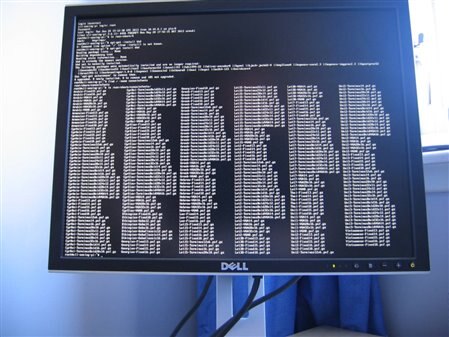
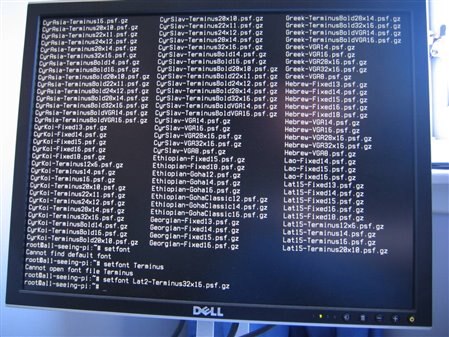
    On reboot the initial screen has the usual tiny font, but partway through there's a pause and then it flips to the much bigger font.

    In theory this should work for you, but check for typos in the highlighted changes above.


    Before:

    image


    After:

    image


    The Terminus font looks ok to me, and I'm assuming this big version is what you're after..

    • Cancel
    • Vote Up 0 Vote Down
    • Sign in to reply
    • Cancel
  • Problemchild
    Problemchild over 12 years ago in reply to Former Member

    You are right keep the resolution high as it can go and merely increase the font size.

    Keep the output resolution the same as the display's native resolution.

    Get some good lighting (Tri/Quad phosphor  daylight tubes are good BTW I've had them for 12 years or more in my Man cave)


    Biger monitors are good because you can put them further away image  and they are still in focus Selsinork's 30" monitor is the way to go if you can afford it

    • Cancel
    • Vote Up 0 Vote Down
    • Sign in to reply
    • Cancel
  • Problemchild
    Problemchild over 12 years ago in reply to Former Member

    BTW I keep a compact cam (lumix TZ20)on the desk for the occasional video and also to identify really small stuff.

    Getting more light and better still more diffuse light on the parts makes it better to see parts, also better for the cammera too

    • Cancel
    • Vote Up 0 Vote Down
    • Sign in to reply
    • Cancel
  • Problemchild
    Problemchild over 12 years ago

    Malcolm you still see in HD it's just that you can't  focus right up close also a lot of cheap screens are pritty crap anyway so it all depends what the limiting factor is!!

    • Cancel
    • Vote Up 0 Vote Down
    • Sign in to reply
    • Cancel
  • Problemchild
    Problemchild over 12 years ago in reply to Problemchild

    While we are at it  consider an IPS monitor rather than a cheap TN the quality is much better  most are Matt rather than shiney like many cheap monitors which is easier on  the eyes.

    The shiney stuff is to make movies look good but we aint interested in that here

    • Cancel
    • Vote Up 0 Vote Down
    • Sign in to reply
    • Cancel
  • mgt6910
    mgt6910 over 12 years ago in reply to Former Member

    Many thanks, I've managed it. My problem was  16X32 instead of 16x32  !!   Now it's simply ENORMOUS !!


    Now how do I change the status to answered ?

    • Cancel
    • Vote Up 0 Vote Down
    • Sign in to reply
    • Cancel
  • Former Member
    Former Member over 12 years ago in reply to mgt6910

    Malcolm Turner wrote:


    Many thanks, I've managed it. My problem was  16X32 instead of 16x32  !! 

    The more you use these computing gadgets the more you'll find that it's always something silly like that causing all the problems, and regardless of the size of the font you can never see the problem image

    Glad you have it working!

    Now how do I change the status to answered ?

    if you go back to your first post on the first page, you should find something at the bottom of the post to click to say it's answered.  There's probably also some buttons in every post that are only visible to you to mark posts as helpful or as the correct answer. I think picking a correct answer also marks the question answered, but I may be wrong.

    • Cancel
    • Vote Up 0 Vote Down
    • Sign in to reply
    • Cancel
  • mcb1
    mcb1 over 12 years ago in reply to Former Member

    Malcolm

    When you log in and view the thread, you should see Correct and Helpful choices on all the replies.


    Selsinork

    Did you know you can also ask a question, answer it and mark yourself correct ....

    I'm thinking we could exponentially increase our points ...


    mark

    • Cancel
    • Vote Up 0 Vote Down
    • Sign in to reply
    • Cancel
  • morgaine
    morgaine over 12 years ago

    When the problem is inability to focus close up rather than lack of visual acuity, a 48" screen placed at twice the distance of your 24" monitor may be easier to read despite both having the same pixel resolution and the same angular size per pixel.  If there are no physical constraints on location of your screens (eg. you work on a very large table with no other occupants), it may be worth trying this because a 48" 1920x1080 monitor is called a TV and therefore can be quite cheap these days!


    And one day, a 96" HDTV at 4 times the distance should be even better. image

    • Cancel
    • Vote Up 0 Vote Down
    • Sign in to reply
    • Cancel
  • mcb1
    mcb1 over 12 years ago in reply to morgaine

    What happens when the room isn't long enough.


    Wireless keyboards and mice are fine so thats not a problem, just the room.


    mark

    • Cancel
    • Vote Up 0 Vote Down
    • Sign in to reply
    • Cancel
<>
element14 Community

element14 is the first online community specifically for engineers. Connect with your peers and get expert answers to your questions.

  • Members
  • Learn
  • Technologies
  • Challenges & Projects
  • Products
  • Store
  • About Us
  • Feedback & Support
  • FAQs
  • Terms of Use
  • Privacy Policy
  • Legal and Copyright Notices
  • Sitemap
  • Cookies

An Avnet Company © 2026 Premier Farnell Limited. All Rights Reserved.

Premier Farnell Ltd, registered in England and Wales (no 00876412), registered office: Farnell House, Forge Lane, Leeds LS12 2NE.

ICP 备案号 10220084.

Follow element14

  • X
  • Facebook
  • linkedin
  • YouTube