element14 Community
element14 Community
    Register Log In
  • Site
  • Search
  • Log In Register
  • Community Hub
    Community Hub
    • What's New on element14
    • Feedback and Support
    • Benefits of Membership
    • Personal Blogs
    • Members Area
    • Achievement Levels
  • Learn
    Learn
    • Ask an Expert
    • eBooks
    • element14 presents
    • Learning Center
    • Tech Spotlight
    • STEM Academy
    • Webinars, Training and Events
    • Learning Groups
  • Technologies
    Technologies
    • 3D Printing
    • FPGA
    • Industrial Automation
    • Internet of Things
    • Power & Energy
    • Sensors
    • Technology Groups
  • Challenges & Projects
    Challenges & Projects
    • Design Challenges
    • element14 presents Projects
    • Project14
    • Arduino Projects
    • Raspberry Pi Projects
    • Project Groups
  • Products
    Products
    • Arduino
    • Avnet & Tria Boards Community
    • Dev Tools
    • Manufacturers
    • Multicomp Pro
    • Product Groups
    • Raspberry Pi
    • RoadTests & Reviews
  • About Us
  • Store
    Store
    • Visit Your Store
    • Choose another store...
      • Europe
      •  Austria (German)
      •  Belgium (Dutch, French)
      •  Bulgaria (Bulgarian)
      •  Czech Republic (Czech)
      •  Denmark (Danish)
      •  Estonia (Estonian)
      •  Finland (Finnish)
      •  France (French)
      •  Germany (German)
      •  Hungary (Hungarian)
      •  Ireland
      •  Israel
      •  Italy (Italian)
      •  Latvia (Latvian)
      •  
      •  Lithuania (Lithuanian)
      •  Netherlands (Dutch)
      •  Norway (Norwegian)
      •  Poland (Polish)
      •  Portugal (Portuguese)
      •  Romania (Romanian)
      •  Russia (Russian)
      •  Slovakia (Slovak)
      •  Slovenia (Slovenian)
      •  Spain (Spanish)
      •  Sweden (Swedish)
      •  Switzerland(German, French)
      •  Turkey (Turkish)
      •  United Kingdom
      • Asia Pacific
      •  Australia
      •  China
      •  Hong Kong
      •  India
      • Japan
      •  Korea (Korean)
      •  Malaysia
      •  New Zealand
      •  Philippines
      •  Singapore
      •  Taiwan
      •  Thailand (Thai)
      • Vietnam
      • Americas
      •  Brazil (Portuguese)
      •  Canada
      •  Mexico (Spanish)
      •  United States
      Can't find the country/region you're looking for? Visit our export site or find a local distributor.
  • Translate
  • Profile
  • Settings
Raspberry Pi
  • Products
  • More
Raspberry Pi
Raspberry Pi Forum Raspberry Pi - Controlling DC Motor - Both Directions
  • Blog
  • Forum
  • Documents
  • Quiz
  • Events
  • Polls
  • Files
  • Members
  • Mentions
  • Sub-Groups
  • Tags
  • More
  • Cancel
  • New
Join Raspberry Pi to participate - click to join for free!
Featured Articles
Announcing Pi
Technical Specifications
Raspberry Pi FAQs
Win a Pi
Raspberry Pi Wishlist
Actions
  • Share
  • More
  • Cancel
Forum Thread Details
  • Replies 6 replies
  • Subscribers 676 subscribers
  • Views 1338 views
  • Users 0 members are here
  • raspberry_pi
Related

Raspberry Pi - Controlling DC Motor - Both Directions

Anonymous-211339
Anonymous-211339 over 12 years ago

I have a raspberry pi and I was wondering if there was a way to make the GPIO pins control a DC motor in both directions.


I came up with a little schematic but I'm sure I did it horribly wrong.
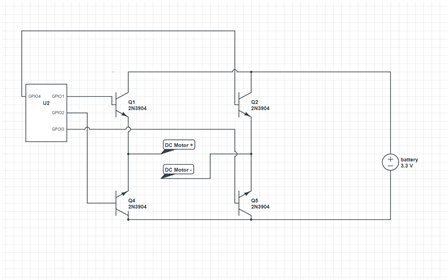
 

image


Any suggestions would be greatly appreciated!

  • Sign in to reply
  • Cancel
  • edwin@oetelaar.com
    edwin@oetelaar.com over 12 years ago

    The connection of your transistors makes no sense if you intent to make a H-bridge. (all NPN transistors is not a common solution, (there are ways to do it for sure), and will not work the way you connected them)


    Read up on the theory, check this article : http://www.robotroom.com/BipolarHBridge.html

    And read this :http://learn.adafruit.com/adafruit-raspberry-pi-lesson-9-controlling-a-dc-motor/overview


    I would suggest a H-Bridge IC (easily found eg. L293D or similar), and some protection (opto or resistors) between your IO ports and the power circuits.

    Also, look at mosfet variants, these need less cooling and can handle more current.


    Good luck,

    Edwin van den Oetelaar.

    • Cancel
    • Vote Up +1 Vote Down
    • Sign in to reply
    • Cancel
  • Former Member
    Former Member over 12 years ago

    I have managed to run DC motors succesfully using the L293D.

    • Cancel
    • Vote Up 0 Vote Down
    • Sign in to reply
    • Cancel
  • Anonymous-211339
    Anonymous-211339 over 12 years ago in reply to edwin@oetelaar.com

    Thanks,


    I decided to go witht he L293D. I just have one question. Does the VCC1 pin (top-right) need to provide power to something. In other words, the Pi is powered by other means, so can I just leave that pin alone?

    • Cancel
    • Vote Up 0 Vote Down
    • Sign in to reply
    • Cancel
  • Anonymous-211339
    Anonymous-211339 over 12 years ago

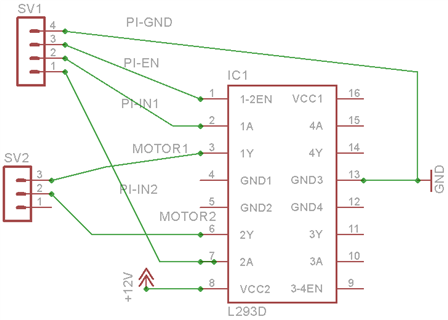
    Ok, here is what I have to far:


    image


    Any suggestions?

    • Cancel
    • Vote Up 0 Vote Down
    • Sign in to reply
    • Cancel
  • shabaz
    shabaz over 12 years ago in reply to Anonymous-211339

    Hi Nicholas,


    If you want to control a motor with RPI and L293D, Adafruit has a tutorial here, (using the same device) including wiring diag.

    • Cancel
    • Vote Up +1 Vote Down
    • Sign in to reply
    • Cancel
  • will2055
    will2055 over 8 years ago

    I have a project that depended on changing from a Pololu qik 2s9v1 motor controller with a simple logic level motor driver (L293D). It works great and here is my code:

    /*
     * L293D_rpi_motor test.cpp
     * 
     * Copyright 2017 Brandon Williams <brandon.w2055@gmail.com>
     * 
     * This program is free software; you can redistribute it and/or modify
     * it under the terms of the GNU General Public License as published by
     * the Free Software Foundation; either version 2 of the License, or
     * (at your option) any later version.
     * 
     * This program is distributed in the hope that it will be useful,
     * but WITHOUT ANY WARRANTY; without even the implied warranty of
     * MERCHANTABILITY or FITNESS FOR A PARTICULAR PURPOSE.  See the
     * GNU General Public License for more details.
     * 
     * You should have received a copy of the GNU General Public License
     * along with this program; if not, write to the Free Software
     * Foundation, Inc., 51 Franklin Street, Fifth Floor, Boston,
     * MA 02110-1301, USA.
     * 
     * 
     */
    
    /* Raspberry Pi Model B2 Pinmap
     +-----+-----+---------+------+---+-Model B2-+---+------+---------+-----+-----+
     | BCM | wPi |   Name  | Mode | V | Physical | V | Mode | Name    | wPi | BCM |
     +-----+-----+---------+------+---+----++----+---+------+---------+-----+-----+
     |     |     |    3.3v |      |   |  1 || 2  |   |      | 5v      |     |     |
     |   2 |   8 |   SDA.1 | ALT0 | 1 |  3 || 4  |   |      | 5V      |     |     |
     |   3 |   9 |   SCL.1 | ALT0 | 1 |  5 || 6  |   |      | 0v      |     |     |
     |   4 |   7 | GPIO. 7 |   IN | 1 |  7 || 8  | 1 | ALT0 | TxD     | 15  | 14  |
     |     |     |      0v |      |   |  9 || 10 | 1 | ALT0 | RxD     | 16  | 15  |
     |  17 |   0 | GPIO. 0 |   IN | 0 | 11 || 12 | 0 | IN   | GPIO. 1 | 1   | 18  |
     |  27 |   2 | GPIO. 2 |   IN | 0 | 13 || 14 |   |      | 0v      |     |     |
     |  22 |   3 | GPIO. 3 |   IN | 0 | 15 || 16 | 0 | IN   | GPIO. 4 | 4   | 23  |
     |     |     |    3.3v |      |   | 17 || 18 | 0 | IN   | GPIO. 5 | 5   | 24  |
     |  10 |  12 |    MOSI |   IN | 0 | 19 || 20 |   |      | 0v      |     |     |
     |   9 |  13 |    MISO |   IN | 0 | 21 || 22 | 0 | IN   | GPIO. 6 | 6   | 25  |
     |  11 |  14 |    SCLK |   IN | 0 | 23 || 24 | 1 | IN   | CE0     | 10  | 8   |
     |     |     |      0v |      |   | 25 || 26 | 1 | IN   | CE1     | 11  | 7   |
     +-----+-----+---------+------+---+----++----+---+------+---------+-----+-----+
     |  28 |  17 | GPIO.17 |   IN | 0 | 51 || 52 | 0 | IN   | GPIO.18 | 18  | 29  |
     |  30 |  19 | GPIO.19 |   IN | 0 | 53 || 54 | 0 | IN   | GPIO.20 | 20  | 31  |
     +-----+-----+---------+------+---+----++----+---+------+---------+-----+-----+
     | BCM | wPi |   Name  | Mode | V | Physical | V | Mode | Name    | wPi | BCM |
     +-----+-----+---------+------+---+-Model B2-+---+------+---------+-----+-----+
    
    
     */
    
    /*
        The following software is a test for the L293D motor driver
    as a greater project objective to integrate this IC into a shield for
    the raspberry pi.
    
    Pinout Map [L293D pin# (Function) -- Rpi pin# (Name)]
    *     
        1 (Enable 1)   --  11 (GPIO 2)
        2 (Input 1)    --  13 (GPIO 3)
        3 (Output 1)
        4 (GND)
        5 (GND)
        6 (Output 2)
        7 (Input 2)    --  15 (GPIO 4)
        8 (Control V)  --  1 (5V)
        9 (Enable 2)   --  /
        10 (Input 3)   --  /
        11 (Output 3)
        12 (GND)
        13 (GND)
        14 (Output 4)
        15 (Input 4)   --  /
        16 (Supply V)
    *
    Truth Table for a Single Motor (F=forward, R=reverse, S=stop)
    * Enable | Input 1 | Input 2 | Output 1 | Output 2| Dir.
    *    H   |    H    |    L    |     H    |     L   |  F  
    *    H   |    L    |    H    |     H    |     L   |  R   
    *    L   |    /    |    /    |     /    |     /   |  S   
    */
    #include <stdio.h>
    #inlcude <wiringPi.h>
    
    #define ENABLEPIN 0
    #define INPUT1 2
    #define INPUT2 3
    
    int main void{
        printf("Raspberry Pi - Motor Control L293D");
        
        wiringPiSetup();
        
        pinMode(ENABLEPIN, OUTPUT);
        pinMode(INPUT1, OUTPUT);
        pinMode(INPUT2, OUTPUT);
        
        digitalWrite(ENABLEPIN, 1); /*Enable Motor 1 channel active*/
        
        for(int i=0; i>=0; i++){
            delay(500);
            printf("Forward Motion");
            digitalWrite(INPUT1, 1); /*Begin Forward Motion*/
            digitalWrite(INPUT2, 0);
            delay(1500);
            printf("Reverse Motion");
            digitalWrite(INPUT1, 0); /*Begin Reverse Motion*/
            digitalWrite(INPUT2, 1);
        }
        /* Stop Motors and Disable Motor 1 */
        digitalWrite(INPUT1,0);
        digitalWrite(INPUT2,0);
        digitalWrite(ENABLEPIN,0);
        
        return 0;
    }

    • Cancel
    • Vote Up +1 Vote Down
    • Sign in to reply
    • Cancel
element14 Community

element14 is the first online community specifically for engineers. Connect with your peers and get expert answers to your questions.

  • Members
  • Learn
  • Technologies
  • Challenges & Projects
  • Products
  • Store
  • About Us
  • Feedback & Support
  • FAQs
  • Terms of Use
  • Privacy Policy
  • Legal and Copyright Notices
  • Sitemap
  • Cookies

An Avnet Company © 2025 Premier Farnell Limited. All Rights Reserved.

Premier Farnell Ltd, registered in England and Wales (no 00876412), registered office: Farnell House, Forge Lane, Leeds LS12 2NE.

ICP 备案号 10220084.

Follow element14

  • X
  • Facebook
  • linkedin
  • YouTube