element14 Community
element14 Community
    Register Log In
  • Site
  • Search
  • Log In Register
  • Community Hub
    Community Hub
    • What's New on element14
    • Feedback and Support
    • Benefits of Membership
    • Personal Blogs
    • Members Area
    • Achievement Levels
  • Learn
    Learn
    • Ask an Expert
    • eBooks
    • element14 presents
    • Learning Center
    • Tech Spotlight
    • STEM Academy
    • Webinars, Training and Events
    • Learning Groups
  • Technologies
    Technologies
    • 3D Printing
    • FPGA
    • Industrial Automation
    • Internet of Things
    • Power & Energy
    • Sensors
    • Technology Groups
  • Challenges & Projects
    Challenges & Projects
    • Design Challenges
    • element14 presents Projects
    • Project14
    • Arduino Projects
    • Raspberry Pi Projects
    • Project Groups
  • Products
    Products
    • Arduino
    • Avnet & Tria Boards Community
    • Dev Tools
    • Manufacturers
    • Multicomp Pro
    • Product Groups
    • Raspberry Pi
    • RoadTests & Reviews
  • About Us
  • Store
    Store
    • Visit Your Store
    • Choose another store...
      • Europe
      •  Austria (German)
      •  Belgium (Dutch, French)
      •  Bulgaria (Bulgarian)
      •  Czech Republic (Czech)
      •  Denmark (Danish)
      •  Estonia (Estonian)
      •  Finland (Finnish)
      •  France (French)
      •  Germany (German)
      •  Hungary (Hungarian)
      •  Ireland
      •  Israel
      •  Italy (Italian)
      •  Latvia (Latvian)
      •  
      •  Lithuania (Lithuanian)
      •  Netherlands (Dutch)
      •  Norway (Norwegian)
      •  Poland (Polish)
      •  Portugal (Portuguese)
      •  Romania (Romanian)
      •  Russia (Russian)
      •  Slovakia (Slovak)
      •  Slovenia (Slovenian)
      •  Spain (Spanish)
      •  Sweden (Swedish)
      •  Switzerland(German, French)
      •  Turkey (Turkish)
      •  United Kingdom
      • Asia Pacific
      •  Australia
      •  China
      •  Hong Kong
      •  India
      • Japan
      •  Korea (Korean)
      •  Malaysia
      •  New Zealand
      •  Philippines
      •  Singapore
      •  Taiwan
      •  Thailand (Thai)
      • Vietnam
      • Americas
      •  Brazil (Portuguese)
      •  Canada
      •  Mexico (Spanish)
      •  United States
      Can't find the country/region you're looking for? Visit our export site or find a local distributor.
  • Translate
  • Profile
  • Settings
Raspberry Pi
  • Products
  • More
Raspberry Pi
Raspberry Pi Forum RASPBERRY PI INTERNATE CONNECTION PROBLEM BY ETHERNATE
  • Blog
  • Forum
  • Documents
  • Quiz
  • Events
  • Polls
  • Files
  • Members
  • Mentions
  • Sub-Groups
  • Tags
  • More
  • Cancel
  • New
Join Raspberry Pi to participate - click to join for free!
Featured Articles
Announcing Pi
Technical Specifications
Raspberry Pi FAQs
Win a Pi
Raspberry Pi Wishlist
Actions
  • Share
  • More
  • Cancel
Forum Thread Details
  • Replies 21 replies
  • Subscribers 676 subscribers
  • Views 3206 views
  • Users 0 members are here
  • ethernate
  • raspberry_pi
Related

RASPBERRY PI INTERNATE CONNECTION PROBLEM BY ETHERNATE

Former Member
Former Member over 11 years ago

Dear Sir,

            I am new user of RASPBERRY PI . I purchase B+ & install raspian whizy as per your youtube video procedure. All are ok but internate not connected my bsnl broadband ethernate fixed land line. After set manually dhcp in static condition.ping 192.168.1.1 is ok but not update or upgrade or not open any browser , always say host problem.CMMAND hostname -i give me 127.0.1.1

I set manually

address 192.168.1.2

bcast 192.168.1.255

gatewaymask 255.255.255.0

gateway 192.168.1.1

after this ping 192.168.1.1 is response  but when sudo apt-get update  ""Err http:// raspberrypi.collabora.com wheezy Release.gpg could not resolve

failed to fetch http://mirrordirector.raspian.org/


at last

w: some index files failed to download.They have been ignored, or old ones used instead.


Kindly help me.

sujitkarmakarkuttus@gmail.com

  • Sign in to reply
  • Cancel
Parents
  • Robert Peter Oakes
    Robert Peter Oakes over 11 years ago

    You don't seem to have a DNS server setup


    Do this and your problem may be solved


    Sent from my iPhone

    • Cancel
    • Vote Up 0 Vote Down
    • Sign in to reply
    • Cancel
  • Former Member
    Former Member over 11 years ago in reply to Robert Peter Oakes

    Sir I set up manually by cmnd "sudo nano /etc/network/interfaces"

    & then address ,netmask, bcast, gateway select & dhcp change static but same.

    So how to set my dns or ovrcome tthis prblm.

    • Cancel
    • Vote Up 0 Vote Down
    • Sign in to reply
    • Cancel
  • Former Member
    Former Member over 11 years ago in reply to mudz

    Sir ,If I use morzila Then how to go your setting?

    many many thanks your quick response.

    • Cancel
    • Vote Up 0 Vote Down
    • Sign in to reply
    • Cancel
  • mudz
    mudz over 11 years ago in reply to Former Member

    start Mozilla or IE or chrome.. type 192.168.1.1 on address bar(address bar: where you type addresses like www.google.com)

    Now it will ask you for two things : username and password : type admin for both fields.


    That's it

    • Cancel
    • Vote Up 0 Vote Down
    • Sign in to reply
    • Cancel
  • Former Member
    Former Member over 11 years ago in reply to Former Member

    ok sir now I am understand.Thanku U very much.

    • Cancel
    • Vote Up 0 Vote Down
    • Sign in to reply
    • Cancel
  • Former Member
    Former Member over 11 years ago in reply to Former Member

    Sir , when i type 192.168.1.1 on address bar it always say "web page is not availavail".

    • Cancel
    • Vote Up 0 Vote Down
    • Sign in to reply
    • Cancel
  • mudz
    mudz over 11 years ago in reply to Former Member

    Alright,

    Lets Debug the problem:


    1) Connect modem to pc via Ethernet cable.


    2) check the default gateway of modem in network connections by clicking on details of your Ethernet connection. (default is : 192.168.1.1, try this once again!!)


    3) type that address on your IE.


    4) If this does not works take the modem to the bsnl office and ask them to change it settings accordingly.(as you need direct internet feed from modem). Tell them, you don't want to use dial up setup. Ask them to make modem Internet always on.

    p.s.- I can tell you the whole procedure to do it yourself but I don't want to get in any trouble, its better and safe if you just take it to the bsnl office and ask them to that setting.

    • Cancel
    • Vote Up 0 Vote Down
    • Sign in to reply
    • Cancel
  • clem57
    clem57 over 11 years ago in reply to Former Member

    Type in URL:      http://192.168.1.1  

    • Cancel
    • Vote Up 0 Vote Down
    • Sign in to reply
    • Cancel
  • Former Member
    Former Member over 11 years ago in reply to clem57

    HURRAH sir I am abel to connect to my raspberry pi by my broadband . Sir , verry verry thanks to you, you are only one person or your forum only one forum help me.

    At first I delete my dialup icon from my desktop after this delete frm network place then 192.168.1.1 type on my browser then admin ,admin then go to advance setting then wan then edit then ppoe settong then username & password, save & reboot my modem then connect my dirrect connect my pc as well as rapberry pi.


    Sir verry thanks to u.

    sir I do not want to disturb u but I hve more some querry ,can I ask to u?

    1) can I get video out put from B+ model like as b model ?

    2) when I connect internate & sudo apt-get update it is near about 124 wheezy update & continue. How many this?

    any mp3 songs & video not play .plugins problem. How to overcome ?

    • Cancel
    • Vote Up 0 Vote Down
    • Sign in to reply
    • Cancel
  • Robert Peter Oakes
    Robert Peter Oakes over 11 years ago in reply to Former Member

    The b+ has video out as hdmi and also on the audio jack (so I'm told), it was on an svideo connector on the B but it has been moved


    I am assuming your asking about that one as the hdmi is rather conspicuous


    Sent from my iPhone

    • Cancel
    • Vote Up 0 Vote Down
    • Sign in to reply
    • Cancel
  • clem57
    clem57 over 11 years ago in reply to Former Member

    !) @Peter Oakes answered this one very well

    2) A downloaded version of wheezy is usually several months or possible a year old normally. I would not be surprised for the # of updates you had. Best off let it run and catch a coffee to relax. image

    3) On MP3/video, the codecs (software to decode the bits into a song or video) can be licensed. You may have to pay a small amount to get them from Raspberry Pi foundation and install a serial number. Usually takes a simple email back with information. Please check this for help or goto their site at the Raspberry Pi shop.


    Clem

    • Cancel
    • Vote Up 0 Vote Down
    • Sign in to reply
    • Cancel
  • Former Member
    Former Member over 11 years ago in reply to clem57

    Sir, If I try to playing my youtube video & mp3 songs also necessary those licence for this? any chance to test my raspberry pi audio is ok or not?

    • Cancel
    • Vote Up 0 Vote Down
    • Sign in to reply
    • Cancel
Reply
  • Former Member
    Former Member over 11 years ago in reply to clem57

    Sir, If I try to playing my youtube video & mp3 songs also necessary those licence for this? any chance to test my raspberry pi audio is ok or not?

    • Cancel
    • Vote Up 0 Vote Down
    • Sign in to reply
    • Cancel
Children
  • Robert Peter Oakes
    Robert Peter Oakes over 11 years ago in reply to Former Member

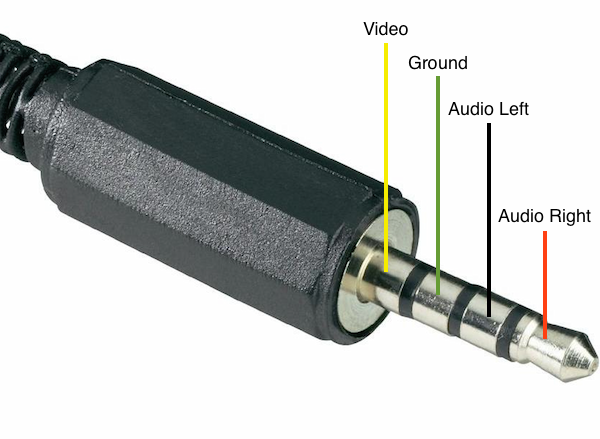
    4-pole AV jack plug with connection configuration for Raspberry Pi B

    this is the pin out of the audio jack, as you can see, audio and video, I hope this helps

    • Cancel
    • Vote Up +1 Vote Down
    • Sign in to reply
    • Cancel
element14 Community

element14 is the first online community specifically for engineers. Connect with your peers and get expert answers to your questions.

  • Members
  • Learn
  • Technologies
  • Challenges & Projects
  • Products
  • Store
  • About Us
  • Feedback & Support
  • FAQs
  • Terms of Use
  • Privacy Policy
  • Legal and Copyright Notices
  • Sitemap
  • Cookies

An Avnet Company © 2025 Premier Farnell Limited. All Rights Reserved.

Premier Farnell Ltd, registered in England and Wales (no 00876412), registered office: Farnell House, Forge Lane, Leeds LS12 2NE.

ICP 备案号 10220084.

Follow element14

  • X
  • Facebook
  • linkedin
  • YouTube