The previous Wolfson card has a 26 pin header with male pins to connect to the Raspberry GPIO header after pushed on top of it. Does the new audio card do the same for the 40 pin header? Sorry, but I cannot discern from the card images I have.


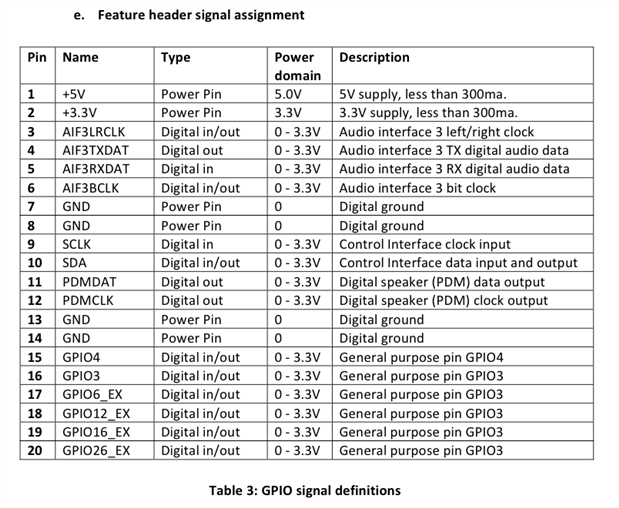
Thank you both. From the schematics I see they use the I2C and SPI pins, for example, but there is no sign of them passing out, to connect other devices. (although they are designed to connect several devices, not only one, isn't it?) With the Raspberry model B, we had, beside the I2C (2 pins) and SPI (4 pins) other 11 pins for general IO, with the model B+ this increased to at least 20 - so 26 pins, counting the 6 mentioned ones. Now on the Cirrus card expansion header I see 6 pins for general IO, plus some pins I don't understand. There is no mention of SPI, there is SDA and SCLK (Control Interface - what does it mean?) which resemble the I2C (just the clock was named SCL, and "Control Interface clock input" is a bit confusing, because I2C clocks can be output as well, as I know), and a few pins I don't understand. The Audio Interface 3 seems to refer to the SPDIF, isn't it? There are also 2 pins for a "Digital speaker", what can be very cool, I assume (for audiophiles). So if I put in Cirrus, it looks like the whole Raspberry is converted to a super audio card, with a lot of audio inputs and outputs. If I want to do some other stuff, I should content myself with a total of 6 GPIO pins (and this with the model B+). Cool, isn't it?
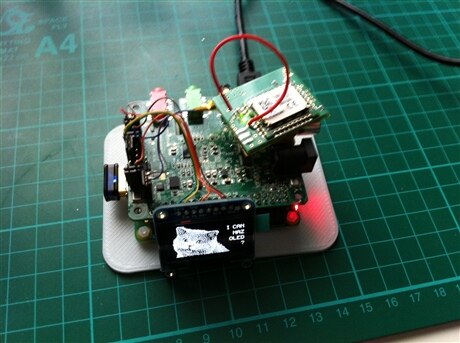
I'm currently working on a project with the A+ and the Cirrus Logic audio card. I needed to connect a I2C display and another module using UART.
I was able to find all the pins on the expansion header. Not totally practical, but it works.
I would have preferred stacking headers on the audio card to still be able to use the available pins as is, without being forced to use the expansion header layout.
Frederick
I'm currently working on a project with the A+ and the Cirrus Logic audio card. I needed to connect a I2C display and another module using UART.
I was able to find all the pins on the expansion header. Not totally practical, but it works.
I would have preferred stacking headers on the audio card to still be able to use the available pins as is, without being forced to use the expansion header layout.
Frederick
I wander where you found them (and how). If it's not documented, then it can be a field for hacking it (I can imagine, for example taking pins from the original header, by some hack soldering, and checking if they are used with a logic analyzer.) There is no documentation of what is really *used* from the 40 pins. I have an LCD display which only takes 7 pins by itself (not counting the other bits). But why should I do hacking? The engineers at Cirrus clearly haven't done a correct job. When you install a tumble dryer, you don't take over all the doors and windows in the house. Shame.
In reply to post #7 (http://www.element14.com/community/message/136223#136223), is the OLED display connected using I2C or SPI?
Many thanks.
I'm having problems with my OLED display connected using I2C. I posted details here: http://www.element14.com/community/message/158693#158693
This is preliminary -- I've only just fired up an RPi 2-B with Cirrus audio card to use for a software-defined radio and I'm beginning to learn about it.
I found that i2c (to control an Si5351 frequency generator) is indeed carried through to the Cirrus connector, but apparently not to the pins given in the user manual at http://www.element14.com/community/servlet/JiveServlet/previewBody/72078-102-1-303819/Cirrus%20Logic%20Audio%20Card%20Us…
Unless, of course, I completely misunderstand the manual!
The manual lists header pins as 1, 2, 3 . . . but doesn't give their physical arrangement. I'm assuming that it is:
2 4 6 8 10 . . .
1 3 5 7 9
with pin 1 closest to the speaker header and the edge of the board as shown here:
https://github.com/guussie/PiDS/wiki/09.-How-to-make-various-DACs-work
That seems to work -- I can confirm pin 1 is +5v, pin 2 is +3.3v and pin7 is Gnd.
The manual gives pin 9 as SCLK (I presume they mean SCL) and pin 10 as SDA.
That doesn't work for me -- but I find pin 9 as SCL and pin 11 as SDA does work, provided pin 11 is not connected to my i2c device at boot-up. If it is, then the audio card fails to be recognised and instantiated.
So I have to boot up the RPi, then connect SDA -- which won't work for what's supposed to be a remote setup, wili it!
Does anyone else have similar experience, or any light to cast on mine?
Thanks -- Ross