element14 Community
element14 Community
    Register Log In
  • Site
  • Search
  • Log In Register
  • Community Hub
    Community Hub
    • What's New on element14
    • Feedback and Support
    • Benefits of Membership
    • Personal Blogs
    • Members Area
    • Achievement Levels
  • Learn
    Learn
    • Ask an Expert
    • eBooks
    • element14 presents
    • Learning Center
    • Tech Spotlight
    • STEM Academy
    • Webinars, Training and Events
    • Learning Groups
  • Technologies
    Technologies
    • 3D Printing
    • FPGA
    • Industrial Automation
    • Internet of Things
    • Power & Energy
    • Sensors
    • Technology Groups
  • Challenges & Projects
    Challenges & Projects
    • Design Challenges
    • element14 presents Projects
    • Project14
    • Arduino Projects
    • Raspberry Pi Projects
    • Project Groups
  • Products
    Products
    • Arduino
    • Avnet & Tria Boards Community
    • Dev Tools
    • Manufacturers
    • Multicomp Pro
    • Product Groups
    • Raspberry Pi
    • RoadTests & Reviews
  • About Us
  • Store
    Store
    • Visit Your Store
    • Choose another store...
      • Europe
      •  Austria (German)
      •  Belgium (Dutch, French)
      •  Bulgaria (Bulgarian)
      •  Czech Republic (Czech)
      •  Denmark (Danish)
      •  Estonia (Estonian)
      •  Finland (Finnish)
      •  France (French)
      •  Germany (German)
      •  Hungary (Hungarian)
      •  Ireland
      •  Israel
      •  Italy (Italian)
      •  Latvia (Latvian)
      •  
      •  Lithuania (Lithuanian)
      •  Netherlands (Dutch)
      •  Norway (Norwegian)
      •  Poland (Polish)
      •  Portugal (Portuguese)
      •  Romania (Romanian)
      •  Russia (Russian)
      •  Slovakia (Slovak)
      •  Slovenia (Slovenian)
      •  Spain (Spanish)
      •  Sweden (Swedish)
      •  Switzerland(German, French)
      •  Turkey (Turkish)
      •  United Kingdom
      • Asia Pacific
      •  Australia
      •  China
      •  Hong Kong
      •  India
      • Japan
      •  Korea (Korean)
      •  Malaysia
      •  New Zealand
      •  Philippines
      •  Singapore
      •  Taiwan
      •  Thailand (Thai)
      • Vietnam
      • Americas
      •  Brazil (Portuguese)
      •  Canada
      •  Mexico (Spanish)
      •  United States
      Can't find the country/region you're looking for? Visit our export site or find a local distributor.
  • Translate
  • Profile
  • Settings
Raspberry Pi
  • Products
  • More
Raspberry Pi
Raspberry Pi Forum Cirrus Logic Audio Card working on the Raspberry Pi 2
  • Blog
  • Forum
  • Documents
  • Quiz
  • Events
  • Polls
  • Files
  • Members
  • Mentions
  • Sub-Groups
  • Tags
  • More
  • Cancel
  • New
Join Raspberry Pi to participate - click to join for free!
Featured Articles
Announcing Pi
Technical Specifications
Raspberry Pi FAQs
Win a Pi
Raspberry Pi Wishlist
Actions
  • Share
  • More
  • Cancel
Forum Thread Details
  • Replies 165 replies
  • Subscribers 684 subscribers
  • Views 22716 views
  • Users 0 members are here
  • wolfson
  • raspberry
  • audio
  • pi
  • cirrus
  • raspberry_pi
  • rpi2
  • raspeberry_pi_accessories
  • pi2
Related

Cirrus Logic Audio Card working on the Raspberry Pi 2

Former Member
Former Member over 10 years ago

Hi all!


As you might know, Cirrus Logic's main kernel source branch recently switched to 3.18.

My first thought was "Hmm, that means the Cirrus Logic card could finally work on the RPi2..."

I have built a couple of 3.18 kernels for my B+ and RPi2 and I have managed to get both models to produce sound image


It's still early days, i.e. there are possibly bugs and glitches to fix, but for those of you who would like to try it out I've made an image file that you can download here:

https://drive.google.com/file/d/0BzIaxMH3N5O1cmJ1bFhMcG1hc0E/view?usp=sharing

The file is a 1.3 GB zip. Uncompressed size is 3.1 GB, so it fits comfortably on a 4 GB card.


The image is based on the standard 2015-02-16-raspbian-wheezy image from the Foundation that you flash to a SD card for a fresh install.

I have only added my kernels and set up the configuration files to get the card going.

It should work on the older B model  with a Wolfson Audio Card too, but I haven't tested that yet.


Have fun!

--

Ragnar

  • Sign in to reply
  • Cancel
Parents
  • Former Member
    Former Member over 10 years ago

    I tried the patched kernel with Ubuntu MATE Beta 15.04 and it worked.

    But with the new stable release of Ubuntu the kernel breaks all network connections and input devices even bluetooth keyboard image

    • Cancel
    • Vote Up 0 Vote Down
    • Sign in to reply
    • Cancel
  • Former Member
    Former Member over 10 years ago in reply to Former Member

    Hello,

    thank you for the provided image. The audio works fine.

    However, I am trying to compile the kernel with cirrus driver and RT patch without success. I assume it already fails with the cirrus part.

    I followed the cirrus instructions from here: https://github.com/CirrusLogic/rpi-linux/wiki/Building-the-code

    and added the RT patch from https://www.kernel.org/pub/linux/kernel/projects/rt/3.18/older/patch-3.18.9-rt5.patch.gz

    How did you build your image, Ragnar?

    Martin

    • Cancel
    • Vote Up 0 Vote Down
    • Sign in to reply
    • Cancel
  • Former Member
    Former Member over 10 years ago in reply to Former Member

    The Cirrus Logic drivers are loaded by means of the Device Tree mechanism, controlled by the overlay file /boot/overlays/rpi-cirrus-wm5102-overlay.dtb.

    You have to mark the kernel as Device Tree capable, otherwise the DT mechanism will be turned off. If it's not marked, it won't even try to load the overlay file and as a consequence the drivers aren't loaded either.

    That's what these commands do:

    mv zImage zImage.org 
    ~/bin/raspberrypi/tools/mkimage/mkknlimg zImage.org zImage


    zImage is the compressed kernel image. Rename it to zImage.org and then run the command mkknlimg on it to create a new zImage with a Device-Tree-Capable stamp on it.

    There's another command - knlinfo - to check if a kernel file has a DT stamp on it.

    E.g.

    $  ~/bin/raspberrypi/tools/mkimage/knlinfo zImage  # This kernel image is DT capable.
    Kernel trailer found at 3946712/0x3c38d8:
      KVer: "Linux version 3.18.9-v7cludlmmapfllirq (ragnar@quadripi) (gcc version 4.8.3 (Raspbian 4.8.3-13) ) #5 SMP PREEMPT Fri May 1 18:06:15 CEST 2015"
      DTOK: true
    
    $ ~/bin/raspberrypi/tools/mkimage/knlinfo zImage.org # This kernel image does not have the DT stamp.
    * no trailer


    Are these settings stored permanently?

    Yes. The script /etc/init.d/alsa-utils saves all ALSA settings at shutdown and restores them at boot.

    --

    Ragnar

    • Cancel
    • Vote Up 0 Vote Down
    • Sign in to reply
    • Cancel
  • Former Member
    Former Member over 10 years ago in reply to Former Member

    Thank you for the explanation.

    Since I followed your guide and checked the image with knlinfo, the kernel should be DT capable.

    Thus I should end up with an exact copy of your kernel. How come the audio card is not working? Even though aplay -l looks the fine.

    • Cancel
    • Vote Up 0 Vote Down
    • Sign in to reply
    • Cancel
  • Former Member
    Former Member over 10 years ago in reply to Former Member

    I think it might be a problem with sox.

    Try these

    export AUDIODEV=hw:0,0

    export AUDIODRIVER=alsa

    before running sox.


    Can you play the file with aplay?

    --

    Ragnar

    • Cancel
    • Vote Up 0 Vote Down
    • Sign in to reply
    • Cancel
  • Former Member
    Former Member over 10 years ago in reply to Former Member

    Setting the variables helped! Sox/play works now! Great! But not with aplay.

    Your image plays wave and flac with play and aplay fine without any tuning. Wouldn't you have to set these variables somewhere in your workflow?


    pi@raspberrypi2 ~ $ aplay testfile.wav 
    Playing WAVE 'testfile.wav' : Unsigned 8 bit, Rate 8000 Hz, Mono
    aplay: set_params:1145: Unable to install hw params:
    ACCESS:  RW_INTERLEAVED
    FORMAT:  U8
    SUBFORMAT:  STD
    SAMPLE_BITS: 8
    FRAME_BITS: 8
    CHANNELS: 1
    RATE: 8000
    PERIOD_TIME: 125000
    PERIOD_SIZE: 1000
    PERIOD_BYTES: 1000
    PERIODS: 4
    BUFFER_TIME: 500000
    BUFFER_SIZE: 4000
    BUFFER_BYTES: 4000
    TICK_TIME: 0

    • Cancel
    • Vote Up 0 Vote Down
    • Sign in to reply
    • Cancel
  • Former Member
    Former Member over 10 years ago in reply to Former Member

    Playing WAVE 'testfile.wav' : Unsigned 8 bit, Rate 8000 Hz, Mono

    aplay: set_params:1145: Unable to install hw params:

    CHANNELS: 1

    The Cirrus card can't do single-channel playback and aplay doesn't convert to 2-channel.

    Try with a standard CD-quality file - 44.1kHz/16bit/2channel.


    No, I haven't put in any special treatment for any player. It's all defaults, e.g. there's no /home/pi/.asoundrc file in the image.  Something else must still differ.


    I get  the

    play WARN alsa: can't encode 0-bit Unknown or not applicable

    warning from sox too, but it still plays.

    --

    Ragnar

    • Cancel
    • Vote Up 0 Vote Down
    • Sign in to reply
    • Cancel
  • Former Member
    Former Member over 10 years ago in reply to Former Member

    You are right, a generated tone in CD-quality plays via aplay.

    sox -n -c 2 -r 44100 -b 16 440-cd.wav synth 10 sin 440 gain -3

    Although, the testfile.wav plays fine with your image and aplay. This is weird.


    Since I need to do some JACK programming in C, jackd is more important but does not work either on my kernel version.

    pi@raspberrypi2 ~ $ jackd -v -P70 -p16 -t2000 -d alsa -dhw:0,0 -p 128 -n 3 -r 44100 -s
    jackd 0.122.0
    Copyright 2001-2009 Paul Davis, Stephane Letz, Jack O'Quinn, Torben Hohn and others.
    jackd comes with ABSOLUTELY NO WARRANTY
    This is free software, and you are welcome to redistribute it
    under certain conditions; see the file COPYING for details
    
    getting driver descriptor from /usr/lib/arm-linux-gnueabihf/jack/jack_oss.so
    getting driver descriptor from /usr/lib/arm-linux-gnueabihf/jack/jack_dummy.so
    getting driver descriptor from /usr/lib/arm-linux-gnueabihf/jack/jack_net.so
    getting driver descriptor from /usr/lib/arm-linux-gnueabihf/jack/jack_alsa.so
    JACK compiled with System V SHM support.
    server `default' registered
    registered builtin port type 32 bit float mono audio
    registered builtin port type 8 bit raw midi
    clock source = system clock via clock_gettime
    loading driver ..
    start poll on 3 fd's
    apparent rate = 44100
    creating alsa driver ... hw:0,0|hw:0,0|128|3|44100|0|0|nomon|swmeter|soft-mode|32bit
    control device hw:0
    new client: alsa_pcm, id = 1 type 1 @ 0x1781548 fd = -1
    configuring for 44100Hz, period = 128 frames (2.9 ms), buffer = 3 periods
    ALSA: mmap-based access is not possible for the capture stream of this audio interface
    ALSA: cannot configure capture channel
    cannot load driver module alsa
    starting server engine shutdown
    freeing shared port segments
    stopping server thread
    last xrun delay: 0.000 usecs
    max delay reported by backend: 0.000 usecs
    freeing engine shared memory
    max usecs: 0.000, engine deleted
    cleaning up shared memory
    cleaning up files
    unregistering server `default'


    Even if I force mmap based access via -dplughw:0,0 (which is apparently less efficient and less preferable) it results in a bus error

    pi@raspberrypi2 ~ $ jackd -v -P70 -p16 -t2000 -d alsa -dplughw:0,0 -p 128 -n 3 -r 44100 -s
    jackd 0.122.0
    Copyright 2001-2009 Paul Davis, Stephane Letz, Jack O'Quinn, Torben Hohn and others.
    jackd comes with ABSOLUTELY NO WARRANTY
    This is free software, and you are welcome to redistribute it
    under certain conditions; see the file COPYING for details
    
    getting driver descriptor from /usr/lib/arm-linux-gnueabihf/jack/jack_oss.so
    getting driver descriptor from /usr/lib/arm-linux-gnueabihf/jack/jack_dummy.so
    getting driver descriptor from /usr/lib/arm-linux-gnueabihf/jack/jack_net.so
    getting driver descriptor from /usr/lib/arm-linux-gnueabihf/jack/jack_alsa.so
    JACK compiled with System V SHM support.
    server `default' registered
    registered builtin port type 32 bit float mono audio
    registered builtin port type 8 bit raw midi
    clock source = system clock via clock_gettime
    loading driver ..
    start poll on 3 fd's
    new client: alsa_pcm, id = 1 type 1 @ 0x1999548 fd = -1
    apparent rate = 44100
    creating alsa driver ... plughw:0,0|plughw:0,0|128|3|44100|0|0|nomon|swmeter|soft-mode|32bit
    control device hw:0
    configuring for 44100Hz, period = 128 frames (2.9 ms), buffer = 3 periods
    ALSA: final selected sample format for capture: 32bit float little-endian
    You appear to be using the ALSA software "plug" layer, probably
    a result of using the "default" ALSA device. This is less
    efficient than it could be. Consider using a hardware device
    instead rather than using the plug layer. Usually the name of the
    hardware device that corresponds to the first soun
    ALSA: use 3 periods for capture
    ALSA: final selected sample format for playback: 32bit float little-endian
    You appear to be using the ALSA software "plug" layer, probably
    a result of using the "default" ALSA device. This is less
    efficient than it could be. Consider using a hardware device
    instead rather than using the plug layer. Usually the name of the
    hardware device that corresponds to the first soun
    ALSA: use 3 periods for playback
    new buffer size 128
    resizing port buffer segment for type 0, one buffer = 512 bytes
    resizing port buffer segment for type 1, one buffer = 512 bytes
    registered port system:capture_1, offset = 512
    registered port system:capture_2, offset = 1024
    registered port system:playback_1, offset = 0
    registered port system:playback_2, offset = 0
    ++ jack_sort_graph
    ++ jack_rechain_graph():
    -- jack_rechain_graph()
    -- jack_sort_graph
    3439 waiting for signals
    Bus error


    Finally, after updating the repository from http://rpi.autostatic.com/ it work, though not as smooth as on your image.

    late driver wakeup: nframes to process = 384.
    max delay reported by backend: 2415.000 usecs
    max usecs: 577.000, engine deleted

    vs yours:

    max usecs: 61.000, engine deleted


    Did you include any updates/new repositories in your

    copying files to and editing files in the right places

    process?

    I was not able to get a sound from jack_metro -b 120 after starting jackd on neither image.

    ecasound -i tone,sine,880 -o jack,system however connected successfully. Could this still be an issue with the cirrus driver?


    Any idea what JACK might need to run as smoothly as on your image?

    • Cancel
    • Vote Up 0 Vote Down
    • Sign in to reply
    • Cancel
  • Former Member
    Former Member over 10 years ago in reply to Former Member

    Although, the testfile.wav plays fine with your image and aplay. This is weird.

    Yes, it is. I have no explanation image


    ALSA: mmap-based access is not possible for the capture stream of this audio interface

    ALSA: cannot configure capture channel

    I patched the kernel in my image to add mmap support for I2S cards. The stock Raspbian kernel doesn't have it, but the old Wolfson 3.10 kernel does.

    For some reason, mmap support disappeared in the Cirrus 3.12 kernel and it is still missing in Cirrus' 3.18 kernel.

    It's a very small patch:

    --- a/sound/soc/bcm/bcm2708-i2s.c
    +++ b/sound/soc/bcm/bcm2708-i2s.c
    @@ -871,8 +871,13 @@
    };
    
    static const struct snd_pcm_hardware bcm2708_pcm_hardware = {
    -       .info                   = SNDRV_PCM_INFO_INTERLEAVED |
    -                                 SNDRV_PCM_INFO_JOINT_DUPLEX,
    +       .info                    = SNDRV_PCM_INFO_MMAP |
    +                                  SNDRV_PCM_INFO_MMAP_VALID |
    +                                  SNDRV_PCM_INFO_INTERLEAVED |
    +                                  SNDRV_PCM_INFO_PAUSE |
    +                                  SNDRV_PCM_INFO_RESUME |
    +                                  SNDRV_PCM_INFO_JOINT_DUPLEX |
    +                                  SNDRV_PCM_INFO_NO_PERIOD_WAKEUP,
            .formats                = SNDRV_PCM_FMTBIT_S16_LE |
                                      SNDRV_PCM_FMTBIT_S24_LE |
                                      SNDRV_PCM_FMTBIT_S32_LE,

    Did you include any updates/new repositories in your


    copying files to and editing files in the right places

    process?

    No, the process is simply

    • rename the original kernel files in /boot
    • copy the new kernel files to /boot
    • copy the new kernel module trees to /lib/modules
    • copy the overlay file to /boot/overlays
    • edit /boot/config.txt to load the overlay
    • comment out snd-bcm2835 in /etc/modules
    • add the module load order in /etc/modprobe.d/raspi-blacklist.conf


    I use JACK extensively, too. I use jackd2, but it looks like you're using jackd1? I first installed it from the Raspbian repositories, but it didn't work at all (bus errors, due to packed structures). I soon found out it didn't work for anybody. This was two years ago. I found the excellent work done by autostatic and used jack from his repository for a while. Today, I use a version I built myself from source.


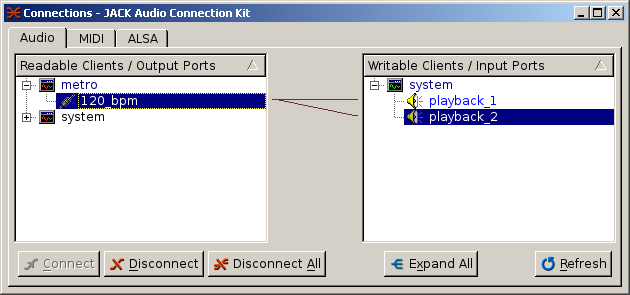
    I was not able to get a sound from jack_metro -b 120 after starting jackd on neither image.

    ecasound -i tone,sine,880 -o jack,system however connected successfully. Could this still be an issue with the cirrus driver?


    jack_metro beeps nicely in my setup...

    image

    I don't think it's the Cirrus driver. In my experience jack either works for everything or not at all.

    Could I tempt you to try jackd2?

    Any idea what JACK might need to run as smoothly as on your image?

    I would guess it's the MMAP support in the I2S driver I patched in.


    --

    Ragnar

    • Cancel
    • Vote Up 0 Vote Down
    • Sign in to reply
    • Cancel
  • Former Member
    Former Member over 10 years ago in reply to Former Member

    I patched the kernel in my image to add mmap support for I2S cards. The stock Raspbian kernel doesn't have it, but the old Wolfson 3.10 kernel does.

    For some reason, mmap support disappeared in the Cirrus 3.12 kernel and it is still missing in Cirrus' 3.18 kernel.

    OK, I have to patch and replace the kernel then aswell. This will hopefully decrease the latency?


    Could I tempt you to try jackd2?

    Of course, I am very grateful for every hint!


    JACK2 is where my display and bus errors occur

    pi@raspberrypi ~ $ jackd -v -P70 -p16 -t2000 -d alsa -dhw:0,0 -p 128 -n 3 -r 44100 -s
    jackdmp 1.9.9
    Copyright 2001-2005 Paul Davis and others.
    Copyright 2004-2012 Grame.
    jackdmp comes with ABSOLUTELY NO WARRANTY
    This is free software, and you are welcome to redistribute it
    under certain conditions; see the file COPYING for details
    JACK server starting in realtime mode with priority 70
    Jack: JackPosixThread::StartImp : create non RT thread
    Jack: JackPosixThread::ThreadHandler : start
    Jack: playback device hw:0,0
    Jack: capture device hw:0,0
    Jack: frames per period = 128
    Jack: apparent rate = 44100
    Jack: JackDriver::Open capture_driver_name = hw:0,0
    Jack: JackDriver::Open playback_driver_name = hw:0,0
    Jack: Check protocol client = 8 server = 8
    Jack: JackEngine::ClientInternalOpen: name = system
    Jack: JackEngine::AllocateRefNum ref = 0
    Jack: JackPosixSemaphore::Allocate name = jack_sem.1000_default_system val = 0
    Jack: JackEngine::NotifyAddClient: name = system
    Jack: JackGraphManager::SetBufferSize size = 128
    Jack: JackConnectionManager::DirectConnect first: ref1 = 0 ref2 = 0
    Jack: JackGraphManager::ConnectRefNum cur_index = 0 ref1 = 0 ref2 = 0
    Jack: JackDriver::SetupDriverSync driver sem in flush mode
    control device hw:0
    control device hw:0
    Failed to connect to session bus for device reservation Unable to autolaunch a dbus-daemon without a $DISPLAY for X11
    
    Failed to acquire device name : Audio0 error : Invalid argument
    Audio device hw:0,0 cannot be acquired...
    Jack: ~JackDriver
    Cannot initialize driver
    Jack: no message buffer overruns
    Jack: JackPosixThread::Stop
    Jack: JackPosixThread::ThreadHandler : exit
    JackServer::Open failed with -1
    Jack: Succeeded in unlocking 13589216 byte memory area
    Jack: JackShmMem::delete size = 0 index = 0
    Jack: ~JackDriver
    Jack: Succeeded in unlocking 1040 byte memory area
    Jack: JackShmMem::delete size = 0 index = 1
    Jack: Cleaning up shared memory
    Jack: Cleaning up files
    Jack: Unregistering server `default'
    Failed to open server


    and with -dplughw:0,0

    pi@raspberrypi ~ $ jackd -v -P70 -p16 -t2000 -d alsa -dplughw:0,0 -p 128 -n 3 -r 44100 -s
    jackdmp 1.9.9
    Copyright 2001-2005 Paul Davis and others.
    Copyright 2004-2012 Grame.
    jackdmp comes with ABSOLUTELY NO WARRANTY
    This is free software, and you are welcome to redistribute it
    under certain conditions; see the file COPYING for details
    JACK server starting in realtime mode with priority 70
    Jack: JackPosixThread::StartImp : create non RT thread
    Jack: JackPosixThread::ThreadHandler : start
    Jack: playback device plughw:0,0
    Jack: capture device plughw:0,0
    Jack: frames per period = 128
    Jack: apparent rate = 44100
    Jack: JackDriver::Open capture_driver_name = plughw:0,0
    Jack: JackDriver::Open playback_driver_name = plughw:0,0
    Jack: Check protocol client = 8 server = 8
    Jack: JackEngine::ClientInternalOpen: name = system
    Jack: JackEngine::AllocateRefNum ref = 0
    Jack: JackPosixSemaphore::Allocate name = jack_sem.1000_default_system val = 0
    Jack: JackEngine::NotifyAddClient: name = system
    Jack: JackGraphManager::SetBufferSize size = 128
    Jack: JackConnectionManager::DirectConnect first: ref1 = 0 ref2 = 0
    Jack: JackGraphManager::ConnectRefNum cur_index = 0 ref1 = 0 ref2 = 0
    Jack: JackDriver::SetupDriverSync driver sem in flush mode
    control device hw:0
    control device hw:0
    Failed to connect to session bus for device reservation Unable to autolaunch a dbus-daemon without a $DISPLAY for X11
    
    Failed to acquire device name : Audio0 error : Invalid argument
    Audio device plughw:0,0 cannot be acquired...
    Jack: ~JackDriver
    Cannot initialize driver
    Jack: no message buffer overruns
    Jack: JackPosixThread::Stop
    Jack: JackPosixThread::ThreadHandler : exit
    JackServer::Open failed with -1
    Jack: Succeeded in unlocking 13589216 byte memory area
    Jack: JackShmMem::delete size = 0 index = 0
    Jack: ~JackDriver
    Jack: Succeeded in unlocking 1040 byte memory area
    Jack: JackShmMem::delete size = 0 index = 1
    Jack: Cleaning up shared memory
    Jack: Cleaning up files
    Jack: Unregistering server `default'
    Failed to open server


    So you compiled and installed the official code from https://github.com/jackaudio/jack2 ?

    Guess that is my next step tonight.

    Many thanks for your help!

    Martin


    PS: At least I got the jack2 simple_client example working on a jack1 server. The jack1 version did not have a tone generator included, and I was wondering why I didn't receive any sound. I didn't find the fault with the metronom though.

    • Cancel
    • Vote Up 0 Vote Down
    • Sign in to reply
    • Cancel
  • Former Member
    Former Member over 10 years ago in reply to Former Member

    OK, I have to patch and replace the kernel then aswell. This will hopefully decrease the latency?

    Yup.


    JACK2 is where my display and bus errors occur

    That's why I built my own, without dbus. Almost all of my Pis are headless, thus no X server running and consequently no dbus service.


    So you compiled and installed the official code from https://github.com/jackaudio/jack2 ?

    Guess that is my next step tonight.

    Yes, that's correct. Optionally, you can use a dbus-enabled jackd if you start a dbus session manually before you start jackd.

    eval `dbus-launch --auto-syntax`
    export DBUS_SESSION_BUS_PID DBUS_SESSION_BUS_ADDRESS

    --

    Ragnar

    • Cancel
    • Vote Up 0 Vote Down
    • Sign in to reply
    • Cancel
  • Former Member
    Former Member over 10 years ago in reply to Former Member

    No need to recompile, Jack2 from the Raspbian repositories works on the RPi (contrary to Jack1 which needs a patch to work around the bus error). You need to tell it where the dbus session bus is though:

    export DBUS_SESSION_BUS_ADDRESS=unix:path=/run/dbus/system_bus_socket


    Then it probably still won't start because Jack2 can not acquire the sound card, you can fix that by adding the following lines to /etc/dbus-1/system.conf:

      <policy user="pi">
            <allow own="org.freedesktop.ReserveDevice1.Audio1"/>
      </policy>


    More info here: http://wiki.linuxaudio.org/wiki/raspberrypi#running_jack

    • Cancel
    • Vote Up 0 Vote Down
    • Sign in to reply
    • Cancel
Reply
  • Former Member
    Former Member over 10 years ago in reply to Former Member

    No need to recompile, Jack2 from the Raspbian repositories works on the RPi (contrary to Jack1 which needs a patch to work around the bus error). You need to tell it where the dbus session bus is though:

    export DBUS_SESSION_BUS_ADDRESS=unix:path=/run/dbus/system_bus_socket


    Then it probably still won't start because Jack2 can not acquire the sound card, you can fix that by adding the following lines to /etc/dbus-1/system.conf:

      <policy user="pi">
            <allow own="org.freedesktop.ReserveDevice1.Audio1"/>
      </policy>


    More info here: http://wiki.linuxaudio.org/wiki/raspberrypi#running_jack

    • Cancel
    • Vote Up 0 Vote Down
    • Sign in to reply
    • Cancel
Children
No Data
element14 Community

element14 is the first online community specifically for engineers. Connect with your peers and get expert answers to your questions.

  • Members
  • Learn
  • Technologies
  • Challenges & Projects
  • Products
  • Store
  • About Us
  • Feedback & Support
  • FAQs
  • Terms of Use
  • Privacy Policy
  • Legal and Copyright Notices
  • Sitemap
  • Cookies

An Avnet Company © 2025 Premier Farnell Limited. All Rights Reserved.

Premier Farnell Ltd, registered in England and Wales (no 00876412), registered office: Farnell House, Forge Lane, Leeds LS12 2NE.

ICP 备案号 10220084.

Follow element14

  • X
  • Facebook
  • linkedin
  • YouTube