element14 Community
element14 Community
    Register Log In
  • Site
  • Search
  • Log In Register
  • Community Hub
    Community Hub
    • What's New on element14
    • Feedback and Support
    • Benefits of Membership
    • Personal Blogs
    • Members Area
    • Achievement Levels
  • Learn
    Learn
    • Ask an Expert
    • eBooks
    • element14 presents
    • Learning Center
    • Tech Spotlight
    • STEM Academy
    • Webinars, Training and Events
    • Learning Groups
  • Technologies
    Technologies
    • 3D Printing
    • FPGA
    • Industrial Automation
    • Internet of Things
    • Power & Energy
    • Sensors
    • Technology Groups
  • Challenges & Projects
    Challenges & Projects
    • Design Challenges
    • element14 presents Projects
    • Project14
    • Arduino Projects
    • Raspberry Pi Projects
    • Project Groups
  • Products
    Products
    • Arduino
    • Avnet & Tria Boards Community
    • Dev Tools
    • Manufacturers
    • Multicomp Pro
    • Product Groups
    • Raspberry Pi
    • RoadTests & Reviews
  • About Us
  • Store
    Store
    • Visit Your Store
    • Choose another store...
      • Europe
      •  Austria (German)
      •  Belgium (Dutch, French)
      •  Bulgaria (Bulgarian)
      •  Czech Republic (Czech)
      •  Denmark (Danish)
      •  Estonia (Estonian)
      •  Finland (Finnish)
      •  France (French)
      •  Germany (German)
      •  Hungary (Hungarian)
      •  Ireland
      •  Israel
      •  Italy (Italian)
      •  Latvia (Latvian)
      •  
      •  Lithuania (Lithuanian)
      •  Netherlands (Dutch)
      •  Norway (Norwegian)
      •  Poland (Polish)
      •  Portugal (Portuguese)
      •  Romania (Romanian)
      •  Russia (Russian)
      •  Slovakia (Slovak)
      •  Slovenia (Slovenian)
      •  Spain (Spanish)
      •  Sweden (Swedish)
      •  Switzerland(German, French)
      •  Turkey (Turkish)
      •  United Kingdom
      • Asia Pacific
      •  Australia
      •  China
      •  Hong Kong
      •  India
      • Japan
      •  Korea (Korean)
      •  Malaysia
      •  New Zealand
      •  Philippines
      •  Singapore
      •  Taiwan
      •  Thailand (Thai)
      • Vietnam
      • Americas
      •  Brazil (Portuguese)
      •  Canada
      •  Mexico (Spanish)
      •  United States
      Can't find the country/region you're looking for? Visit our export site or find a local distributor.
  • Translate
  • Profile
  • Settings
Raspberry Pi
  • Products
  • More
Raspberry Pi
Raspberry Pi Forum Cirrus Logic Audio Card working on the Raspberry Pi 2
  • Blog
  • Forum
  • Documents
  • Quiz
  • Events
  • Polls
  • Files
  • Members
  • Mentions
  • Sub-Groups
  • Tags
  • More
  • Cancel
  • New
Join Raspberry Pi to participate - click to join for free!
Featured Articles
Announcing Pi
Technical Specifications
Raspberry Pi FAQs
Win a Pi
Raspberry Pi Wishlist
Actions
  • Share
  • More
  • Cancel
Forum Thread Details
  • Replies 165 replies
  • Subscribers 684 subscribers
  • Views 22770 views
  • Users 0 members are here
  • wolfson
  • raspberry
  • audio
  • pi
  • cirrus
  • raspberry_pi
  • rpi2
  • raspeberry_pi_accessories
  • pi2
Related

Cirrus Logic Audio Card working on the Raspberry Pi 2

Former Member
Former Member over 10 years ago

Hi all!


As you might know, Cirrus Logic's main kernel source branch recently switched to 3.18.

My first thought was "Hmm, that means the Cirrus Logic card could finally work on the RPi2..."

I have built a couple of 3.18 kernels for my B+ and RPi2 and I have managed to get both models to produce sound image


It's still early days, i.e. there are possibly bugs and glitches to fix, but for those of you who would like to try it out I've made an image file that you can download here:

https://drive.google.com/file/d/0BzIaxMH3N5O1cmJ1bFhMcG1hc0E/view?usp=sharing

The file is a 1.3 GB zip. Uncompressed size is 3.1 GB, so it fits comfortably on a 4 GB card.


The image is based on the standard 2015-02-16-raspbian-wheezy image from the Foundation that you flash to a SD card for a fresh install.

I have only added my kernels and set up the configuration files to get the card going.

It should work on the older B model  with a Wolfson Audio Card too, but I haven't tested that yet.


Have fun!

--

Ragnar

  • Sign in to reply
  • Cancel
Parents
  • Former Member
    Former Member over 10 years ago

    Thank you for doing this!


    I'm actually shocked that it took me under and hour to get this Cirrus Logic Audio Card (CLAC) working with a Raspberry Pi 2 (RPi2).


    For the total noob, here are the steps I took to get playback working.


    1.) Downloaded Ragnar's O/S image: https://docs.google.com/uc?id=0BzIaxMH3N5O1cmJ1bFhMcG1hc0E&export=download

    2.) Using OSX, I unzipped the image and it is simply a .img file (about 3 gigs)

    3.) I downloaded and then ran SDFormatter for OSX https://www.sdcard.org/downloads/formatter_4/eula_mac/index.html

    4.) In SDFormatter I selected the QuickFormat option for my MicroSD Card (uSD) (connected through a USB Adapter).  It changed the name of the Drive to "Recovery" for some reason.  In OSX's Finder (File Manager program for the Windows user) I right-clicked and selected "Get Info" to verify it was "MS-DOS" (FAT32) type and moved on.

    5.) Now I needed to burn Ragnar's .img file to my uSD card.  I followed the instructions here: https://www.raspberrypi.org/documentation/installation/installing-images/mac.md and went with the "Mostly Graphical" method.  One important thing to note: after you type the "sudo dd bs=1m if=path_of_your_image.img of=/dev/diskn" command, where n is a number (in my case, the actual command was: sudo dd bs=1m if=/Users/Tsunami/Downloads/2015-02-16-raspbian-wheezyW_CL.img of=/dev/disk1 ) ....yeah...after you do that, you may be sitting there watching a terminal that is doing nothing and it can take a while.  This is noted later on in the instructions under the "Command Line" method but if you didn't scroll down that far because you settled on the "Mostly Graphical" method, you may have been wondering what the heck was going on.  I ran my Activity Monitor and selected the Disk tab and noticed that the "dd" process was in fact slowly adding to the Bytes Written.  But it was slow.  Then I went back to the instructions and noticed under the "Command Line" method that it says: This will take a few minutes, depending on the image file size. You can check the progress by sending a SIGINFO signal pressing Ctrl+T.


    I pressed Ctrl+T and sure enough, it spat me out a little status about how many bytes had been written.  So just be aware that it takes time and it probably didn't lock up.  After this was complete, I noticed the name of my MicroSD card was now "boot" and the file system looked pretty familiar.


    6.) I popped the CLAC card onto my RPI2, inserted the uSD card into the slot on the RPI2 and provided power through the RPIs microUSB connector.  BOOM.  It posted into the command line and everything seemed to load correctly.  I ran "startx" from the command line and it loaded the UI.  Meanwhile, the CLAC card showed some LED activity.  I restarted the RPI2.

    7.) Now I had no idea what to do.  I started reading through this Thread again and I saw people talking about scripts.  I vaguely remembered seeing them in the CLAC user manual here: Cirrus Logic Audio Card User Manual

    8.) Since I didn't follow the steps to get their patched-kernal O/S image I was worried that the remainder of the steps wouldn't apply.  I never saw a "Music Player" on the Desktop in the UI.

    9.) I ran "sudo apt-get update", "sudo apt-get upgrade", and then "sudo apt-get install vlc" to get a media player on this RPI2.  After those finished I tried playing one of the preloaded Music files located in the /home/pi/Music folder.  I connected a 3.5mm stereo headphone jack to the Black Output marked "Headset" on the CLAC.  No sound.  I hoped it was simply because I hadn't run one of those scripts that I had seen people talking about and that the User guide referred to.  But I assumed there were 200 other reasons it wasn't working.

    10.) NOPE.  Only needed to run one script.  I simply entered "sudo bash ./Playback_to_Headset.sh" and after it spat out a ton of gibberish I tried opening the music file again.  What a beautiful sound.


    All I'm going to say is, I've sunk lots of hours into trying to get stuff like this to work.  When I initially researched sound for the RPI2 I was very dismayed at how troublesome the process is.  I read through much of this forum and it looked like a nightmare.  So thank you very much Ragnar!  I'm sure you saved me a ton of hours.  Now I need to figure out how to record audio and do some signal processing with this CLAC.  If I have success there I will post my step-by-step walkthrough.

    • Cancel
    • Vote Up 0 Vote Down
    • Sign in to reply
    • Cancel
  • Former Member
    Former Member over 10 years ago in reply to Former Member

    Was working on Friday.  Today I get "no soundcards found".


    CLAC is lighting up.  No idea what happened.


    Is it possible that because I ran apt-get update and upgrade that it blew away the kernal patches?

    • Cancel
    • Vote Up 0 Vote Down
    • Sign in to reply
    • Cancel
  • Former Member
    Former Member over 10 years ago in reply to Former Member

    Your self diagnosis is almost certainly right.


    To get the cirrus card working you need a specially modded kernel.  The repositories probably contain a more recent version of the kernel, and your upgrade has overwritten your working one.


    I have seen that the solution is of the form ...


    sudo apt-mark hold raspberrypi-bootloader


    I have not yet got my rpi and cirrus working and stable, so there may well be other packages that need to be held as well as the above.

    Good luck.

    David

    • Cancel
    • Vote Up 0 Vote Down
    • Sign in to reply
    • Cancel
Reply
  • Former Member
    Former Member over 10 years ago in reply to Former Member

    Your self diagnosis is almost certainly right.


    To get the cirrus card working you need a specially modded kernel.  The repositories probably contain a more recent version of the kernel, and your upgrade has overwritten your working one.


    I have seen that the solution is of the form ...


    sudo apt-mark hold raspberrypi-bootloader


    I have not yet got my rpi and cirrus working and stable, so there may well be other packages that need to be held as well as the above.

    Good luck.

    David

    • Cancel
    • Vote Up 0 Vote Down
    • Sign in to reply
    • Cancel
Children
  • Former Member
    Former Member over 10 years ago in reply to Former Member

    I have been trying to get my :-

         Raspberry Pi 2 Model B V1.1

         Cirrus Logic Audio Card  Ver: A1.0

    to behave for me.  I have downloaded and installed stacks of SD card images and have had some stuff working, but never all at once.


    My ideal would to be able to run

         jack-rack

    and

         sonic-pi

    not necessarily at the same time, but using the Cirrus card.


    Can anyone point me at a .img that already exists that I can download and install?


    Yours

    David


    • Cancel
    • Vote Up 0 Vote Down
    • Sign in to reply
    • Cancel
  • Former Member
    Former Member over 10 years ago in reply to Former Member

    Yeah I went through the entire process again, following my own step-by-step guide.  Funny, on Friday, I thought it was a bit superfluous.  Not 3 days later, I'm glad I documented it.


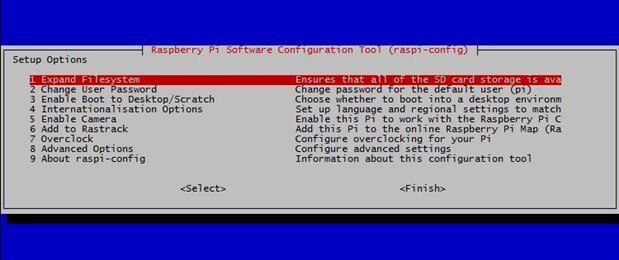
    This time I ran into a few stumbling blocks.  Most notably, I was getting errors about being out of disk space.  Turns out, the first time I went through the process, I made sure to "Expand Filesystem".  The second time, I did not.  I even got errors when I tried to autocomplete with a tab in the shell.  I ran sudo raspi-config and selected it.  After a reboot, problem solved.


    image

    • Cancel
    • Vote Up 0 Vote Down
    • Sign in to reply
    • Cancel
  • Former Member
    Former Member over 10 years ago in reply to Former Member

    Just after I asked my question a few days ago I tried again.  I am sure that I used the same image that I used earlier , but ...


    The thing worked for me.  I now have exactly what I wanted - except that I would ideally have the Pi running headless.  At present I am running it using ssh -Y to communicate.  If I do not use the X forwarding then the jack stuff wont start.


    Does anyone else have pointers for me?


    David

    p.s.   The kernel I am running successfully is

    3.18.9-v7cludlmmap #2 SMP PREEMPT Fri Mar 27 12:07:39 CET 2015 armv7l GNU/Linux


    I think that the image I started with was 2015-02-16-raspbian-wheezyW_CL.img

    • Cancel
    • Vote Up 0 Vote Down
    • Sign in to reply
    • Cancel
element14 Community

element14 is the first online community specifically for engineers. Connect with your peers and get expert answers to your questions.

  • Members
  • Learn
  • Technologies
  • Challenges & Projects
  • Products
  • Store
  • About Us
  • Feedback & Support
  • FAQs
  • Terms of Use
  • Privacy Policy
  • Legal and Copyright Notices
  • Sitemap
  • Cookies

An Avnet Company © 2025 Premier Farnell Limited. All Rights Reserved.

Premier Farnell Ltd, registered in England and Wales (no 00876412), registered office: Farnell House, Forge Lane, Leeds LS12 2NE.

ICP 备案号 10220084.

Follow element14

  • X
  • Facebook
  • linkedin
  • YouTube