element14 Community
element14 Community
    Register Log In
  • Site
  • Search
  • Log In Register
  • Community Hub
    Community Hub
    • What's New on element14
    • Feedback and Support
    • Benefits of Membership
    • Personal Blogs
    • Members Area
    • Achievement Levels
  • Learn
    Learn
    • Ask an Expert
    • eBooks
    • element14 presents
    • Learning Center
    • Tech Spotlight
    • STEM Academy
    • Webinars, Training and Events
    • Learning Groups
  • Technologies
    Technologies
    • 3D Printing
    • FPGA
    • Industrial Automation
    • Internet of Things
    • Power & Energy
    • Sensors
    • Technology Groups
  • Challenges & Projects
    Challenges & Projects
    • Design Challenges
    • element14 presents Projects
    • Project14
    • Arduino Projects
    • Raspberry Pi Projects
    • Project Groups
  • Products
    Products
    • Arduino
    • Avnet & Tria Boards Community
    • Dev Tools
    • Manufacturers
    • Multicomp Pro
    • Product Groups
    • Raspberry Pi
    • RoadTests & Reviews
  • About Us
    About the element14 Community
  • Store
    Store
    • Visit Your Store
    • Choose another store...
      • Europe
      •  Austria (German)
      •  Belgium (Dutch, French)
      •  Bulgaria (Bulgarian)
      •  Czech Republic (Czech)
      •  Denmark (Danish)
      •  Estonia (Estonian)
      •  Finland (Finnish)
      •  France (French)
      •  Germany (German)
      •  Hungary (Hungarian)
      •  Ireland
      •  Israel
      •  Italy (Italian)
      •  Latvia (Latvian)
      •  
      •  Lithuania (Lithuanian)
      •  Netherlands (Dutch)
      •  Norway (Norwegian)
      •  Poland (Polish)
      •  Portugal (Portuguese)
      •  Romania (Romanian)
      •  Russia (Russian)
      •  Slovakia (Slovak)
      •  Slovenia (Slovenian)
      •  Spain (Spanish)
      •  Sweden (Swedish)
      •  Switzerland(German, French)
      •  Turkey (Turkish)
      •  United Kingdom
      • Asia Pacific
      •  Australia
      •  China
      •  Hong Kong
      •  India
      •  Japan
      •  Korea (Korean)
      •  Malaysia
      •  New Zealand
      •  Philippines
      •  Singapore
      •  Taiwan
      •  Thailand (Thai)
      •  Vietnam
      • Americas
      •  Brazil (Portuguese)
      •  Canada
      •  Mexico (Spanish)
      •  United States
      Can't find the country/region you're looking for? Visit our export site or find a local distributor.
  • Translate
  • Profile
  • Settings
Raspberry Pi
  • Products
  • More
Raspberry Pi
Raspberry Pi Forum PiFace RTC on Raspberry Pi2: still losing time on reboot!
  • Blog
  • Forum
  • Documents
  • Quiz
  • Events
  • Polls
  • Files
  • Members
  • Mentions
  • Sub-Groups
  • Tags
  • More
  • Cancel
  • New
Join Raspberry Pi to participate - click to join for free!
Featured Articles
Announcing Pi
Technical Specifications
Raspberry Pi FAQs
Win a Pi
Raspberry Pi Wishlist
Actions
  • Share
  • More
  • Cancel
Forum Thread Details
  • State Suggested Answer
  • Replies 24 replies
  • Answers 1 answer
  • Subscribers 688 subscribers
  • Views 3972 views
  • Users 0 members are here
  • clock
  • pi
  • rtc
  • raspberry_pi
  • raspberrypi
  • date
  • settings
  • piface
Related

PiFace RTC on Raspberry Pi2: still losing time on reboot!

Former Member
Former Member over 10 years ago

Hi!


I bought a PiFace RTC and I'm trying it on a Raspberry Pi 2 Model B. I followed the many guides I found on the internet, but I'm still having problem with the date: when I reboot, the system time is always set to Jan 1, 1970! It seems to be in a reset condition.

The I2C detects well the device at the address 0x6F, and the battery is ok.

After the execution of the .sh script as written in the PiFace RTC user guide, I set the actual date with "sudo date -s "12 jan 2016 10:30:00",

set the i2c module from raspi-config.

I triyed in so many ways but I really can't understand what I'm doing wrong!


Any idea would be appreciated!
Thanks,


Andrea.

  • Sign in to reply
  • Cancel
Parents
  • Robert Peter Oakes
    0 Robert Peter Oakes over 10 years ago

    You may have done this already but...


    without any script to talk to the RTC on power up


    set the RTC time manually using one of the above commands

    read the time back from the RTC... is it correct


    now without any automated scripts talking to the RTC reboot the PI, and remember... no scripts should be talking to the RTC during power up either


    once booted, again read (Only Read) the time back out of the RTC, it should be correct or very close as you have not powered off the device irrespective of the battery


    if this worked, shutdown the pi and dissconnect the power to the PI, wait a few seconds and power up again, now read the RTC again... again no other scripts should be going near the RTC


    If this also reads correctly or within a few seconds, then you issue is with your scripts in the auto start up.


    If this does not work then you probably have hardware issues

    • Cancel
    • Vote Up 0 Vote Down
    • Sign in to reply
    • Verify Answer
    • Cancel
  • Former Member
    0 Former Member over 10 years ago in reply to Robert Peter Oakes

    Hi Peter,


    a strange thing happens.

    I set the date with

    sudo date -s ...

    I write the RTC with

    sudo hwclock -w

    Read the time with

    sudo hwclock -r

    And it gives me the correct time.

    Now I shoutdown and I wait for few minutes.

    I boot up, I read the RTC with

    sudo hwclock -r

    and the time is OK.

    Now I reboot (without shutting down) with

    sudo reboot

    Once booted, I read the RTC:

    sudo hwclock -r

    The correct time doesn't appears, it give me the error message:

    hwclock: The Hardware Clock registers contain values that are either  
    invalid (e.g. 50th day of month) or beyond the range we can handle (e.g. Year 2095).


    How can the RTC be correct after a shoutdown / powerup and not correct after a simple reboot? Who is that set the date to an invalid range value?? There should be somewhere some wrong stuff that is involved at the startup.. really cannot understand where!

    Many thanks!

    Andrea


    Added:

    I don't believe this can be the issue (because the i2c is well detected), but I noticed that in the /boot/config.txt I have a dtparam=i2c=on; shouldn't it be dtparam=i2c1=on?

    • Cancel
    • Vote Up 0 Vote Down
    • Sign in to reply
    • Verify Answer
    • Cancel
  • Former Member
    0 Former Member over 10 years ago in reply to Former Member

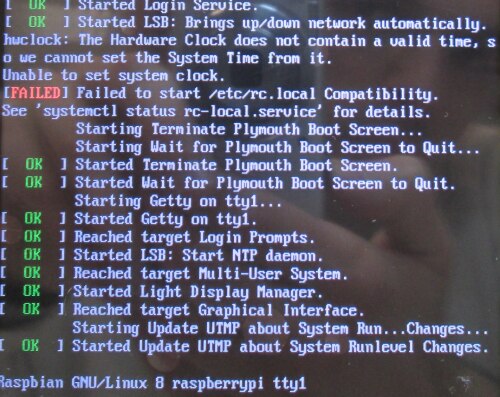
    I noticed one thing.

    When the RTC is not read well, during the boot I can read an error message on the screen, please see the image provided:

    image

    It seems to involve the /etc/rc.local. Perhaps is there an issue in such file?

    My /etc/rc.local is below. Is there something wrong inside it?

    !/bin/sh -e 
    # 
    # rc.local 
    # 
    # This script is executed at the end of each multiuser ru$ 
    # Make sure that the script will "" on success or any oth$ 
    # value on error. 
    # 
    # In order to enable or disable this script just change t$ 
    # bits. 
    # 
    # By default this script does nothing. 
    
    # Print the IP address 
    _IP=$(hostname -I) || true 
    if [ "$_IP" ]; then 
      printf "My IP address is %s\n" "$_IP" 
    fi 
    
    # Calibrate the clock (default: 0x47). See datasheet for $ 
    i2cset -y 1 0x6f 0x08 0x47 
    modprobe i2c:mcp7941x 
    echo mcp7941x 0x6f > /sys/class/i2c-dev/i2c-1/device/new_$ 
    hwclock -s


    Thanks again,

    Andrea.

    • Cancel
    • Vote Up 0 Vote Down
    • Sign in to reply
    • Verify Answer
    • Cancel
  • rew
    0 rew over 10 years ago in reply to Former Member

    I would not be surprised if the driver takes a second before it has the chip up-and-running. So I would place a "sleep 1"  before the "hwclock -s".


    Does that help?

    • Cancel
    • Vote Up 0 Vote Down
    • Sign in to reply
    • Verify Answer
    • Cancel
Reply
  • rew
    0 rew over 10 years ago in reply to Former Member

    I would not be surprised if the driver takes a second before it has the chip up-and-running. So I would place a "sleep 1"  before the "hwclock -s".


    Does that help?

    • Cancel
    • Vote Up 0 Vote Down
    • Sign in to reply
    • Verify Answer
    • Cancel
Children
  • Former Member
    0 Former Member over 10 years ago in reply to rew

    Unfortunately it does not help image!

    • Cancel
    • Vote Up 0 Vote Down
    • Sign in to reply
    • Verify Answer
    • Cancel
  • Former Member
    0 Former Member over 10 years ago in reply to Former Member

    Does 'man hwclock' provide any insight, it appears to have various routes to accessing the RTC.  My Pi returns "Cannot access the hardware clock by any known method" but I'd expect this because I haven't added a system driver.  I do however have an off-board circuit to drive a DS1337 via I2C.  For this I have used Gordon's WiringPi but if the truth were known I haven't yet resolved the time discrepancy with that. Too many things to do...

    • Cancel
    • Vote Up 0 Vote Down
    • Sign in to reply
    • Verify Answer
    • Cancel
  • briangawenus
    0 briangawenus over 10 years ago in reply to Former Member

    is there any way of pinging the time off the internet to reset? using the time.windows.com server ?

    • Cancel
    • Vote Up 0 Vote Down
    • Sign in to reply
    • Verify Answer
    • Cancel
  • Robert Peter Oakes
    0 Robert Peter Oakes over 10 years ago in reply to briangawenus

    yes, use the NTP... Network Time Protocol

    • Cancel
    • Vote Up +1 Vote Down
    • Sign in to reply
    • Verify Answer
    • Cancel
element14 Community

element14 is the first online community specifically for engineers. Connect with your peers and get expert answers to your questions.

  • Members
  • Learn
  • Technologies
  • Challenges & Projects
  • Products
  • Store
  • About Us
  • Feedback & Support
  • FAQs
  • Terms of Use
  • Privacy Policy
  • Legal and Copyright Notices
  • Sitemap
  • Cookies

An Avnet Company © 2026 Premier Farnell Limited. All Rights Reserved.

Premier Farnell Ltd, registered in England and Wales (no 00876412), registered office: Farnell House, Forge Lane, Leeds LS12 2NE.

ICP 备案号 10220084.

Follow element14

  • X
  • Facebook
  • linkedin
  • YouTube