element14 Community
element14 Community
    Register Log In
  • Site
  • Search
  • Log In Register
  • Community Hub
    Community Hub
    • What's New on element14
    • Feedback and Support
    • Benefits of Membership
    • Personal Blogs
    • Members Area
    • Achievement Levels
  • Learn
    Learn
    • Ask an Expert
    • eBooks
    • element14 presents
    • Learning Center
    • Tech Spotlight
    • STEM Academy
    • Webinars, Training and Events
    • Learning Groups
  • Technologies
    Technologies
    • 3D Printing
    • FPGA
    • Industrial Automation
    • Internet of Things
    • Power & Energy
    • Sensors
    • Technology Groups
  • Challenges & Projects
    Challenges & Projects
    • Design Challenges
    • element14 presents Projects
    • Project14
    • Arduino Projects
    • Raspberry Pi Projects
    • Project Groups
  • Products
    Products
    • Arduino
    • Avnet & Tria Boards Community
    • Dev Tools
    • Manufacturers
    • Multicomp Pro
    • Product Groups
    • Raspberry Pi
    • RoadTests & Reviews
  • About Us
    About the element14 Community
  • Store
    Store
    • Visit Your Store
    • Choose another store...
      • Europe
      •  Austria (German)
      •  Belgium (Dutch, French)
      •  Bulgaria (Bulgarian)
      •  Czech Republic (Czech)
      •  Denmark (Danish)
      •  Estonia (Estonian)
      •  Finland (Finnish)
      •  France (French)
      •  Germany (German)
      •  Hungary (Hungarian)
      •  Ireland
      •  Israel
      •  Italy (Italian)
      •  Latvia (Latvian)
      •  
      •  Lithuania (Lithuanian)
      •  Netherlands (Dutch)
      •  Norway (Norwegian)
      •  Poland (Polish)
      •  Portugal (Portuguese)
      •  Romania (Romanian)
      •  Russia (Russian)
      •  Slovakia (Slovak)
      •  Slovenia (Slovenian)
      •  Spain (Spanish)
      •  Sweden (Swedish)
      •  Switzerland(German, French)
      •  Turkey (Turkish)
      •  United Kingdom
      • Asia Pacific
      •  Australia
      •  China
      •  Hong Kong
      •  India
      •  Japan
      •  Korea (Korean)
      •  Malaysia
      •  New Zealand
      •  Philippines
      •  Singapore
      •  Taiwan
      •  Thailand (Thai)
      •  Vietnam
      • Americas
      •  Brazil (Portuguese)
      •  Canada
      •  Mexico (Spanish)
      •  United States
      Can't find the country/region you're looking for? Visit our export site or find a local distributor.
  • Translate
  • Profile
  • Settings
Raspberry Pi
  • Products
  • More
Raspberry Pi
Raspberry Pi Forum NesPi Needs More Power
  • Blog
  • Forum
  • Documents
  • Quiz
  • Events
  • Polls
  • Files
  • Members
  • Mentions
  • Sub-Groups
  • Tags
  • More
  • Cancel
  • New
Join Raspberry Pi to participate - click to join for free!
Featured Articles
Announcing Pi
Technical Specifications
Raspberry Pi FAQs
Win a Pi
Raspberry Pi Wishlist
Actions
  • Share
  • More
  • Cancel
Forum Thread Details
  • State Verified Answer
  • Replies 26 replies
  • Answers 3 answers
  • Subscribers 709 subscribers
  • Views 4703 views
  • Users 0 members are here
  • nespi power
  • raspberry_pi
Related

NesPi Needs More Power

e14 Contributor
e14 Contributor over 9 years ago

So i am doing the nespi project and have found that i need power to a usb hub and power to the pi. I only have installed one usb 3.0 port for power to come into the nes case. If i get this power supply --> https://www.amazon.com/Adapter-Portable ... wer+supply


Can i take two usb cables from ^^^this power supply from a usb splitter into a single usb cable then split it back out into two usb connections. Then have one end go to the pi and the other end go to the usb hub to power both devices.


Another possibility i have thought of is trying to bring more amps to the usb hub but i do not know it it can handle more power in and if that would allow it to output more power per port.


I would also greatly appreciate any other ideas on how to get power to both devices with only using one usb port to get power into the case.


Attached is the setup before the powered usb hub was added in to power the 4 controllers separate from the pi's power. And the back port is the single usb 3.0 port i have to bring power into the case.


Hopefully later i can get a pic of that to help with any questions on the setup.

Attachments:
image
image
  • Sign in to reply
  • Cancel
Parents
  • e14 Contributor
    0 e14 Contributor over 9 years ago

    Thanks for that info. Hmm so i may have to try another route with getting a second set of power into to the case. I have another idea the i could try if it works....


    So here is my other idea(long shot). Coming from my usb power source have a usb to 3.5mm adapter then from the 3.5mm cable back out to a micro usb cable to power the hub then use the normal usb cable that i have been tring to use use all along to power the pi?


    Can 3.5mm carry 5v?

    • Cancel
    • Vote Up 0 Vote Down
    • Sign in to reply
    • Verify Answer
    • Cancel
  • uscdadnyc
    0 uscdadnyc over 9 years ago in reply to e14 Contributor

    AD wrote>>...Can 3.5mm carry 5v?

    USCDADNYC>>Yes, if the gauge of the wire is sufficient to carry the load (amperage required), But wouldn't this require soldering the connections?. BTW if you go this route, follow convention. The Inner (center) conductor SHOULD BE at Ground (- polarity) for the connector that looks like a Barrel. If your connector looks like a Needle then the center is + polarity, while the other conductor is Ground (- polarity). Again do a Wiki (on the subject). BTW2 where is AD located physically? If in USA, I might be able to make and give you something along the lines of what I was proposing.

    USCDADNYC (NY NY USA)

    • Cancel
    • Vote Up 0 Vote Down
    • Sign in to reply
    • Verify Answer
    • Cancel
  • e14 Contributor
    0 e14 Contributor over 9 years ago in reply to uscdadnyc

    Im in missouri and i have found a 3.5mm panel jack to male 3.5 connector so no soldering would be needed. Its like a headphone connection vs a barrel connection. So i would have a usb to 3.5mm adapter to this panel jack >> https://www.amazon.com/gp/product/B00QHF3WY8/ref=oh_aui_detailpage_o09_s00?ie=UTF8&psc=1  Then from this panel jack to a 3.5mm to micro usb adapter to the pi.

    • Cancel
    • Vote Up 0 Vote Down
    • Sign in to reply
    • Verify Answer
    • Cancel
  • uscdadnyc
    0 uscdadnyc over 9 years ago in reply to e14 Contributor

    To AD: Nice adapter. the female-end looks like it can mount on a panel. But still you have to get back to the USB2.0/3.0 -A Form Factor. Soldering will be required. OLD cheapie Ethernet RJ-45 Hubs had Pwr Bricks w/ Barrel shaped connectors BUT they Were 7.5Vdc. Will not work. I could make you up something BUT I do not have any USB3.0 cables. I have 2 WIN10 PC's w/ USB3.0 Ports, but am still using my Legary USB2.0 extension cables. I have lots of spare/old USB2.0 Stuff, which I can cut-up and solder. TS[Time Stamp] is now 3:17PM EDT 24AUG16. I will be busy till late tonight. In the meantime, watch some youtube videos on Electronic soldering.

    USCDADNYC (NY NY USA)

    • Cancel
    • Vote Up 0 Vote Down
    • Sign in to reply
    • Verify Answer
    • Cancel
Reply
  • uscdadnyc
    0 uscdadnyc over 9 years ago in reply to e14 Contributor

    To AD: Nice adapter. the female-end looks like it can mount on a panel. But still you have to get back to the USB2.0/3.0 -A Form Factor. Soldering will be required. OLD cheapie Ethernet RJ-45 Hubs had Pwr Bricks w/ Barrel shaped connectors BUT they Were 7.5Vdc. Will not work. I could make you up something BUT I do not have any USB3.0 cables. I have 2 WIN10 PC's w/ USB3.0 Ports, but am still using my Legary USB2.0 extension cables. I have lots of spare/old USB2.0 Stuff, which I can cut-up and solder. TS[Time Stamp] is now 3:17PM EDT 24AUG16. I will be busy till late tonight. In the meantime, watch some youtube videos on Electronic soldering.

    USCDADNYC (NY NY USA)

    • Cancel
    • Vote Up 0 Vote Down
    • Sign in to reply
    • Verify Answer
    • Cancel
Children
  • e14 Contributor
    0 e14 Contributor over 9 years ago in reply to uscdadnyc

    I think i can get it from usb to 3.5mm with this >>  https://www.amazon.com/3-5mm-Jack-Plug-Data-Cable/dp/B006T95XUS/ref=sr_1_3?s=pc&ie=UTF8&qid=1472067305&sr=1-3&keywords=m…  Then after than adpter to get it to the hub i can try this >> https://www.amazon.com/gp/product/B01ET6H4V8/ref=ox_sc_sfl_title_1?ie=UTF8&psc=1&smid=A3QPFB2O33ZLTX

    • Cancel
    • Vote Up 0 Vote Down
    • Sign in to reply
    • Verify Answer
    • Cancel
  • uscdadnyc
    0 uscdadnyc over 9 years ago in reply to uscdadnyc

    To AD: Take another pic w/ your powered USB Hub inside the case. This so I can see about Clearance of what I may make for you. Does not have to be exact placement. Also a Q: going into the micro-B(?) receptacle of the RaspPi 3, is that a Full Size USB3.0-to-micro-B Adapter? And there is a USB3.0 Full-Size M-F Cable. of which the Female is Panel Mounted next to the panel-mount HDMI? Well, if so I do Not have any Panel mount USB Cables (No USB 2.0 , No USB 3.0). Unless it is one of those contraptions that hold a Female end of a Cable in close proximity to the Case Wall, that it functions as a Panel Mount. Will need a Pic of of this taken.

    BTW if you want my credentials, go to www.uspto.gov. Go to OED "Office of Enrollment and Discipline". Be careful there are two Edward Yee's listed

    USCDADNYC (NY NY USA)

    • Cancel
    • Vote Up 0 Vote Down
    • Sign in to reply
    • Verify Answer
    • Cancel
  • e14 Contributor
    0 e14 Contributor over 9 years ago in reply to uscdadnyc

    From the back of the nes it is a panel mount female to male USB 3.0 cable(i did this so it could be installed to the nes as a power port more or less). Also at the end of this cable it is a microusb adapter going into the pi.

    • Cancel
    • Vote Up 0 Vote Down
    • Sign in to reply
    • Verify Answer
    • Cancel
  • uscdadnyc
    0 uscdadnyc over 9 years ago in reply to e14 Contributor

    Below is a n Alphanumeric (text) Schematic. Having problems w/ my Scanner under WIN10, SO NO jpeg image.

    _______

                                        +| Data +            outside box | inside box

                                        - | Data -                                |

    Male-A USB2.0-----------|------------|                           |

                                                          |                           |

                                                          |                           |

                                              +|+       |                           |

                                              - |-        |                           |

    Male-A USB2.0------------------------|--Male-A USB2.0 | Female-A USB2.0--[MIRROR IMAGE]

                                                                                      |

                                                                                      |

                                                                                      |

    Notes:(a) Inside the Box, you can(?) mount Female-A USB2.0 in place of your USB3.0 Female cable OR keep USB3.0 Female cable and just add the Right side [Mirror Image] onto the end of your USB3.0 Female Cable

    ___________________

    I do not have a SPARE Female-A USB2.0 Connector, otherwise I would make you these Two Cables. IDK (I Don't Know) what other devices you have in the Box. This set-up will present DC power as (two) Male-A USB2.0 connector(s). This will work for your RaspPi 3 B/C you have an adapter (Full-micro).

    As to the other Device(s) in the Box, send me the specs

    Any Q's?

    USCDADNYC (NY NY)

    • Cancel
    • Vote Up 0 Vote Down
    • Sign in to reply
    • Verify Answer
    • Cancel
  • e14 Contributor
    0 e14 Contributor over 9 years ago in reply to uscdadnyc

    No worry's i appreciate the offer.


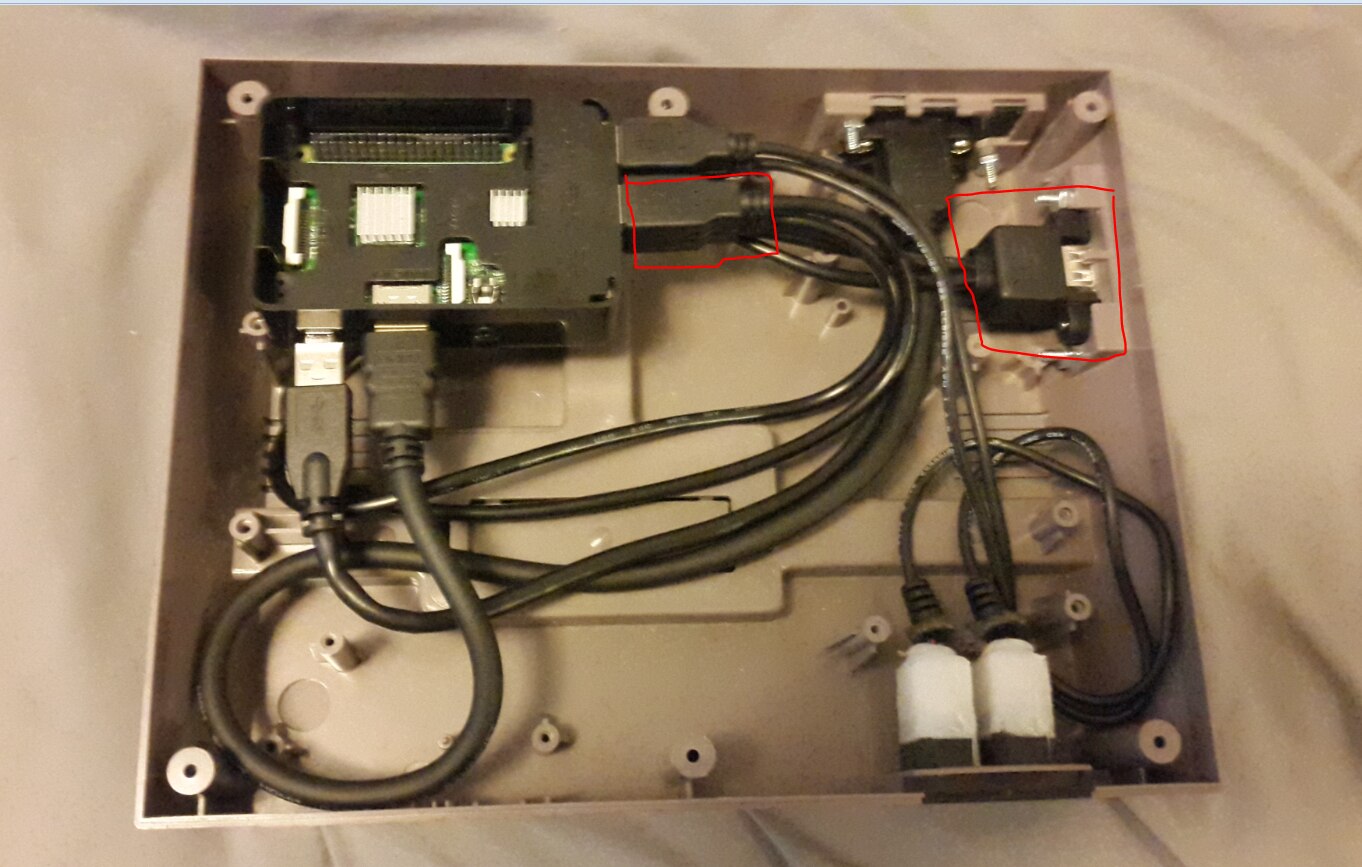
    I do have a good update. I have found that i am getting enough power to the pi with the single usb 3.0 port and cable with the 5v 3a power supply. I found the issue was related to the dual port usb i had running controller 3 and 4. Adding a splitter to the dual usb port with the controllers caused the pi not to boot. Running the pi off the usb hub caused low power to the pi. I then was still having issues with controllers 3 and 4 going in to the dual port usb. So i decided to bypass them and boom everything was working with no issues.


    It seems that the dual port usb some how scrambles the power and data between the ports which messed up the controllers powering on/working correctly.


    On a side note the wires that i used for carrying th power in are both 20awg usb 3.0 cables so shouldn't have any issues with those.


    The two red squares is where my issues occurred from once eliminated everything seems to be working ok again.


    image

    • Cancel
    • Vote Up 0 Vote Down
    • Sign in to reply
    • Reject Answer
    • Cancel
  • uscdadnyc
    0 uscdadnyc over 9 years ago in reply to e14 Contributor

    To: AD. GTK (Good To Know) that you are up & running. Many discussions/threads have been resolved when comment(ers) had to (re)consider their use of USB Hubs. Especially those whom all USB Ports were not= in current-supplying capacity. I haven't use an USB since 2013 when I housed my RaspPi 1B within a USB1.1 Powered Hub. Present day. I have a RaspPi 3B & 7" touchscreen w/i a SmartiPi Case. Great Case but No Access to HDMI port. This I will remedy using my Dremel Tool and a Right-Angle HDMI-HDMI Adapter. Your Last Picture shows your RaspPi neatly in the corner. I assume that this case was made for the RaspPi & other devices to be put together inside. I am glad (we) didn't have to make any special Cables. B/C while they may Work. They are a pain to fix/troubleshoot b/c of the special cables. Hard to swap-out something that is a "one-of-a-kind"

    Keep in touch. If you find yourself in NYC, look me up. Go to that www.uspto.gov URL. Come over for my BBQ. That's strange, originating from a NY'er to somebody in the Midwest.

    USCDADNYC (NY NY USA)

    • Cancel
    • Vote Up 0 Vote Down
    • Sign in to reply
    • Verify Answer
    • Cancel
  • e14 Contributor
    0 e14 Contributor over 9 years ago in reply to uscdadnyc

    Yeah the black case was what came with the cana kit. It was the easiest way to mount the pie without having move any preexisting mounting points in the NES. Being from the midwest BBQ is a way of life.

    • Cancel
    • Vote Up 0 Vote Down
    • Sign in to reply
    • Verify Answer
    • Cancel
  • uscdadnyc
    0 uscdadnyc over 9 years ago in reply to e14 Contributor

    Was it REW (Roger Wolff) that has on his WishList the "NVidia GTX Titan X 12GB graphics card?" IMPRESSIVE! This baby costs more than my recent Win!0 PC's combined. A Intel NUC5i7RYH (w/480GB SSD, 16GbRAM) and a Homebrew GigaBit MoBo w/ AMD A10 CPU, Blu-ray & DVDRAM Optical Drives, 12GbRAM. I did save $$ on the Win10. A friend gave me a number of Win8 OEM Product Keys, which I parlayed into Win10 Pro. Such a Deal. I guess the Titan X is for Gamers, whom one I am not. Never played games on a PC, nor had any Console Games. I never got into it (gaming). I guess I Hated to Lose. Also when there were Gambling Junkets at Work (Los Vegas, Atlantic City), I would decline on going. Saying: "I only gamble at Love".

    USCDADNYC (NY NY USA)

    • Cancel
    • Vote Up 0 Vote Down
    • Sign in to reply
    • Verify Answer
    • Cancel
  • gregoryfenton
    0 gregoryfenton over 9 years ago in reply to uscdadnyc

    It was (and still is) me that wants the Titan X 12GB.


    I rarely play games, and when I do I actually prefer older ones such as Quake 3.


    What would I use it for? To keep my home warm in winter image


    Greg

    • Cancel
    • Vote Up 0 Vote Down
    • Sign in to reply
    • Verify Answer
    • Cancel
  • clem57
    0 clem57 over 9 years ago in reply to gregoryfenton

    LOL!

    • Cancel
    • Vote Up 0 Vote Down
    • Sign in to reply
    • Verify Answer
    • Cancel
element14 Community

element14 is the first online community specifically for engineers. Connect with your peers and get expert answers to your questions.

  • Members
  • Learn
  • Technologies
  • Challenges & Projects
  • Products
  • Store
  • About Us
  • Feedback & Support
  • FAQs
  • Terms of Use
  • Privacy Policy
  • Legal and Copyright Notices
  • Sitemap
  • Cookies

An Avnet Company © 2026 Premier Farnell Limited. All Rights Reserved.

Premier Farnell Ltd, registered in England and Wales (no 00876412), registered office: Farnell House, Forge Lane, Leeds LS12 2NE.

Follow element14

  • X
  • Facebook
  • linkedin
  • YouTube