element14 Community
element14 Community
    Register Log In
  • Site
  • Search
  • Log In Register
  • Community Hub
    Community Hub
    • What's New on element14
    • Feedback and Support
    • Benefits of Membership
    • Personal Blogs
    • Members Area
    • Achievement Levels
  • Learn
    Learn
    • Ask an Expert
    • eBooks
    • element14 presents
    • Learning Center
    • Tech Spotlight
    • STEM Academy
    • Webinars, Training and Events
    • Learning Groups
  • Technologies
    Technologies
    • 3D Printing
    • FPGA
    • Industrial Automation
    • Internet of Things
    • Power & Energy
    • Sensors
    • Technology Groups
  • Challenges & Projects
    Challenges & Projects
    • Design Challenges
    • element14 presents Projects
    • Project14
    • Arduino Projects
    • Raspberry Pi Projects
    • Project Groups
  • Products
    Products
    • Arduino
    • Avnet & Tria Boards Community
    • Dev Tools
    • Manufacturers
    • Multicomp Pro
    • Product Groups
    • Raspberry Pi
    • RoadTests & Reviews
  • About Us
  • Store
    Store
    • Visit Your Store
    • Choose another store...
      • Europe
      •  Austria (German)
      •  Belgium (Dutch, French)
      •  Bulgaria (Bulgarian)
      •  Czech Republic (Czech)
      •  Denmark (Danish)
      •  Estonia (Estonian)
      •  Finland (Finnish)
      •  France (French)
      •  Germany (German)
      •  Hungary (Hungarian)
      •  Ireland
      •  Israel
      •  Italy (Italian)
      •  Latvia (Latvian)
      •  
      •  Lithuania (Lithuanian)
      •  Netherlands (Dutch)
      •  Norway (Norwegian)
      •  Poland (Polish)
      •  Portugal (Portuguese)
      •  Romania (Romanian)
      •  Russia (Russian)
      •  Slovakia (Slovak)
      •  Slovenia (Slovenian)
      •  Spain (Spanish)
      •  Sweden (Swedish)
      •  Switzerland(German, French)
      •  Turkey (Turkish)
      •  United Kingdom
      • Asia Pacific
      •  Australia
      •  China
      •  Hong Kong
      •  India
      • Japan
      •  Korea (Korean)
      •  Malaysia
      •  New Zealand
      •  Philippines
      •  Singapore
      •  Taiwan
      •  Thailand (Thai)
      • Vietnam
      • Americas
      •  Brazil (Portuguese)
      •  Canada
      •  Mexico (Spanish)
      •  United States
      Can't find the country/region you're looking for? Visit our export site or find a local distributor.
  • Translate
  • Profile
  • Settings
Raspberry Pi
  • Products
  • More
Raspberry Pi
Raspberry Pi Forum Serial port appears to be controlled by another program.
  • Blog
  • Forum
  • Documents
  • Quiz
  • Events
  • Polls
  • Files
  • Members
  • Mentions
  • Sub-Groups
  • Tags
  • More
  • Cancel
  • New
Join Raspberry Pi to participate - click to join for free!
Featured Articles
Announcing Pi
Technical Specifications
Raspberry Pi FAQs
Win a Pi
Raspberry Pi Wishlist
Actions
  • Share
  • More
  • Cancel
Forum Thread Details
  • State Verified Answer
  • Replies 9 replies
  • Answers 1 answer
  • Subscribers 677 subscribers
  • Views 3251 views
  • Users 0 members are here
Related

Serial port appears to be controlled by another program.

tcoder
tcoder over 9 years ago

On a Raspberry Pi I have a program that was working great using the serial port /dev/ttyAMA0.  Now all of a sudden it doesn't work.  When I try and open the port, it only opens sometimes and when it doesn't, it hangs forever.  When I look at the port data with a logic analyzer, I get "ERROR" bytes coming from it.  I tried running "screen /dev/ttyAMA0 115200" and I get "ERROR login incorrect ERROR" messages.  It's as if some program has control over the port.  If I did something, I don't know what it was.  How can I find out what might be using the port besides me?


I decided to put an FTDI cable on the serial port and see what happens on a bootup.  Here is what I got:


[  380.473251] reboot: Restarting system

ERROR

Uncompressing Linux... done, booting the kernel.

ERROR

ø

ERROR

Welcome to the rescue system

ERROR

recovery login:

ERROR

Welcome to the rescue system

ERROR

recovery login:

ERROR

Welcome to the rescue system

ERROR

recovery login:

ERROR

Welcome to the rescue system

ERROR

recovery login:


How do I prevent the system from using the tty/AMA0 port?  I'm using it to connect to a Wifi module.


Terry

  • Sign in to reply
  • Cancel
  • rew
    0 rew over 9 years ago

    There is a Linux program called "fuser". It lists those processes that have an open file descriptor to a file  you list on the commandline.

    tree:~> sleep 5 < /dev/ttyAMA0 &

    [1] 15354

    tree:~> fuser /dev/ttyAMA0

    /dev/ttyAMA0:        15354

    tree:~> fuser /dev/ttyAMA0

    tree:~>

    Then you can list the process using ps. In my case, if I hadn't known what that 15354 process was, I would have typed "ps auxww |grep 15354".

    • Cancel
    • Vote Up 0 Vote Down
    • Sign in to reply
    • Verify Answer
    • Reject Answer
    • Cancel
  • gdstew
    0 gdstew over 9 years ago in reply to rew

    To find the process name of a pid you can also use "ps -a 15354".

    • Cancel
    • Vote Up 0 Vote Down
    • Sign in to reply
    • Verify Answer
    • Cancel
  • johnbeetem
    0 johnbeetem over 9 years ago

    I found this at RasPi Wiki at elinux.org:

    S/W: Preventing Linux from using the serial port


    By default Linux will grab the serial port and use it as a terminal. If you want to use it for other purposes you must prevent this. Here are the methods you can use: ...

    Maybe this is what's going on.

    • Cancel
    • Vote Up 0 Vote Down
    • Sign in to reply
    • Reject Answer
    • Cancel
  • gdstew
    0 gdstew over 9 years ago in reply to johnbeetem

    You may be correct. There is a file in the boot partition/directory on the SD card called cmdline.txt. The file has one line in it:


    dwc_otg.lpm_enable=0 console=serial0,115200 console=tty1 root=/dev/mmcblk0p2 rootfstype=ext4 elevator=deadline fsck.repair=yes rootwait


    As you can see "console=serial0,115200" tells Linux to use the serial port as a console. If you remove that part of the command line (you probably

    want to save the original file in the boot directory first), Linux will no longer use the serial port. Since the boot partition uses a Microsoft FAT partition

    the file can be edited using either Windows or Linux.

    • Cancel
    • Vote Up 0 Vote Down
    • Sign in to reply
    • Verify Answer
    • Cancel
  • tcoder
    0 tcoder over 9 years ago in reply to gdstew

    Thanks for all the help.  I decided to take another SD card and rebuild the system I had and save it as a starting point in case I have any other problems.  When I get finished, I'll go back to the original OS and figure out what caused the problem using the help you guys have given me.  I'm sure someone else might eventually have the same problem and would like to know what the resolution was.  Give me a day or so as I have other things to attend to.

    • Cancel
    • Vote Up 0 Vote Down
    • Sign in to reply
    • Verify Answer
    • Cancel
  • tcoder
    0 tcoder over 9 years ago in reply to gdstew

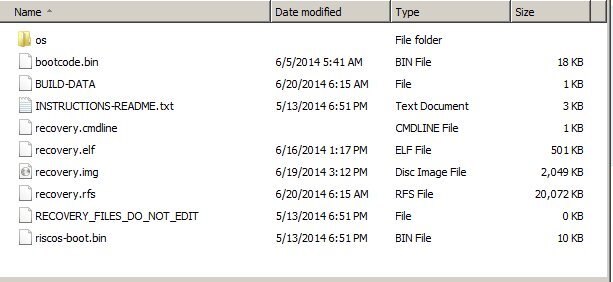
    I pulled the SD card and looked at it.  There is no file called "cmdline.txt" on the disk.  Here is the contents of the SD card:

    image

    • Cancel
    • Vote Up 0 Vote Down
    • Sign in to reply
    • Verify Answer
    • Cancel
  • tcoder
    0 tcoder over 9 years ago

    I went back to this pointer and did what it said.  I executed "raspi-config", selected #9, "Advanced Options", selected "Serial" and then disabled the serial.  Then selected "Finish" and that took care of it after a reboot.  Thanks a million for the help.


    Terry

    • Cancel
    • Vote Up +1 Vote Down
    • Sign in to reply
    • Verify Answer
    • Cancel
  • gdstew
    0 gdstew over 9 years ago in reply to tcoder

    Not sure what OS you are using other than it is not Raspbian. I see the riscos-boot.bin file but the fact that you used raspi-config which is I believe a BASH

    script program to fix it has gotten me really confused.


    Good to see that you got it working !

    • Cancel
    • Vote Up 0 Vote Down
    • Sign in to reply
    • Verify Answer
    • Cancel
  • tcoder
    0 tcoder over 9 years ago in reply to gdstew

    Actually, it's what came with the Pi I got from Element 14 along with the preconfigured SD card. I had two SD cards and they were both the same.

    • Cancel
    • Vote Up 0 Vote Down
    • Sign in to reply
    • Verify Answer
    • Cancel
element14 Community

element14 is the first online community specifically for engineers. Connect with your peers and get expert answers to your questions.

  • Members
  • Learn
  • Technologies
  • Challenges & Projects
  • Products
  • Store
  • About Us
  • Feedback & Support
  • FAQs
  • Terms of Use
  • Privacy Policy
  • Legal and Copyright Notices
  • Sitemap
  • Cookies

An Avnet Company © 2025 Premier Farnell Limited. All Rights Reserved.

Premier Farnell Ltd, registered in England and Wales (no 00876412), registered office: Farnell House, Forge Lane, Leeds LS12 2NE.

ICP 备案号 10220084.

Follow element14

  • X
  • Facebook
  • linkedin
  • YouTube