element14 Community
element14 Community
    Register Log In
  • Site
  • Search
  • Log In Register
  • Community Hub
    Community Hub
    • What's New on element14
    • Feedback and Support
    • Benefits of Membership
    • Personal Blogs
    • Members Area
    • Achievement Levels
  • Learn
    Learn
    • Ask an Expert
    • eBooks
    • element14 presents
    • Learning Center
    • Tech Spotlight
    • STEM Academy
    • Webinars, Training and Events
    • Learning Groups
  • Technologies
    Technologies
    • 3D Printing
    • FPGA
    • Industrial Automation
    • Internet of Things
    • Power & Energy
    • Sensors
    • Technology Groups
  • Challenges & Projects
    Challenges & Projects
    • Design Challenges
    • element14 presents Projects
    • Project14
    • Arduino Projects
    • Raspberry Pi Projects
    • Project Groups
  • Products
    Products
    • Arduino
    • Avnet & Tria Boards Community
    • Dev Tools
    • Manufacturers
    • Multicomp Pro
    • Product Groups
    • Raspberry Pi
    • RoadTests & Reviews
  • About Us
  • Store
    Store
    • Visit Your Store
    • Choose another store...
      • Europe
      •  Austria (German)
      •  Belgium (Dutch, French)
      •  Bulgaria (Bulgarian)
      •  Czech Republic (Czech)
      •  Denmark (Danish)
      •  Estonia (Estonian)
      •  Finland (Finnish)
      •  France (French)
      •  Germany (German)
      •  Hungary (Hungarian)
      •  Ireland
      •  Israel
      •  Italy (Italian)
      •  Latvia (Latvian)
      •  
      •  Lithuania (Lithuanian)
      •  Netherlands (Dutch)
      •  Norway (Norwegian)
      •  Poland (Polish)
      •  Portugal (Portuguese)
      •  Romania (Romanian)
      •  Russia (Russian)
      •  Slovakia (Slovak)
      •  Slovenia (Slovenian)
      •  Spain (Spanish)
      •  Sweden (Swedish)
      •  Switzerland(German, French)
      •  Turkey (Turkish)
      •  United Kingdom
      • Asia Pacific
      •  Australia
      •  China
      •  Hong Kong
      •  India
      • Japan
      •  Korea (Korean)
      •  Malaysia
      •  New Zealand
      •  Philippines
      •  Singapore
      •  Taiwan
      •  Thailand (Thai)
      • Vietnam
      • Americas
      •  Brazil (Portuguese)
      •  Canada
      •  Mexico (Spanish)
      •  United States
      Can't find the country/region you're looking for? Visit our export site or find a local distributor.
  • Translate
  • Profile
  • Settings
Raspberry Pi
  • Products
  • More
Raspberry Pi
Raspberry Pi Forum Raspberry Pi wifi connection with Wi-Pi dongle
  • Blog
  • Forum
  • Documents
  • Quiz
  • Events
  • Polls
  • Files
  • Members
  • Mentions
  • Sub-Groups
  • Tags
  • More
  • Cancel
  • New
Join Raspberry Pi to participate - click to join for free!
Featured Articles
Announcing Pi
Technical Specifications
Raspberry Pi FAQs
Win a Pi
Raspberry Pi Wishlist
Actions
  • Share
  • More
  • Cancel
Forum Thread Details
  • State Not Answered
  • Replies 2 replies
  • Subscribers 674 subscribers
  • Views 630 views
  • Users 0 members are here
Related

Raspberry Pi wifi connection with Wi-Pi dongle

Former Member
Former Member over 11 years ago

Hi Complete newbie to Pi's  (just bought one for my 8 year old son as I remember ZX Spectrums with some fondness). Basically bought a kit which contains Raspberry Pi Model B 512MB and runs Wheezy (via a preloaded SD card, a 4 way USB hub and keyboard/mouse and an Element 14 Wi-Pi dongle. We log in ok and when we do the WiFi Config set up, it picks up our BT Home Hub ok. We scan all this in and enter the Wireless Key code into the PSK password and all seems ok. The Status comes up as '4 way handshake' but it keeps on saying 'wpa_gui Disconnected from network' and we have never managed to get on the internet from Midori. We have tried following the same WIFI set up for the Element 14 Wi-Pi many times and had no luck. It is also the 2nd Wi-Pi dongle as we sent the 1st one back thinking it may be faulty. My laptop picks up the same WIFI signal where the Pi is so guess it is not a signal issue. Has anyone got any clues? Please treat any answers as if you are talking to a complete beginner!! Thanks for any help - desperate to get it running for Xmas day for my son!! Thanks, Steve

  • Sign in to reply
  • Cancel
  • shabaz
    0 shabaz over 11 years ago

    Hi Ivan,


    This is what worked for me (I used the latest image, I did not have a preloaded card).


    First, confirm that the /etc/network/interfaces file looks like this:

    pi@raspberrypi:~$ cat /etc/network/interfaces

    auto lo
    
    iface lo inet loopback
    iface eth0 inet dhcp
    
    allow-hotplug wlan0
    iface wlan0 inet manual
    wpa-roam /etc/wpa_supplicant/wpa_supplicant.conf
    iface default inet dhcp


    Then, get the /etc/wpa_supplicant/wpa_supplicant.conf file to look like this:

    pi@raspberrypi:~$ sudo cat /etc/wpa_supplicant/wpa_supplicant.conf

    ctrl_interface=DIR=/var/run/wpa_supplicant GROUP=netdev
    update_config=1
    network={
     ssid="enter-ssid-here"
     scan_ssid=1
     psk="enter-key-here"
     proto=RSN
     key_mgmt=WPA-PSK
     pairwise=CCMP
     auth_alg=OPEN
    }


    (The above relied on the information found at this site).

    Then, assuming the network cable is disconnected, the RPI will connect using the WiPi module and acquire an IP address from your router.

    You can check this, by logging onto your router:

    You should see this on some BT home hubs:

    image

    Notice that there are two 'raspberrypi' "connections", where one is at status "Not connected" and the other is "Connected". The former refers to the wired Ethernet connection (which is disconnected) and the latter refers to the wireless connection. Yours may be on the right side (I have a separate wireless access point).

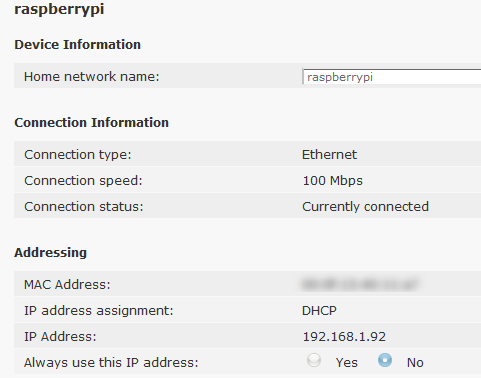
    Then, it should be possible to get some more detail with the router:

    image

    The above shows the IP address that the router has given to the RPI. You can use that address to connect to the RPI. If you're using a monitor and keyboard then you don't need the above information, and you can obtain it directly from the RPI using:

    pi@raspberrypi:~$ ifconfig -a

    eth0      Link encap:Ethernet  HWaddr xx:xx:xx:xx:xx:xx  
              UP BROADCAST MULTICAST  MTU:1500  Metric:1
              RX packets:730 errors:0 dropped:0 overruns:0 frame:0
              TX packets:253 errors:0 dropped:0 overruns:0 carrier:0
              collisions:0 txqueuelen:1000 
              RX bytes:57134 (55.7 KiB)  TX bytes:35325 (34.4 KiB)
    
    lo        Link encap:Local Loopback  
              inet addr:127.0.0.1  Mask:255.0.0.0
              UP LOOPBACK RUNNING  MTU:16436  Metric:1
              RX packets:0 errors:0 dropped:0 overruns:0 frame:0
              TX packets:0 errors:0 dropped:0 overruns:0 carrier:0
              collisions:0 txqueuelen:0 
              RX bytes:0 (0.0 B)  TX bytes:0 (0.0 B)
    
    wlan0     Link encap:Ethernet  HWaddr xx:xx:xx:xx:xx:xx  
              inet addr:192.168.1.92  Bcast:192.168.1.255  Mask:255.255.255.0
              UP BROADCAST RUNNING MULTICAST  MTU:1500  Metric:1
              RX packets:310 errors:0 dropped:0 overruns:0 frame:0
              TX packets:82 errors:0 dropped:0 overruns:0 carrier:0
              collisions:0 txqueuelen:1000 
              RX bytes:30886 (30.1 KiB)  TX bytes:11439 (11.1 KiB)


    On line 17, you can see the IP address.


    There is some additional information here, which I've not had a chance to try.

    • Cancel
    • Vote Up 0 Vote Down
    • Sign in to reply
    • Verify Answer
    • Cancel
  • Former Member
    0 Former Member over 11 years ago in reply to shabaz

    Thanks Shabaz. Will give it a go later on and let you know how I get on. Best wishes, Steve

    • Cancel
    • Vote Up 0 Vote Down
    • Sign in to reply
    • Verify Answer
    • Cancel
element14 Community

element14 is the first online community specifically for engineers. Connect with your peers and get expert answers to your questions.

  • Members
  • Learn
  • Technologies
  • Challenges & Projects
  • Products
  • Store
  • About Us
  • Feedback & Support
  • FAQs
  • Terms of Use
  • Privacy Policy
  • Legal and Copyright Notices
  • Sitemap
  • Cookies

An Avnet Company © 2025 Premier Farnell Limited. All Rights Reserved.

Premier Farnell Ltd, registered in England and Wales (no 00876412), registered office: Farnell House, Forge Lane, Leeds LS12 2NE.

ICP 备案号 10220084.

Follow element14

  • X
  • Facebook
  • linkedin
  • YouTube