element14 Community
element14 Community
    Register Log In
  • Site
  • Search
  • Log In Register
  • Community Hub
    Community Hub
    • What's New on element14
    • Feedback and Support
    • Benefits of Membership
    • Personal Blogs
    • Members Area
    • Achievement Levels
  • Learn
    Learn
    • Ask an Expert
    • eBooks
    • element14 presents
    • Learning Center
    • Tech Spotlight
    • STEM Academy
    • Webinars, Training and Events
    • Learning Groups
  • Technologies
    Technologies
    • 3D Printing
    • FPGA
    • Industrial Automation
    • Internet of Things
    • Power & Energy
    • Sensors
    • Technology Groups
  • Challenges & Projects
    Challenges & Projects
    • Design Challenges
    • element14 presents Projects
    • Project14
    • Arduino Projects
    • Raspberry Pi Projects
    • Project Groups
  • Products
    Products
    • Arduino
    • Avnet & Tria Boards Community
    • Dev Tools
    • Manufacturers
    • Multicomp Pro
    • Product Groups
    • Raspberry Pi
    • RoadTests & Reviews
  • About Us
  • Store
    Store
    • Visit Your Store
    • Choose another store...
      • Europe
      •  Austria (German)
      •  Belgium (Dutch, French)
      •  Bulgaria (Bulgarian)
      •  Czech Republic (Czech)
      •  Denmark (Danish)
      •  Estonia (Estonian)
      •  Finland (Finnish)
      •  France (French)
      •  Germany (German)
      •  Hungary (Hungarian)
      •  Ireland
      •  Israel
      •  Italy (Italian)
      •  Latvia (Latvian)
      •  
      •  Lithuania (Lithuanian)
      •  Netherlands (Dutch)
      •  Norway (Norwegian)
      •  Poland (Polish)
      •  Portugal (Portuguese)
      •  Romania (Romanian)
      •  Russia (Russian)
      •  Slovakia (Slovak)
      •  Slovenia (Slovenian)
      •  Spain (Spanish)
      •  Sweden (Swedish)
      •  Switzerland(German, French)
      •  Turkey (Turkish)
      •  United Kingdom
      • Asia Pacific
      •  Australia
      •  China
      •  Hong Kong
      •  India
      • Japan
      •  Korea (Korean)
      •  Malaysia
      •  New Zealand
      •  Philippines
      •  Singapore
      •  Taiwan
      •  Thailand (Thai)
      • Vietnam
      • Americas
      •  Brazil (Portuguese)
      •  Canada
      •  Mexico (Spanish)
      •  United States
      Can't find the country/region you're looking for? Visit our export site or find a local distributor.
  • Translate
  • Profile
  • Settings
Raspberry Pi
  • Products
  • More
Raspberry Pi
Raspberry Pi Forum New reworked driver for Wolfson/Cirrus Logic audio card
  • Blog
  • Forum
  • Documents
  • Quiz
  • Events
  • Polls
  • Files
  • Members
  • Mentions
  • Sub-Groups
  • Tags
  • More
  • Cancel
  • New
Join Raspberry Pi to participate - click to join for free!
Featured Articles
Announcing Pi
Technical Specifications
Raspberry Pi FAQs
Win a Pi
Raspberry Pi Wishlist
Actions
  • Share
  • More
  • Cancel
Forum Thread Details
  • Replies 390 replies
  • Subscribers 743 subscribers
  • Views 42425 views
  • Users 0 members are here
  • raspberry_pi
  • raspeberry_pi_accessories
Related

New reworked driver for Wolfson/Cirrus Logic audio card

hiassoft
hiassoft over 9 years ago

I've been working on a driver rework, mainly to get rid of the requirement to carry around a bunch of patches to upstream driver code, and also to fix some outstanding issues and introduce some new features.


Most issues have been ironed out so here's the first public release.


Edit: the driver has been included in official RPi kernels. Just run sudo rpi-update to install it.

You still have to install the mixer scripts and add the /etc/modprobe.d file. See my website for details

RPi Linux driver for Wolfson / Cirrus Logic Audio Card


Source: https://github.com/HiassofT/rpi-linux/tree/cirrus-ng-4.9.0

Precompiled kernel: http://www.horus.com/~hias/tmp/cirrus/cirrus-ng-linux-4.9.0.tgz

New mixer scripts: http://www.horus.com/~hias/tmp/cirrus/cirrus-ng-scripts.tgz


Important notes:

  • The new driver bases on the rather fresh kernel 4.9.0 which means there's some risk of (yet unknown) issues. Use it at your own risk and please run "rpi-update" to get the latest firmware before installing the new driver.
  • The soundcard name has been changed from "snd_rpi_wsp" to "RPi-Cirrus", also several ALSA controls have been removed and new ones were added. This means the old usecase scripts and any custom-made scripts will no longer work. Use the new mixer scripts instead of the old usecase/listen scripts.
  • The new driver supports setting (and receiving) of the S/PDIF channel status bits (aka AES bits). If you add an ALSA card configuration file this means applications like Kodi can do proper AC3/DTS passthrough. A sample card configuration file (plus the mixer scripts) can be found here: https://github.com/HiassofT/rpi-cirrus-config
  • I haven't fully updated the documentation on my website RPi Linux driver for Wolfson / Cirrus Logic Audio Card  yet, will do that during the next weeks/months. But except for the things noted above most stuff should still work as in previous driver versions.


Please report back if you tested the driver (either successfully or unsuccessfully), any feedback will help me!


so long,


Hias

  • Sign in to reply
  • Cancel
Parents
  • timg73
    timg73 over 8 years ago

    Hias,

    A huge thank-you for all the work you've put into supporting the Cirrus Audio card.  Until now I've been using your kernel packages, and have just got round to trying the latest official 4.9 kernel which is also working very nicely.  It's a real shame that the Cirrus card has (or appears to have) gone out of production just when the software support became so good.  The older Wolfson cards are still available, so perhaps I'll get a couple and try modifying them to fit a 40-pin header.  Anyway, thanks again for everything you've done.  I really do appreciate it.

    Tim

    • Cancel
    • Vote Up 0 Vote Down
    • Sign in to reply
    • Cancel
  • hystrix
    hystrix over 8 years ago in reply to timg73

    The Cirrus Card does seem to be out of stock everywhere - what a shame.  I just started working on an alternative ultrasound sensistive microphone, since the electret type I was using has been out of production for years and is now virtually impossible to get hold of.


    What other options are there for recording audio at 192kHz with the Raspberry Pi?


    • Cancel
    • Vote Up 0 Vote Down
    • Sign in to reply
    • Cancel
  • psyj
    psyj over 8 years ago in reply to hystrix

    Tim and hysterix,


    Do not dispair.


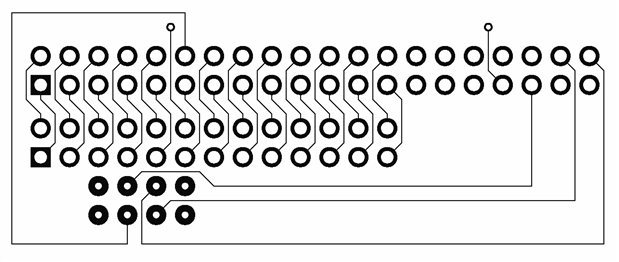
    If you look earlier in this thread (2 weeks ago)  Matthias and I were discussing how to adapt the Wolfson variant of this card to run on Pi2/3.  He should take all the credit for verifying that this is a simple matter  ..... indeed trivial from a software perspective.  The hardware modifications are not to everybodys taste and I am still looking into less obtrusive ways of making the adaptation (using a piggy back board, eg)

    image

    Trouble is it needs to be double sided, plated through and gold plated on the 8 "thick" pads!  But such a board (with connectors installed) would allow the Wolfson card to plug into a Pi 2/3 with no hardware modifications to either (Hias, if you are reading this, can you confirm that I have not done something stupid like reverse clks or tx/rx?).  For the more intrepid/impatient, the solution which Hias has already posted works perfectly.  For those who do not want to unsolder the 8 pin pogo connector, you can cut-off pin 2 of the connector (which snags the I2C pull up resistor on the Pi) and place a small piece of insulating material beneath the pins for extra safety.  That would make the only unsoldering the removal of one resistor on the Wolfson card.

    • Cancel
    • Vote Up 0 Vote Down
    • Sign in to reply
    • Cancel
  • hystrix
    hystrix over 8 years ago in reply to psyj

    Hi John. I have a spare Wolfson card, so I might try adapting it for Pi2/3.


    It's a shame that the Wolfson card doesn't have Line In micbias, but I could live with that.


    Many thanks for the info.

    • Cancel
    • Vote Up +1 Vote Down
    • Sign in to reply
    • Cancel
  • psyj
    psyj over 8 years ago in reply to hystrix

    Hi,


    Interesting,  I really had not investigated that part of the schematics.  You are right of course  ..... can you not tie the inputs to the bias as the signal leaves the jack socket? Much easier there as you are not working at a microscopic scale.


    Let us all know what route you take for the modification  ..... as you rightly note the only way of using the Wolfson device is through this card, so we all need to work on finding the best way forward. Best of luck

    • Cancel
    • Vote Up 0 Vote Down
    • Sign in to reply
    • Cancel
  • hystrix
    hystrix over 8 years ago in reply to psyj

    Hi John - Is removing R39 on the Wolfson board absolutely essential?


    • Cancel
    • Vote Up 0 Vote Down
    • Sign in to reply
    • Cancel
  • psyj
    psyj over 8 years ago in reply to hystrix

    Hystrix


    As always Hias is the guru, but (for a direct plug in connection between pi and Wolfson) yes removal of R39 is necessary, otherwise you will be pumping the I2S bit clock directly into the 8804 SPDIF chip CSB pin.


    This (and the pogo connector) are the reasons I am looking at a piggy back board .... I do not trust myself on components of that size. The down side of this is board construction and the extra height that is involved in the sandwich as a whole


    If you do not want to unsolder R39 and do not want to use a piggy back board, the only alternative is to cut pin 12 out of the 40 way connector on the pi and run a flying lead from the stump of that pin up to pin 3 of the pogo connector on the W (working on cutting one of the tracks on the Wolfson board is in my opinion more difficult than removing R39). If you have no intention of reusing the pi with its expansion header, this is perhaps the easiest modification

    • Cancel
    • Vote Up 0 Vote Down
    • Sign in to reply
    • Cancel
  • hiassoft
    hiassoft over 8 years ago in reply to psyj

    Hi John!

    The hardware modifications are not to everybodys taste and I am still looking into less obtrusive ways of making the adaptation (using a piggy back board, eg)

    image

    Trouble is it needs to be double sided, plated through and gold plated on the 8 "thick" pads! But such a board (with connectors installed) would allow the Wolfson card to plug into a Pi 2/3 with no hardware modifications to either (Hias, if you are reading this, can you confirm that I have not done something stupid like reverse clks or tx/rx?).

    Looks like you have pins 3/4 and 5/6 of P5 swapped - the P5 layout (as eg here http://elinux.org/RPi_Low-level_peripherals) is from the bottom side of the board (as opposed to the P1 layout which is from the top side). Pin 1 of P5 is next to the P1 GPIO connector.


    Instead of using "hard" gold plated P5 pads you could try ENIG finish - it's cheaper and should be OK (though not as durable as hard gold).


    You'd probably need to make the PCB full-size so you can add mounting screws for the Wolfson card and the RPi2/3. Then mechanical stability should be OK.


    Other than these issues your approach look fine!


    so long,


    Hias

    • Cancel
    • Vote Up +1 Vote Down
    • Sign in to reply
    • Cancel
Reply
  • hiassoft
    hiassoft over 8 years ago in reply to psyj

    Hi John!

    The hardware modifications are not to everybodys taste and I am still looking into less obtrusive ways of making the adaptation (using a piggy back board, eg)

    image

    Trouble is it needs to be double sided, plated through and gold plated on the 8 "thick" pads! But such a board (with connectors installed) would allow the Wolfson card to plug into a Pi 2/3 with no hardware modifications to either (Hias, if you are reading this, can you confirm that I have not done something stupid like reverse clks or tx/rx?).

    Looks like you have pins 3/4 and 5/6 of P5 swapped - the P5 layout (as eg here http://elinux.org/RPi_Low-level_peripherals) is from the bottom side of the board (as opposed to the P1 layout which is from the top side). Pin 1 of P5 is next to the P1 GPIO connector.


    Instead of using "hard" gold plated P5 pads you could try ENIG finish - it's cheaper and should be OK (though not as durable as hard gold).


    You'd probably need to make the PCB full-size so you can add mounting screws for the Wolfson card and the RPi2/3. Then mechanical stability should be OK.


    Other than these issues your approach look fine!


    so long,


    Hias

    • Cancel
    • Vote Up +1 Vote Down
    • Sign in to reply
    • Cancel
Children
  • hystrix
    hystrix over 8 years ago in reply to hiassoft

    Ha! I was just looking at those pogo pin connections myself.  From the photo, it looks like the connections are:


    P5 Pin 3 to GPIO Pin 12

    P5 Pin 4 to GPIO Pin 35

    P5 Pin 5 to GPIO Pin 38

    P5 Pin 6 to GPIO Pin 40


    And remove R39.


    Are those the only chnages to make?  On the piggy-back board, what is that connection on GPIO Pin 33 on the 40 pin header and GPIO Pin 12 on the 26 pin header?


    Many thanks :-)

    • Cancel
    • Vote Up 0 Vote Down
    • Sign in to reply
    • Cancel
  • psyj
    psyj over 8 years ago in reply to hystrix

    Hystrix


    See Hias comment, it looks as though I have mirrored the J5 pins, so wait for the revised diagram! Sorry!  But the link you are referring to provides the correct connection back to the 8804.  That is done for completeness, because as Hias says, the pin on the 8804 can be left open circuit without a problem.


    The minimum set of connections are just as you say.


    As per Hias suggestion, I had thought of making the piggy back card "full size" so that it can offer mechanical support.  At the moment I am thinking of what else to use the card space for.  I need to drive a relay(!) based digital attenuator for the output of the Wolfson, so I will probably put a couple of I2C ports on the card.


    Hias,


    Once again, thank you for your help

    • Cancel
    • Vote Up 0 Vote Down
    • Sign in to reply
    • Cancel
  • psyj
    psyj over 8 years ago in reply to psyj

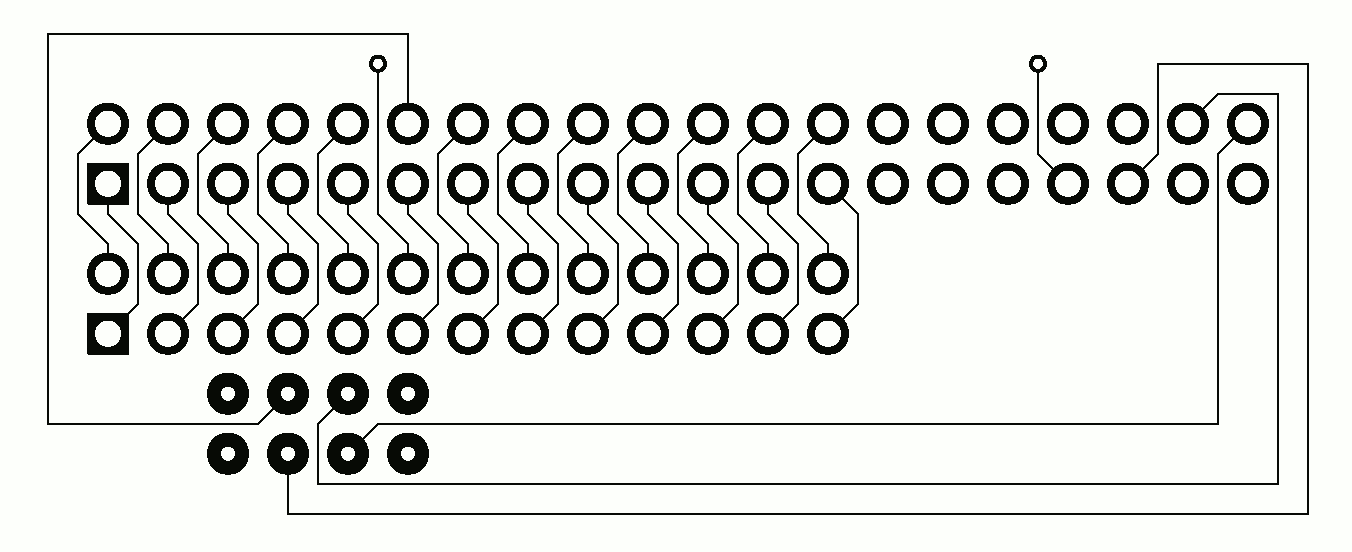
    And herewith the revised pcb

    image

    • Cancel
    • Vote Up 0 Vote Down
    • Sign in to reply
    • Cancel
  • hystrix
    hystrix over 8 years ago in reply to psyj

    Hi John - thanks for the update.


    Now all I have to do is find the elusive R39.  I only had a quick look last night.


    • Cancel
    • Vote Up 0 Vote Down
    • Sign in to reply
    • Cancel
  • hiassoft
    hiassoft over 8 years ago in reply to hystrix

    Now all I have to do is find the elusive R39. I only had a quick look last night.


    It's on the bottom side of the PCB, near the mounting hole.


    so long,


    Hias

    • Cancel
    • Vote Up 0 Vote Down
    • Sign in to reply
    • Cancel
  • hystrix
    hystrix over 8 years ago in reply to hiassoft

    Hias and John,


    I got my "Frankenson" sound card working with a Pi2 image.


    I didn't de-solder the pogo pins.  I found a cover that fits over them nicely - made from a UK 3-pin mains plug protector that all new electrical devices come with.  I cut the end off the Earth pin end of the protector.  It fits neatly onto the pogo pins.  Once the Wolfson card is attached to the Pi, the cover is held nicely in place, and stops them shorting on anything on the Pi.


    image


    Here's the pogo cover made from a plug protector:


    imageimageimage


    Thanks for your help with this neat hack.


    Hystrix


    • Cancel
    • Vote Up +2 Vote Down
    • Sign in to reply
    • Cancel
  • psyj
    psyj over 8 years ago in reply to hystrix

    Bravo, I like it.  One of the positive british traits that, improvisation.


    I knew UK plugs would prove better one day .... It has only taken 60 years  ..... Ironically I cut the last one off my appliances only this week.


    More seriously, note that there is a wee bit of strain introduced by the pin protector, perhaps raise the Wolfson card a millimetre to compensate.


    I have just made the mark 1 piggy back board, so if I can get the single sided version to work, expect photos of that too.  It's good to see an active community

    • Cancel
    • Vote Up 0 Vote Down
    • Sign in to reply
    • Cancel
  • hystrix
    hystrix over 8 years ago in reply to psyj

    Ha!  I knew someone would mention the strain caused by the pogo pin protector. image   This was an early photo - I actually trimmed off some more of the plastic on the left-hand side.  You can see the black header is catching on it in the photo - it's much better now.


    My only concern is whether the springs in the pogo pins will eventually start to push the audio card off the header.  Time will tell.  I may even file off some of the plastic from the bottom of the pin protector, so the springs aren't compressed as much.


    I look foward to the photos of the piggy-back board.


    • Cancel
    • Vote Up 0 Vote Down
    • Sign in to reply
    • Cancel
  • hiassoft
    hiassoft over 8 years ago in reply to hystrix

    I got my "Frankenson" sound card working with a Pi2 .


    I didn't de-solder the pogo pins. I found a cover that fits over them nicely - made from a UK 3-pin mains plug protector that all new electrical devices come with. I cut the end off the Earth pin end of the protector. It fits neatly onto the pogo pins. Once the Wolfson card is attached to the Pi, the cover is held nicely in place, and stops them shorting on anything on the Pi.

    That's looking really nice, well done! And I think the cap over the pogo pins is a rather clever idea!


    so long,


    Hias

    • Cancel
    • Vote Up 0 Vote Down
    • Sign in to reply
    • Cancel
  • psyj
    psyj over 8 years ago in reply to psyj

    All,


    I promised an update on the piggy back card approach. Apologies for the delay, real world demands ...


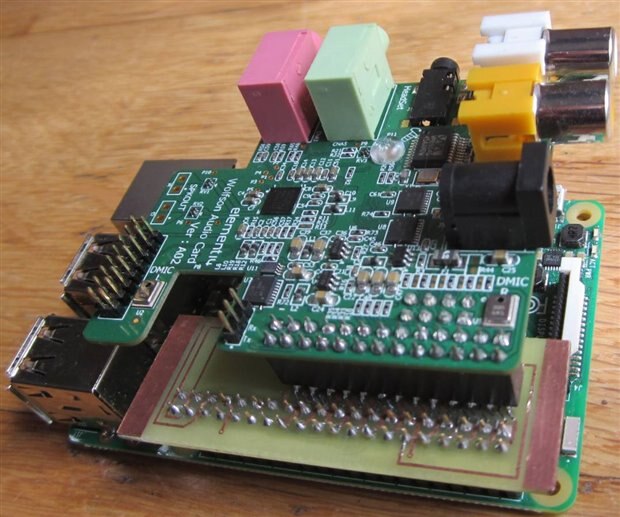
    First a photo

    image


    Herewith my observations


    1)  Making the pcb at home is a pain for the following reasons.

    1.     Drilling the board exactly (for the headers) is difficult.
    2.      I can do only single sided boards and this approach demands "creativity" when installing the 26 pin header for the Wolfson. Plated through holes would be better/easier/stronger
    3.     (and worst) the pads to receive the pogo connectors must be gold plated (So whilst my card works at the moment, I await the effects of O2)

    So the board needs to be made professionally to be a good long term option  .... and that will mean 10 of them!


    2) The Wolfson is well clear of the main board.  This is good for ventilation and for access to the ribbon cable connectors if you need them. It is bad in terms of mechanical support of the card.


    3) It does offer a zero mod way of connecting the Wolfson to a pi 2/3


    Overall I shall probably "sacrifice" a pi 3 and cut pin 12 off the Pi header and connect Wolfson direct to pi 3, ie not bother with a piggy back board .  It is a minor mod and will have probably no impact on any future project  ... and a pi is easier to source than these sound cards!  So, with the exception of not removing R39, I will probably follow the same route as others on the forum.   But if your project needs easy access to those ribbon sockets, the piggy back route is worth considering.


    Good job I am a Brit (expat) and still have one of those mains plug shrouds!

    • Cancel
    • Vote Up 0 Vote Down
    • Sign in to reply
    • Cancel
element14 Community

element14 is the first online community specifically for engineers. Connect with your peers and get expert answers to your questions.

  • Members
  • Learn
  • Technologies
  • Challenges & Projects
  • Products
  • Store
  • About Us
  • Feedback & Support
  • FAQs
  • Terms of Use
  • Privacy Policy
  • Legal and Copyright Notices
  • Sitemap
  • Cookies

An Avnet Company © 2026 Premier Farnell Limited. All Rights Reserved.

Premier Farnell Ltd, registered in England and Wales (no 00876412), registered office: Farnell House, Forge Lane, Leeds LS12 2NE.

ICP 备案号 10220084.

Follow element14

  • X
  • Facebook
  • linkedin
  • YouTube