element14 Community
element14 Community
    Register Log In
  • Site
  • Search
  • Log In Register
  • Community Hub
    Community Hub
    • What's New on element14
    • Feedback and Support
    • Benefits of Membership
    • Personal Blogs
    • Members Area
    • Achievement Levels
  • Learn
    Learn
    • Ask an Expert
    • eBooks
    • element14 presents
    • Learning Center
    • Tech Spotlight
    • STEM Academy
    • Webinars, Training and Events
    • Learning Groups
  • Technologies
    Technologies
    • 3D Printing
    • FPGA
    • Industrial Automation
    • Internet of Things
    • Power & Energy
    • Sensors
    • Technology Groups
  • Challenges & Projects
    Challenges & Projects
    • Design Challenges
    • element14 presents Projects
    • Project14
    • Arduino Projects
    • Raspberry Pi Projects
    • Project Groups
  • Products
    Products
    • Arduino
    • Avnet & Tria Boards Community
    • Dev Tools
    • Manufacturers
    • Multicomp Pro
    • Product Groups
    • Raspberry Pi
    • RoadTests & Reviews
  • About Us
  • Store
    Store
    • Visit Your Store
    • Choose another store...
      • Europe
      •  Austria (German)
      •  Belgium (Dutch, French)
      •  Bulgaria (Bulgarian)
      •  Czech Republic (Czech)
      •  Denmark (Danish)
      •  Estonia (Estonian)
      •  Finland (Finnish)
      •  France (French)
      •  Germany (German)
      •  Hungary (Hungarian)
      •  Ireland
      •  Israel
      •  Italy (Italian)
      •  Latvia (Latvian)
      •  
      •  Lithuania (Lithuanian)
      •  Netherlands (Dutch)
      •  Norway (Norwegian)
      •  Poland (Polish)
      •  Portugal (Portuguese)
      •  Romania (Romanian)
      •  Russia (Russian)
      •  Slovakia (Slovak)
      •  Slovenia (Slovenian)
      •  Spain (Spanish)
      •  Sweden (Swedish)
      •  Switzerland(German, French)
      •  Turkey (Turkish)
      •  United Kingdom
      • Asia Pacific
      •  Australia
      •  China
      •  Hong Kong
      •  India
      • Japan
      •  Korea (Korean)
      •  Malaysia
      •  New Zealand
      •  Philippines
      •  Singapore
      •  Taiwan
      •  Thailand (Thai)
      • Vietnam
      • Americas
      •  Brazil (Portuguese)
      •  Canada
      •  Mexico (Spanish)
      •  United States
      Can't find the country/region you're looking for? Visit our export site or find a local distributor.
  • Translate
  • Profile
  • Settings
Raspberry Pi
  • Products
  • More
Raspberry Pi
Documents Raspberry Pi 2 Model B 1GB Technical Specifications
  • Blog
  • Forum
  • Documents
  • Quiz
  • Events
  • Polls
  • Files
  • Members
  • Mentions
  • Sub-Groups
  • Tags
  • More
  • Cancel
  • New
Join Raspberry Pi to participate - click to join for free!
Actions
  • Share
  • More
  • Cancel
Engagement
  • Author Author: pchan
  • Date Created: 23 Jan 2015 4:01 PM Date Created
  • Last Updated Last Updated: 10 May 2021 7:09 PM
  • Views 35973 views
  • Likes 6 likes
  • Comments 62 comments
Related
Recommended

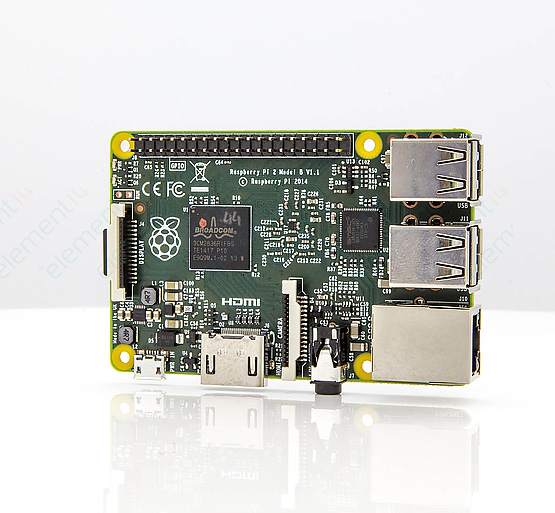
Raspberry Pi 2 Model B 1GB Technical Specifications

image

image

The Raspberry Pi 2 Model B 1GB
6X Faster

Learn More


Buy NowBuy Now


Benefits  image
Technical Specifications  image
Features  image

Benefits:

Get personal with your Pi. Welcome to the Raspberry Piimage 2, the single board computer that thinks it’s a home PC.

Enhanced Quad Core Processor and 1GB RAM now provides you with the opportunity to:

  • Build your own workstation – create and manage your documents and spreadsheets with ease using LibreOfficeimage
  • Faster and more enjoyable gaming – experience less lag and more seamless gaming in all your favourites. Can’t wait to demolish buildings in Minecraftimage, trigger your TNT now and be amazed by the results!
  • No more buffer face – boots up Raspbian in less than half the time as the Model B+
  • More power for your favourite projects – create Space Progammes, Time Lapse Videos, GPS tracking, HD audio and lots more with a full ecosystem of supporting accessories.
  • All your previous Raspberry Pi projects are 100% backward compatible with the new Raspberry Pi 2 Model B 1GB

Technical Specifications:

  • Broadcom BCM2837 Arm7 Quad Core Processor powered Single Board Computer running at 900MHz
  • 1GB RAM
  • 40pin extended GPIO
  • 4 x USB 2 ports
  • 4 pole Stereo output and Composite video port
  • Full size HDMI
  • CSI camera port for connecting the Raspberry Pi camera
  • DSI display port for connecting the Raspberry Pi touch screen display
  • Micro SD port for loading your operating system and storing data
  • Micro USB power source

Raspberry Pi 2 Model B Features:

  • Broadcom BCM2837Arm7 Quad Core Processor powered Single Board Computer running at 900MHz
  • 1GB RAM so you can now run bigger and more powerful applications
  • Identical board layout and footprint as the Model B+, so all cases and 3rd party add-on boards designed for the Model B+ will be fully compatible.
  • Fully HAT compatible
  • 40pin extended GPIO to enhance your “real world” projects. GPIO is 100% compatible with the Model B+ and A+ boards. First 26 pins are identical to the Model A and Model B boards to provide full backward compatibility across all boards.
  • Connect a Raspberry Pi camera and touch screen display (each sold separately)
  • Stream and watch Hi-definition video output at 1080P
  • Micro SD slot for storing information and loading your operating systems.
  • Advanced power management:
  • You can now provide up to 1.2 AMP to the USB port – enabling you to connect more power hungry USB devices directly to the Raspberry PI. (This feature requires a 2Amp micro USB Power Supply)
  • 10/100 Ethernet Port to quickly connect the Raspberry Pi to the Internet
  • Combined 4-pole jack for connecting your stereo audio out and composite video out
  • raspberry
  • broadcom bcm2837
  • the
  • pi
  • 2
  • new
  • b
  • raspberry_pi_space
  • technical
  • 1gb
  • model
  • specifications
  • Share
  • History
  • More
  • Cancel
  • Sign in to reply

Top Comments

  • alnico
    alnico over 11 years ago in reply to Former Member +1
    I moved over 1000 miles from it, unfortunately. Fortunately, I have a buddy that is close and can buy and ship to me cheaper than the element 14 'personal' partner does.
  • shabaz
    shabaz over 10 years ago in reply to Former Member +1
    No full schematic is publicly available (it is not open source). But yes, you can directly connect 5V DC to the 40-way connector if you wish to.
  • Former Member
    Former Member over 11 years ago

    Why an Individual cannot buy raspberry-pi-2 from element14?

    • Cancel
    • Vote Up 0 Vote Down
    • Sign in to reply
    • More
    • Cancel
  • cstanton
    cstanton over 11 years ago in reply to alnico

    It's a legal distinction issue, mainly. Different laws and taxes apply.

    • Cancel
    • Vote Up 0 Vote Down
    • Sign in to reply
    • More
    • Cancel
  • element14jamie
    element14jamie over 11 years ago in reply to alnico

    Hello alnico

    There are no licensing differences, no you are not prohibited in any way.


    Thank you,


    Jamie

    • Cancel
    • Vote Up 0 Vote Down
    • Sign in to reply
    • More
    • Cancel
  • alnico
    alnico over 11 years ago

    Why the different distribution channels for 'business' and 'pesonal' use?  Are there licensing differences?  If I buy for one purpose and I prohibited from transferring to another purpose?

    • Cancel
    • Vote Up 0 Vote Down
    • Sign in to reply
    • More
    • Cancel
  • cstanton
    cstanton over 11 years ago in reply to Former Member

    3G adapters just basically act like a modem, so yes. If you just look up how to do it in linux you'll find your answer image

    • Cancel
    • Vote Up 0 Vote Down
    • Sign in to reply
    • More
    • Cancel
  • Former Member
    Former Member over 11 years ago

    very mice of new one.But i have one question to ask.is this support to connect to advanced 3g dongle.that dongle act like router.   any way congrats for new launch.

    • Cancel
    • Vote Up 0 Vote Down
    • Sign in to reply
    • More
    • Cancel
  • clem57
    clem57 over 11 years ago in reply to my8051

    @my8051

         This would be nice for some people and a waste for others. The Pi Foundation target is inexpensive board with little to break(put it into the hands of kids). A bluetooth/WiFi module would violate their stated goals.But we can always build out own. BTW, I found some $5 WiFi usb nano that works well with arch linux(my chosen O/S).


    Clem

    • Cancel
    • Vote Up 0 Vote Down
    • Sign in to reply
    • More
    • Cancel
  • cstanton
    cstanton over 11 years ago in reply to my8051

    Hi my8051,

    If you watch the interview with Eben for the launch conference you'll find they did consider it.

    However, it doesn't make sense to embed these onto the board, for cost and practicality reasons. Not everyone requires them so it makes sense for them to be modular and add them when necessary.


    If you need an embedded solution then you should be looking at buying a The specified item was not found. and creating your own printed circuit board for it.

    • Cancel
    • Vote Up 0 Vote Down
    • Sign in to reply
    • More
    • Cancel
  • cstanton
    cstanton over 11 years ago in reply to dexterindustries

    Hello dexterindustries / wareagle5555


    Because you're using Raspbian, make sure you run:


    sudo apt-get update

    sudo apt-get upgrade -y

    sudo apt-get dist-upgrade -y

    sudo rpi-update


    Before you switch your SD card over to the Raspberry Pi 2.


    If you find that it doesn't work, then just wait a week or so because the Raspbian repositories where apt-get pulls its updates are probably still being updated (I imagine they already are though).


    Also, note, that I have post-fixed the commands with '-y' this means that you will not be asked to press 'yes' or 'no' to update packages. If for whatever reason you don't want to update the packages you'll have to determine the right ones for the kernel to be updated to support the Pi 2.


    Hope that helps, also you might want to run "man apt-get" so you understand how to use your package manager for Raspbian. image

    • Cancel
    • Vote Up 0 Vote Down
    • Sign in to reply
    • More
    • Cancel
  • my8051
    my8051 over 11 years ago

    Hi Element14 Team,


    I wonder that the new version 2 of the Raspberry Pi do have onboard ESP 8266 WiFi module and a Bluetooth Low Energy module. But, I guess the Raspberry Pi team didn't consider this while developing this version.


    All we have to do is to buy those modules separately and plug them to get those features working.


    Have fun!

    • Cancel
    • Vote Up 0 Vote Down
    • Sign in to reply
    • More
    • Cancel
<>
element14 Community

element14 is the first online community specifically for engineers. Connect with your peers and get expert answers to your questions.

  • Members
  • Learn
  • Technologies
  • Challenges & Projects
  • Products
  • Store
  • About Us
  • Feedback & Support
  • FAQs
  • Terms of Use
  • Privacy Policy
  • Legal and Copyright Notices
  • Sitemap
  • Cookies

An Avnet Company © 2026 Premier Farnell Limited. All Rights Reserved.

Premier Farnell Ltd, registered in England and Wales (no 00876412), registered office: Farnell House, Forge Lane, Leeds LS12 2NE.

ICP 备案号 10220084.

Follow element14

  • X
  • Facebook
  • linkedin
  • YouTube