element14 Community
element14 Community
    Register Log In
  • Site
  • Search
  • Log In Register
  • Community Hub
    Community Hub
    • What's New on element14
    • Feedback and Support
    • Benefits of Membership
    • Personal Blogs
    • Members Area
    • Achievement Levels
  • Learn
    Learn
    • Ask an Expert
    • eBooks
    • element14 presents
    • Learning Center
    • Tech Spotlight
    • STEM Academy
    • Webinars, Training and Events
    • Learning Groups
  • Technologies
    Technologies
    • 3D Printing
    • FPGA
    • Industrial Automation
    • Internet of Things
    • Power & Energy
    • Sensors
    • Technology Groups
  • Challenges & Projects
    Challenges & Projects
    • Design Challenges
    • element14 presents Projects
    • Project14
    • Arduino Projects
    • Raspberry Pi Projects
    • Project Groups
  • Products & Partners
    Products & Partners
    • Arduino
    • Avnet & Tria Boards Community
    • Dev Tools
    • Manufacturers
    • Multicomp Pro
    • Product Groups
    • Raspberry Pi
    • RoadTests & Reviews
  • About Us
    About the element14 Community
  • Store
    Store
    • Visit Your Store
    • Choose another store...
      • Europe
      •  Austria (German)
      •  Belgium (Dutch, French)
      •  Bulgaria (Bulgarian)
      •  Czech Republic (Czech)
      •  Denmark (Danish)
      •  Estonia (Estonian)
      •  Finland (Finnish)
      •  France (French)
      •  Germany (German)
      •  Hungary (Hungarian)
      •  Ireland
      •  Israel
      •  Italy (Italian)
      •  Latvia (Latvian)
      •  
      •  Lithuania (Lithuanian)
      •  Netherlands (Dutch)
      •  Norway (Norwegian)
      •  Poland (Polish)
      •  Portugal (Portuguese)
      •  Romania (Romanian)
      •  Russia (Russian)
      •  Slovakia (Slovak)
      •  Slovenia (Slovenian)
      •  Spain (Spanish)
      •  Sweden (Swedish)
      •  Switzerland(German, French)
      •  Turkey (Turkish)
      •  United Kingdom
      • Asia Pacific
      •  Australia
      •  China
      •  Hong Kong
      •  India
      •  Japan
      •  Korea (Korean)
      •  Malaysia
      •  New Zealand
      •  Philippines
      •  Singapore
      •  Taiwan
      •  Thailand (Thai)
      •  Vietnam
      • Americas
      •  Brazil (Portuguese)
      •  Canada
      •  Mexico (Spanish)
      •  United States
      Can't find the country/region you're looking for? Visit our export site or find a local distributor.
  • Translate
  • Profile
  • Settings
RoadTests & Reviews
  • Products & Partners
  • More
RoadTests & Reviews
Review Blogs POST 8 A case in point...Red Pitaya STEMlab 125-14 PRO Gen 2 Starter Kit
  • Blogs
  • Forum
  • Documents
  • RoadTests
  • Reviews
  • Polls
  • Files
  • Members
  • Sub-Groups
  • More
  • Cancel
  • New
Join RoadTests & Reviews to participate - click to join for free!
  • Share
  • More
  • Cancel
  • Author Author: colporteur
  • Date Created: 11 Oct 2026 8:12 PM Date Created
  • Views 51 views
  • Likes 8 likes
  • Comments 7 comments
Related
Recommended
  • RoadTest
  • test equipment
  • red pitaya

POST 8 A case in point...Red Pitaya STEMlab 125-14 PRO Gen 2 Starter Kit

colporteur
colporteur
11 Oct 2026

Recall from an earlier post, that I had ordered and then reordered a case for the Red Pitaya. The first case ordered from a local supplier, wasn’t compatible with the RoadTest unit. It would have been nice if compatibility was mentioned during ordering. It seems the Red Pitaya STEMlab 125-14 PRO Gen 2 needs its own unique case. It took a member from the E14 community to find and identify the case. My search skills are not up to par. I looked and couldn’t find the unit.

In Canadian dollar it was $148 to purchase. Duties and tariffs added another $25. Returning the wrong case cost me $29 in restocking charges. All in, a little over $200 for the case.

What rubs me the wrong way is that, Red Pitaya recommends using a case in their documentation but didn’t provide one as part of the RoadTest.

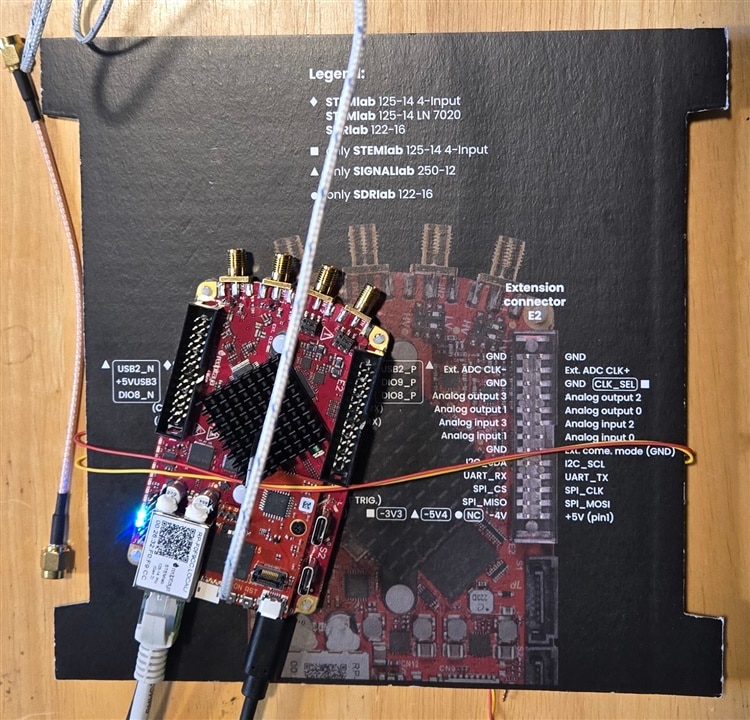
No case concerned me from the beginning. The Red Pitaya PCB exposed to my test bench had a high probability of being shorted out coming in touch with something metal.
image

After the unit was dragged off the bench due to the weight of cables, I used the pinout card to isolate and expand the surface area of the PCB using a piece of wire.

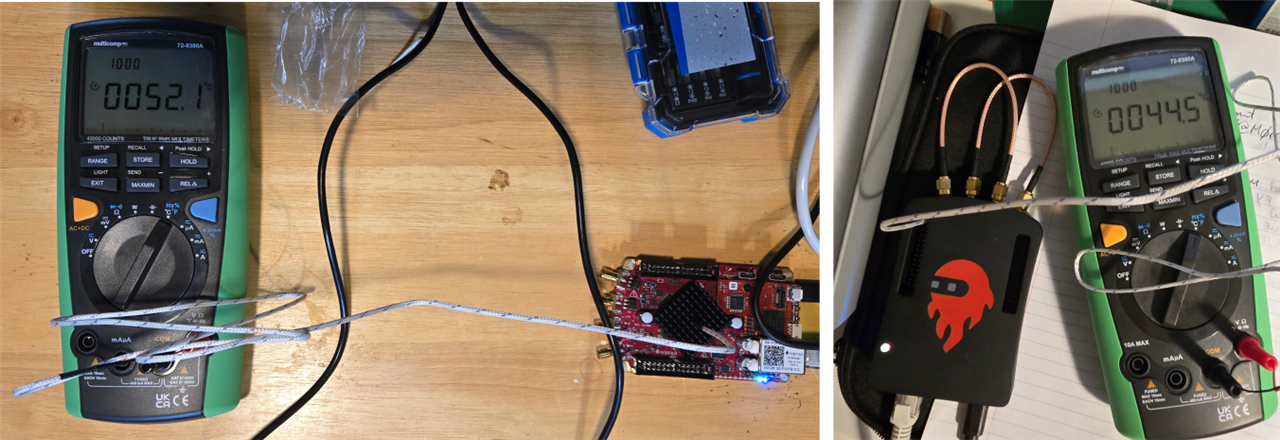
Adding the cable drag option didn’t relieve my concern of the unit being to hot to touch during operation. The metal case is designed to be heat sink as well.
image

Without the case the temperature at the heat sink was 53.1C. With the Red Pitaya wrapped in a case the temperature is down close to ten degrees at 44.5C.

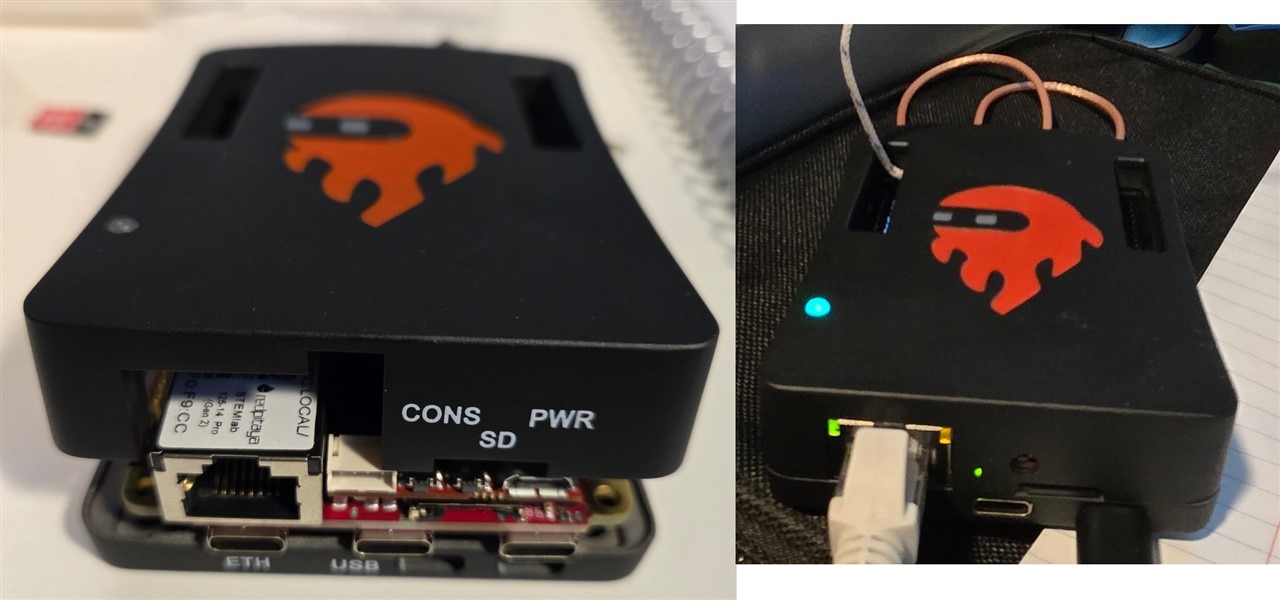
I'm happy with the case. Well reasonably happy. The connectors are labeled on the PCB. You lose the labeling when enclosed in the case.
image

It seems the Red Pitaya STEMlab 125-14 PRO Gen 2 case doesn't need labels. The case on left wasn't physically compatible but it did include labels.

I'm not sure I want to test plugging the power cable the far right USB-C into the Serial console USB-C connector under the RJ45 jack. I think I'm going to break out the label maker for my new case.

  • Sign in to reply
  • colporteur
    colporteur 2 hours ago in reply to shabaz

    I struggled with the thermodynamic course in college. A bunch of stuff doesn't jive well with my really old theory.

    The thermal pad is close to 1/8 inch thick.  There doesn't appear to be much compression when I separate the units after I've tighten all the screws. When we used paste to cover the thermal gap, it was never put on thick. That was a no-no. A misaligned heat sink to me is another minus on dissipating heat. 

    I recall doing the calculations to size a heat sink for a particular problem. The bigger, the better but throw in costs as a design requirement a the bigger got smaller.

    The case is 20 euros more than the model case for the other units. Maybe when they use up old stock, they will spring for some paint and label the connectors on the newer units.

    • Cancel
    • Vote Up 0 Vote Down
    • Sign in to reply
    • More
    • Cancel
  • beacon_dave
    beacon_dave 17 hours ago in reply to shabaz

    "...14 mm pitch spacing is all that's needed for SMA..."

    It's usually the other end of the one-piece SMA inter-series adapters that are the issue.

    • Cancel
    • Vote Up 0 Vote Down
    • Sign in to reply
    • More
    • Cancel
  • shabaz
    shabaz 1 day ago in reply to obones

    I don't know.. 14 mm pitch spacing is all that's needed for SMA. It's alignment which is a bit fiddly with any SMA, made all the more difficult because of the different angles they've got. Admittedly I like criticizing any design : ) 

    • Cancel
    • Vote Up 0 Vote Down
    • Sign in to reply
    • More
    • Cancel
  • shabaz
    shabaz 1 day ago in reply to colporteur

    They probably dragged that chip a few millimeters more toward the RF connector end (maybe to make clearance for that add-on Flash board) in that PCB iteration, and forgot to modify the enclosure (or was too expensive to redo that, since this may be a low-volume enclosure.. or maybe getting rid of old stock).  It looks like they've milled off some of it (yellow area) too, precisely where that add-on board goes.

    The fact it's not entirely covering the IC might not matter too much (these ICs might have internal temperature sensors too), plus, there's always inaccuracy in this kind of design, some boards may press a bit deeper into the thermal pad, some may not, so there's no precision with this style of implementing heatsinking anyway.

    image

    • Cancel
    • Vote Up 0 Vote Down
    • Sign in to reply
    • More
    • Cancel
  • colporteur
    colporteur 1 day ago

    image

    I was going to ignore this anomaly but after opening the case once again today, I felt it was important to put pen to paper. I know the RoadTest didn't include a case so pointing out flaws in design could be consider outside the scope. I had hoped the alignment of the processor and the metal case heat sink tab was something I had done in assembly but it appears not.

    I took the thermal conducting pad and place it squarely on the processor and secured the case with screws. The pad is sized to fit right to the edge of the processor. After opening the case I notice the thermal pad overhangs the metal heat sink tab. It does not sit squarely in the middle. At first I thought it was me and ignored the anomaly. When I re-positioned the pad to discover the same issue appeared again I took a closer look and noticed the alignment issue.

    How much that misalignment reduces heat dissipation efficiency I'm not sure. Maybe with a position tweak to get better alignment the temperature drop does break ten degrees. Hopefully the vendor doesn't have a lot of cases with no labels sitting on the shelf. Fixing the alignment and printing some labels could be a two for one deal.

    • Cancel
    • Vote Up 0 Vote Down
    • Sign in to reply
    • More
    • Cancel
>
element14 Community

element14 is the first online community specifically for engineers. Connect with your peers and get expert answers to your questions.

  • Members
  • Learn
  • Technologies
  • Challenges & Projects
  • Products
  • Store
  • About Us
  • Feedback & Support
  • FAQs
  • Terms of Use
  • Privacy Policy
  • Legal and Copyright Notices
  • Sitemap
  • Cookies

An Avnet Company © 2026 Premier Farnell Limited. All Rights Reserved.

Premier Farnell Ltd, registered in England and Wales (no 00876412), registered office: Farnell House, Forge Lane, Leeds LS12 2NE.

Follow element14

  • X
  • Facebook
  • linkedin
  • YouTube