


For my RoadTest review of the CM5 I am building a remote dog feeder. I am planning to use a pair of CSI (Camera Serial Interface) cameras, which are still in transit. After my unboxing post, I thought it would be wroth while to run through a bunch of interfaces and see how some real bench tests stack up against the specifications.
Network: gigabit Ethernet

As a test of network speed I used the Unix tool iperf3, which works on a simple client/server model: one side runs as a server and just listens, the other connects as a client and pushes data at it for a set duration (10 seconds, in my runs), and reports the throughput and any retransmissions it had to make along the way. Passing -R flips which side is doing the sending, so the same server/client pair can test both directions without swapping cables or roles. When I first ran it from my Mac against quintessa, I got a disappointing ~322 Mbit/s with over a thousand retransmissions. Turned out that number said nothing about the CM5 (named quintessa) — my Mac is connected to my home network over Wi-Fi, so that was the limitation, not the board’s Gigabit Ethernet port.
At this point I realised I didn’t actually have a setup on hand to properly test a 1Gbit connection. After some thinking, I remembered I had a mini-PC lying around (a LinkStar H68K running OpenWRT, named kickboxer) that could make this happen, and picked up some Cat6A cables to wire it up (rated for 10Gigabit, far more than the 1Gbit I actually needed, but that’s what was on the shelf). Wiring the CM5 directly to the LinkStar H68K, I ran the following:
# one-shot: exits after this test
ssh kickboxer "iperf3 -s -1"

# quintessa (CM5) -> kickboxer (H68K)
ssh quintessa "iperf3 -c 192.168.100.1 -t 10"

# restart it — one-shot exits after each test
ssh kickboxer "iperf3 -s -1"

# kickboxer (H68K) -> quintessa (CM5), reverse
ssh quintessa "iperf3 -c 192.168.100.1 -t 10 -R"
(Or skip the restart: iperf3 -s with no -1 stays up for repeat connections — ssh kickboxer "killall iperf3" to stop it once you’re done.)
The client’s own output already reports both ends’ final numbers (it gets the server’s stats back over the control connection), so there’s no need to show the server-side log too — just the client, trimmed to the first/last second:
Forward, CM5 -> H68K:
Connecting to host 192.168.100.1, port 5201
[ ID] Interval           Transfer     Bitrate         Retr  Cwnd
[  5]   0.00-1.00   sec   114 MBytes   951 Mbits/sec    0    491 KBytes
...
[  5]   9.00-10.00  sec   111 MBytes   932 Mbits/sec    0    540 KBytes
- - - - - - - - - - - - - - - - - - - - - - - - -
[ ID] Interval           Transfer     Bitrate         Retr
[  5]   0.00-10.00  sec  1.09 GBytes   938 Mbits/sec    0            sender
[  5]   0.00-10.00  sec  1.09 GBytes   936 Mbits/sec                  receiver
Reverse, H68K -> CM5:
Connecting to host 192.168.100.1, port 5201
Reverse mode, remote host 192.168.100.1 is sending
[ ID] Interval           Transfer     Bitrate
[  5]   0.00-1.00   sec   112 MBytes   939 Mbits/sec
...
[  5]   9.00-10.00  sec   112 MBytes   942 Mbits/sec
- - - - - - - - - - - - - - - - - - - - - - - - -
[ ID] Interval           Transfer     Bitrate         Retr
[  5]   0.00-10.00  sec  1.09 GBytes   939 Mbits/sec   25            sender
[  5]   0.00-10.00  sec  1.09 GBytes   938 Mbits/sec                  receiver
936–939 Mbit/s both directions — right at the practical ceiling for Gigabit Ethernet once TCP/IP overhead is accounted for, with retransmissions ranging from 0 (forward) up to 25 (reverse) and no visible dent in throughput either way. That earlier ~322 Mbit/s number really was just the Mac’s Wi-Fi, not the board.
Storage: eMMC
To test read/write speed I used dd — a Unix tool that copies raw bytes between two files or block devices, a fixed block size at a time, and reports how long the copy took. Pointed at /dev/zero as input and a real file as output, it doubles as a simple sequential-write benchmark; run the other way round, reading that file back out to /dev/null, it becomes a sequential-read benchmark aswell.
First pass against quintessa’s storage came back at 3.9 GB/s write, 5.0 GB/s read — an immediate red flag, since that’s RAM-bandwidth territory, not eMMC. df -hT /tmp explained it: /tmp is tmpfs, RAM-backed. The whole test had never touched storage at all.
Re-ran against the real eMMC-backed path (/home), using iflag=direct on the read side so the kernel bypasses the page cache (no root/drop_caches needed):
dd if=/dev/zero of=/home/pi/dd_test.bin bs=1M count=1024 conv=fdatasync

     1024+0 records in
     1024+0 records out
     1073741824 bytes (1.1 GB, 1.0 GiB) copied, 9.50106 s, 113 MB/s

dd if=/home/pi/dd_test.bin of=/dev/null bs=1M iflag=direct

     1024+0 records in
     1024+0 records out
     1073741824 bytes (1.1 GB, 1.0 GiB) copied, 3.25867 s, 330 MB/s
113 MB/s sequential write, 330 MB/s sequential read — read faster than write, exactly the expected pattern for eMMC 5.1-class storage, and both numbers land squarely where that storage class should sit.
Vision: cameras and how fast they actually feed frames
Still a work in progress — this is the section I expect to keep coming back to once the CSI (Arducam) modules finally arrive, since the whole point of building this harness was to compare USB against CSI fairly. For now, USB is what’s on hand, so USB is what I’ve been characterising.
A core part of the dog feeder is watching the dogs and working out whether they’re actually sitting and waiting for their food — the ML side of this project needs a camera feed to work with at all. New sibling project, video-streaming-cm5/, same conventions as the soundboard project (Flask + systemd + mise, no Docker). First USB camera module DOA — enumeration errors in dmesg (error -71, “unable to enumerate USB device”) pointed at real hardware failure, not a config issue. Swapped modules and it enumerated cleanly.


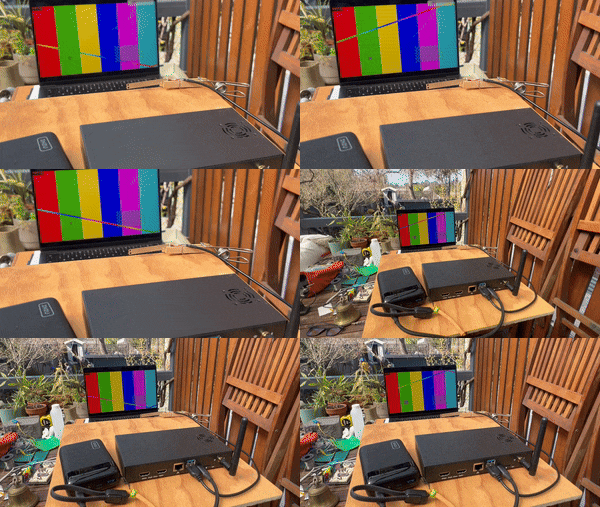
attempting to test all Black, all White and the use of ffmpeg's test video pattern
How FPS actually gets measured
video-streaming-cm5 has a /api/benchmark/run endpoint that pulls frames straight off the camera in a tight loop for a fixed number of seconds, timestamping every successful read:
deadline = time.monotonic() + seconds
while time.monotonic() < deadline:
    ok, _ = camera.read()
    if ok:
        timestamps.append(time.monotonic())
    else:
        dropped += 1
Average FPS is just frame count over elapsed time, but an average alone hides a camera that arrives in uneven bursts — a steady 20fps and a bursty one that also averages 20fps look identical on that number alone. So the gaps between consecutive timestamps get recorded too (min/max/mean/ stddev); the stddev is what actually tells a steady feed from a jittery one.
A cheap camera, and a decode/re-encode bug
At 1280×720 MJPG, the naive pipeline (decode MJPG → OpenCV BGR → re-encode to JPEG → serve) topped out at 14.99 fps, well under the raw driver ceiling (~27–28 fps). MJPG frames arrive already JPEG-compressed, so decoding and immediately re-encoding them was pure waste — setting CAP_PROP_CONVERT_RGB=0 to skip the decode and pass the camera’s original compressed bytes straight through fixed it: 30.12 fps, CPU down from 8.1% to 3.4%, frame-gap stddev down from 16.88ms to 4.13ms. Every metric improved together, which is the sign the fix removed real waste rather than trading one thing for another.
Then the numbers got inconsistent — and it looks like lighting is why
Same camera, same 1280×720 MJPG mode, pointed at different things:
| Scene | FPS |
|---|---|
| Indoor wall (bright, direct) | 30.12 |
| Monitor playing a test pattern | 14.99 |
| Hallway | 7.58 |
| Lens covered | 3.84 |
| Outdoors, direct sun | 22.07 |
The first four numbers are close to an exact halving at each step darker — 30 → 15 → 7.5 → 3.75 — which points at the camera’s auto-exposure lengthening its shutter time as the scene dims (checked and ruled out a bandwidth/bigger-frames explanation directly: the darker scenes weren’t producing bigger JPEG frames, if anything the opposite). Outdoors breaks that clean pattern, though — direct sun should need a shorter exposure than an indoor wall, not land in between the wall and the test pattern, and dropping resolution at the same outdoor scene didn’t recover the FPS either. So: lighting is clearly a real factor, and probably the dominant one indoors, but it isn’t the whole story outdoors. This camera doesn’t expose exposure controls over UVC, so none of this can be confirmed directly, only inferred from behaviour — still investigating.
A better camera changes the picture
Swapped in a Logitech C922 Pro Stream Webcam and immediately hit a different, unrelated bug: switching modes without explicitly requesting an FPS silently dropped it to the slowest option the camera enumerates (5fps) — turns out leaving that unset isn’t safe to assume defaults to the fastest. Once fixed to always request a specific FPS, the C922 held a clean 1080p30, sub-2ms jitter, no auto-exposure games. Early days with this camera still, but the gap to the cheap webcam is already obvious.
Lesson for next time either way: lighting/exposure is a real confound, easy to mistake for a bandwidth or interface finding. Keeping the physical setup identical matters as much as keeping the test content identical — something to hold constant once CSI actually lands and the real three-way comparison (cheap USB / good USB / CSI) can happen.
Remote: Raspberry Pi Connect
When I unboxed, I turned on Raspberry Pi Connect. Frustrated with how slow VNC was over my Mac’s Wi-Fi, I turned it straight back off again mid-troubleshoot and never actually gave it a fair test. Turns out it can give me both remote shell and screen sharing on quintessa — the catch with screen sharing is it needs a window manager running, which quintessa currently doesn’t. More on that in a follow-up post.
Feeder: dog feed mechanism
My current mechanical build skills are limited to woodwork and a few hand power tools, so I wanted a dispensing mechanism simple enough to build with that and still take electronic control cleanly. The plan is a servo-driven mechanism: each turn of the servo dispenses a small, roughly fixed amount of kibble to the dogs.
Up next
- Find out if Raspberry Pi Connect supports port forwarding — more useful here than remote shell or screen sharing, since it’s the feeder’s own web dashboard that actually needs reaching from outside the LAN.
- I have a few Raspberry Pi HATs lying around, like the Sense HAT — I’ll check whether they’re actually compatible before assuming they just plug in and work.
- Then it’ll be time to run some YOLOv8s models, to see how capable the CM5 actually is.
- And much, much more…


