


In my previous article about SDR++ on the CM5, I ended with an unresolved issue: although UHD was correctly detected during the SDR++ build and the USRP source was included, I could not get my Ettus USRP B205mini-i to actually work with SDR++. I decided to leave the troubleshooting for a separate follow-up rather than complicate the first SDR++ test.
That follow-up has now paid off. The problem turned out not to be with the SDR++ build itself, but with the UHD images required to initialize the USRP. Once these were installed and the location of the images was made available to SDR++ through the UHD_IMAGES_DIR environment variable, the B205mini-i could finally be detected and initialized correctly. There was one additional detail to take care of for starting SDR++ from the Raspberry Pi OS desktop menu, which I will show below.
Download USRP UHD images
The UHD images contain the firmware and FPGA bitstreams required to initialize and operate the USRP hardware. Running uhd_images_downloader as root downloaded the images to /usr/share/uhd/4.8.0/images. After setting:
export UHD_IMAGES_DIR=/usr/share/uhd/4.8.0/images
both uhd_find_devices and uhd_usrp_probe successfully detected and initialized the B205mini-i. The probe confirmed the device was operating over USB 3 and successfully loaded the FPGA image.
me@raspberrypi:~ $ uhd_find_devices
[INFO] [UHD] linux; GNU C++ version 14.2.0; Boost_108300; UHD_4.8.0.0+ds1-2
--------------------------------------------------
-- UHD Device 0
--------------------------------------------------
Device Address:
    serial: 31E26E5
    name: B205i
    product: B205mini
    type: b200


me@raspberrypi:~ $ uhd_usrp_probe
[INFO] [UHD] linux; GNU C++ version 14.2.0; Boost_108300; UHD_4.8.0.0+ds1-2
[INFO] [B200] Detected Device: B205mini
[INFO] [B200] Loading FPGA image: /usr/share/uhd/4.8.0/images/usrp_b205mini_fpga.bin...
[INFO] [B200] Operating over USB 3.
[INFO] [B200] Initialize CODEC control...
[INFO] [B200] Initialize Radio control...
[INFO] [B200] Performing register loopback test...
[INFO] [B200] Register loopback test passed
[INFO] [B200] Setting master clock rate selection to 'automatic'.
[INFO] [B200] Asking for clock rate 16.000000 MHz...
[INFO] [B200] Actually got clock rate 16.000000 MHz.
  _____________________________________________________
 /
|       Device: B-Series Device
|     _____________________________________________________
|    /
|   |       Mboard: B205mini
|   |   serial: 31E26E5
|   |   name: B205i
|   |   product: 30522
|   |   revision: 3
|   |   FW Version: 8.0
|   |   FPGA Version: 7.0
|   |
|   |   Time sources:  none, internal, external
|   |   Clock sources: internal, external
|   |   Sensors: ref_locked
|   |     _____________________________________________________
|   |    /
|   |   |       RX DSP: 0
|   |   |
|   |   |   Freq range: -8.000 to 8.000 MHz
|   |     _____________________________________________________
|   |    /
|   |   |       RX Dboard: A
|   |   |     _____________________________________________________
|   |   |    /
|   |   |   |       RX Frontend: A
|   |   |   |   Name: FE-RX1
|   |   |   |   Antennas: TX/RX, RX2
|   |   |   |   Sensors: temp, rssi, lo_locked
|   |   |   |   Freq range: 50.000 to 6000.000 MHz
|   |   |   |   Gain range PGA: 0.0 to 76.0 step 1.0 dB
|   |   |   |   Bandwidth range: 200000.0 to 56000000.0 step 0.0 Hz
|   |   |   |   Connection Type: IQ
|   |   |   |   Uses LO offset: No
|   |   |     _____________________________________________________
|   |   |    /
|   |   |   |       RX Codec: A
|   |   |   |   Name: B205mini RX dual ADC
|   |   |   |   Gain Elements: None
|   |     _____________________________________________________
|   |    /
|   |   |       TX DSP: 0
|   |   |
|   |   |   Freq range: -8.000 to 8.000 MHz
|   |     _____________________________________________________
|   |    /
|   |   |       TX Dboard: A
|   |   |     _____________________________________________________
|   |   |    /
|   |   |   |       TX Frontend: A
|   |   |   |   Name: FE-TX1
|   |   |   |   Antennas: TX/RX
|   |   |   |   Sensors: temp, lo_locked
|   |   |   |   Freq range: 50.000 to 6000.000 MHz
|   |   |   |   Gain range PGA: 0.0 to 89.8 step 0.2 dB
|   |   |   |   Bandwidth range: 200000.0 to 56000000.0 step 0.0 Hz
|   |   |   |   Connection Type: IQ
|   |   |   |   Uses LO offset: No
|   |   |     _____________________________________________________
|   |   |    /
|   |   |   |       TX Codec: A
|   |   |   |   Name: B205mini TX dual DAC
|   |   |   |   Gain Elements: None

me@raspberrypi:~ $
Update desktop menu item
There was one more small catch. When SDR++ was started from the Raspberry Pi OS desktop menu, the USRP would not start, while launching SDR++ from a terminal after setting UHD_IMAGES_DIR worked correctly. The solution was simply to add the environment variable to the SDR++ desktop launcher:
Exec=env UHD_IMAGES_DIR=/usr/share/uhd/4.8.0/images sdrpp
This addition can be done either from the terminal, by editing /usr/share/applications/sdrpp.desktop, or editing from the menu by richt clicking on the SDR++ icon.
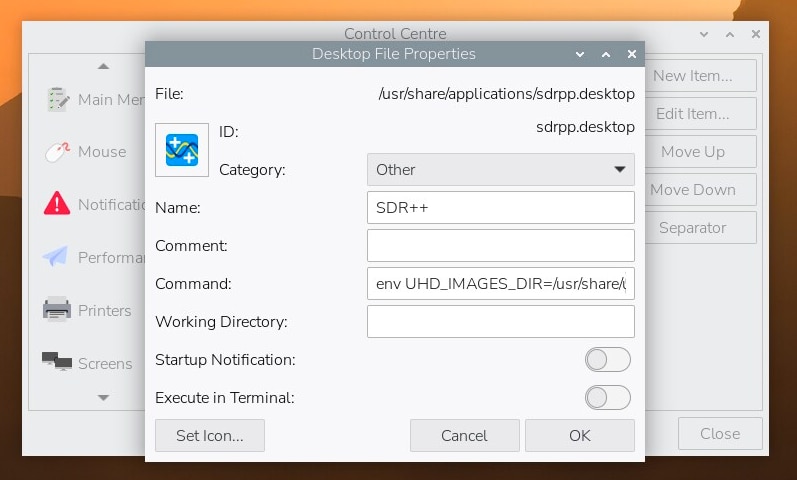
Add env UHD_IMAGES_DIR=/usr/share/uhd/4.8.0/images to the Command field in the SDR++ Desktop File Properties
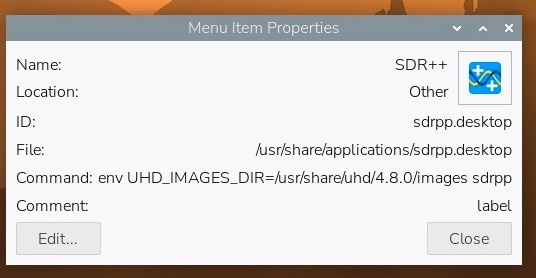
This is how the Properties should look like
With this change, SDR++ can now start the USRP directly from the desktop menu. The B205mini-i is initialized correctly, its status LED turns green, and SDR++ is able to receive in this case a 4 MHz bandwidth.
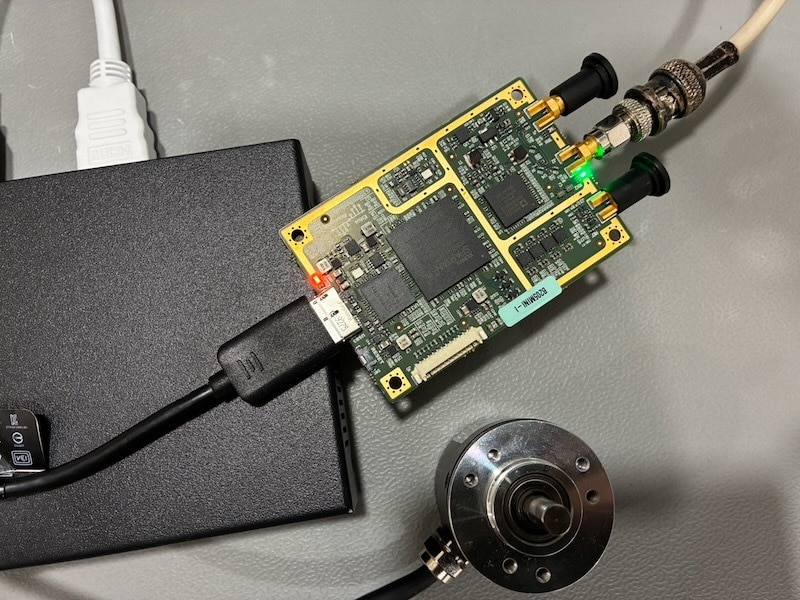
USRP up and running, the status LED of the selected antenna port turns green
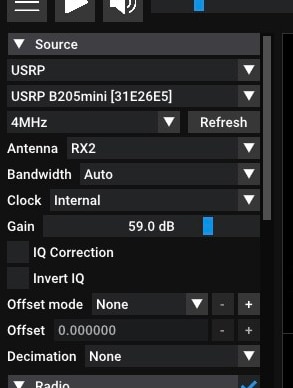
SDR++ source settings shows USRP and its settings
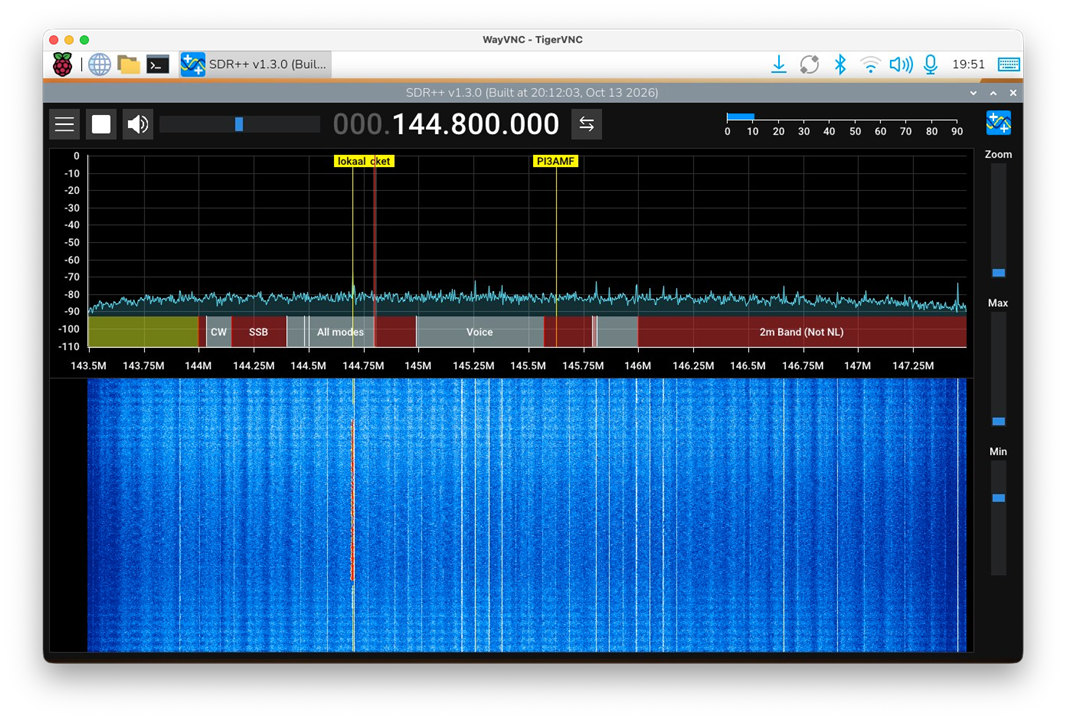
Receiving the 2 meter band with a 4Mhz bandwidth
Bottom line
The solution turned out to be a small configuration change: once the UHD images could be found by SDR++, the USRP could be initialized correctly and used as a receiver. With the UHD images installed and UHD_IMAGES_DIR included in the desktop launcher, the USRP B205mini-i is now working natively with SDR++ on the Raspberry Pi CM5.
There are still some settings to investigate, particularly the available sample rates and how these relate to the selected bandwidth, but more importantly how well this configuration runs on the CM5. I'm planning to investigate the CPU load and other performance characteristics using different digital encoding methods, like pocsag, FT4/8, DMR and more, stay tuned for the next parts of the CM5 RoadTest.
Top Comments