element14 Community
element14 Community
    Register Log In
  • Site
  • Search
  • Log In Register
  • Community Hub
    Community Hub
    • What's New on element14
    • Feedback and Support
    • Benefits of Membership
    • Personal Blogs
    • Members Area
    • Achievement Levels
  • Learn
    Learn
    • Ask an Expert
    • eBooks
    • element14 presents
    • Learning Center
    • Tech Spotlight
    • STEM Academy
    • Webinars, Training and Events
    • Learning Groups
  • Technologies
    Technologies
    • 3D Printing
    • FPGA
    • Industrial Automation
    • Internet of Things
    • Power & Energy
    • Sensors
    • Technology Groups
  • Challenges & Projects
    Challenges & Projects
    • Design Challenges
    • element14 presents Projects
    • Project14
    • Arduino Projects
    • Raspberry Pi Projects
    • Project Groups
  • Products
    Products
    • Arduino
    • Avnet & Tria Boards Community
    • Dev Tools
    • Manufacturers
    • Multicomp Pro
    • Product Groups
    • Raspberry Pi
    • RoadTests & Reviews
  • About Us
    About the element14 Community
  • Store
    Store
    • Visit Your Store
    • Choose another store...
      • Europe
      •  Austria (German)
      •  Belgium (Dutch, French)
      •  Bulgaria (Bulgarian)
      •  Czech Republic (Czech)
      •  Denmark (Danish)
      •  Estonia (Estonian)
      •  Finland (Finnish)
      •  France (French)
      •  Germany (German)
      •  Hungary (Hungarian)
      •  Ireland
      •  Israel
      •  Italy (Italian)
      •  Latvia (Latvian)
      •  
      •  Lithuania (Lithuanian)
      •  Netherlands (Dutch)
      •  Norway (Norwegian)
      •  Poland (Polish)
      •  Portugal (Portuguese)
      •  Romania (Romanian)
      •  Russia (Russian)
      •  Slovakia (Slovak)
      •  Slovenia (Slovenian)
      •  Spain (Spanish)
      •  Sweden (Swedish)
      •  Switzerland(German, French)
      •  Turkey (Turkish)
      •  United Kingdom
      • Asia Pacific
      •  Australia
      •  China
      •  Hong Kong
      •  India
      •  Japan
      •  Korea (Korean)
      •  Malaysia
      •  New Zealand
      •  Philippines
      •  Singapore
      •  Taiwan
      •  Thailand (Thai)
      •  Vietnam
      • Americas
      •  Brazil (Portuguese)
      •  Canada
      •  Mexico (Spanish)
      •  United States
      Can't find the country/region you're looking for? Visit our export site or find a local distributor.
  • Translate
  • Profile
  • Settings
Embedded and Microcontrollers
  • Technologies
  • More
Embedded and Microcontrollers
Blog EasyL1105: A Dev Board for the TI ARM Cortex-M0+ L-Series
  • Blog
  • Forum
  • Documents
  • Quiz
  • Polls
  • Files
  • Members
  • Mentions
  • Sub-Groups
  • Tags
  • More
  • Cancel
  • New
Join Embedded and Microcontrollers to participate - click to join for free!
  • Share
  • More
  • Cancel
Group Actions
  • Group RSS
  • More
  • Cancel
Engagement
  • Author Author: shabaz
  • Date Created: 10 Aug 2025 11:07 PM Date Created
  • Views 2983 views
  • Likes 11 likes
  • Comments 61 comments
  • MSPM0L1105
  • MSPM0
  • arm cortex
  • cortex-m0+
  • easyL1105
  • arm cortex-m
  • texas instruments
  • MSPM0L1106
  • ti
Related
Recommended

EasyL1105: A Dev Board for the TI ARM Cortex-M0+ L-Series

shabaz
shabaz
10 Aug 2025

Table of Contents

  • Introduction
  • Circuit Description
    • 1. Microcontroller Core
    • 2. USB UART
    • 3. Voltage Regulator
  • Circuit Board
  • Building and Running an Example Project
  • Summary


TLDR Section

The easyL1105 is a TI MSPM0L1105 Development Board that can be DIY'd. Here are the links:

Schematic PDF

PCB Gerber Zip file

Parts List PDF

For more blogs and information: Use the searchbox, tags are easyL1105 or MSPM0

easyL1105 GitHub repository page

Introduction

I was browsing the Texas Instruments (TI) website, and noticed they had some very low-cost, very basic ARM Cortex-M0+ microcontrollers. I was keen on finding something low-power, small (but hand-solderable), and cheap. I aim to eventually use such a chip for interfacing to simple sensors for a few possible projects (one requires some sort of low-accuracy current sensor, and another requires an presence sensor), so all I require is a basic built-in ADC, I2C, SPI, or perhaps UART, and either control an output, or send text to an I2C LCD display, or perhaps write to external SPI storage.

In the end, I decided to order a few parts from the TI MSPM0 L-Series, which they class as low-power, and I found a 28-pin variant which has a fair amount of general-purpose input/output (GPIO) connections.

The microcontroller doesn’t have any particularly remarkable features, other than the very low power consumption and cheapness, and the fact that it doesn’t require many components at all, not even a crystal oscillator. Just a few decoupling capacitors are all that’s technically required.
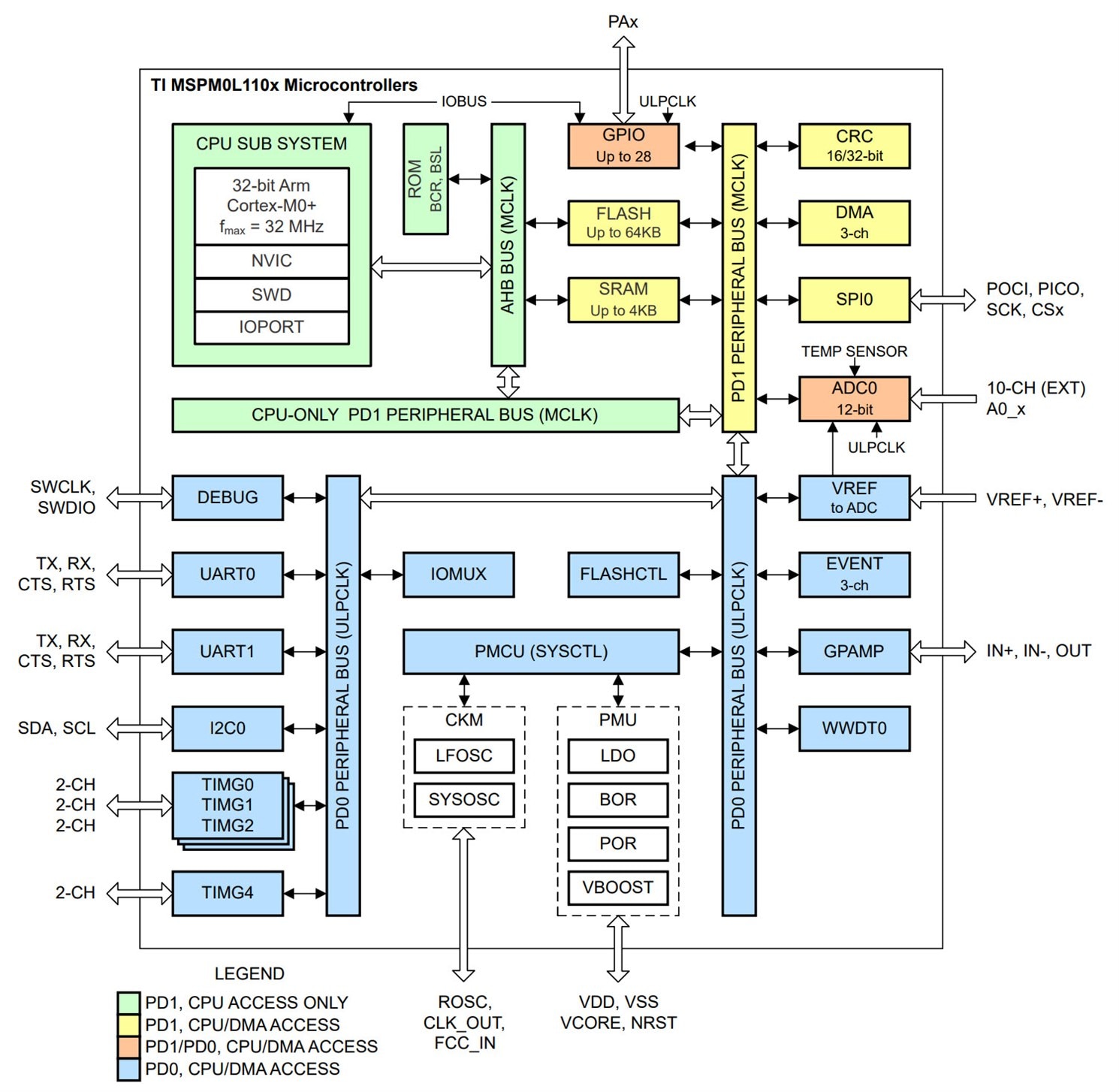
image

(Image source: Microcontroller PDF Datasheet)

In shutdown (with GPIO wakeup capability), current consumption is apparently 61 nA, which seems pretty low. RAM can be maintained and timers can be running in a ‘standby’ mode, where current consumption is 1uA, which also seems reasonable.

One more thing I really liked; it has an in-built bootloader that can accept firmware over the serial (UART) port, so that no separate programmer device is required for in-the-field updates. You could just attach it directly to a PC and program it up.

The particular part I went for is the L1105 (the full name is MSPM0L1105TDGS28R), which has 32 kByte of Flash memory and 4 kByte of RAM, but there is a pin-compatible L1106 upgrade part with 64 kByte of Flash if needed.

In terms of major downsides, there’s no ability to add a crystal oscillator if you need such precision. Interestingly, as a compromise, the chip can use an external 0.1% tolerance 100k resistor in order to create a reasonably precise internal oscillator, but it won’t compare with a crystal, of course. I would have liked an accurate RTC, but I suppose that could always be an external I2C peripheral chip, perhaps with a separate backup battery.

TI doesn’t actually have a dev-board for this particular L1105 part, but since it’s a simple chip, I’d much rather make my own dev-board, so I can get used to working with the chip without all the extras that many dev-boards have.

Circuit Description

The circuit is split up into three main sections, described next. For the PDF version of the schematic and the project files, see the easyL1105 project repository on GitHub.

1. Microcontroller Core

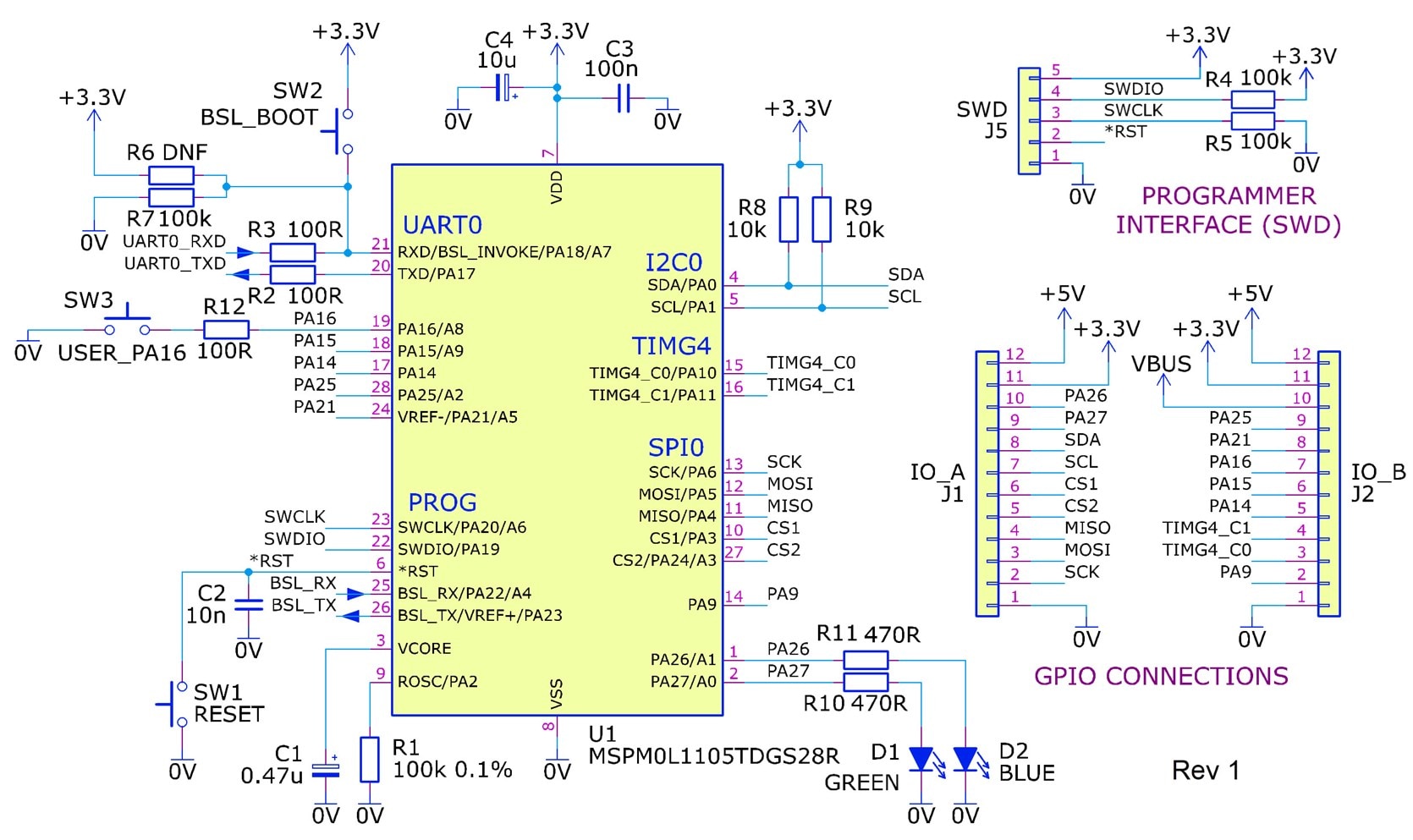
The core of the circuit is shown below (click to enlarge).

This doesn’t do much, other than breaking out most of the microcontroller connections to 0.1” pin headers. I took a reasonable guess at how the pins might be used, and so some are labelled with I2C and SPI connection names. A couple of pins are useful for timer-based input/output capabilities; for instance, one could use them for attaching a rotary encoder. As a simple user interface, the circuit has a single button (SW3) and a couple of LEDs attached to GPIO pins; it’s up to the user to write code to make use of that button and the LEDs.

There is a 5-pin header, J5, that can be used to attach a traditional SWD JTAG programmer device if required.

The BSL_RX and BSL_TX connections are used for uploading firmware via serial. To enable this, there is a BSL_BOOT button that needs to be held down during a reset. There are some non-populated resistor pads attached to the BSL_BOOT switch, because I’m unsure if that pin floats, or if the user may wish to permanently set that to a particular level.
image

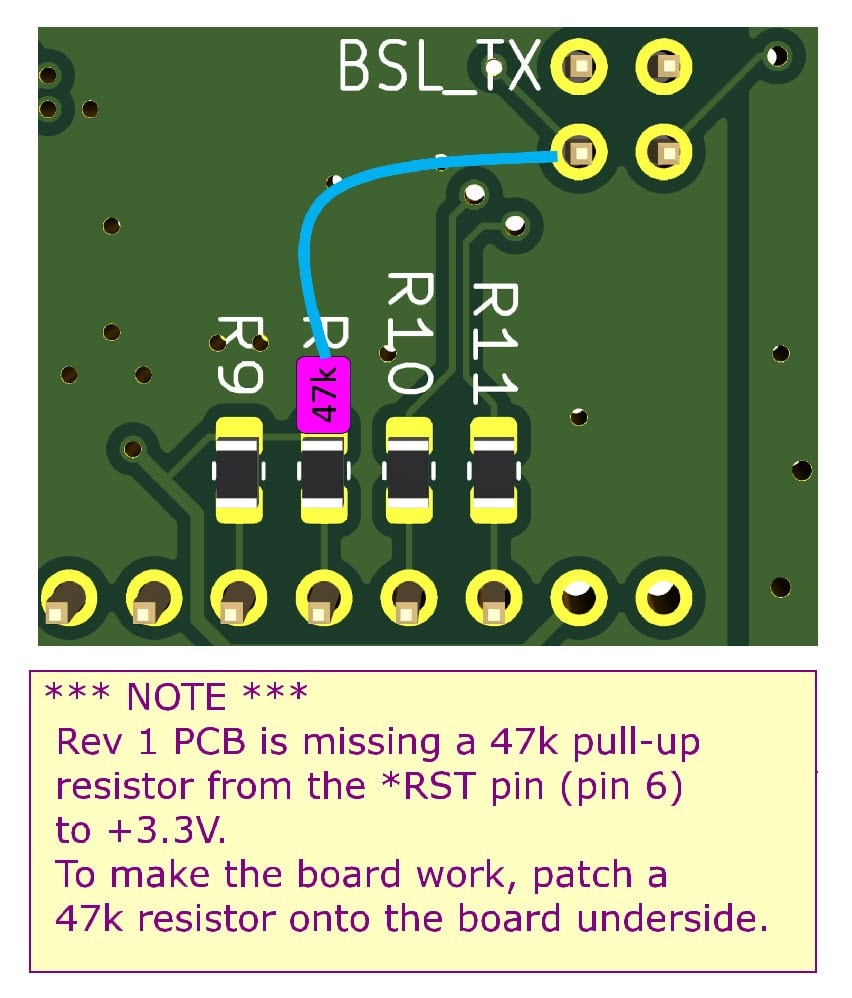
Note: It was later discovered that this Rev 1 circuit is missing a 47k pull-up resistor, from the *RST pin (pin 6 on the microcontroller) to +3.3V. It was easy to patch onto the underside of the PCB.
image

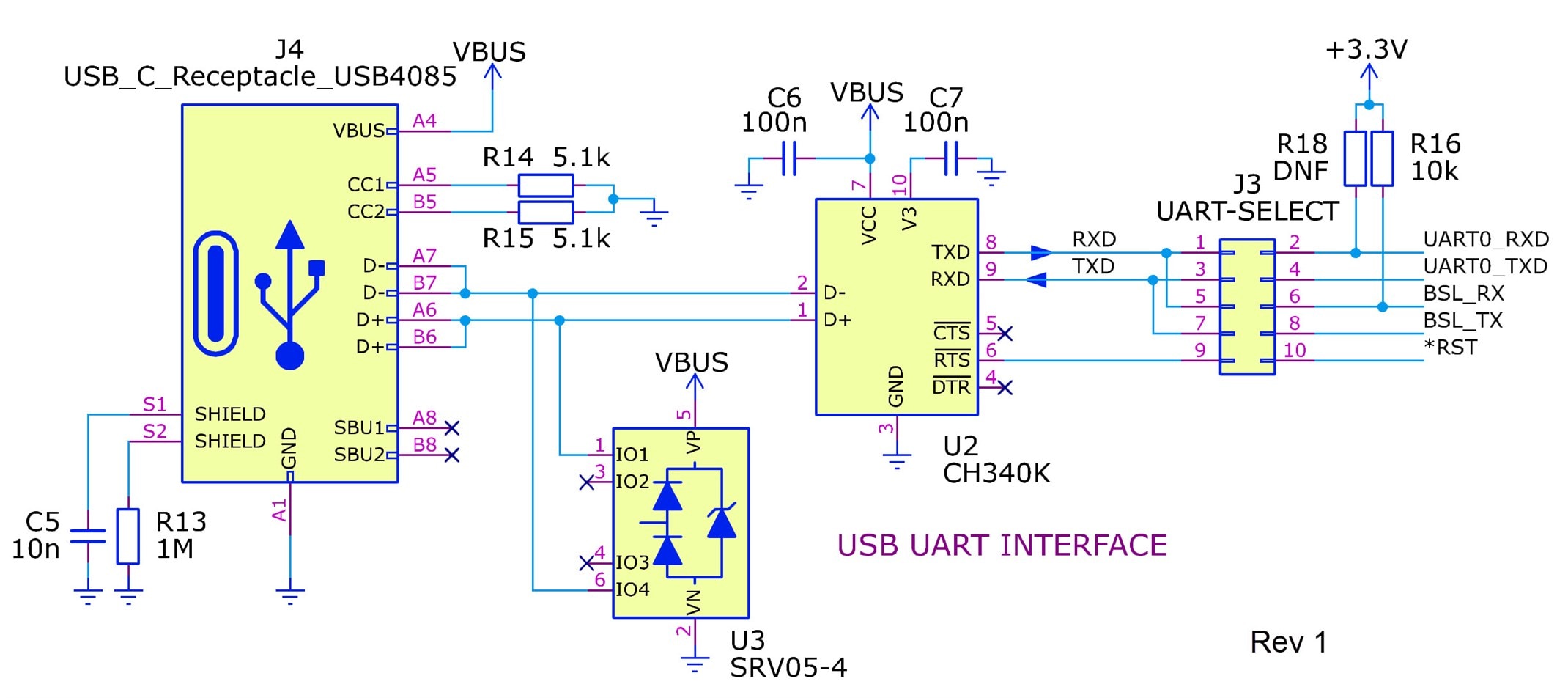
2. USB UART

Since I was keen to use the serial bootloader, the dev-board contains a USB-UART adapter. It’s based around a CH340K USB-UART chip, which I’ve never used before. The chip is a little unusual in that it uses pull-up resistors on the UART side if the chip is powered from 5V and not from the (lower) microcontroller voltage; that’s the reason for R16 on the right side of the circuit (R18 is not fitted, otherwise the microcontroller will always start in bootloader mode!). After some discussion with Jan Cumps  it's likely R16 is not needed, so it could potentially be removed (depending on if the RX pin is floating or not on the microcontroller). The microcontroller reset pin is wired through a jumper on J3 to the RTS line, in case it is possible to automatically reset the board from the PC (if you're using the official TI app, UniFlash, then it's not possible, and the jumper needs to be removed). You would still need to manually press the BSL_BOOT button (although, if the microcontroller is new from the factory with the Flash erased, then for that first time the BSL_BOOT button doesn’t need to be pressed).

The pin headers labelled J3 are used with shorting jumpers to redirect the USB-UART from the BSL pins to alternative pins for UART0. This is so that the same USB-UART can be used for general program serial input/output, too.
image

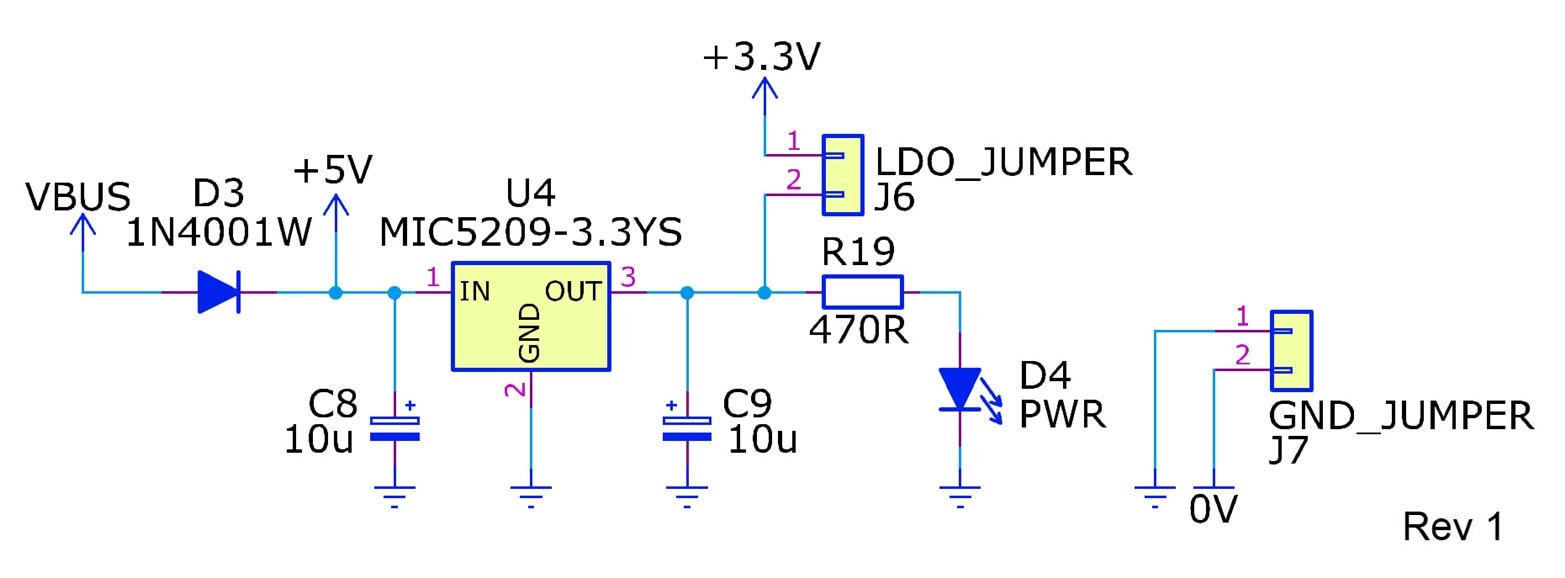
3. Voltage Regulator

The final bit of circuitry is a 3.3V regulator, which can be powered either by the USB connection or from a 5V labelled connection that is exposed on the GPIO pin headers. The two shorting jumpers can be used to separate the power to the microcontroller portion of the circuitry from the rest of the board. By removing the shorting jumpers, you could wire in a separate power supply if desired, or attach current measurement circuitry.
image

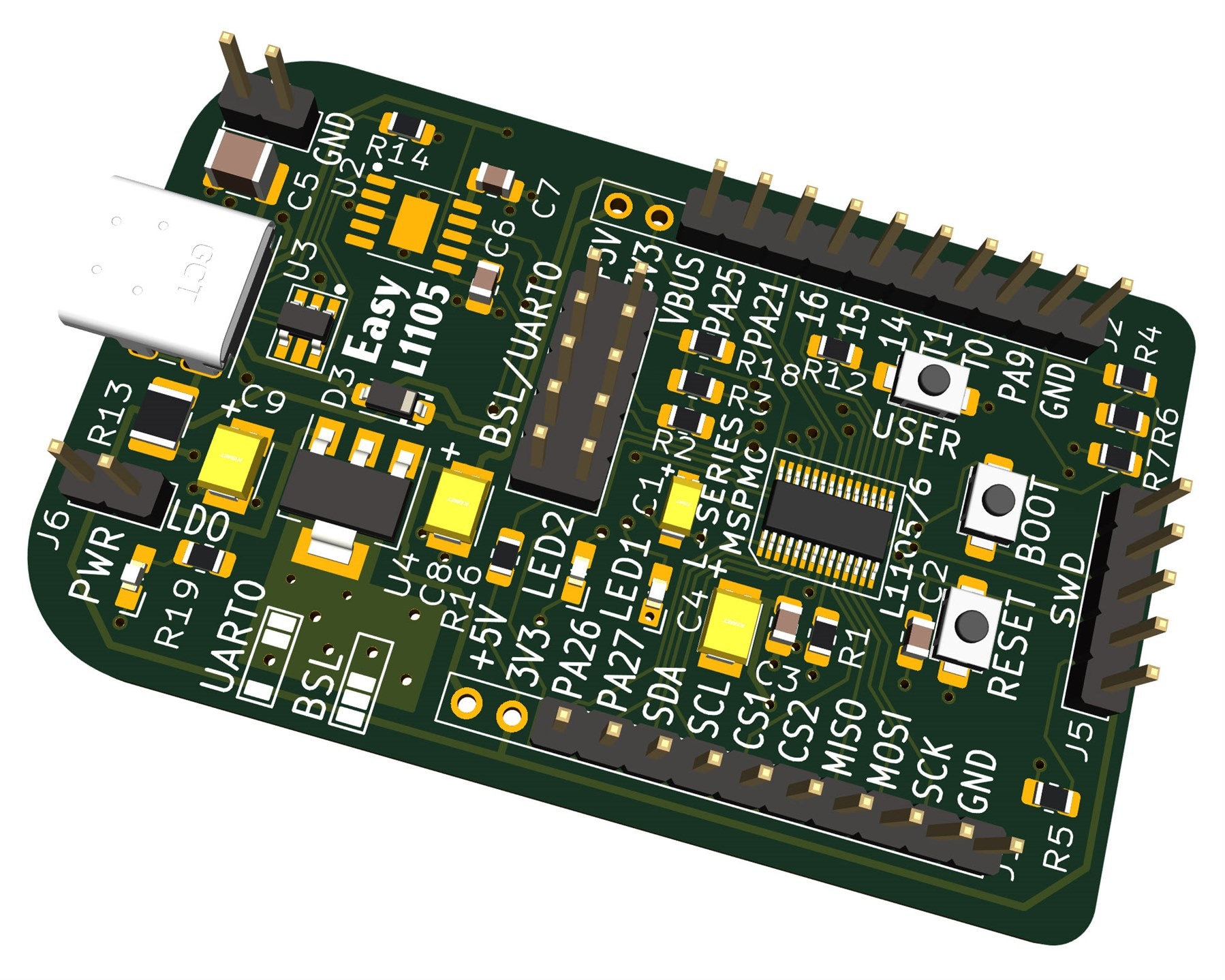
Circuit Board

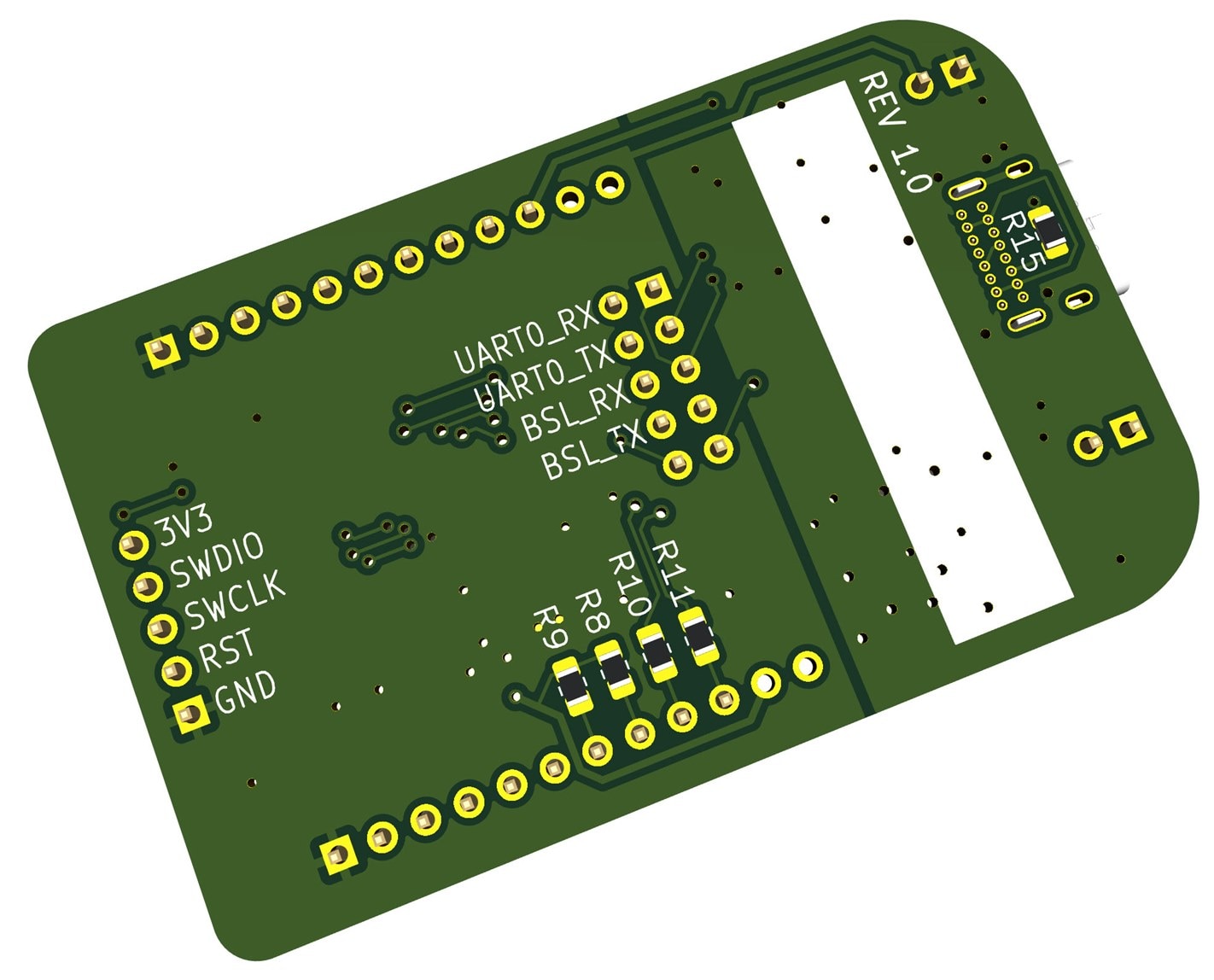
An approximate render of the circuit board is shown below; it is about 60 x 40 mm.
image

Underside:

image

Building and Running an Example Project

All the steps are described at the README file in the easyL1105 GitHub repository. Scroll down to the Example Project section to see the detail. By following the steps there, it is possible to build using either Keil or with GCC. The Keil steps were tested with Windows. GCC was tested with Windows and Linux.

The steps to use TI's UniFlash tool, for uploading the built .hex firmware file to the board, are also described at the same location.

Summary

TI’s MSPM0 L-series microcontrollers offer low-power and low-cost, and a simple development board was created for the 28-pin L1105 part (32 kByte Flash and 4 kByte RAM). The dev-board brings out most of the connections on the microcontroller, and also allows the testing of the serial bootloader capability of the chip, so that it can be programmed in the field, by connecting to a PC without any programmer hardware required.

The KiCad files and PCB files for sending to any PCB manufacturer are in the EasyL1105 GitHub repository. Although the board has not been tested yet (Edit: it has now been assembled and tried out. See the comments below for information about how to use the board). If you give it a go, it would be interesting to hear any feedback.

Also, if you have any ideas/uses for such a board or a similar one, it would be great to hear about them.

Thanks for reading.

  • Sign in to reply

Top Comments

  • shabaz
    shabaz 6 months ago +1
    Maybe worth mentioning how I'm soldering this. Apologies for the low-quality photos, they were taken with mobile phone. I used a small bent-conical tip, but it's not that critical. First step, apply…
  • shabaz
    shabaz 6 months ago in reply to dougw

    Hi Doug,

    That's a really neat idea. That would definitely be viable, especially in the HD44780 4-bit mode which I believe all of those typical alphanumeric displays support, since then only 6 pins are used for the connections to the LCD), plus two for I2C, still leaving pins available for (say) ability to blink the backlight using another I2C command perhaps, and so on.

    • Cancel
    • Vote Up 0 Vote Down
    • Sign in to reply
    • More
    • Cancel
  • shabaz
    shabaz 6 months ago in reply to Jan Cumps

    Interesting.. I was worried about something like this, but forgot to test this.

    I can't think of a good fix for that : ( It's annoying that the chip uses an input for boot mode which happens to be a pin that would idle high if connected to it's other purpose (i.e. UART). In the circuit, there's a weak pull-down (R7), but that will get overridden by the USB-UART chip which will idle high.

    image

    Some possible ideas, all non-great:

    (1) The design could be modified in a rev 2 in order not to use UART on those pins, but that would restrict usage of other features only available on the remainder pins, so that has some negatives : (

    (2) If the MSPM0 chip allows it (I've not checked yet, but it might) configure UART to have inverted signals, and then have logic inverter gates on the RXD and TXD pins.

    (3) If both the CH340 and the MSPM0 chip allow it, configure both of them to use inverted signals! However, CH340K doesn't seem to have that capability : ( whereas, CH340K does, but it's a 16-pin part so again that would be a PCB modification, and is still dependent on if the MSPM0 supports the inversion too

    (4) Some way of temporarily overriding it low on reset, e.g. an AND gate could do it, using it inline with the RXD connection, and the other input wired to *RST. Maybe an easy-to-solder SOT23-sized SN74LV1T08DBVR for instance, and it could be bodged on the board, by cutting the track shown. Might actually be a tidy fix since all the needed connections are close by there.

    image

    Of all of those, the only viable one is (4) on the current board. Even on a rev 2 board, options (2) and (3) are ugly, because they mean that code written to use the UART would be different to code written for (4), so even on a Rev 2, maybe option (4) is the one to go for (assuming it can work).

    • Cancel
    • Vote Up 0 Vote Down
    • Sign in to reply
    • More
    • Cancel
  • Jan Cumps
    Jan Cumps 6 months ago

    I think I found a board issue:

    When the UART jumpers are placed, the board doesn't start. Even after pressing reset

    If you place the UART jumpers after the board is running, it keeps running. 

    Both after power up, or when pushing reset while powered .

    Same behaviour when RST jumper is mounted or not.

    Easiest way to replicate: use the demo program, and plug the USB in a PC with or without the UART jumpers. See LED flash behaviour.

    • Cancel
    • Vote Up 0 Vote Down
    • Sign in to reply
    • More
    • Cancel
  • dougw
    dougw 6 months ago in reply to shabaz

    Does it have enough pins to make an adapter to convert I2C to drive an alphanumeric LCD?

    • Cancel
    • Vote Up 0 Vote Down
    • Sign in to reply
    • More
    • Cancel
  • shabaz
    shabaz 6 months ago

    Project Ideas!

    Now that the microcontroller minimal boot hardware, bootloader methods, build methods and peripheral usage are all known or coming along well, it's becoming easy to see what sort of applications might be possible with it.

    Here's some that come to mind, although not initially the reason I wished to use the microcontroller for:

    1. A power management device

    The idea is that it could wake or sleep hardware based on a push-button, and maybe configurable via I2C for periodic wakeup. An emulated EEPROM (as used with the PocketBeagle2) could be extremely useful as part of it, I'm frequently missing EEPROM in microcontroller circuits!

    1.5 (phase 2 of idea 1)

    Ability to control a micro-sized OLED, that could display status over I2C, for instance, an IP address or startup/shutdown status.

    2. A UART pass-through, with ability to detect special sequences or keywords, for (say) starting up or shutting down hardware.

    3. A chime generator, ideally with say FM synthesis, using PWM, for decent alert or warning sounds. 

    Any other ideas?

    • Cancel
    • Vote Up 0 Vote Down
    • Sign in to reply
    • More
    • Cancel
<>
element14 Community

element14 is the first online community specifically for engineers. Connect with your peers and get expert answers to your questions.

  • Members
  • Learn
  • Technologies
  • Challenges & Projects
  • Products
  • Store
  • About Us
  • Feedback & Support
  • FAQs
  • Terms of Use
  • Privacy Policy
  • Legal and Copyright Notices
  • Sitemap
  • Cookies

An Avnet Company © 2026 Premier Farnell Limited. All Rights Reserved.

Premier Farnell Ltd, registered in England and Wales (no 00876412), registered office: Farnell House, Forge Lane, Leeds LS12 2NE.

ICP 备案号 10220084.

Follow element14

  • X
  • Facebook
  • linkedin
  • YouTube