element14 Community
element14 Community
    Register Log In
  • Site
  • Search
  • Log In Register
  • Community Hub
    Community Hub
    • What's New on element14
    • Feedback and Support
    • Benefits of Membership
    • Personal Blogs
    • Members Area
    • Achievement Levels
  • Learn
    Learn
    • Ask an Expert
    • eBooks
    • element14 presents
    • Learning Center
    • Tech Spotlight
    • STEM Academy
    • Webinars, Training and Events
    • Learning Groups
  • Technologies
    Technologies
    • 3D Printing
    • FPGA
    • Industrial Automation
    • Internet of Things
    • Power & Energy
    • Sensors
    • Technology Groups
  • Challenges & Projects
    Challenges & Projects
    • Design Challenges
    • element14 presents Projects
    • Project14
    • Arduino Projects
    • Raspberry Pi Projects
    • Project Groups
  • Products
    Products
    • Arduino
    • Avnet & Tria Boards Community
    • Dev Tools
    • Manufacturers
    • Multicomp Pro
    • Product Groups
    • Raspberry Pi
    • RoadTests & Reviews
  • About Us
  • Store
    Store
    • Visit Your Store
    • Choose another store...
      • Europe
      •  Austria (German)
      •  Belgium (Dutch, French)
      •  Bulgaria (Bulgarian)
      •  Czech Republic (Czech)
      •  Denmark (Danish)
      •  Estonia (Estonian)
      •  Finland (Finnish)
      •  France (French)
      •  Germany (German)
      •  Hungary (Hungarian)
      •  Ireland
      •  Israel
      •  Italy (Italian)
      •  Latvia (Latvian)
      •  
      •  Lithuania (Lithuanian)
      •  Netherlands (Dutch)
      •  Norway (Norwegian)
      •  Poland (Polish)
      •  Portugal (Portuguese)
      •  Romania (Romanian)
      •  Russia (Russian)
      •  Slovakia (Slovak)
      •  Slovenia (Slovenian)
      •  Spain (Spanish)
      •  Sweden (Swedish)
      •  Switzerland(German, French)
      •  Turkey (Turkish)
      •  United Kingdom
      • Asia Pacific
      •  Australia
      •  China
      •  Hong Kong
      •  India
      • Japan
      •  Korea (Korean)
      •  Malaysia
      •  New Zealand
      •  Philippines
      •  Singapore
      •  Taiwan
      •  Thailand (Thai)
      • Vietnam
      • Americas
      •  Brazil (Portuguese)
      •  Canada
      •  Mexico (Spanish)
      •  United States
      Can't find the country/region you're looking for? Visit our export site or find a local distributor.
  • Translate
  • Profile
  • Settings
Embedded and Microcontrollers
  • Technologies
  • More
Embedded and Microcontrollers
Embedded Forum Freescale Kinetis software & mbed.org compiler
  • Blog
  • Forum
  • Documents
  • Quiz
  • Polls
  • Files
  • Members
  • Mentions
  • Sub-Groups
  • Tags
  • More
  • Cancel
  • New
Join Embedded and Microcontrollers to participate - click to join for free!
Actions
  • Share
  • More
  • Cancel
Forum Thread Details
  • State Verified Answer
  • Replies 15 replies
  • Answers 1 answer
  • Subscribers 474 subscribers
  • Views 1684 views
  • Users 0 members are here
  • kinetis
  • mbed
  • k64f
  • ksdk
Related

Freescale Kinetis software & mbed.org compiler

Former Member
Former Member over 11 years ago

Has anyone any experience (successful preferably) at exporting code from mbed to Kinetis SDK?

I have been playing with a FRDM K64F board and found it much easier to create code using the mbed compiler.

However debugging is a complete mystery to me ( other than printf statements)

The learning curve for KDSK etc is extreemly steep.

My main misfortune is to use WIN8.1

secondly to choose a recently released mbed device where most documentation is for something else!

So a few pointers would be gratefully received.

georgemm101

  • Sign in to reply
  • Cancel

Top Replies

  • Former Member
    Former Member over 11 years ago in reply to clem57 +1
    I was actually able to do this for the FRDM-K64F last week. I took one of the basic pre-built examples in mbed.org and brought it into Kinetis Design Studio, and could successfully compile and debug. I…
  • FreescaleTools_and_Software
    FreescaleTools_and_Software over 11 years ago +1
    Hi guys This discussion should be probably moved to the dedicated place in Design Center for the Freedom Development Platform HERE as the informations will be useful for other Freedom and mbed users Thank…
  • clem57
    clem57 over 11 years ago in reply to Former Member +1
    That's why I wait for others to cross the frontier! Clem
Parents
  • Former Member
    0 Former Member over 11 years ago

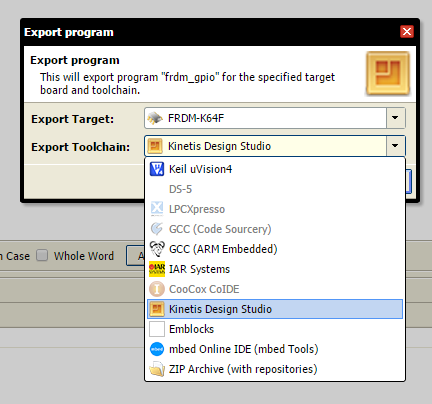
    In mbed, right click on your project and select "Export Program..."

    image


    Then in the dialog box that comes up, select the Kinetis Design Studio toolchain under "Export Toolchain:" and then click on the Export button. You could of course also select the other available toolchains like Keil or IAR.

    image


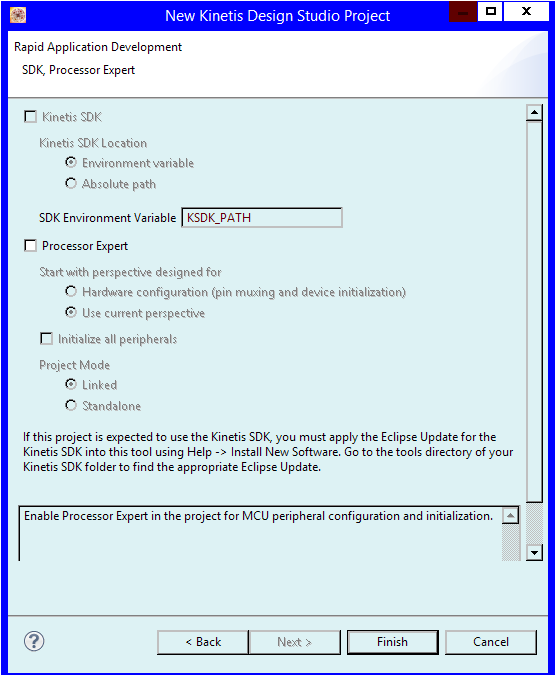
    The website will think for a while and then give you a zip file to download. Unzip it, and import it into KDS like normal (see here for an example: [FRDM-K64F + Kinetis Design Studio (KDS) + Software Dev Kit (SDK)] Tutorial: Toggling an RGB LED without Processor expert).


    It'll compile and there are OpenOCD/CMSIS-DAP debug configurations already prepopulated to easily start debugging via the OpenSDAv2 circuit on the board.


    Inside that zip directory you can also find the KSDK HAL code at \<project_name>\mbed\TARGET_K64F\TARGET_Freescale\TARGET_KPSDK_MCUS\TARGET_KPSDK_CODE

    This obviously is only true for devices supported by KSDK and mbed enabled, so the FRDM-K64F and FRDM-K22F

    • Cancel
    • Vote Up 0 Vote Down
    • Sign in to reply
    • Verify Answer
    • Cancel
Reply
  • Former Member
    0 Former Member over 11 years ago

    In mbed, right click on your project and select "Export Program..."

    image


    Then in the dialog box that comes up, select the Kinetis Design Studio toolchain under "Export Toolchain:" and then click on the Export button. You could of course also select the other available toolchains like Keil or IAR.

    image


    The website will think for a while and then give you a zip file to download. Unzip it, and import it into KDS like normal (see here for an example: [FRDM-K64F + Kinetis Design Studio (KDS) + Software Dev Kit (SDK)] Tutorial: Toggling an RGB LED without Processor expert).


    It'll compile and there are OpenOCD/CMSIS-DAP debug configurations already prepopulated to easily start debugging via the OpenSDAv2 circuit on the board.


    Inside that zip directory you can also find the KSDK HAL code at \<project_name>\mbed\TARGET_K64F\TARGET_Freescale\TARGET_KPSDK_MCUS\TARGET_KPSDK_CODE

    This obviously is only true for devices supported by KSDK and mbed enabled, so the FRDM-K64F and FRDM-K22F

    • Cancel
    • Vote Up 0 Vote Down
    • Sign in to reply
    • Verify Answer
    • Cancel
Children
  • Former Member
    0 Former Member over 11 years ago in reply to Former Member

    Thanks Anthony I will give it a go later.


    George

    • Cancel
    • Vote Up 0 Vote Down
    • Sign in to reply
    • Verify Answer
    • Cancel
  • Former Member
    0 Former Member over 11 years ago in reply to Former Member

    As with everything to do with kinetis, its the detail that counts!

    Importing the project is half the battle. I was unable to do any debugging until the Segger openSDA Bootloader was installed in the K64F Board ( not the mbed version).

    I never finished debugging, for that matter i never really stated as i got distracted by KDS V2.0 being released.

    So now I am back at square one.image

    KDS2 .0 is another story, typical of the lack of attention to detail by Freescale.

    Do they do Quality at Freescale?

    Does anybody check the release before it goes out?

    I guess we have to install the KDSK again! what else is missing?

    I have spent weeks struggling with the beta version, and 1.1.1, so now its start over............

    I am rapidly loosing the will to live.....

    Is there a product that works first time

    george

    • Cancel
    • Vote Up 0 Vote Down
    • Sign in to reply
    • Verify Answer
    • Cancel
  • clem57
    0 clem57 over 11 years ago in reply to Former Member

    That's why I wait for others to cross the frontier!image


    Clem

    • Cancel
    • Vote Up +1 Vote Down
    • Sign in to reply
    • Verify Answer
    • Cancel
  • Former Member
    0 Former Member over 11 years ago in reply to Former Member

    Hi george,

    You have to install the KSDK eclipse plugin first. That plugin is what tells KDS (and other eclipse based tools) about Kinetis SDK.  Instructions are in Section 4.4.1 of the C:\Freescale\KSDK_1.0.0\doc\Kinetis SDK K64 User's Guide.pdf


      Then when using the new project wizard, you also have to make sure you're selecting a device/board supported by Kinetis SDK.


      You don't have to re-install KSDK. Hope that helps.


    -Anthony

    • Cancel
    • Vote Up +1 Vote Down
    • Sign in to reply
    • Reject Answer
    • Cancel
  • FreescaleTools_and_Software
    0 FreescaleTools_and_Software over 11 years ago in reply to Former Member

    Hi George


    Please keep living ... we are here to support you ;D


    Based on your description, I understand that you are using a FRDM-K64F hardware, right ?


    To debug with Kinetis Design Studio, you need to reprogram the OpenSDA debug interface of your FRDM-K64F which is preprogrammed in factory with the mbed mode. Simply keep reset button press while plugging the -mini-USB cable to the USB port corresponding to the OpenSDA interface. In windows file explorer, you will see a new drive Bootloader. Drag n drop the Segger JLink v2.0 file inside then unplug and replug your usb cable. Bootloader drive should have disappeared and you should have a new JLink device in Device Manager. Your board is now setup to debug in KDS.


    As mentioned by Anthony KDS is the compiler/debugger toolchain and KSDK is a library/driver package. To avoid a frequent KDS update as soon as a new Kinetis derivatives are launched, Freescale has developped KSDK separately to the compiler/debugger. To get KSDK available in KDS 2.0, no need to reinstall it, you just need to go to Help/Install New Software make Add, then Archive and select the file "SDK_1.0.0-GA_Update_for_Eclipse.zip" available at KSDK_1.0.0\tools\eclipse_update as explained in the Kinetis SDK User Guide.


    To save your time, I recommend you to follow Bheema's first step tutorials for Freedom with KDS and SDK available at Freescale Freedom development platform


    Don't hesitate if you have additional questions.

    • Cancel
    • Vote Up +1 Vote Down
    • Sign in to reply
    • Verify Answer
    • Reject Answer
    • Cancel
element14 Community

element14 is the first online community specifically for engineers. Connect with your peers and get expert answers to your questions.

  • Members
  • Learn
  • Technologies
  • Challenges & Projects
  • Products
  • Store
  • About Us
  • Feedback & Support
  • FAQs
  • Terms of Use
  • Privacy Policy
  • Legal and Copyright Notices
  • Sitemap
  • Cookies

An Avnet Company © 2025 Premier Farnell Limited. All Rights Reserved.

Premier Farnell Ltd, registered in England and Wales (no 00876412), registered office: Farnell House, Forge Lane, Leeds LS12 2NE.

ICP 备案号 10220084.

Follow element14

  • X
  • Facebook
  • linkedin
  • YouTube