Is there a way I can generate 0 to 50mV for a meter (dc most likely) from an Arduino Mega?? Any thoughts would be appreciated.
I need two of the sources. so the cheaper the better.
~~Cris
Be sure to click 'more' and select 'suggest as answer'!
If you're the thread creator, be sure to click 'more' then 'Verify as Answer'!
Is there a way I can generate 0 to 50mV for a meter (dc most likely) from an Arduino Mega?? Any thoughts would be appreciated.
I need two of the sources. so the cheaper the better.
~~Cris
The analogWrite instruction uses PWM and a resistor and capacitor on the pin to generate an analog voltage:
https://www.instructables.com/Arduino-RC-Circuit-PWM-to-analog-DC/
The Mega can have 14 PWM pins, each with a different PWM output.
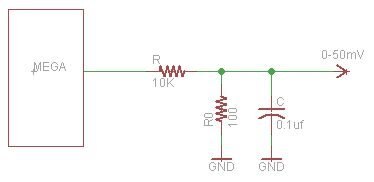
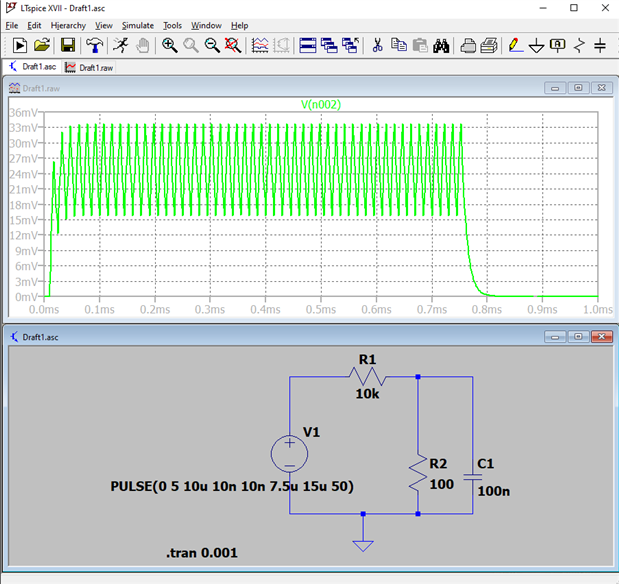
If you want better resolution, you could divide the max 5 V output with a resistor divider. Say a 10K and a 100 ohm, gets pretty close to 50 mV.
The capacitor value may not be ideal.
The time constant of the RC filter is 10us as drawn.
With a PWM frequency of 64kHz (about as fast as an Arduino can go) this will make a lot of ripple.
The ripple is at 64kHz and may not matter. But if it does then increas the value of R1 and R2 by a factor of 10 or more (the limit is the source impedance you can cope with).
Or increase C1.
The lmit of the max RC that is tolerable will depoend on the response time you need. With these values it's less than 100us which is probably much too fast.
With C1 = 10uF the response time will be less than 10ms and the ripple down to 0.3mV pk-pk (about 1.2%).
MK
You're probably aware of this Chris, but it may be worth stating anyway. An IO pin is absolute maximum 40mA but recommended at 20mA. Additionally, there is an overall maximum current draw across all pins, see note 4 on page 356 of the datasheet.
Good point Michael. I didn't calculate the ripple. While an analog meter is a type of filter, getting the ripple down is as easy as picking a better cap.
I had missed that the load is a meter - and from what we know of phoenixcomm work it will likely be a moving coil device.
In which case the ripple probably won't matter very much.
MK
Hi phoenixcomm ,
Please can you a bit explain your needing, your application? e.g. with a photo, or drawing?
0...50mV output voltage can earn a big problem.
Normally under 0,9 V the output signal is logical LOW. Under that the voltages are not defined because at this area you have noise, GND bouncing, threshold and so on.
Please read in the data sheet, page 385, in the chapter 32.7 "Pin driver strength".
You will find the diagram fig. 32-22 I/O Pin output voltage vs. sink current (VCC = 3V). which says that if you sink the pin with 3mA the output voltage will rise up to 0.1V.
And so on,,,, with a 20mA load gets rising up to 0.7 V (25°C; 0.85V 85°C).
Similar you have this as well with the 5V source.
So direct source like with a PWM or so, does not functioning, I think.
-> With a PWM the output voltage can very big vary if you have not a right limitation. Once toggling the frequency or pulse width the output voltage grows up.
What I can think about (I don't know your appl. "for a meter, you said"), if you make a virtual GND with an OPAMP (driven by the I/O pin), and with a DAC trim it with the offset to your 50mV.
Must the 50mV be switch-on able?
Best Regards
Gerald
---
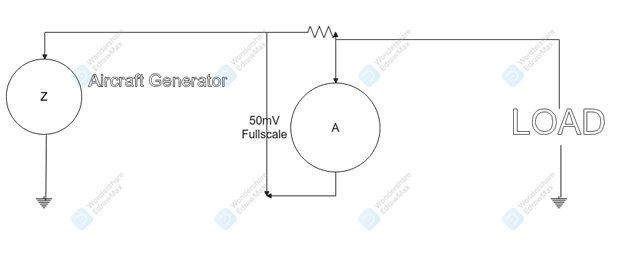
geralds Hi, basically i need to emulate a high current shunt, my load meter has 50mV fullscale defection.
there are pics and info about the load meter here.
grr. could not load my tiff image. so basically you have a generator with - to ground and + to the shunt, on one side of the shunt run a wire to the meter, and another to the LOAD. the other side of the shunt one of the wires goes to the loads ground the other wire goes to the - terminal on the meter.
I just had a senior moment I converted the image from tiff to jpg. :)
I want to do this with the PCM output from the Arduino Max. The meter has 16 tics, so I really should hit all of them + the ones in-between as well
I need to spend as little money as possible, or, as cheaply as I can get away with.
thanks again.
~Cris.
BTW since the meter is messuring Load which is just a percent of Total load so arbitry numbers are fine.
Hi Cris,
I just remembered I had to drive a meter with Arduino too a while back, although I used an Arduino Micro, maybe the ideas are similar with Arduino Mega).
The info is here:
Sensirion Gas/Temp/Humidity Sensor Kit - Review
The code is here:
https://github.com/shabaz123/FeelWellMeter/blob/master/env-sensor.ino
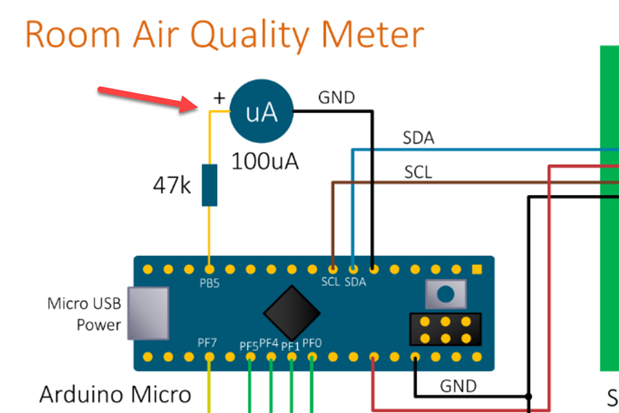
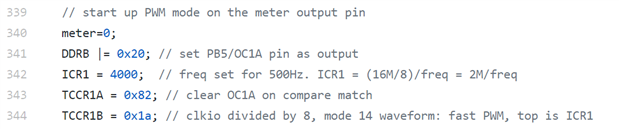
I don't remember it in any detail, but line 23 in the code there defines the constant 'meter' to be pin PB5, where the meter is wired as can be seen in the diagram above.
Lines 339-344 set up the PWM mode, and this may change on Arduino Mega.
Then, whenever the meter reading needs to change, then 'meter' is just set to a different value.
For example, to make the needle swing to maximum, then wait three seconds, then swing to minimum, the following code is used (max and mmin can be calculated or just try any values for experimentally determining them, in my case they were 100 and 3500 respectively, for the 100uA meter):
shabaz looks very straight forward I shall give it a try. From what I am seeing for my 50mv meter all I will have to do double R1 to about 95 ohms.
Thank you immensely.
~~ Cris
shabaz I also looked at your stuff on git hub. nice work. You don't mind if I borrow some of it. And of course, I will give affirmations. in each function.
~~Cris