element14 Community
element14 Community
    Register Log In
  • Site
  • Search
  • Log In Register
  • Community Hub
    Community Hub
    • What's New on element14
    • Feedback and Support
    • Benefits of Membership
    • Personal Blogs
    • Members Area
    • Achievement Levels
  • Learn
    Learn
    • Ask an Expert
    • eBooks
    • element14 presents
    • Learning Center
    • Tech Spotlight
    • STEM Academy
    • Webinars, Training and Events
    • Learning Groups
  • Technologies
    Technologies
    • 3D Printing
    • FPGA
    • Industrial Automation
    • Internet of Things
    • Power & Energy
    • Sensors
    • Technology Groups
  • Challenges & Projects
    Challenges & Projects
    • Design Challenges
    • element14 presents Projects
    • Project14
    • Arduino Projects
    • Raspberry Pi Projects
    • Project Groups
  • Products
    Products
    • Arduino
    • Avnet & Tria Boards Community
    • Dev Tools
    • Manufacturers
    • Multicomp Pro
    • Product Groups
    • Raspberry Pi
    • RoadTests & Reviews
  • About Us
  • Store
    Store
    • Visit Your Store
    • Choose another store...
      • Europe
      •  Austria (German)
      •  Belgium (Dutch, French)
      •  Bulgaria (Bulgarian)
      •  Czech Republic (Czech)
      •  Denmark (Danish)
      •  Estonia (Estonian)
      •  Finland (Finnish)
      •  France (French)
      •  Germany (German)
      •  Hungary (Hungarian)
      •  Ireland
      •  Israel
      •  Italy (Italian)
      •  Latvia (Latvian)
      •  
      •  Lithuania (Lithuanian)
      •  Netherlands (Dutch)
      •  Norway (Norwegian)
      •  Poland (Polish)
      •  Portugal (Portuguese)
      •  Romania (Romanian)
      •  Russia (Russian)
      •  Slovakia (Slovak)
      •  Slovenia (Slovenian)
      •  Spain (Spanish)
      •  Sweden (Swedish)
      •  Switzerland(German, French)
      •  Turkey (Turkish)
      •  United Kingdom
      • Asia Pacific
      •  Australia
      •  China
      •  Hong Kong
      •  India
      • Japan
      •  Korea (Korean)
      •  Malaysia
      •  New Zealand
      •  Philippines
      •  Singapore
      •  Taiwan
      •  Thailand (Thai)
      • Vietnam
      • Americas
      •  Brazil (Portuguese)
      •  Canada
      •  Mexico (Spanish)
      •  United States
      Can't find the country/region you're looking for? Visit our export site or find a local distributor.
  • Translate
  • Profile
  • Settings
Experts, Learning and Guidance
  • Technologies
  • More
Experts, Learning and Guidance
Ask an Expert Forum How could I install a new 12 volt backlight?
  • Blog
  • Forum
  • Documents
  • Leaderboard
  • Files
  • Members
  • Mentions
  • Sub-Groups
  • Tags
  • More
  • Cancel
  • New
Join Experts, Learning and Guidance to participate - click to join for free!
Actions
  • Share
  • More
  • Cancel
Forum Thread Details
  • State Verified Answer
  • Replies 51 replies
  • Answers 5 answers
  • Subscribers 307 subscribers
  • Views 7834 views
  • Users 0 members are here
  • monitor
  • power
  • backlighting
Related
See a helpful answer?

Be sure to click 'more' and select 'suggest as answer'!

If you're the thread creator, be sure to click 'more' then 'Verify as Answer'!

How could I install a new 12 volt backlight?

bwarren97
bwarren97 over 10 years ago

I have a 1080p monitor that I really really liked, until its backlight started being a butthead. So, I decided to take out the old backlight, and stick in an aftermarket one. I thought it would be nice and simple, until I realized that the LED driver ran on 12 volts and there was no 12 volt output anywhere on the monitor (the original LED was driven by 80 volts).
I have confirmed that the backlight works by jump-wiring it to a PC power supply, but I need a somewhat space-saving method of driving it within the monitor case using its own power supply so that it turns on and off with the monitor. I would like to just solder a 12 volt regulator directly onto the 80 volt output, but I don't know if there is a small chip capable of providing sufficient power or stepping down that much voltage. Any ideas?

  • Sign in to reply
  • Cancel

Top Replies

  • mcb1
    mcb1 over 9 years ago in reply to bwarren97 +2 suggested
    An optocoupler (as you discovered when you seardhed it) provides isolation between sides (LED) and the other (Transistor/Tirac/SCR). They come in various forms and some are much more sensitive than others…
  • shabaz
    shabaz over 10 years ago +1
    You can apply ohm's law and the power equation and see immediately you have a very high amount of power to dissipate as cmay77 mentions - heatsinks and fan time basically. So, theoretically possible with…
  • shabaz
    shabaz over 10 years ago in reply to bwarren97 +1
    By connecting to a 80V supply, even if your backlight draws just 0.3A (4W), your heatsink will need to dissipate more than 20W - that's a huge heatsink. Furthermore, the supply you measured is probably…
Parents
  • cmay77
    0 cmay77 over 10 years ago

    Okay, first of all you cannot just solder in a voltage regulator directly to your 80 volt output is just going to blow your new backlight. First things first we need to get some information about your new backlight, and your tv. Specifically what is the current rating of the light, and what is the current output of the TV power supply driver?

    While hooking up a voltage regulator will change the output voltage it will not limit the current. This will be just like hooking up and led up directly to a battery. Once you have the current output and the current rating we can design a circuit that will limit the current, and drop the voltage, the circuit will most likely integrate a voltage regulator. You also probably need a couple of half watt or 1 watt resistors dropping from 80 volts down to 12 volts will cause a high rate of power dissipation, and since your television will be running for extended periods of time, you will want to make the circuit as close to indestructible as possible. Also keep in mind that the voltage regulator dropping from 80 down to 12 volts is also going to be dissipating a great deal of heat, you're going to have to have a heat sink attached to it and that will take up a bit of space, and you don't want that touching any of the plastic parts of the television.


    Please post the following information:

    Backlight power dissipation, and current rating.

    Television monitor driver current output.


    You should be able to find all this in the data sheet for the light bar, might have to do some digging to get the information about the television driver output. If you can't find the information for the television we can still probably design the circuit by assuming that the television current source will attempt to supply infinite current, it would just be nice to have that information handy.

    • Cancel
    • Vote Up 0 Vote Down
    • Sign in to reply
    • Verify Answer
    • Cancel
  • bwarren97
    0 bwarren97 over 10 years ago in reply to cmay77

    Well, here's the problem. The backlight I purchased had literally no documentation attached. It's a cheap one from China. All I know is that the LED driver that it shipped with runs on 12 volts at least, and it needs an enable signal. I am very hesitant to attach my multimeter to read the current draw of it, as my multimeter has a 10 amp capacity and has no fuse (the milliamp setting is also unfused since the original fuse blew and I just decided to bypass it)


    What I meant about tying a regulator to the 80v output, I meant attaching the new driver to that with the 12v regulator or something. The LED driver would then limit the current if I am not mistaken, since it ran just fine from the PC power supply. If I can grab power from somewhere else on the power board that turns off when it goes into sleep mode, then that would be great. The enable line on the LED driver can take as little as 5v (based on what I used on the PC power supply) to turn on, so that can be separate.


    As for the calibration and whatnot, I don't really think that's necessary, because I ran the panel with the new backlight in there and I was very satisfied with the results. It works, but now I'm just looking for a way to run it as just the monitor, not a string of parts everywhere.


    I will do some research on the monitor. It is an ASUS VK248. What I do know is that the power going to the logic is just 5v.


    In my opinion, there appears to be plenty of space for a heat sink to fit within the metal shielding of the device. Here's some pictures to maybe give you guys a better idea. https://drive.google.com/folderview?id=0B5FOtrrp9MnYZDMwcHI1TUJxOUU&usp=sharing

    • Cancel
    • Vote Up 0 Vote Down
    • Sign in to reply
    • Verify Answer
    • Cancel
  • cmay77
    0 cmay77 over 10 years ago in reply to bwarren97

    That LED bar isn't  going to be pulling anything close to 10 amps. My stove in my kitchen doesn't pull 10 amps. You should be fine to use your meter.

    • Cancel
    • Vote Up 0 Vote Down
    • Sign in to reply
    • Verify Answer
    • Cancel
  • shabaz
    0 shabaz over 10 years ago in reply to bwarren97

    By connecting to a 80V supply, even if your backlight draws just 0.3A (4W), your heatsink will need to dissipate more than 20W - that's a huge heatsink.

    Furthermore, the supply you measured is probably a constant current supply (i.e. designed specifically to power the LEDs that were originally there), whereas your LED strips require a 12V constant voltage supply (and they will draw whatever current is needed). Your LED strip is incompatible with a constant current supply since you mention they need a fixed 12V.

    You won't be able to tell if your supply is a fixed 80V until you also measure the supply under a different load.

    • Cancel
    • Vote Up +1 Vote Down
    • Sign in to reply
    • Verify Answer
    • Cancel
  • bwarren97
    0 bwarren97 over 10 years ago in reply to shabaz

    Well, if I can't connect to the 80v supply, then I suppose I can try to wire up an AC adapter inside the thing, and see if I can find one of the logic power pins to connect to the enable line? Or is it a very bad idea, dealing with AC?

    • Cancel
    • Vote Up 0 Vote Down
    • Sign in to reply
    • Verify Answer
    • Cancel
  • mcb1
    0 mcb1 over 10 years ago in reply to bwarren97

    I fixed quite a few LCD monitors.

    Most of the problem stems from capacitors that have dried out due to age (many are rated for a year or two).

    Have you tried replacing the capacitors in the original backlight driver board.??


    It's usually a few dollars to get something with 2-3 years life expectancy.


    Most monitors have a AC to DC converter, which then has a DC-DC converter and some regulators for the lower voltages.

    You'll probably need an external supply, since the DC-DC converter is unlikely to have another 4-5 watts at 12v.


    You could use an optocoupler to drive the enable pin, which means you don't have to mess with power from different sources.

    ie connect the LED side through a resistor to the monitor 5v, and the transistor side to the 12v and enable pin.


    Mark

    • Cancel
    • Vote Up 0 Vote Down
    • Sign in to reply
    • Verify Answer
    • Reject Answer
    • Cancel
  • bwarren97
    0 bwarren97 over 10 years ago in reply to mcb1

    I have fixed TVs with bad capacitors as well, so I know that can be a problem. However, all the capacitors seem to be fine. Regardless, I knew that the original LED strip was damaged because I saw some lamps weren't fully lit, and it was causing it to go dim or immediately turn off after a few milliseconds. And even now it's even more damaged somehow, so it's completely unusable.


    I was thinking I can probably get a converter brick small enough to maybe fit inside the case if I take the casing off somehow. If I could find a part of the board that outputs something much closer to 12v that would be great, but most of everything is either way too high or too low. I think I remember finding a 50v output somewhere on the board.


    I might have to find a place to put a brightness knob in, because if the board has the constant current method like shabaz said I don't think I'd be able to use that line to control the brightness normally.


    I had no idea what an optocoupler was, so I looked it up, and that looks like a really good idea. I probably need to connect it to a resistor of some sort on the high voltage side, right?

    • Cancel
    • Vote Up 0 Vote Down
    • Sign in to reply
    • Verify Answer
    • Cancel
  • mcb1
    0 mcb1 over 10 years ago in reply to bwarren97

    converter brick small enough to maybe fit inside the case if I take the casing off somehow

    That should be possible, and most are simply a board inside with a power socket on the end.


    I probably need to connect it to a resistor of some sort on the high voltage side, right?

    No, as I suggested above..

    connect the LED side through a resistor to the monitor 5v, and the transistor side to the 12v and enable pin.

    If the 5v gets switched when the monitor is 'sleeping' or in rest state, you can use this.

    As long as you can find a voltage that drops when the monitor goes to sleep, you should be able to use it on the LED side of the optocoupler.


    I assume the enable line can be switched with 12v, so I'd use your new supply to enable it.


    Mark

    • Cancel
    • Vote Up 0 Vote Down
    • Sign in to reply
    • Verify Answer
    • Cancel
  • bwarren97
    0 bwarren97 over 10 years ago in reply to mcb1

    Oh, I was thinking of putting the optocoupler on the 80v backlight output, because the monitor does also turn off the backlight when switching inputs or screen resolutions. Also, the enable pin  on my driver can be driven by 5v, that's why I suggested the logic board power.

    • Cancel
    • Vote Up 0 Vote Down
    • Sign in to reply
    • Verify Answer
    • Cancel
  • bwarren97
    0 bwarren97 over 10 years ago in reply to bwarren97

    I ordered a 12v supply and an optocoupler from Mouser. When I solder to the AC power, I imagine I won't need very thick wires, right?

    • Cancel
    • Vote Up 0 Vote Down
    • Sign in to reply
    • Verify Answer
    • Cancel
  • mcb1
    0 mcb1 over 10 years ago in reply to bwarren97

    When I solder to the AC power, I imagine I won't need very thick wires, right

    correct.

    • Cancel
    • Vote Up 0 Vote Down
    • Sign in to reply
    • Verify Answer
    • Cancel
Reply
  • mcb1
    0 mcb1 over 10 years ago in reply to bwarren97

    When I solder to the AC power, I imagine I won't need very thick wires, right

    correct.

    • Cancel
    • Vote Up 0 Vote Down
    • Sign in to reply
    • Verify Answer
    • Cancel
Children
  • bwarren97
    0 bwarren97 over 9 years ago in reply to mcb1

    I received the parts I ordered and started hooking things up. As I was testing voltages I noticed a single line that switches to ~3.5v whenever the backlight is supposed to turn on, so I really want to use that. Is there a specific reason I need to use the optocoupler, though?

    • Cancel
    • Vote Up 0 Vote Down
    • Sign in to reply
    • Verify Answer
    • Cancel
  • mcb1
    0 mcb1 over 9 years ago in reply to bwarren97

    An optocoupler (as you discovered when you seardhed it) provides isolation between sides (LED) and the other (Transistor/Tirac/SCR).


    They come in various forms and some are much more sensitive than others, but the important part is the LED side can be driven by almost any voltage with a few milliamps.

    When the LED illuminates (internally) it causes the transistor/Triac/SCR to conduct, which can then switch a different voltage which may not be even common to the LED side.


    The nearest equivalent is a relay, which usually require 5 volts and 50-100mA.


    So the answer is NO but it is the simpliest and cheapest solution in your application.


    Mark

    • Cancel
    • Vote Up +2 Vote Down
    • Sign in to reply
    • Verify Answer
    • Reject Answer
    • Cancel
  • bwarren97
    0 bwarren97 over 9 years ago in reply to mcb1

    Okay, I don't know what I'm doing wrong.


    I now have a  FOD3180FOD3180 and a FOD3184 Both of these chips act the exact same way it seems but I can't get either of them to work


    I have 5v going through a 1k resistor to the LED side of the chip, then going to an external LED so I confirm it's working (I don't want to break another one >.<). On the other side, I have 12v on VCC and ground on VSS, and a .1 uf capacitor between them just as the datasheet points out. Monitoring the voltage on the output pins, literally nothing is happening between when the LED is on or off. The only way I get any difference is if I have either 12v or Ground disconnected, but it doesn't do anything close to what I want.


    Based on the visuals I'm seeing with the test circuit on the FOD3184 at least, I should be getting what I want to happen: LED off gives no output, LED on gives output.


    By the way, I was testing the brightness line on my backlight driver with a potentiometer. It seems to accept an output between 0 and 5v, but it's not exactly linear, because between 2.2 and 4.5v it gradually dims, but once it hits 4.5v it flickers to a much dimmer state, then stable after 4.5v. I was going to try and see if there was a way to attach the monitor's brightness control to it, I still have yet to find where to probe that, though.

    • Cancel
    • Vote Up 0 Vote Down
    • Sign in to reply
    • Verify Answer
    • Cancel
  • mcb1
    0 mcb1 over 9 years ago in reply to bwarren97

    Blake

    I'm tied up until tomorrow at the earliest.

    If you can send a link to the datasheet for the opto, that will help.


    Mark

    • Cancel
    • Vote Up 0 Vote Down
    • Sign in to reply
    • Verify Answer
    • Cancel
  • bwarren97
    0 bwarren97 over 9 years ago in reply to mcb1

    No problem. Here are the datasheet links.

    https://www.fairchildsemi.com/datasheets/FO/FOD3180.pdf

    https://www.fairchildsemi.com/datasheets/FO/FOD3184.pdf

    • Cancel
    • Vote Up 0 Vote Down
    • Sign in to reply
    • Verify Answer
    • Cancel
  • mcb1
    0 mcb1 over 9 years ago in reply to bwarren97

    bwarren97

    Blake

    A quick check of your connection (well my imagination of it) is

    5v through 1000 ohms into the LED on the Optocoupler and then out to a second LED between the Opto and ground.


    The forward voltage of the LED is 1.2-1.8v so 2x1.8 = 3.6v.

    With 5v driving these the voltage available is 1.4v and the current flowing through the 1k resistor will be 1.4mA.


    I suspect this is too low to trigger the Optocoupler.

    I suggest you change the resistor from 1k down to 150 ohms. (R= E / I  = 1.4 / .008 = 175 ohms.)


    This might give some change on the Output.

    You will need some form of load so add a 1-2K.


    Mark

    • Cancel
    • Vote Up 0 Vote Down
    • Sign in to reply
    • Verify Answer
    • Reject Answer
    • Cancel
  • bwarren97
    0 bwarren97 over 9 years ago in reply to mcb1

    I bought a bunch of resistors. I couldn't find a 150 ohm so I got some 100 and some 10 ohm resistors.

    I wired a bunch in series for 150 ohms, and all I got on the output was -.002 volts. I reduced the resistance down to 100 ohms and the output I got was -.003 volts.

    Should I just try without the other LED? Or just keep reducing the resistance?


    BTW, I have my LED driver connected by the enable pin on the output of the opto. Does that count as load?


    EDIT: I tried with the 1K resistor, still jack-squat.

    • Cancel
    • Vote Up 0 Vote Down
    • Sign in to reply
    • Verify Answer
    • Cancel
  • mcb1
    0 mcb1 over 9 years ago in reply to bwarren97

    Any chance you could give us some pictures, and possibly a schematic.

    (nice focused images will allow us to see the connections)


    The voltage you're getting doesn't make sense, and the issue might be the output side since it should trigger.


    BTW is the LED coming ON??


    Mark

    • Cancel
    • Vote Up 0 Vote Down
    • Sign in to reply
    • Verify Answer
    • Cancel
  • supper_slash
    0 supper_slash over 9 years ago in reply to mcb1

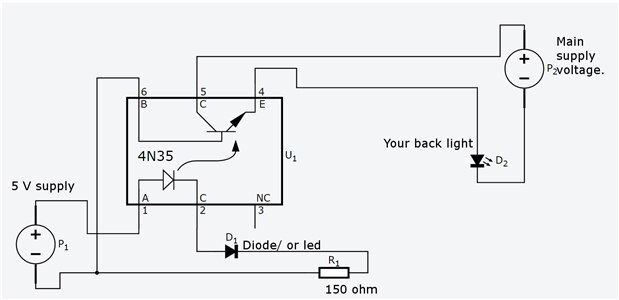
    Here is an idea of what you are doing. image


    Are you sure your led/diode is connected the correct way?

    Just a thought.

    P.S. I know the ground is connected, I just forgot to add that to the diagram.

    Also, Please take Voltage readings for ground, and each "LEG" of the circuit, This will be most helpful.

    I.E. reading at pin 2, than at pin3, resistor, then at diode/Led, both sides, etc.

    • Cancel
    • Vote Up 0 Vote Down
    • Sign in to reply
    • Verify Answer
    • Cancel
  • mudz
    0 mudz over 9 years ago in reply to bwarren97

    Your power supply is on? right? No short connections ? right? No wrong opto-coupler connections? No blown opcto-coupler?

    • Cancel
    • Vote Up 0 Vote Down
    • Sign in to reply
    • Verify Answer
    • Cancel
element14 Community

element14 is the first online community specifically for engineers. Connect with your peers and get expert answers to your questions.

  • Members
  • Learn
  • Technologies
  • Challenges & Projects
  • Products
  • Store
  • About Us
  • Feedback & Support
  • FAQs
  • Terms of Use
  • Privacy Policy
  • Legal and Copyright Notices
  • Sitemap
  • Cookies

An Avnet Company © 2025 Premier Farnell Limited. All Rights Reserved.

Premier Farnell Ltd, registered in England and Wales (no 00876412), registered office: Farnell House, Forge Lane, Leeds LS12 2NE.

ICP 备案号 10220084.

Follow element14

  • X
  • Facebook
  • linkedin
  • YouTube