element14 Community
element14 Community
    Register Log In
  • Site
  • Search
  • Log In Register
  • Community Hub
    Community Hub
    • What's New on element14
    • Feedback and Support
    • Benefits of Membership
    • Personal Blogs
    • Members Area
    • Achievement Levels
  • Learn
    Learn
    • Ask an Expert
    • eBooks
    • element14 presents
    • Learning Center
    • Tech Spotlight
    • STEM Academy
    • Webinars, Training and Events
    • Learning Groups
  • Technologies
    Technologies
    • 3D Printing
    • FPGA
    • Industrial Automation
    • Internet of Things
    • Power & Energy
    • Sensors
    • Technology Groups
  • Challenges & Projects
    Challenges & Projects
    • Design Challenges
    • element14 presents Projects
    • Project14
    • Arduino Projects
    • Raspberry Pi Projects
    • Project Groups
  • Products
    Products
    • Arduino
    • Avnet & Tria Boards Community
    • Dev Tools
    • Manufacturers
    • Multicomp Pro
    • Product Groups
    • Raspberry Pi
    • RoadTests & Reviews
  • About Us
  • Store
    Store
    • Visit Your Store
    • Choose another store...
      • Europe
      •  Austria (German)
      •  Belgium (Dutch, French)
      •  Bulgaria (Bulgarian)
      •  Czech Republic (Czech)
      •  Denmark (Danish)
      •  Estonia (Estonian)
      •  Finland (Finnish)
      •  France (French)
      •  Germany (German)
      •  Hungary (Hungarian)
      •  Ireland
      •  Israel
      •  Italy (Italian)
      •  Latvia (Latvian)
      •  
      •  Lithuania (Lithuanian)
      •  Netherlands (Dutch)
      •  Norway (Norwegian)
      •  Poland (Polish)
      •  Portugal (Portuguese)
      •  Romania (Romanian)
      •  Russia (Russian)
      •  Slovakia (Slovak)
      •  Slovenia (Slovenian)
      •  Spain (Spanish)
      •  Sweden (Swedish)
      •  Switzerland(German, French)
      •  Turkey (Turkish)
      •  United Kingdom
      • Asia Pacific
      •  Australia
      •  China
      •  Hong Kong
      •  India
      • Japan
      •  Korea (Korean)
      •  Malaysia
      •  New Zealand
      •  Philippines
      •  Singapore
      •  Taiwan
      •  Thailand (Thai)
      • Vietnam
      • Americas
      •  Brazil (Portuguese)
      •  Canada
      •  Mexico (Spanish)
      •  United States
      Can't find the country/region you're looking for? Visit our export site or find a local distributor.
  • Translate
  • Profile
  • Settings
Experts, Learning and Guidance
  • Technologies
  • More
Experts, Learning and Guidance
Ask an Expert Forum Beginner here. Designed a PC Arcade Controller, trying to figure out how to make it work.
  • Blog
  • Forum
  • Documents
  • Leaderboard
  • Files
  • Members
  • Mentions
  • Sub-Groups
  • Tags
  • More
  • Cancel
  • New
Join Experts, Learning and Guidance to participate - click to join for free!
Actions
  • Share
  • More
  • Cancel
Forum Thread Details
  • State Suggested Answer
  • Replies 26 replies
  • Answers 10 answers
  • Subscribers 305 subscribers
  • Views 4418 views
  • Users 0 members are here
  • custom arcade stick
  • teensy
Related
See a helpful answer?

Be sure to click 'more' and select 'suggest as answer'!

If you're the thread creator, be sure to click 'more' then 'Verify as Answer'!

Beginner here. Designed a PC Arcade Controller, trying to figure out how to make it work.

lyndan
lyndan over 8 years ago

Over the past month or so I've been working on a design for my ideal PC game controller and I'm getting closer to figuring it all out.. And I was wondering if I could run it by the experts here for some help in understanding it all.

Here is the latest version of my design!

image


It started as my ideal handheld controller and evolved into an arcade stick. The stick I plan to build has two analog sticks; the leftmost analog stick being Ultimarc's Ultrastik 360 (or U360) and the rightmost being a thumbstick. Also on my design are 12 pushbuttons.

So I've been doing a lot of searching and learning about interfaces and such, but I still feel very in the dark. At this point, I believe it's a Teensy board that I'll need in order to convert these signals to digital so my PC can recognize my arcade controller as a HID. So as far as I understand, the voltage of the Interface I use will need to support the highest voltage of any of my switches, right? The U360 has it's own interface that you can hook to buttons and plug and play, but it only supports eight buttons, and my project incorporates 12 plus an additional analog stick. The U360 can also work in output mode, with 2 of it's eight pins outputting raw analog signal. Also note the stick can output digital 100% signals, but that is not what I want to use. I need the analog signals.

Here's the info on the U360: http://www.ultimarc.com/ultrastik_inst.html

So it shows the pin for powering the U360 is 5V.

Sorry for getting off topic a bit, but it says on the raw analog signals "not used at present".. Does this mean I wouldn't be able to use it? I contacted Andy at Ultimarc and he said it can output raw analog, but he seemed to want me to also buy his I-PAC for my extra buttons, which doesn't support analog, and just make my project act as two separate devices: one for the ultrastick and one for the buttons. That still doesn't let me use my extra analog stick and is too... messy for what I want. I want it to be clean and simple.


Anyway, as far as I can understand, I'll need a Teensy board that can power 5V, connect the two raw analog pins of the U360 to the Teensy's analog inputs and it should work fine, right?

Here is the analog stick from Adafruit I plan to pair with it: https://www.adafruit.com/product/512  "Usable with any voltage up to 5V, 2 analog outputs. 1 milliamp draw when used with 5V"

So the two analog sticks would take up four analog pins on a board, right? Then all that's left are the buttons which I can't find the voltage for.. it doesn't say on any of the sites for ordering them. I guess that's not something you have to worry about?

With all this information, if you notice something I'm missing, please let me know.


I guess the main questions I'm asking are: is this going to work with this U360 analog stick wired to a Teensy board, and which board should I buy for this project?

Thank you so much for your time.

  • Sign in to reply
  • Cancel

Top Replies

  • jeremy.f.medlin
    jeremy.f.medlin over 8 years ago in reply to lyndan +2 suggested
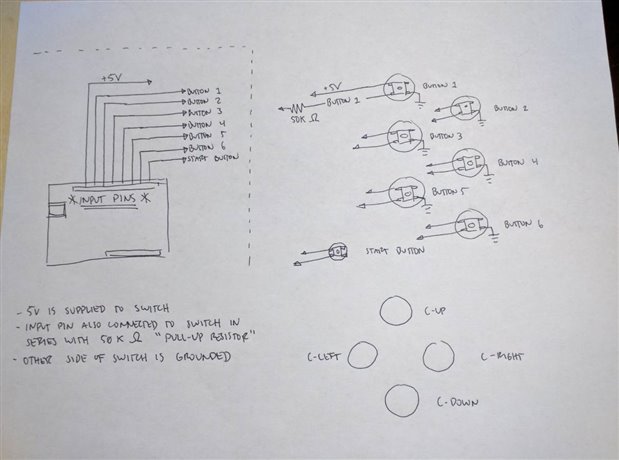
    Maybe this will help. Arduino is on the left. Each one of those lines represents a wire going somewhere. That +5V which is your power rail will connect to one side of your switch. Then an input pin wire…
  • Sean_Miller
    Sean_Miller over 8 years ago +1 suggested
    Good discussion. Your thumbstick is probably just two mechanically driven potentiometers that center on Vcc/2. So, not counting power and ground, you will consume two pins per stick. Get you the prototyping…
  • jeremy.f.medlin
    jeremy.f.medlin over 8 years ago in reply to lyndan +1 suggested
    Ah okay! Yep, definitely a way to get the joystick info. Hall effect sensors use voltage to determine direction, so you would read the voltage at the pins in order to find the direction and distance the…
  • Sean_Miller
    0 Sean_Miller over 8 years ago

    I love your energy and I know you are going to pull this off.


    My son and I made a controller and wireless receiver to control our R2D2.  It entailed making our own Printed Circuit Boards.  It was a long journey (see video).  If you pull this off, you can build anything.


    I'd first point that energy to make a prototyping rig.  You need a bread board, jumper (DuPont) cables, your switches/thumbsticks, and an Arduino.


    Then proceed as follows:

    • Get the Arduino blink example to work.
    • Get the Arduino to output your thumbstick position
    • Get the Arduino to output the position of a switch
    • Get the Arduino to output the position of every switch using shift registers.


    After that, then we'll talk what's the best embedded microcontroller.  It may be the Teensy.  It could be an Arduino pro mini.  It could be a custom circuit board you make that has their open source designs built in minus the pins you don't need.


    See ya',

    Sean

    • Cancel
    • Vote Up 0 Vote Down
    • Sign in to reply
    • Verify Answer
    • Reject Answer
    • Cancel
  • lyndan
    0 lyndan over 8 years ago in reply to Sean_Miller

    Thank you for the kind words! image

    So after looking around, I think I should start with an Arduino Uno, yes?

    • Cancel
    • Vote Up 0 Vote Down
    • Sign in to reply
    • Verify Answer
    • Cancel
  • jeremy.f.medlin
    0 jeremy.f.medlin over 8 years ago in reply to lyndan

    Depends on what you want to accomplish.


    -Choose the Arduino that has the number of input/output pins that you want. Looking at my Uno it uses pin 2 through pin 13 without any tweaking. That means you have 12 pins available to sense if a button is being pressed.

         -Per joystick it will need at least 4 pins on the arduino, and then of course each button you want will also need a pin.

         -Unless you are using parts I'm not familiar with, then it looks like you'll need 20 pins. 4 per joystick and then 12 for the pushbuttons.


    Again, off the top of my head it seems like you'd need an Arduino with more pins available for inputs. Maybe the Arduino MEGA 2560? It has 54 pins, more than enough for your uses. Also if you continue enjoying working with Arduino boards then you will never find a project you can't accomplish with 54 input pins.

    • Cancel
    • Vote Up 0 Vote Down
    • Sign in to reply
    • Verify Answer
    • Reject Answer
    • Cancel
  • lyndan
    0 lyndan over 8 years ago in reply to jeremy.f.medlin

    Wait, I need 4 analog pins per joystick? I thought each analog stick only used 2 pins: an x and y.. Could you explain please?

    • Cancel
    • Vote Up 0 Vote Down
    • Sign in to reply
    • Verify Answer
    • Cancel
  • jeremy.f.medlin
    0 jeremy.f.medlin over 8 years ago

    An Arduino input at it's very basic level can either sense when voltage is being applied to the pin (true or on) or when there is no voltage on the pin (false or off.)


    Without getting too complex, you can either have example 1, which is a joystick connected to its own chip that will output a number that arduino will read (then you can read that value and say okay, that value means forward, left, backward, right etc.) Or you can, example 2, have a joystick where when you push up, it pushes the "up" button and the arduino reads that as a voltage on the pin it's connected to.


    In the second example, that joystick is more like a stick connected to a gamepad. Thus you treat each axis like it's two buttons. On the y-axis you have up and down button. On the x-axis you have left and right button. 4 buttons total.


    It can get more complicated for sure, and a lot of joysticks don't work as simply as I described, but for your first Arduino project, keep it simple! It's just as important to limit how much you have to do on your first project so that you can at least have something you can test rather than chasing the perfect gamepad setup on your first try!

    • Cancel
    • Vote Up 0 Vote Down
    • Sign in to reply
    • Verify Answer
    • Cancel
  • lyndan
    0 lyndan over 8 years ago in reply to jeremy.f.medlin

    Ohhh no, I'm not using a switch joystick. The Joystick and the thumbstick are both analog.

    • Cancel
    • Vote Up 0 Vote Down
    • Sign in to reply
    • Verify Answer
    • Cancel
  • Sean_Miller
    0 Sean_Miller over 8 years ago

    Good discussion.  Your thumbstick is probably just two mechanically driven potentiometers that center on Vcc/2.  So, not counting power and ground, you will consume two pins per stick.


    Get you the prototyping rig (bread board, jumper (DuPont) cables, your switches/thumbsticks, and an Arduino) rocking and rolling and we'll go from there.  Once you achieve that, you might want to build an R2D2 instead.


    -Sean

    • Cancel
    • Vote Up +1 Vote Down
    • Sign in to reply
    • Verify Answer
    • Reject Answer
    • Cancel
  • lyndan
    0 lyndan over 8 years ago in reply to Sean_Miller

    I believe the thumbstick uses pots, but the U360 Joystick uses hall effect sensors with a magnet at the bottom of the joystick shaft.

    UltraStik1.jpg

    Still outputs an X and Y signal, so it should work the same way, right?

    Hahaa.. I'm not crazy about Star Wars, but I probably won't stop at building an arcade stick! image

    • Cancel
    • Vote Up 0 Vote Down
    • Sign in to reply
    • Verify Answer
    • Cancel
  • jeremy.f.medlin
    0 jeremy.f.medlin over 8 years ago in reply to lyndan

    Ah okay! Yep, definitely a way to get the joystick info. Hall effect sensors use voltage to determine direction, so you would read the voltage at the pins in order to find the direction and distance the joystick was pushed. Still should be fine using that with Arduino.


    The tricky bit will be once you prototype your board with the hardware, is figuring out how to handle the joystick information in the Arduino coding.


    I agree with Sean that you should go ahead and build the prototype because once everything is hooked up, the coding section is a whole other animal. Good idea to build it and get excited for it, then we'll tackle the software side image

    • Cancel
    • Vote Up +1 Vote Down
    • Sign in to reply
    • Verify Answer
    • Reject Answer
    • Cancel
  • jeremy.f.medlin
    0 jeremy.f.medlin over 8 years ago in reply to lyndan

    image

    Maybe this will help. Arduino is on the left. Each one of those lines represents a wire going somewhere. That +5V which is your power rail will connect to one side of your switch. Then an input pin wire will run from an Arduino pin to the switch in series with a 50K Ohm pull-up resistor. Also that little tail coming off the right bottom of the switch means its connected to ground. If you can see, that means that the 5V power line is connected directly to an input pin THROUGH your switch AND the 50K ohm resistor. This means that when your button is not pressed, the Arduino will "see" the button at 5V but as soon as you press the button the power line will be connected to your ground instead of your input pin and the voltage will drop to 0. Arduino will then see that 0V as a sign the button has been pressed.


    I hope this drawing isnt confusing, I only actually filled in how Button 1 will work, but the rest of the buttons will be wired and will work the exact same way. As for the joysticks, they will be a bit different so I figured we'll wait on those.

    • Cancel
    • Vote Up +2 Vote Down
    • Sign in to reply
    • Verify Answer
    • Reject Answer
    • Cancel
>
element14 Community

element14 is the first online community specifically for engineers. Connect with your peers and get expert answers to your questions.

  • Members
  • Learn
  • Technologies
  • Challenges & Projects
  • Products
  • Store
  • About Us
  • Feedback & Support
  • FAQs
  • Terms of Use
  • Privacy Policy
  • Legal and Copyright Notices
  • Sitemap
  • Cookies

An Avnet Company © 2025 Premier Farnell Limited. All Rights Reserved.

Premier Farnell Ltd, registered in England and Wales (no 00876412), registered office: Farnell House, Forge Lane, Leeds LS12 2NE.

ICP 备案号 10220084.

Follow element14

  • X
  • Facebook
  • linkedin
  • YouTube