element14 Community
element14 Community
    Register Log In
  • Site
  • Search
  • Log In Register
  • Community Hub
    Community Hub
    • What's New on element14
    • Feedback and Support
    • Benefits of Membership
    • Personal Blogs
    • Members Area
    • Achievement Levels
  • Learn
    Learn
    • Ask an Expert
    • eBooks
    • element14 presents
    • Learning Center
    • Tech Spotlight
    • STEM Academy
    • Webinars, Training and Events
    • Learning Groups
  • Technologies
    Technologies
    • 3D Printing
    • FPGA
    • Industrial Automation
    • Internet of Things
    • Power & Energy
    • Sensors
    • Technology Groups
  • Challenges & Projects
    Challenges & Projects
    • Design Challenges
    • element14 presents Projects
    • Project14
    • Arduino Projects
    • Raspberry Pi Projects
    • Project Groups
  • Products
    Products
    • Arduino
    • Avnet & Tria Boards Community
    • Dev Tools
    • Manufacturers
    • Multicomp Pro
    • Product Groups
    • Raspberry Pi
    • RoadTests & Reviews
  • About Us
  • Store
    Store
    • Visit Your Store
    • Choose another store...
      • Europe
      •  Austria (German)
      •  Belgium (Dutch, French)
      •  Bulgaria (Bulgarian)
      •  Czech Republic (Czech)
      •  Denmark (Danish)
      •  Estonia (Estonian)
      •  Finland (Finnish)
      •  France (French)
      •  Germany (German)
      •  Hungary (Hungarian)
      •  Ireland
      •  Israel
      •  Italy (Italian)
      •  Latvia (Latvian)
      •  
      •  Lithuania (Lithuanian)
      •  Netherlands (Dutch)
      •  Norway (Norwegian)
      •  Poland (Polish)
      •  Portugal (Portuguese)
      •  Romania (Romanian)
      •  Russia (Russian)
      •  Slovakia (Slovak)
      •  Slovenia (Slovenian)
      •  Spain (Spanish)
      •  Sweden (Swedish)
      •  Switzerland(German, French)
      •  Turkey (Turkish)
      •  United Kingdom
      • Asia Pacific
      •  Australia
      •  China
      •  Hong Kong
      •  India
      • Japan
      •  Korea (Korean)
      •  Malaysia
      •  New Zealand
      •  Philippines
      •  Singapore
      •  Taiwan
      •  Thailand (Thai)
      • Vietnam
      • Americas
      •  Brazil (Portuguese)
      •  Canada
      •  Mexico (Spanish)
      •  United States
      Can't find the country/region you're looking for? Visit our export site or find a local distributor.
  • Translate
  • Profile
  • Settings
Experts, Learning and Guidance
  • Technologies
  • More
Experts, Learning and Guidance
Ask an Expert Forum Driving e-Paper display with Adafruit Feather nRF52 Bluefruit LE, but not getting sharp Image
  • Blog
  • Forum
  • Documents
  • Leaderboard
  • Files
  • Members
  • Mentions
  • Sub-Groups
  • Tags
  • More
  • Cancel
  • New
Join Experts, Learning and Guidance to participate - click to join for free!
Actions
  • Share
  • More
  • Cancel
Forum Thread Details
  • State Not Answered
  • Replies 15 replies
  • Subscribers 301 subscribers
  • Views 2704 views
  • Users 0 members are here
  • epaper
  • nrf52
Related
See a helpful answer?

Be sure to click 'more' and select 'suggest as answer'!

If you're the thread creator, be sure to click 'more' then 'Verify as Answer'!

Driving e-Paper display with Adafruit Feather nRF52 Bluefruit LE, but not getting sharp Image

KKaushik
KKaushik over 3 years ago

I am driving e-Paper display with nRF52 Module named mentioned above, but not getting sharp image

#include <GxEPD.h>

#include <GxGDEH0213B73/GxGDEH0213B73.h> // 2.13" b/w newer panel

#include GxEPD_BitmapExamples

// FreeFonts from Adafruit_GFX
#include <Fonts/FreeMonoBold9pt7b.h>
#include <Fonts/FreeMonoBold12pt7b.h>
#include <Fonts/FreeMonoBold18pt7b.h>
#include <Fonts/FreeMonoBold24pt7b.h>


#include <GxIO/GxIO_SPI/GxIO_SPI.h>
#include <GxIO/GxIO.h>

#include "IMG_0001.h"

GxIO_Class io(SPI, /*CS=*/ 4, /*DC=*/ 3, /*RST=*/ 2); // arbitrary selection of 8, 9 selected for default of GxEPD_Class

GxEPD_Class display(io, /*RST=*/ 2, /*BUSY=*/ 5); // default selection of (9), 7

void setup()
{
Serial.begin(115200);
Serial.println();
Serial.println("setup");

display.init(115200); // enable diagnostic output on Serial

Serial.println("setup done");
//showpic();
}

void loop()
{
//showpic();
display.drawPaged(showFontCallback);
delay(5000);
}
void showFontCallback()
{
const char* name = "FreeMonoBold9pt7b";
const GFXfont* f = &FreeMonoBold9pt7b;
display.fillScreen(GxEPD_WHITE);
display.setTextColor(GxEPD_BLACK);
display.setFont(f);
display.setCursor(0, 0);
display.println();
display.println(name);
display.println(" !\"#$%&'()*+,-./");
display.println("0123456789:;<=>?");
display.println("@ABCDEFGHIJKLMNO");
display.println("PQRSTUVWXYZ[\\]^_");
#if defined(HAS_RED_COLOR)
display.setTextColor(GxEPD_RED);
#endif
display.println("`abcdefghijklmno");
display.println("pqrstuvwxyz{|}~ ");
}

void showpic()
{
//uint16_t x = (display.width() - 128) / 2;
uint16_t x = 0;
uint16_t y = 0;
display.fillScreen(GxEPD_BLACK);
display.drawExampleBitmap(gImage_IMG_0001, x, y, 128, 250, GxEPD_WHITE);
display.update();

}

  • Sign in to reply
  • Cancel

Top Replies

  • dougw
    dougw over 3 years ago +3
    The black and white particles get separated based on voltage and duration of the applied signal. You can check the high voltage supply to ensure it is high enough (it could also need extra capacitance…
  • shabaz
    shabaz over 3 years ago in reply to KKaushik +2
    Where did you buy the display from? Did you buy it from the some source that the driver code came from, or not? You can see in the datasheet that you provided: The special parameters are not part…
  • feiticeir0
    feiticeir0 over 3 years ago in reply to KKaushik +1
    Hi ! I'm guessing, by the pictures, that's a display problem... Did it, in any time, give a sharper image ? Even the first time you thinker with it ?
  • rsjawale24
    0 rsjawale24 over 3 years ago

    Could you attach a picture of the display?

    • Cancel
    • Vote Up 0 Vote Down
    • Sign in to reply
    • Verify Answer
    • Cancel
  • KKaushik
    0 KKaushik over 3 years ago in reply to rsjawale24

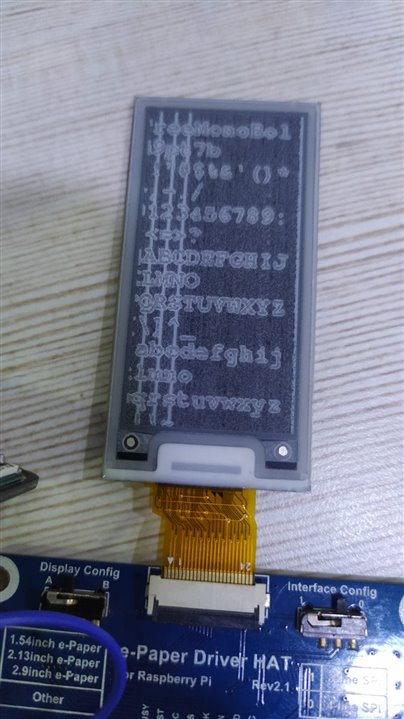
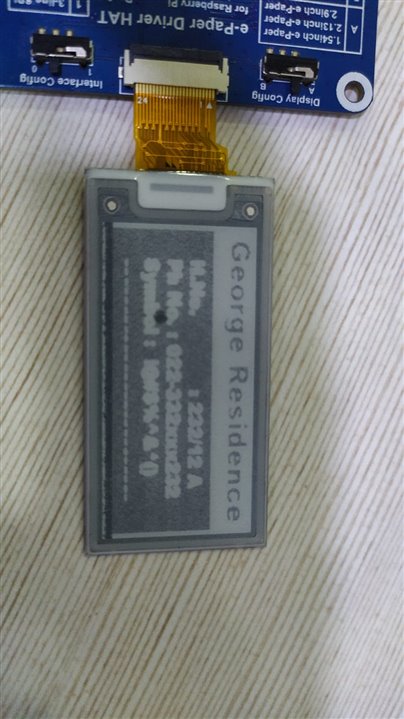
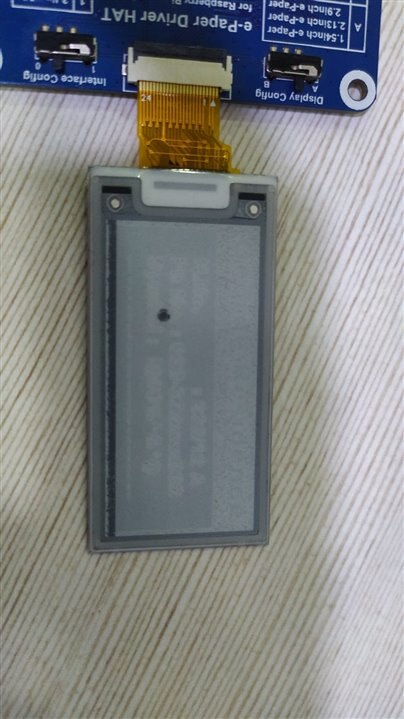
    imageDark at Power Onimage

    When it gets updated it gives a darker image but is still not as clear as it is supposed to be. Immediately after the update, it goes dull and can't see anything. (This is when repeating update)
    If I update once only it will go dull and stops there.

    A similar thing happens when I quickly remove the display from the driver circuit. It stays dark for a longer time but starts to get dull again. Ans also previously updated images starts to show up in the background.
    Since I haven't worked with e-paper displays before, So I'm not sure about their behavior. 

    • Cancel
    • Vote Up 0 Vote Down
    • Sign in to reply
    • Verify Answer
    • Cancel
  • feiticeir0
    0 feiticeir0 over 3 years ago in reply to KKaushik

    Hi !

    I'm guessing, by the pictures, that's a display problem...

    Did it, in any time, give a sharper image ? Even the first time you thinker with it ?

    • Cancel
    • Vote Up +1 Vote Down
    • Sign in to reply
    • Verify Answer
    • Cancel
  • KKaushik
    0 KKaushik over 3 years ago in reply to feiticeir0

    Hello,

    No these displays never gave any sharper images not even with ESP32. But I was in doubt because it's not just this one, there were other two. 

    1st FPC connector got damaged and 2nd one stopped working suddenly. Both of them didn't give any sharper images using the same library, so I thought there is some issue with the driver /library for EPD.

    Also when I checked the manufacturer for these, Its branded so I wasn't sure.

    • Cancel
    • Vote Up 0 Vote Down
    • Sign in to reply
    • Verify Answer
    • Cancel
  • shabaz
    0 shabaz over 3 years ago

    Where did you buy the e-paper display from?

    The code that drives them is fine-tuned to match production runs of e-paper displays, because the manufacturing process has variations from what I understand. The code usually has a load of configuration parameters. If you're using Adafruit code, then the configuration parameters will be best tuned for their displays.

    The display manufacturer is responsible for providing the set of values, it's not something you can derive yourself.

    • Cancel
    • Vote Up +1 Vote Down
    • Sign in to reply
    • Verify Answer
    • Cancel
  • KKaushik
    0 KKaushik over 3 years ago in reply to shabaz

    https://drive.google.com/file/d/1ZL9M1V500O0vegqsBbeMTPr0Vli2cNjX/view?usp=sharing 
    Could you please which setting I need to look for to make changes in code as per datasheet provided by manufacturer.

    • Cancel
    • Vote Up 0 Vote Down
    • Sign in to reply
    • Verify Answer
    • Cancel
  • shabaz
    0 shabaz over 3 years ago in reply to KKaushik

    Where did you buy the display from? Did you buy it from the some source that the driver code came from, or not?

    You can see in the datasheet that you provided:

    image

    The special parameters are not part of the datasheet, since they can change after production runs. 

    The special parameters will most likely be within a header file in the code you're using.

    • Cancel
    • Vote Up +2 Vote Down
    • Sign in to reply
    • Verify Answer
    • Cancel
  • rsjawale24
    0 rsjawale24 over 3 years ago in reply to KKaushik

    Did the display come along with the HAT that you're using?

    • Cancel
    • Vote Up +1 Vote Down
    • Sign in to reply
    • Verify Answer
    • Cancel
  • KKaushik
    0 KKaushik over 3 years ago in reply to shabaz

    No, the display is from a direct manufacturer and not the ones in code which is from Adafruit libraries.

    .

    • Cancel
    • Vote Up 0 Vote Down
    • Sign in to reply
    • Verify Answer
    • Cancel
  • shabaz
    0 shabaz over 3 years ago in reply to KKaushik

    I see, in that case, the manufacturer of the display needs to provide that data file, and you need to then modify the Adafruit code (header file most likely) to replace the config params with the ones that match your display. Otherwise, the result will never be perfect.

    • Cancel
    • Vote Up 0 Vote Down
    • Sign in to reply
    • Verify Answer
    • Cancel
>
element14 Community

element14 is the first online community specifically for engineers. Connect with your peers and get expert answers to your questions.

  • Members
  • Learn
  • Technologies
  • Challenges & Projects
  • Products
  • Store
  • About Us
  • Feedback & Support
  • FAQs
  • Terms of Use
  • Privacy Policy
  • Legal and Copyright Notices
  • Sitemap
  • Cookies

An Avnet Company © 2025 Premier Farnell Limited. All Rights Reserved.

Premier Farnell Ltd, registered in England and Wales (no 00876412), registered office: Farnell House, Forge Lane, Leeds LS12 2NE.

ICP 备案号 10220084.

Follow element14

  • X
  • Facebook
  • linkedin
  • YouTube