


Introduction
This blog post discusses a high quality three-transistor audio preamp, intended for speech applications such as radio or intercoms. The circuit was designed by michaelkellett and there is more detail at the blog page Two pre-amplifiers and a power amplifier.
The K2 Preamplifier PCB layout that was used is on GitHub; the project is deliberately through-hole, uses easy-to-find parts, and can be assembled within half an hour.

What Does it Do?
The amplifier basic specifications are below. It can be used as an audio amplification stage for amateur radio receivers, or it could be used as an electret microphone element amplifier, say for transmitters. With the component values as shown in the circuit, the specifications are as follows:
Power Supply: 9V (e.g. PP3 battery)
Gain: 45 dB (170 times amplification)
Frequency Response: 100 Hz to 3.5 kHz (speech bandwidth)
For more detailed, additional specifications and measurements, please refer to the blog link in the introduction.
How Does it Work?
I’m no audio expert! See the circuit diagram below. Here’s my layman’s interpretation, which could be very wrong in places:
R13, C6: Provides a filtered voltage supply, needed for rejecting power supply noise
R8, R9, R10, C3: Stable biasing for Q1
R1, Q1, R3, C1, R2: Common Emitter amplifier, providing the bulk of the voltage gain, with inverted output at the Q1 collector
Q2, Q3, R11: This is a DC coupled pair, which I believe may sometimes be called a Sziklai (Complementary Darlington) pair, providing the bulk of the current gain and another inversion. R11 results in negative feedback for these two transistors, and a more linear output, important for reducing distortion. Please refer to Michael’s blog post for more detail and the history regarding this type of design.
R5, C4: Provides negative feedback from the output to the first stage; the gain and bandwidth can be adjusted by tweaking these components.
Circuit Diagram

Simulating It
The KiCad files for the amplifier contain a SPICE simulation. Simply open up the circuit within KiCad 10, then click on Inspect->Simulator, and you’ll see simulation tabs. Click on any of them and then click on the triangular run icon. The results will appear either in charts, or directly overlaid on the circuit, as appropriate. If you make any changes to the circuit, click on the run icon again to see the result.
The following simulation tabs are available:
DC voltages and currents: Select the tab labelled OP (Operating Point), and when run, all the voltages and currents (that may also be observed in real life with a multimeter) will be displayed overlaid on the original schematic.
Time-domain signals: Select the TRAN (Transient) tab, and when you click run, you’ll see signals as if an oscilloscope was connected to various nodes such as the input and output. You can choose the nodes from a list that will be displayed.
Frequency response: Select the AC tab. Click run and you’ll see a chart appear with the results.
Building It
The circuit was easy to solder up in half an hour. There is space on the board for soldering 3.5 mm audio sockets, or plain 2.54 mm pin headers. Although overkill, I soldered on cheap SMA connectors, just to make it a little easier to attach the circuit to a signal generator/oscilloscope.
I used surface-mount BC849 transistors (they fitted nicely on the underside) since I didn’t have any through-hole ones (BC549). BC547 could be used too.

Results
Output Quality
One worthwhile measurement is to apply a known signal (in my case, a 1 kHz sine wave, at 10 mV p-p amplitude), and then connect an oscilloscope to the output, and switch on the FFT or spectrum view. In the screenshot below, the yellow trace is the input signal, and the green one is the output. The spectrums for each are shown over the range 10 Hz to 100 kHz (on a log scale) and I set the ‘resolution bandwidth’ to 10 Hz.
Here I was keen on visually observing harmonics, because they indicate distortion.
It’s possible to calculate a total harmonic distortion (THD) figure from this, but in reality it’s already very clear from visual observation, that the distortion is extremely low and negligible (the vertical axis is logarithmic). As can be seen, there is about 65 dB of difference between the 1 kHz tone output, and the second harmonic (the scale is 10 dB per tick on the vertical axis).

Frequency Response
It’s possible to obtain the frequency response of the amplifier by attaching a signal generator to the input, and measuring the output amplitude say with an oscilloscope, and plotting measurements as the signal generator frequency is adjusted.
The result is shown below, on a log frequency scale. For this test, I used a 10 mV peak-to-peak sine wave input signal, varied in frequency over the range of 10 Hz to 100 kHz. It was seen that the amplifier frequency response very closely matches the simulation. The results show the amplifier gain over the speech bandwidth is approximately 45 dB. The vertical scale is 3 dB per axis tick.

Practical Use: Microphone Amplifier
I made an identical copy of the circuit on a PCB called "Mic Board", and added very little; a few resistors and a capacitor and an electret microphone element. This board also has a barrel DC power input connector, and on/off rotary switch. I’m going to use it to make an intercom, hence the curved edge (a speaker needs to fit there).
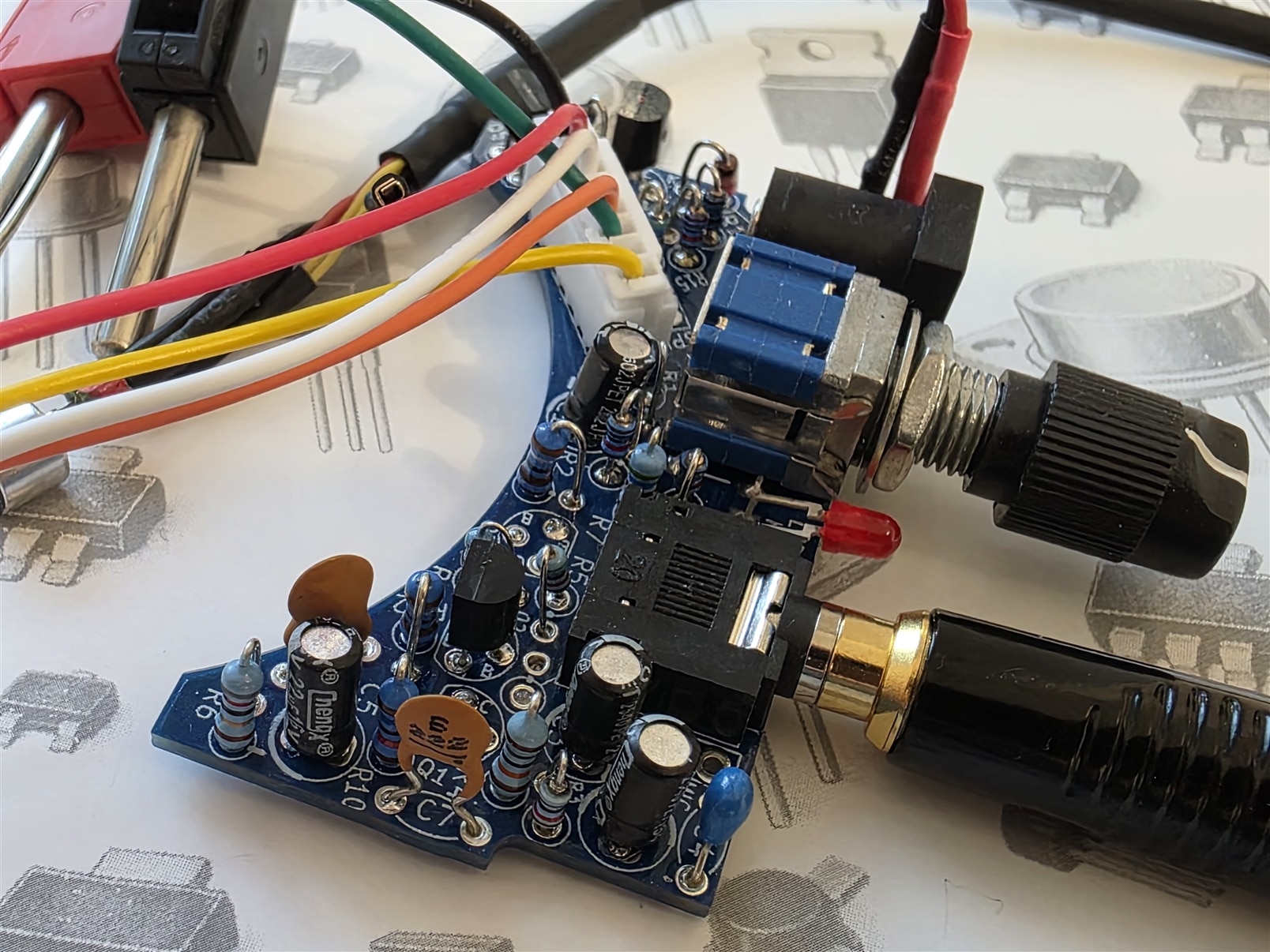
I tried two mic elements. One (slightly lower-cost) had a sensitivity figure of -64 dB according to the datasheet. The other one was far more sensitive at -32 dB. You’d probably need to reduce the amplifier gain for many practical uses with the -32 dB mic element.
Here’s a short video demonstration with the -64 dB sensitivity mic element:
Summary
The “K2 Preamplifier” is a three-transistor audio amplifier with extremely low distortion, very good output current capability, and decent bandwidth all ready for speech applications such as radio communications and intercoms (overkill for that!). The measured performance is very good; with a sine wave input, the harmonics were observed with an oscilloscope, and were seen to be extremely low.
The design was rebuilt identically, but with power switch and a handset connector, so that it can be used for an intercom (which is a work-in-progress).
Thanks for reading!

