element14 Community
element14 Community
    Register Log In
  • Site
  • Search
  • Log In Register
  • Community Hub
    Community Hub
    • What's New on element14
    • Feedback and Support
    • Benefits of Membership
    • Personal Blogs
    • Members Area
    • Achievement Levels
  • Learn
    Learn
    • Ask an Expert
    • eBooks
    • element14 presents
    • Learning Center
    • Tech Spotlight
    • STEM Academy
    • Webinars, Training and Events
    • Learning Groups
  • Technologies
    Technologies
    • 3D Printing
    • FPGA
    • Industrial Automation
    • Internet of Things
    • Power & Energy
    • Sensors
    • Technology Groups
  • Challenges & Projects
    Challenges & Projects
    • Design Challenges
    • element14 presents Projects
    • Project14
    • Arduino Projects
    • Raspberry Pi Projects
    • Project Groups
  • Products
    Products
    • Arduino
    • Avnet & Tria Boards Community
    • Dev Tools
    • Manufacturers
    • Multicomp Pro
    • Product Groups
    • Raspberry Pi
    • RoadTests & Reviews
  • About Us
  • Store
    Store
    • Visit Your Store
    • Choose another store...
      • Europe
      •  Austria (German)
      •  Belgium (Dutch, French)
      •  Bulgaria (Bulgarian)
      •  Czech Republic (Czech)
      •  Denmark (Danish)
      •  Estonia (Estonian)
      •  Finland (Finnish)
      •  France (French)
      •  Germany (German)
      •  Hungary (Hungarian)
      •  Ireland
      •  Israel
      •  Italy (Italian)
      •  Latvia (Latvian)
      •  
      •  Lithuania (Lithuanian)
      •  Netherlands (Dutch)
      •  Norway (Norwegian)
      •  Poland (Polish)
      •  Portugal (Portuguese)
      •  Romania (Romanian)
      •  Russia (Russian)
      •  Slovakia (Slovak)
      •  Slovenia (Slovenian)
      •  Spain (Spanish)
      •  Sweden (Swedish)
      •  Switzerland(German, French)
      •  Turkey (Turkish)
      •  United Kingdom
      • Asia Pacific
      •  Australia
      •  China
      •  Hong Kong
      •  India
      • Japan
      •  Korea (Korean)
      •  Malaysia
      •  New Zealand
      •  Philippines
      •  Singapore
      •  Taiwan
      •  Thailand (Thai)
      • Vietnam
      • Americas
      •  Brazil (Portuguese)
      •  Canada
      •  Mexico (Spanish)
      •  United States
      Can't find the country/region you're looking for? Visit our export site or find a local distributor.
  • Translate
  • Profile
  • Settings
Open Source Hardware
  • Technologies
  • More
Open Source Hardware
Blog How to make PCB Layout On EasyEDA?
  • Blog
  • Forum
  • Documents
  • Events
  • Polls
  • Members
  • Mentions
  • Sub-Groups
  • Tags
  • More
  • Cancel
  • New
Join Open Source Hardware to participate - click to join for free!
  • Share
  • More
  • Cancel
Group Actions
  • Group RSS
  • More
  • Cancel
Engagement
  • Author Author: hadleywhite
  • Date Created: 9 Nov 2015 10:07 AM Date Created
  • Views 6045 views
  • Likes 0 likes
  • Comments 22 comments
  • board
  • layout
  • pcb
  • Design
Related
Recommended

How to make PCB Layout On EasyEDA?

hadleywhite
hadleywhite
9 Nov 2015

  To draw PCB layout is an essential ability for electronic engineer .

  We could use many tools for PCB Layout , Altium Designer, Kicad, PADS,and so forth .But for a reason that these software are all desktop-based , you need to install it on your PC or may need to pay for the software .EasyEDA provides a feasible way to draw schematic and PCB online ,without installing a software on your PC , and you could also save it on the cloud server and share it to all the internet users in the meantime .You could utilize all the internet components Lib and PCB Lib on the internet , you could edit the Libs and add them to your Part. You could also utilize the accomplished module in the System Design or the User’s Design. That really accelerates your speed to accomplish a Project . Furthermore, you could add the PCB Layout to Your CART and pay for it with low cost for the PCB order . That is an easy way to accomplish your Project from Concept Design ,Schematic Design to PCB Design and PCB order .

  Let me introduce how to make PCB Layout out of an online schematic design on EasyEDA , an free online schematic design Tool ,spice simulation tool, PCB Design tool .

  We need to Firstly create a Schematic .

  Let us create e a DC/DC Converter schematic as followed.

image

  https://easyeda.com/GerryChen/LM2596_Module__Adjustable_DC_DC_Power_Converter_1_25V_35V_3A-4y4YgarJD


      The schematic consists of a power management IC LM2596s-ADJ ,A DC-DC Step-Down Power IC

  A feedback circuit including R2&R1 ,a resistor R2 and an adjustable resistor R1 , Vin and Vout Filter Capacitor C1&C2. A led Indicator circuit of output.

  Choose package for every component .

  Then convert the schematic into PCB by clicking “Convert To PCB ”ICON on the Toolbar.

  Then it will transfer to New PCB file

  Press”Ctrl+S” to save the New PCB and rename it .

  On the external frame , click the arc and delete it . Close the external frame with right angle .

image

  ——Change the arc on the left top side to right angle .


  Click every component and drag them to the inside of the frame .

  Put every component on the proper position .

  Then start to route it as followed .

  1、Auto route

  2、Route manually .

  1、You could choose to auto route the circuit by clicking the auto route .

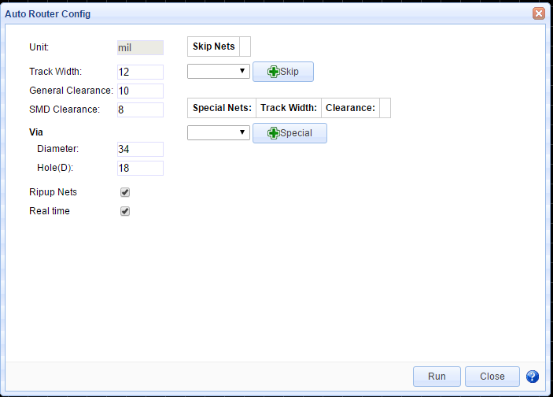
  After clicking “Auto Router” ICON ,the interface will pop up with Auto Router Config .You could modify the track width , General clearance ,and so on .Click run to execute auto routing .
image

  ——Auto Router Config dialog.


image

  ——Effect of Auto Routing .

  2、However , even the tool provides function to auto route, for most of the completed circuits or special circuits , you need to route it manually .

  3、Use the PCB tools and the layers tools and use the track on the PCB Tool to connect every flying line .

  4、Remember to check the DRC Routing Rule and then make the PCB Layout to make sure that it support power integrity .After you route the wire , change the size of Toplayer Silklayer .

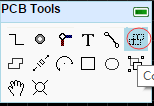
  5、Pour the Copper Area through the icon on the PCB tool. image
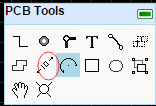
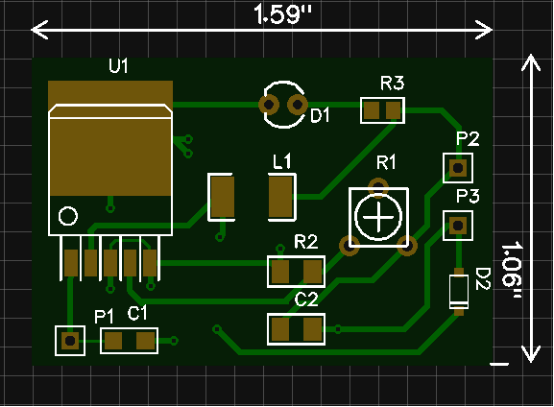
  6、Press ”M” or click the “Dimension ”ICON on the PCB tool to measure the width and the length of the PCB board. image
image

  https://easyeda.com/GerryChen/LM2596_Module__Adjustable_DC_DC_Power_Converter_1_25V_35V_3A-4y4YgarJD

  ——Result of manual routing and measure the width or length of the circuit board .

  7、Commonly we pour copper on the bottom layer as ground network ,pour the copper to the Top layer as the power network .

  8、After you have route the PCB ,you could click the Designer Manager on the right hand side .

  9、Then it will transfer to Properties .Click DRC Errors and Refresh .There are no DRC Errors in the PCB Layout .Click the components and nets , you could make every components or net bright. For example , choose C2 and The capacitor C2 will become bright .

  10、Let us manually make an error . For Example , move MDC wire and there will be a big bright X and DRC Errors track2pad error.

image

  Move the track to its previous location and then then big X and the DRC errors will disappear.

  Once you have finished the PCB Layout , Click photo view to produce the Gerber file .
image

  ——PCB photo preview


  11、If you want to order the PCB board ,Click the Fabrication Output icon in the Toolbar to order the PCB ,Then go to the Add to Cart Interface .

  There are items like Numbers of Layers ,PCB Dimension Width and Height ,PCB Thickness ,PCBQTY,PCB Color,Surface Finish ,Copper Weight ,And Penalized PCB .

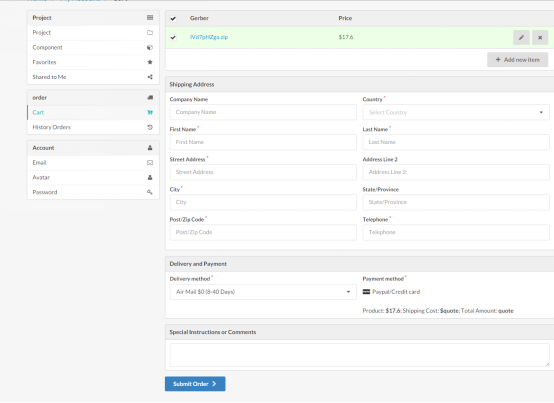
  When you fill in all the Items above ,save it to cart. Then go the Network Payment Interface .

  Delete the useless Gerber file .

  Fill in your country ,your name ,your address ,your Post/Zip Code ,your Telephone ,Choose Delivery Method ,Network Payment Items ,and Click to send Request .
image

  OK , then just wait for your PCB Order at home .

  • Sign in to reply

Top Comments

  • balearicdynamics
    balearicdynamics over 10 years ago in reply to shabaz +3
    Shabaz, it seems we are seeing the things in the same direction. The principle should be that all the projects are private and stored somewhere locally on my computer (and there are plenty of easier or…
  • michaelkellett
    michaelkellett over 10 years ago +1
    Is this a blog or do you in fact work for EasyEDA ? There is an error in you first paragraph - KiCad is truly free - open source and no charges. MK
  • balearicdynamics
    balearicdynamics over 10 years ago in reply to hadleywhite +1
    Hadley, I have always some prejudice adopting tools that I consider strategic for my job, based on the sole online development. First because I have no control on if and when (hopefully not) the company…
Parents
  • DAB
    DAB over 10 years ago

    Nice intro into EasyEDA.


    I had seen it advertised, but never had the time to take a look.


    From your example it looks fairly easy to setup a circuit and PCB placement.


    How long have you used the program to get proficient in its use?


    DAB

    • Cancel
    • Vote Up 0 Vote Down
    • Sign in to reply
    • More
    • Cancel
Comment
  • DAB
    DAB over 10 years ago

    Nice intro into EasyEDA.


    I had seen it advertised, but never had the time to take a look.


    From your example it looks fairly easy to setup a circuit and PCB placement.


    How long have you used the program to get proficient in its use?


    DAB

    • Cancel
    • Vote Up 0 Vote Down
    • Sign in to reply
    • More
    • Cancel
Children
  • balearicdynamics
    balearicdynamics over 10 years ago in reply to DAB

    It is also interesting to know what about the possible exchange of the circuits in different formats, between local and online projects.


    Enrico

    • Cancel
    • Vote Up +1 Vote Down
    • Sign in to reply
    • More
    • Cancel
  • hadleywhite
    hadleywhite over 10 years ago in reply to DAB

    Thanks DAB. I have ever used Altium Designer to draw schematic and layout pcb , so I can get started with Easyeda quickly . It is really much more convinent for me to design Schematics and PCBs , especially when I could easily search the Schematic Libs and PCB Libs online and edit them .

    • Cancel
    • Vote Up 0 Vote Down
    • Sign in to reply
    • More
    • Cancel
  • hadleywhite
    hadleywhite over 10 years ago in reply to balearicdynamics

    Hi ,Enrico ,I could use Easyeda Source to change the Circuits or PCBs into .txt format in local PC , by pasting the contents to txt file ;    and reopen it online using EasyEDA Format Dialog . by pasting the contents to EasyEDA Format Textbox , and Click "Create New Document".

    • Cancel
    • Vote Up 0 Vote Down
    • Sign in to reply
    • More
    • Cancel
  • balearicdynamics
    balearicdynamics over 10 years ago in reply to hadleywhite

    What you are pointing Hadley, is almost what I though. This software seems not supporting interchangeability of formats. My question is: what about if I don't use this tool and you will send me your pcb ? Send a text file? If you send me for example a gerber format - that IMHO is not the better format in the world in terms of simplicity but is highly exportable - I can import it without difficult on Eagle, correct it and send back to you in Gerber format again. Or after corrections convert to gerber again following the producer standard and send it to - for example - a PCB producer that works with Orca and can only accept this format from me.


    In a open source approach what if you should make your circuit open hardware and freely distributable? you can't limit to publish PDF or PNG images of your schematics and layout to avoid that other users will keep your images and redesign by themselves the circuit then rout the layout again...


    Enrico

    • Cancel
    • Vote Up 0 Vote Down
    • Sign in to reply
    • More
    • Cancel
element14 Community

element14 is the first online community specifically for engineers. Connect with your peers and get expert answers to your questions.

  • Members
  • Learn
  • Technologies
  • Challenges & Projects
  • Products
  • Store
  • About Us
  • Feedback & Support
  • FAQs
  • Terms of Use
  • Privacy Policy
  • Legal and Copyright Notices
  • Sitemap
  • Cookies

An Avnet Company © 2026 Premier Farnell Limited. All Rights Reserved.

Premier Farnell Ltd, registered in England and Wales (no 00876412), registered office: Farnell House, Forge Lane, Leeds LS12 2NE.

ICP 备案号 10220084.

Follow element14

  • X
  • Facebook
  • linkedin
  • YouTube