element14 Community
element14 Community
    Register Log In
  • Site
  • Search
  • Log In Register
  • Community Hub
    Community Hub
    • What's New on element14
    • Feedback and Support
    • Benefits of Membership
    • Personal Blogs
    • Members Area
    • Achievement Levels
  • Learn
    Learn
    • Ask an Expert
    • eBooks
    • element14 presents
    • Learning Center
    • Tech Spotlight
    • STEM Academy
    • Webinars, Training and Events
    • Learning Groups
  • Technologies
    Technologies
    • 3D Printing
    • FPGA
    • Industrial Automation
    • Internet of Things
    • Power & Energy
    • Sensors
    • Technology Groups
  • Challenges & Projects
    Challenges & Projects
    • Design Challenges
    • element14 presents Projects
    • Project14
    • Arduino Projects
    • Raspberry Pi Projects
    • Project Groups
  • Products
    Products
    • Arduino
    • Avnet & Tria Boards Community
    • Dev Tools
    • Manufacturers
    • Multicomp Pro
    • Product Groups
    • Raspberry Pi
    • RoadTests & Reviews
  • About Us
    About the element14 Community
  • Store
    Store
    • Visit Your Store
    • Choose another store...
      • Europe
      •  Austria (German)
      •  Belgium (Dutch, French)
      •  Bulgaria (Bulgarian)
      •  Czech Republic (Czech)
      •  Denmark (Danish)
      •  Estonia (Estonian)
      •  Finland (Finnish)
      •  France (French)
      •  Germany (German)
      •  Hungary (Hungarian)
      •  Ireland
      •  Israel
      •  Italy (Italian)
      •  Latvia (Latvian)
      •  
      •  Lithuania (Lithuanian)
      •  Netherlands (Dutch)
      •  Norway (Norwegian)
      •  Poland (Polish)
      •  Portugal (Portuguese)
      •  Romania (Romanian)
      •  Russia (Russian)
      •  Slovakia (Slovak)
      •  Slovenia (Slovenian)
      •  Spain (Spanish)
      •  Sweden (Swedish)
      •  Switzerland(German, French)
      •  Turkey (Turkish)
      •  United Kingdom
      • Asia Pacific
      •  Australia
      •  China
      •  Hong Kong
      •  India
      •  Japan
      •  Korea (Korean)
      •  Malaysia
      •  New Zealand
      •  Philippines
      •  Singapore
      •  Taiwan
      •  Thailand (Thai)
      •  Vietnam
      • Americas
      •  Brazil (Portuguese)
      •  Canada
      •  Mexico (Spanish)
      •  United States
      Can't find the country/region you're looking for? Visit our export site or find a local distributor.
  • Translate
  • Profile
  • Settings
Power & Energy
  • Technologies
  • More
Power & Energy
Blog 100W USB Type-C Power Delivery Source: Getting Started
  • Blog
  • Forum
  • Quiz
  • Documents
  • Polls
  • Events
  • Mentions
  • Sub-Groups
  • Tags
  • More
  • Cancel
  • New
  • Share
  • More
  • Cancel
Toptech-Voices
Group Actions
  • Group RSS
  • More
  • Cancel
Engagement
  • Author Author: shabaz
  • Date Created: 13 Dec 2022 2:08 AM Date Created
  • Views 23648 views
  • Likes 14 likes
  • Comments 16 comments
  • power delivery
  • monolithic power
  • usb type-c
  • usb-c
  • usb-c connector
  • usb pd
  • mps
Related
Recommended

100W USB Type-C Power Delivery Source: Getting Started

shabaz
shabaz
13 Dec 2022

Table of Contents

  • Introduction
  • Circuit Design
    • 1. Power Delivery (PD) Source Function
    • 2. DC-DC Converter
  • Printed Circuit Board (PCB) and Enclosure
  • Summary

(Test: Edited at 01:26 GMT 14th Dec 2022)

Introduction

I’m interested in finding ways to provide phone and laptop power during times when mains power could be absent. Since many phones and laptops have USB Type C (also known as USB-C) connections, this could be a great way to get power into them, without having to use mains voltages connected to AC mains power bricks/chargers.

The technology that gets a lot of power over USB-C, is called USB-C Power Delivery (PD). It is possible to use this technology to connect (say) a car battery to the phone or laptop. USB-C PD “sink” technology is used by the phone/laptop end, to negotiate with the USB-C PD “source” end, to decide on what voltage should be sent across the USB cable. It's easier to see how it approximately works and what this project is about, by looking at the overview diagram below.

image

I don't know a lot about USB-C, so this project will help me discover a bit more about a small aspect of it. If you're interested to learn about USB-C too, then it would be great to simultaneously build this partial project and test it out : ) Some more areas of USB-C PD are discussed here:  USB Type-C and Power Delivery: Any Interest?  

For this project, I decided to build a circuit that can connect to a large battery at one end, and expose a USB-C connector at the other end of the circuit, that will connect to the phone or laptop. This should provide many hours of device operation during a mains power outage. The power output might reach 100W (but I’m not sure), and the project is very low cost (about £15-20 parts cost), and several of the boards could be constructed and used simultaneously to power multiple devices.

Although most car batteries offer about 12V, this project actually requires about 24V (it can support up to 32V) due to only using easily-obtainable components that are currently in stock. To use this project two 12V car batteries could be placed in series, or alternatively, the design can be preceded with a separate DC-DC converter board to step up 12V to 24V. It wouldn’t be as efficient, however. Still, for my first USB-C PD Source prototype, I am OK with the input voltage requirement, and I can always upgrade the DC-DC converter portion later if the 24V need becomes very inconvenient once I further refine requirements, and once I understand USB-C PD technology better.

Circuit Design

1. Power Delivery (PD) Source Function

The MP5031 Power Delivery Controller chip was used because it contains the “Source” functionality.

image(Image source: MPS website)


The MP5031 chip can advertise different power capabilities and can send control signals to the DC-DC converter to adjust the voltage output.

There is an I2C interface, but I believe (not 100% sure) it won’t be needed for a basic configuration. The I2C connections will be broken out to pin headers, in case the configuration needs to be set. Care would be needed because nearly all configuration registers are only one-time programmable (OTP). Incidentally from the block diagram, it can be seen that the MP5031 also supports USB 2.0 Battery Charging negotiation, known as BCS 1.2, in case a USB 2.0 device is connected.

2. DC-DC Converter

The MP2491C DC-DC converter chip was used. It has internal MOSFET switching to simplify the design a bit. It also has a small secondary output, 5V, that can be used to power a small amount of external circuitry.

A couple of voltage-select pins, VSEL1 and VSEL2, are used by the PD Source chip to control the DC-DC converter output. The two pins will adjust the reference voltage used in the feedback loop. Five different voltages are possible (5, 9, 12, 15, and 20 V), depending on if the VSEL pins are at 0V, 5V, or 2.5V.

The Power Good (PG) pin changes state while the output is unsettled.
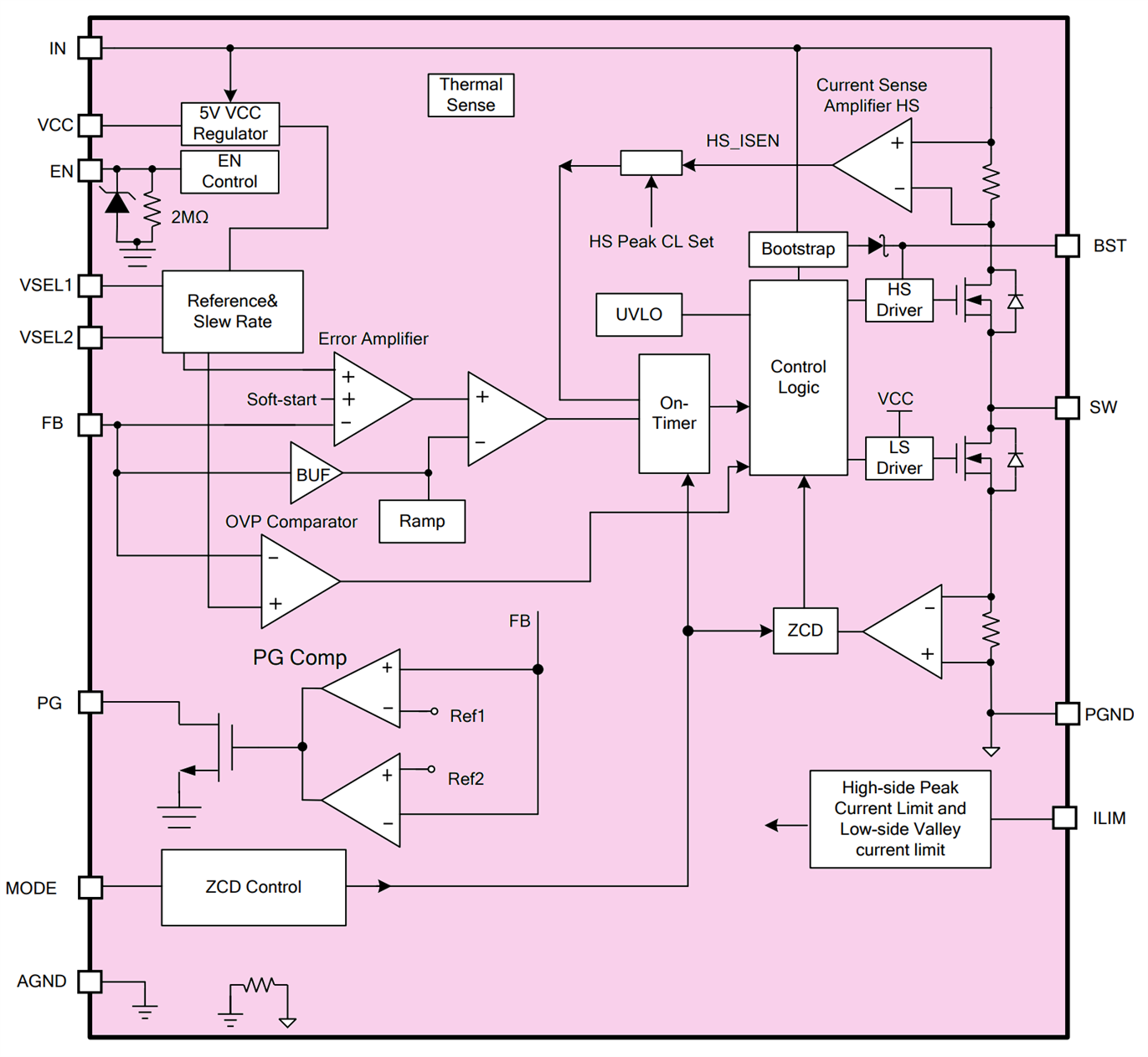
imageImage source: MPS website


The overall combined circuit diagram is shown below (there is a more readable PDF version attached to the blog post further below).

image

Printed Circuit Board (PCB) and Enclosure

The project is supposed to be low-cost, and it is designed to fit a cheap aluminium extrusion, known as E-Case A, and aluminium end-plates and screws can be ordered separately, or PCB end-plates could be designed so that no custom drilling is required.

imageImage source: Lincoln Binns website


Alternatively, perhaps a 3D-printed enclosure would be possible (I don’t have a 3D printer, so I didn’t investigate this). The board size is 40 x 55 mm.

The 24V DC input uses a Molex Mini-Fit Jr board-mount connector part code 172648-0102 or wires could be soldered in the holes if a different connection is required.

All parts are large where possible, and hand-solderable. The MP5031 and MP2491C parts are small, unfortunately, but still manageable.

image

Inner layers:

image

The zip file is attached to this blog post, ready for sending to a PCB factory. The cost for five boards is about $7 + shipping, depending on which PCB factory you order it from. Incidentally, I have not built or ordered the board yet, so there may be faults in the design.

The bill of materials is attached. The finished board should look (almost) like this:

image

Summary

A USB Power Delivery Source IC was combined with a DC-DC converter chip, to be able to supply five different voltages and support up to 100W. The actual power output will partially be dependent on the board layout, so it’s not guaranteed currently. The project is very low cost (under £20) and all parts are currently in-stock. I’m hoping that this project will help a bit during any potential mains power outages, to continue operating computing equipment. Even if it doesn’t, it will be a good experience learning about USB-C power delivery.

Thanks for reading!

export_usb_c_power_supply_gerbers_v1.zip

  • Sign in to reply
  • wolfgangfriedrich
    wolfgangfriedrich over 3 years ago

    This is a really interesting project, and you are moving really fast on it.

    Looking at the switcher, I am concerned about the thermal performance. Assuming best case at 100W, there is 5W of heat to be dissipated through convection at the nice metal housing when the heat gets off the board. The switcher datasheet gives all thermal parameters on a 8.5 mm^2 board with (!) 4 layers of 2 oz copper. This is massive and by the way really tough to solder. Even then they are claiming 32degC/W temp rise from ambient to junction. If you still can, add as much copper as possible on the Vin and SW side and more vias close to the pin. And there are small 3x3 mm^2 heat sinks with double sided sticky thermal transfer tape available, the design might benefit from that as well.

    This will be a great little tool.

    • Cancel
    • Vote Up 0 Vote Down
    • Sign in to reply
    • More
    • Cancel
  • shabaz
    shabaz over 3 years ago

    (Updated the blog post with easier-to-see PCB images).

    • Cancel
    • Vote Up 0 Vote Down
    • Sign in to reply
    • More
    • Cancel
  • shabaz
    shabaz over 3 years ago in reply to michaelkellett

    Hi Michael,

    It's a weird package, the eval board has the layout like this:

    image

    However, I can't see that I can do it like that due to the limitations with the low-cost PCB service. I can't squeeze vias underneath it like they have. This is my current layout, any tips would be greatly appreciated:

    image

    I think I can thicken things a bit more for some of the pads, it might make the heating it more even, since currently the right side may reflow slightly quicker than the left.

    Incidentally, it's now possible to have plated vias at a reasonable cost, so the pads could have vias. JLCPCB charge $16 extra for that, for 5 boards, so it's no issue for prototypes. They would be epoxy-filled at that cost. But I hoped to avoid that for now, and consider it later if the current way doesn't work out.

    Regarding multiple power outlets, the datasheet for the USB PD chip shows an implementation that uses a single DC-DC converter and two of the USB PD chips, but I don't really understand how it works if an old device was connected together with (say) a laptop that needed a higher voltage, perhaps the laptop would then just slowly charge with its internal DC-DC converter stepping-up. Since the cost is fairly low for the project, about £15 per USB port, I figured it's not a major issue to have the dedicated DC-DC converter per port (this wouldn't make sense for a commercial cost-sensitive product), and then figure a way to get multiple boards powered up together. The Minifit Jr can be daisy-chained a bit for running two boards, and if the electrolytic are short enough, a couple of the boards might squeeze into the same box (I think its only a slim chance though, since there's only 18mm of space above a single board).   

    • Cancel
    • Vote Up 0 Vote Down
    • Sign in to reply
    • More
    • Cancel
  • shabaz
    shabaz over 3 years ago in reply to genebren

    Hi Gene,

    Thanks!

    • Cancel
    • Vote Up 0 Vote Down
    • Sign in to reply
    • More
    • Cancel
  • michaelkellett
    michaelkellett over 3 years ago

    Hello Shabaz, interesting project. I see that you only have one power outlet. If you want two or more do you need an additional interface and DC-DC chip for each one ?

    I don't like the package the DC-DC converter is in, with those horrible semi- buried contacts.

    How will you apply solder paste for them ?

    MK

    • Cancel
    • Vote Up 0 Vote Down
    • Sign in to reply
    • More
    • Cancel
<>
element14 Community

element14 is the first online community specifically for engineers. Connect with your peers and get expert answers to your questions.

  • Members
  • Learn
  • Technologies
  • Challenges & Projects
  • Products
  • Store
  • About Us
  • Feedback & Support
  • FAQs
  • Terms of Use
  • Privacy Policy
  • Legal and Copyright Notices
  • Sitemap
  • Cookies

An Avnet Company © 2026 Premier Farnell Limited. All Rights Reserved.

Premier Farnell Ltd, registered in England and Wales (no 00876412), registered office: Farnell House, Forge Lane, Leeds LS12 2NE.

ICP 备案号 10220084.

Follow element14

  • X
  • Facebook
  • linkedin
  • YouTube