


Back in March, I was flabbergasted to be chosen as the grand prize winner for the Fun and Games competition
I mean, I was participating for the fun of it, thinking to myself "heck, if I reach second place, that'll be a good occasion to replace my aging soldering station by one with a hot air output, and if I'm a finisher, the fume extractor would be a very nice addition to my setup".
Last time, my choice was easy, as I did not have an oscilloscope on my desk, but now I had to think about it a bit more which lead to me asking a question about the usefulness of DMMs.
All the good answers I received confirmed my choice and after a few days, with the help of E14Alice, I received the GDM-8341 from GW INSTEK.
Its look is a bit vintage, but I don’t mind at all, I really appreciate the VFD displays, they have this “sturdy” feeling that I sometimes miss in LCD based approaches.
It took me a while to find a proper place to have it installed in my home lab, but now that it’s settled, my first use was to try logging a “slow changing” voltage that I’m seeing when I power up one of my bench top power supply.
As you will notice on the video, the two embedded meters are starting from a very high value before settling to the programmed value.
What I was wondering is that if this is a meter module artifact or if the output voltage is indeed overshooting for numerous seconds.
As the DMM is provided with a device USB port (type B), it can be connected to a computer that would “talk” to it and get measurements.
The manufacturer’s page gives USB Driver and LabView integration, so I thought this would be the perfect occasion to get introduced to LabView that I have seen mentioned around here quite a few times.
The goal was to setup the DMM, read values in a loop and post those values into my InfluxDB instance as they come along.
I figured this would be a way to exercise my Cursor AI licence and sure enough, it was able to provide me with a plan of action in order to achieve this.
Sadly, as LabView files are in binary format, all I received was a “click through” plan of actions with almost every time a choice of possible ways to do things but without any clear recommendation.
Even worse, the mentioned menus or buttons most often did not exist in my 2016 Q1 version and even after strongly insisting, it did not provide me with entirely valid instructions. This is most likely related to the delay between training and inferring which can be years.
What I find most annoying is that despite telling it I was a perfect noob at this, it failed to explain LabView’s base concepts, the most important one being that everything runs at the same time (on every system tick?), even if the “boxes” are connected. This is perfectly counter intuitive to people like me with a developer background.
In the end, I got a set of VI files, with a “master” one that links to the others in what I find a very convoluted way for something that I believe has to be quite simple:
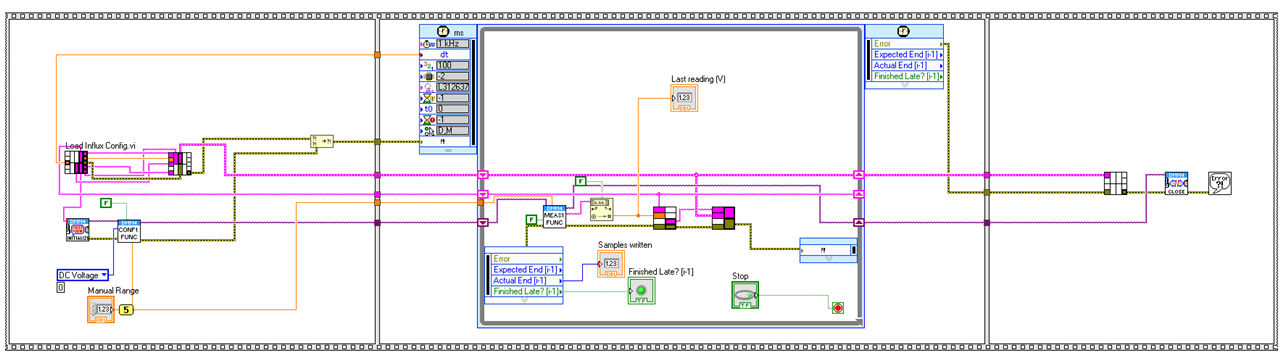
A seasoned LabView user would most likely have done things in a simpler or clearer way, but at least I now have values in InfluxDB and can display them in a dashboard like this:
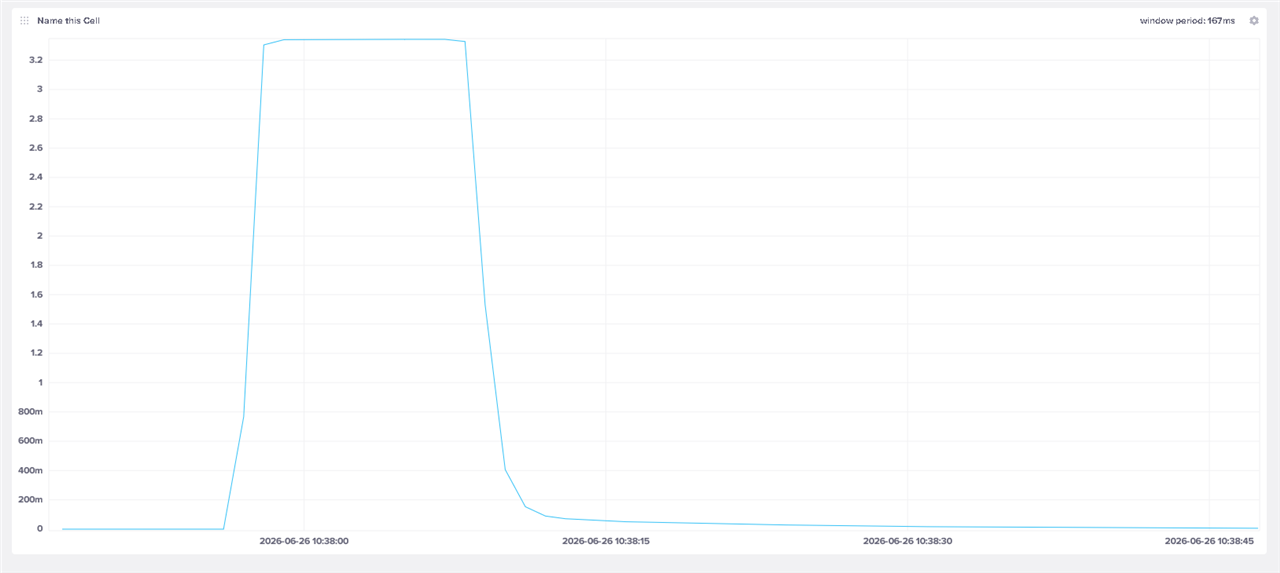
The value does not appear to overshoot the programmed value, but it did not feel right that the graph is so “jaggy” with this broken lines aspect.
As it turns out, the issue was not with the reading frequency in the LV project but just with the way InfluxDB displays values in a dashboard.
Basically, it always “groups” values in bins and uses the aggregation value of each bin as the point in the graphic. As you may have noticed at the top right, this is the “window period” and in the above case, its length is 167ms, automatically computed according to some heuristics that I have no idea about.
But this is configurable in the dashboard and with a setting of 1ms, it gives this smoother image:
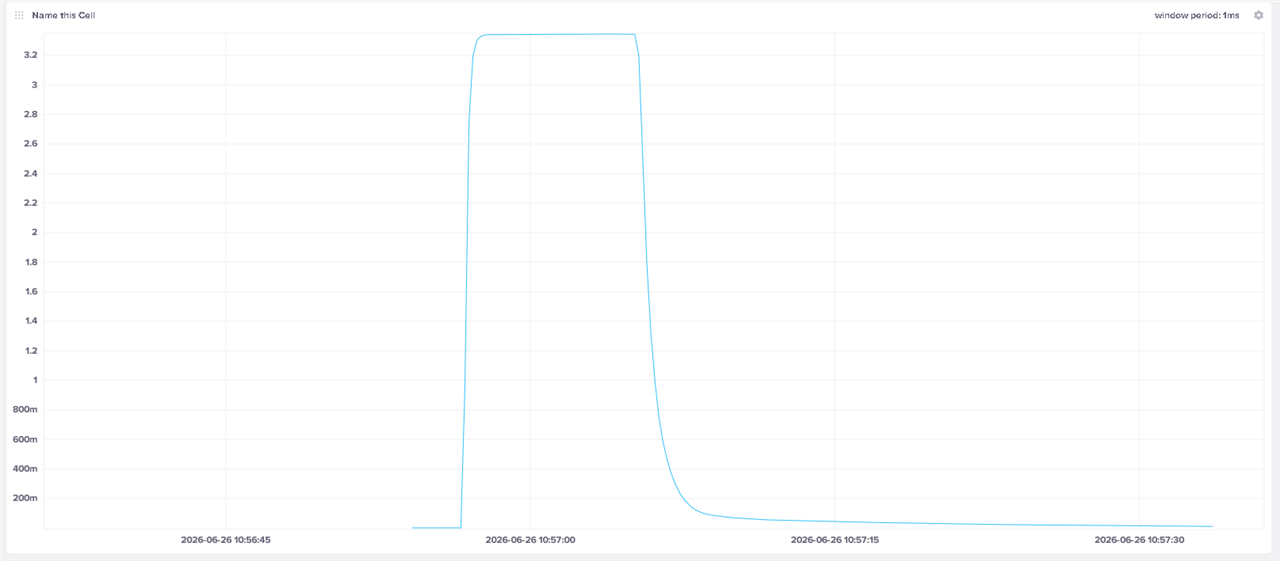
Still no sign of overshoot which is quite reassuring.
And for good measure, I fired-up the oscilloscope to better observe the on-ramp which gave this:

Well, with more than 600ms rise time, it’s no surprise there is no overshoot, the logic inside the power supply has more than enough time to properly sample its output.
With all this, I should be satisfied but LabView still seems like a bazooka to splat a fly, and I don’t really like depending on a software whose usage rights have seen recent tightening, giving a feeling that what happened to VMWare could happen here as well.
Furthermore, it still feels mostly foreign to me, and I must admit that using a LLM to “help” build this did not give me any time to actually learn anything of value. Yet another case of fast reward but null long-term return on investment.
So, I went back to Cursor and asked it to create a C# application within VSCode, a language and environment that I already master and for which I’m more than confident I can better harness the code generator.
The basic idea is to get a version of the same setup/loop idea, using the direct COM based protocol that is described inside the User Manual provided by the manufacturer which appears to be mostly SCPI/IEEE488.2 compatible.
And sure enough, this generated a set of code files that make much more sense to me, even if the output is less “sexy”:
2026-06-26 17:00:41,734 INFO  - Opening COM6 @ 115200 baud
2026-06-26 17:00:41,767 INFO  - Logging DC voltage at max speed. Ctrl+C to stop.
2026-06-26 17:01:14,492 INFO  - Stop requested (Ctrl+C)...
2026-06-26 17:01:14,514 INFO  - Done. samples=1306 rate=39.9 Hz errors=0
And with this I am now able to “see” the noise that gets picked when the leads are left floating:
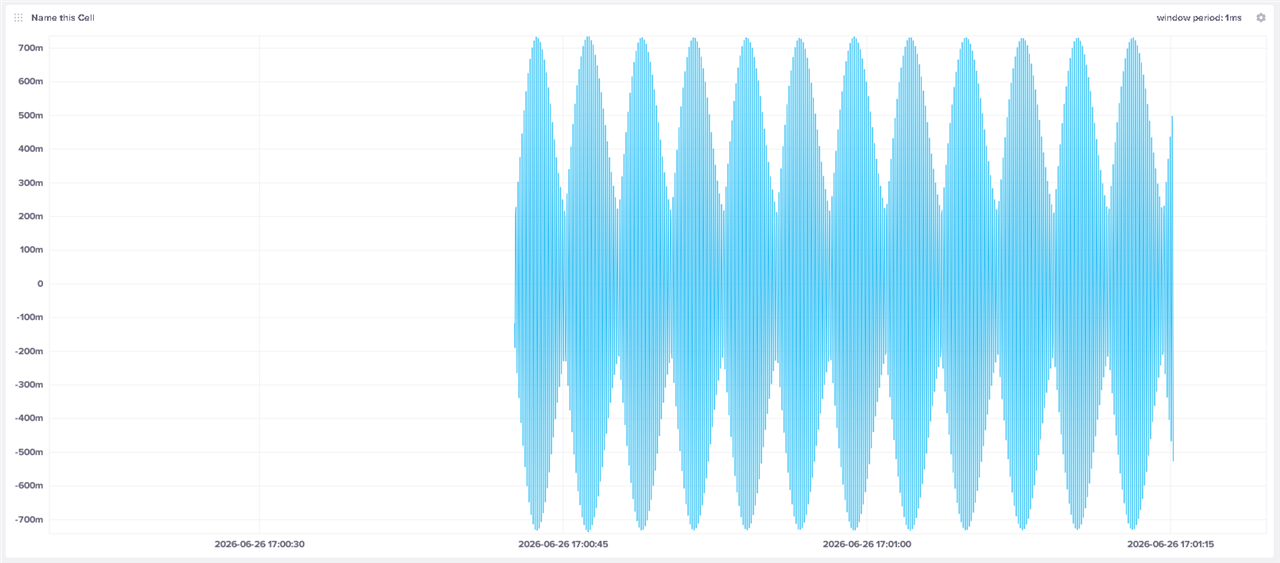
I’m not sure where it’s coming from exactly, but with so many electronic gadgets around, it’s not surprising to see this.
Next steps would be to make the type of measurement configurable from the command line, allow to read both displays at once, something well within my reach, with or without any help from a stochastic parrot.
In the end, I’m glad I chose the DMM as the challenge prize, its logging capabilities will allow me to measure and trace long running variations in the future.
Thanks to E14 for this opportunity and to all the community members that keep answering my sometimes dumb questions.