element14 Community
element14 Community
    Register Log In
  • Site
  • Search
  • Log In Register
  • Community Hub
    Community Hub
    • What's New on element14
    • Feedback and Support
    • Benefits of Membership
    • Personal Blogs
    • Members Area
    • Achievement Levels
  • Learn
    Learn
    • Ask an Expert
    • eBooks
    • element14 presents
    • Learning Center
    • Tech Spotlight
    • STEM Academy
    • Webinars, Training and Events
    • Learning Groups
  • Technologies
    Technologies
    • 3D Printing
    • FPGA
    • Industrial Automation
    • Internet of Things
    • Power & Energy
    • Sensors
    • Technology Groups
  • Challenges & Projects
    Challenges & Projects
    • Design Challenges
    • element14 presents Projects
    • Project14
    • Arduino Projects
    • Raspberry Pi Projects
    • Project Groups
  • Products
    Products
    • Arduino
    • Avnet & Tria Boards Community
    • Dev Tools
    • Manufacturers
    • Multicomp Pro
    • Product Groups
    • Raspberry Pi
    • RoadTests & Reviews
  • About Us
  • Store
    Store
    • Visit Your Store
    • Choose another store...
      • Europe
      •  Austria (German)
      •  Belgium (Dutch, French)
      •  Bulgaria (Bulgarian)
      •  Czech Republic (Czech)
      •  Denmark (Danish)
      •  Estonia (Estonian)
      •  Finland (Finnish)
      •  France (French)
      •  Germany (German)
      •  Hungary (Hungarian)
      •  Ireland
      •  Israel
      •  Italy (Italian)
      •  Latvia (Latvian)
      •  
      •  Lithuania (Lithuanian)
      •  Netherlands (Dutch)
      •  Norway (Norwegian)
      •  Poland (Polish)
      •  Portugal (Portuguese)
      •  Romania (Romanian)
      •  Russia (Russian)
      •  Slovakia (Slovak)
      •  Slovenia (Slovenian)
      •  Spain (Spanish)
      •  Sweden (Swedish)
      •  Switzerland(German, French)
      •  Turkey (Turkish)
      •  United Kingdom
      • Asia Pacific
      •  Australia
      •  China
      •  Hong Kong
      •  India
      • Japan
      •  Korea (Korean)
      •  Malaysia
      •  New Zealand
      •  Philippines
      •  Singapore
      •  Taiwan
      •  Thailand (Thai)
      • Vietnam
      • Americas
      •  Brazil (Portuguese)
      •  Canada
      •  Mexico (Spanish)
      •  United States
      Can't find the country/region you're looking for? Visit our export site or find a local distributor.
  • Translate
  • Profile
  • Settings
Test & Tools
  • Technologies
  • More
Test & Tools
Blog PSL.. Pico SCPI USBTMC labLib makes it easier to write your own PST.. Pico SCPI labTool
  • Blog
  • Forum
  • Documents
  • Files
  • Members
  • Mentions
  • Sub-Groups
  • Tags
  • More
  • Cancel
  • New
Join Test & Tools to participate - click to join for free!
  • Share
  • More
  • Cancel
Group Actions
  • Group RSS
  • More
  • Cancel
Engagement
  • Author Author: Jan Cumps
  • Date Created: 22 Oct 2023 1:41 PM Date Created
  • Views 1548 views
  • Likes 11 likes
  • Comments 7 comments
  • pico_usbtmc_scpi
  • pico
  • USBTMC
  • Pico SCPI labTool
  • labview
  • scpi
Related
Recommended

PSL.. Pico SCPI USBTMC labLib makes it easier to write your own PST.. Pico SCPI labTool

Jan Cumps
Jan Cumps
22 Oct 2023

The Pico SCPI labTool (PST) allows you to connect your PC to equipment to control and monitor all sorts of things. It runs on a Raspberry Pico. 
To make it easier to create several specialised lab instruments, the project is now split up in the Pico SCPI USBTMC labLib (PSL) and the original labTool (PST).
The labTool (as of release 6) is adapted to use the PSL. It serves as a proof of concept for the lib. And as a template project for new instruments.

image

This will enable the pattern: build little instruments, with cheap Picos, that can do great things. 
With USBTMC, SCPI and IEEE488.2 support out-of-box.

How does this work?

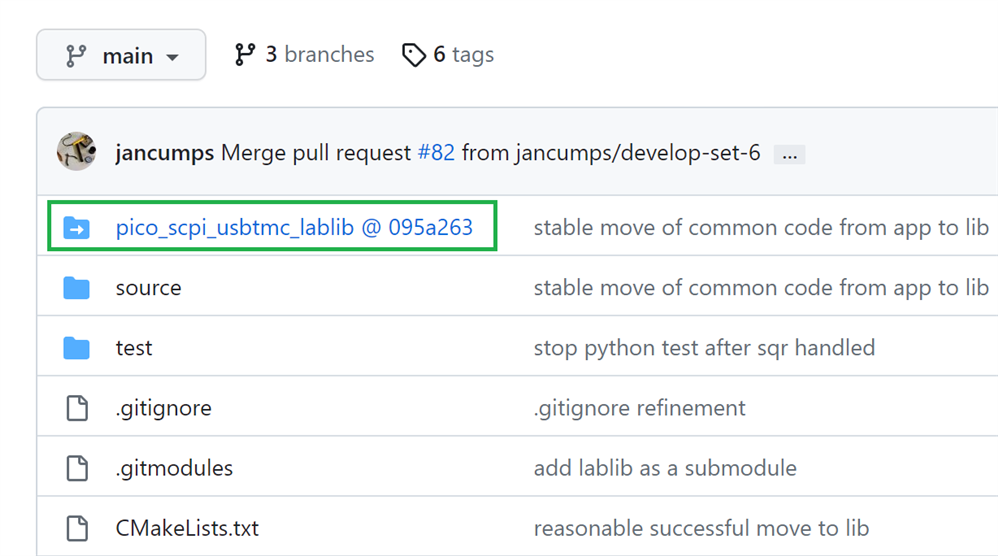
There's a new github project for the PSL. As much as possible of the common infrastructure is moved into the lib:

  • usbtmc handling
  • standard SCPI command definition and handling, including error handling, status byte management and service request support, 

The PST project has significantly slimmed down. It doesn't have to deal with the core functionality anymore, and can focus on the instrument functions:

  • DIGI IN
  • DIGI OUT
  • ANA IN
  • HIRES ANA IN
  • ANA OUT
  • instrument specific registers
  • naming for the USBTMC instrument
  • naming for the *IDN? string

For someone who wants to check out the instrument code: you will automatically also download the library.
Use this clone command, with submodules enabled, to fetch the code:.

git clone https://github.com/jancumps/pico_scpi_usbtmc_labtool.git --recurse-submodules

The build command works as before. The PST make file will automatically also call the PSL make file.
As usual, the release also provides the firmware precompiled and ready to load in .uf2 format. 

Want to start your own firmware project? 
Check out  Do you want to create your own Pico SCPI device, based on PST.. Pico SCPI USBTMC labLib (and labTool)? .

There are no functional changes in this release. That makes it easier to validate if this refactoring introduces regression.

link to all posts

  • Sign in to reply
Parents
  • PavelKCZ
    PavelKCZ over 1 year ago

    Excellent work, I just tried it with my Labview Community Edition and it works like a charm.

    Just one idea (maybe crazy, I don't know). Is it possible to modify it for wifi and Pi Pico W. I mean, instead of USB, one should be able to connect to the Pico through WiFi with standard VISA string like "TCPIP0::address::something::INSTR" ?

    • Cancel
    • Vote Up 0 Vote Down
    • Sign in to reply
    • More
    • Cancel
Comment
  • PavelKCZ
    PavelKCZ over 1 year ago

    Excellent work, I just tried it with my Labview Community Edition and it works like a charm.

    Just one idea (maybe crazy, I don't know). Is it possible to modify it for wifi and Pi Pico W. I mean, instead of USB, one should be able to connect to the Pico through WiFi with standard VISA string like "TCPIP0::address::something::INSTR" ?

    • Cancel
    • Vote Up 0 Vote Down
    • Sign in to reply
    • More
    • Cancel
Children
  • Jan Cumps
    Jan Cumps over 1 year ago in reply to PavelKCZ

    Basic port to TCP is not hard: getting commands from LabVIEW to a socket, and replying back. There is essentially one entry point where you give data to the SCPI lib, and one exit point where you send back SCPI replies. I've done this a few times for Linux devices.

    The complex thing will be to create standard compliant devices that are detected by VISA . And to port the interrupt / service-request part of the lib's functionality (although that's optional).

    • Cancel
    • Vote Up 0 Vote Down
    • Sign in to reply
    • More
    • Cancel
element14 Community

element14 is the first online community specifically for engineers. Connect with your peers and get expert answers to your questions.

  • Members
  • Learn
  • Technologies
  • Challenges & Projects
  • Products
  • Store
  • About Us
  • Feedback & Support
  • FAQs
  • Terms of Use
  • Privacy Policy
  • Legal and Copyright Notices
  • Sitemap
  • Cookies

An Avnet Company © 2025 Premier Farnell Limited. All Rights Reserved.

Premier Farnell Ltd, registered in England and Wales (no 00876412), registered office: Farnell House, Forge Lane, Leeds LS12 2NE.

ICP 备案号 10220084.

Follow element14

  • X
  • Facebook
  • linkedin
  • YouTube