element14 Community
element14 Community
    Register Log In
  • Site
  • Search
  • Log In Register
  • Community Hub
    Community Hub
    • What's New on element14
    • Feedback and Support
    • Benefits of Membership
    • Personal Blogs
    • Members Area
    • Achievement Levels
  • Learn
    Learn
    • Ask an Expert
    • eBooks
    • element14 presents
    • Learning Center
    • Tech Spotlight
    • STEM Academy
    • Webinars, Training and Events
    • Learning Groups
  • Technologies
    Technologies
    • 3D Printing
    • FPGA
    • Industrial Automation
    • Internet of Things
    • Power & Energy
    • Sensors
    • Technology Groups
  • Challenges & Projects
    Challenges & Projects
    • Design Challenges
    • element14 presents Projects
    • Project14
    • Arduino Projects
    • Raspberry Pi Projects
    • Project Groups
  • Products
    Products
    • Arduino
    • Avnet & Tria Boards Community
    • Dev Tools
    • Manufacturers
    • Multicomp Pro
    • Product Groups
    • Raspberry Pi
    • RoadTests & Reviews
  • About Us
  • Store
    Store
    • Visit Your Store
    • Choose another store...
      • Europe
      •  Austria (German)
      •  Belgium (Dutch, French)
      •  Bulgaria (Bulgarian)
      •  Czech Republic (Czech)
      •  Denmark (Danish)
      •  Estonia (Estonian)
      •  Finland (Finnish)
      •  France (French)
      •  Germany (German)
      •  Hungary (Hungarian)
      •  Ireland
      •  Israel
      •  Italy (Italian)
      •  Latvia (Latvian)
      •  
      •  Lithuania (Lithuanian)
      •  Netherlands (Dutch)
      •  Norway (Norwegian)
      •  Poland (Polish)
      •  Portugal (Portuguese)
      •  Romania (Romanian)
      •  Russia (Russian)
      •  Slovakia (Slovak)
      •  Slovenia (Slovenian)
      •  Spain (Spanish)
      •  Sweden (Swedish)
      •  Switzerland(German, French)
      •  Turkey (Turkish)
      •  United Kingdom
      • Asia Pacific
      •  Australia
      •  China
      •  Hong Kong
      •  India
      •  Korea (Korean)
      •  Malaysia
      •  New Zealand
      •  Philippines
      •  Singapore
      •  Taiwan
      •  Thailand (Thai)
      • Americas
      •  Brazil (Portuguese)
      •  Canada
      •  Mexico (Spanish)
      •  United States
      Can't find the country/region you're looking for? Visit our export site or find a local distributor.
  • Translate
  • Profile
  • Settings
Test & Tools
  • Technologies
  • More
Test & Tools
Forum Need help with Multicomp Pro PC Oscilloscope MP720016US (Update: It's working!)
  • Blog
  • Forum
  • Documents
  • Files
  • Members
  • Mentions
  • Sub-Groups
  • Tags
  • More
  • Cancel
  • New
Join Test & Tools to participate - click to join for free!
Actions
  • Share
  • More
  • Cancel
Forum Thread Details
  • Replies 26 replies
  • Subscribers 355 subscribers
  • Views 5930 views
  • Users 0 members are here
  • multicomp pro oscilloscope
  • troubleshooting
  • multicomp pro
  • oscilloscope
Related

Need help with Multicomp Pro PC Oscilloscope MP720016US (Update: It's working!)

rsjawale24
rsjawale24 over 2 years ago

Recently I ordered a PC oscilloscope as the poroject14 prize from 555 timer madness contest. I have always wanted to own a oscilloscope, been trying since 2017 and finally I own one. This is my first ever oscilloscope sore really excited about it!!

But I'm facing troubles getting it to work.

I followed the instructions in the manual, installed the drivers correctly, the USB scope is identified by windows device manager, however when I try to check for waveforms, there's nothing displayed.

As per the manual, I tried to use the probe compensation, and clicked in auto-set to auto set the scope window, however it gets stuck forever at this point as shown in image below.

I tried reconnecting, reinstalling drivers, but nothing seems to work.

Have you used this device before? Any help on how to make this work is appriciated.
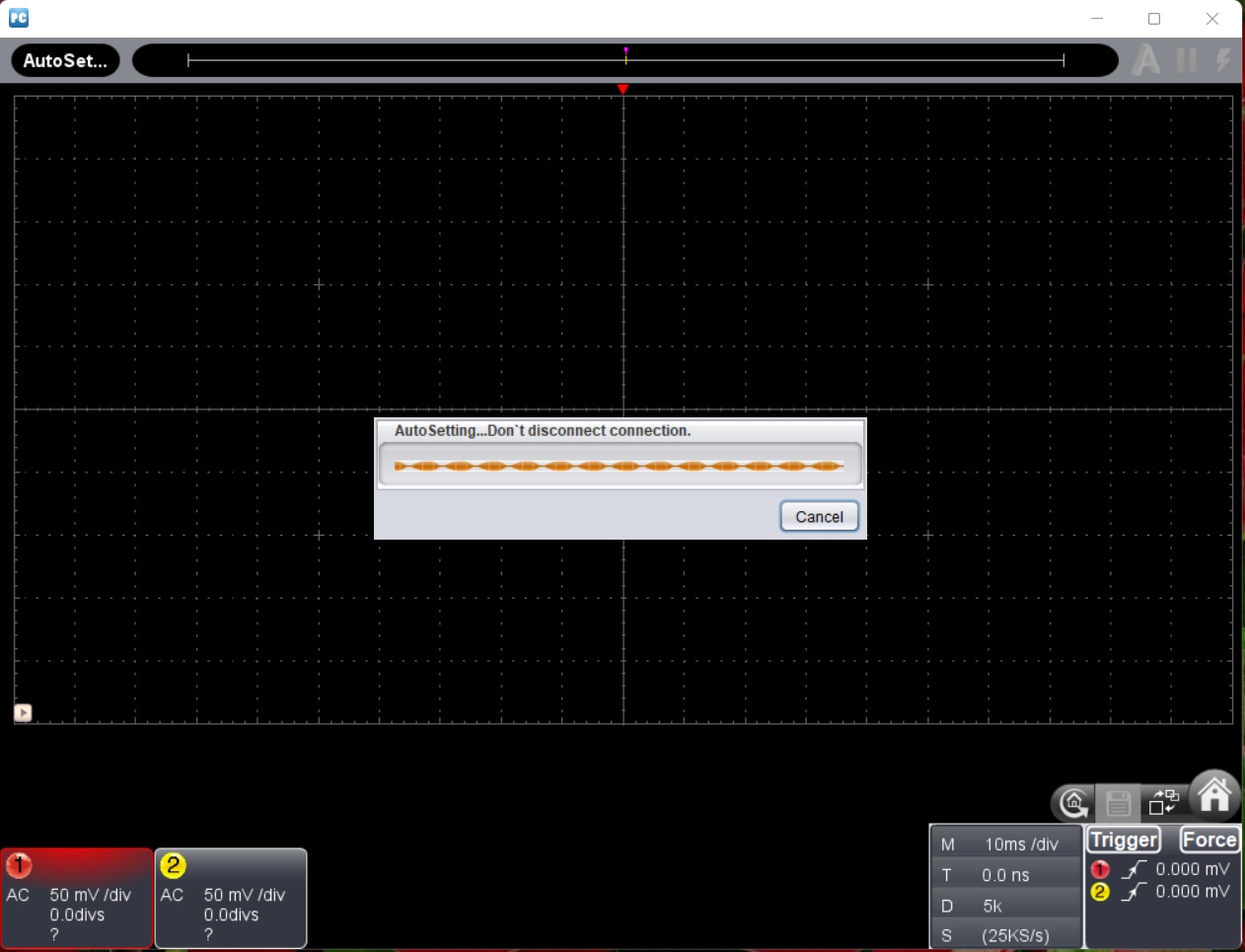
image

UPDATE: The scope's working fine now. I had to install the drivers from Owon website and change the software as well. I'm using the software from Owon. The scope seems to be working fine now.

Will post a detailed blog on my tests with the Scope soon. Really excited about my first scope and can't wait to do lots of pending projects!

  • Sign in to reply
  • Cancel

Top Replies

  • rsjawale24
    rsjawale24 over 2 years ago +7
    Thank you everyone for the help! The scope's working fine now. I had to install the drivers from Owon website and change the software as well. I'm using the software from Owon. The scope seems to be…
  • baldengineer
    baldengineer over 2 years ago in reply to ralphjy +6
    Here's an extensive list of things I like about the software: [This list intentionally left blank]
  • Gough Lui
    Gough Lui over 2 years ago +3
    I would personally try a different computer with a different USB controller. Also avoid using any hubs along the way, use a quality cable. I've had issues previously where certain pieces of test equipment…
  • rsjawale24
    rsjawale24 over 2 years ago in reply to scottiebabe

    Thanks!

    Yes, seems to be a minor problem with the drivers. I'll get it fixed soon. Can't wait to try my first scope! Smiley

    • Cancel
    • Vote Up +2 Vote Down
    • Sign in to reply
    • Cancel
  • rsjawale24
    rsjawale24 over 2 years ago in reply to javagoza

    I tried everything. I'm using Windows 11. I think it's the problem with the driver/software

    • Cancel
    • Vote Up +1 Vote Down
    • Sign in to reply
    • Cancel
  • rsjawale24
    rsjawale24 over 2 years ago in reply to baldengineer

    Thanks! Yep, I should atleast see the noise on the display but I don't see anything.

    I don't have a CD drive so cannot use the drivers and software from the CD but I downloaded the software and drivers form the Newark website.

    The device manager shows libusb device same as you after manually installing the drivers.

    I'm able to connect to the scope using the software also, the only problem is there is no waveform displayed.

    • Cancel
    • Vote Up +2 Vote Down
    • Sign in to reply
    • Cancel
  • rsjawale24
    rsjawale24 over 2 years ago in reply to baldengineer

    I just did a factory reset of the software as suggested in the manual. The trigger for both channels comes automatically when factory reseted.

    • Cancel
    • Vote Up +2 Vote Down
    • Sign in to reply
    • Cancel
  • rsjawale24
    rsjawale24 over 2 years ago in reply to javagoza

    Yep! It's the same as OWON VDS1022 scope. Maybe I'll try using the drivers provided by Owon!

    • Cancel
    • Vote Up +1 Vote Down
    • Sign in to reply
    • Cancel
  • rsjawale24
    rsjawale24 over 2 years ago in reply to ralphjy

    I'll check my version of the software. Now I think the drivers/software on the Newark website are outdated. My software initially shows trig'd then I click on A for auto and it gets stuck there forever like an infinite loop

    I will try drivers and software from Owon as the scope is basically the same as OWON VDS1022

    • Cancel
    • Vote Up +1 Vote Down
    • Sign in to reply
    • Cancel
  • ralphjy
    ralphjy over 2 years ago in reply to baldengineer

    Thx.  I guess I should have realized that he pushed that icon - if I had looked at what was in the middle of the screen Relaxed.  

    Actually, I don't like that the connect functionality is behind that indicator....

    • Cancel
    • Vote Up 0 Vote Down
    • Sign in to reply
    • Cancel
  • baldengineer
    baldengineer over 2 years ago in reply to ralphjy

    Here's an extensive list of things I like about the software:

    • [This list intentionally left blank]
    • Cancel
    • Vote Up +6 Vote Down
    • Sign in to reply
    • Cancel
  • ralphjy
    ralphjy over 2 years ago in reply to baldengineer

    Laughing

    • Cancel
    • Vote Up 0 Vote Down
    • Sign in to reply
    • Cancel
  • baldengineer
    baldengineer over 2 years ago in reply to rsjawale24

    It's normal for both channels to be active (on), but the default trigger is Rising Edge on Channel 1 at 0V.

    Perhaps there's a problem with the trigger circuit, and the software is getting stuck trying to configure it. If the Owon software does the same thing and both "see" the oscilloscope, I would lean toward a hardware issue.

    • Cancel
    • Vote Up +2 Vote Down
    • Sign in to reply
    • Cancel
<>
element14 Community

element14 is the first online community specifically for engineers. Connect with your peers and get expert answers to your questions.

  • Members
  • Learn
  • Technologies
  • Challenges & Projects
  • Products
  • Store
  • About Us
  • Feedback & Support
  • FAQs
  • Terms of Use
  • Privacy Policy
  • Legal and Copyright Notices
  • Sitemap
  • Cookies

An Avnet Company © 2025 Premier Farnell Limited. All Rights Reserved.

Premier Farnell Ltd, registered in England and Wales (no 00876412), registered office: Farnell House, Forge Lane, Leeds LS12 2NE.

ICP 备案号 10220084.

Follow element14

  • X
  • Facebook
  • linkedin
  • YouTube