element14 Community
element14 Community
    Register Log In
  • Site
  • Search
  • Log In Register
  • Community Hub
    Community Hub
    • What's New on element14
    • Feedback and Support
    • Benefits of Membership
    • Personal Blogs
    • Members Area
    • Achievement Levels
  • Learn
    Learn
    • Ask an Expert
    • eBooks
    • element14 presents
    • Learning Center
    • Tech Spotlight
    • STEM Academy
    • Webinars, Training and Events
    • Learning Groups
  • Technologies
    Technologies
    • 3D Printing
    • FPGA
    • Industrial Automation
    • Internet of Things
    • Power & Energy
    • Sensors
    • Technology Groups
  • Challenges & Projects
    Challenges & Projects
    • Design Challenges
    • element14 presents Projects
    • Project14
    • Arduino Projects
    • Raspberry Pi Projects
    • Project Groups
  • Products
    Products
    • Arduino
    • Avnet & Tria Boards Community
    • Dev Tools
    • Manufacturers
    • Multicomp Pro
    • Product Groups
    • Raspberry Pi
    • RoadTests & Reviews
  • About Us
    About the element14 Community
  • Store
    Store
    • Visit Your Store
    • Choose another store...
      • Europe
      •  Austria (German)
      •  Belgium (Dutch, French)
      •  Bulgaria (Bulgarian)
      •  Czech Republic (Czech)
      •  Denmark (Danish)
      •  Estonia (Estonian)
      •  Finland (Finnish)
      •  France (French)
      •  Germany (German)
      •  Hungary (Hungarian)
      •  Ireland
      •  Israel
      •  Italy (Italian)
      •  Latvia (Latvian)
      •  
      •  Lithuania (Lithuanian)
      •  Netherlands (Dutch)
      •  Norway (Norwegian)
      •  Poland (Polish)
      •  Portugal (Portuguese)
      •  Romania (Romanian)
      •  Russia (Russian)
      •  Slovakia (Slovak)
      •  Slovenia (Slovenian)
      •  Spain (Spanish)
      •  Sweden (Swedish)
      •  Switzerland(German, French)
      •  Turkey (Turkish)
      •  United Kingdom
      • Asia Pacific
      •  Australia
      •  China
      •  Hong Kong
      •  India
      •  Japan
      •  Korea (Korean)
      •  Malaysia
      •  New Zealand
      •  Philippines
      •  Singapore
      •  Taiwan
      •  Thailand (Thai)
      •  Vietnam
      • Americas
      •  Brazil (Portuguese)
      •  Canada
      •  Mexico (Spanish)
      •  United States
      Can't find the country/region you're looking for? Visit our export site or find a local distributor.
  • Translate
  • Profile
  • Settings
Forget Me Not Design Challenge
  • Challenges & Projects
  • Design Challenges
  • Forget Me Not Design Challenge
  • More
  • Cancel
Forget Me Not Design Challenge
Blog Episode 3: Forget Me Not: Setup EnOcean with openHAB
  • Blog
  • Forum
  • Documents
  • Files
  • Events
  • Mentions
  • Sub-Groups
  • Tags
  • More
  • Cancel
  • New
  • Share
  • More
  • Cancel
Group Actions
  • Group RSS
  • More
  • Cancel
Engagement
  • Author Author: michaelwylie
  • Date Created: 10 Aug 2014 2:57 AM Date Created
  • Views 2209 views
  • Likes 0 likes
  • Comments 11 comments
  • forget_me_not
  • iot_monitor_auto
Related
Recommended

Episode 3: Forget Me Not: Setup EnOcean with openHAB

michaelwylie
michaelwylie
10 Aug 2014

Shouldn't the process for setting up home automation software be automated?


Past Posts:

Epidode 1: Forget Me Not: Application

Episode 2: Forget Me Not: The Best Laid Plans ...


This post is about my experience setting up my Raspberry Pi. Other users have detailed documentation for setting up openHAB and I don't see the merit in producing the same work. I will, instead, add my two cents to what has already been published.

[Forget me Knot Week 1] BASHing my head against the wall

Forget_me_not: My Smart Home Post #2 Week-1 Getting Started

Forget_me_not: My Smart Home Post #2 Week-1 Getting Started

[CaTS] ForgetMeNot - Week 1: EnOceanPi and Sensors     <----- You should definitely read this one, good job Frederick!


Resources for setting up:

Downloading NOOBS

Disabling the Raspberry Pi Serial Port

Configuring openHAB

EnOcean Bindings

Raspberry Pi, No Keyboard or Mouse Required


Setup the Raspberry Pi


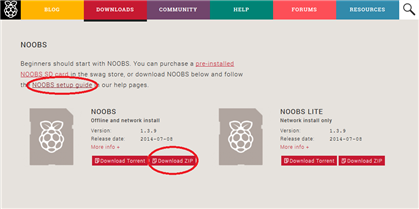
1. Go to Downloads | Raspberry Pi and download NOOBS. Below I have shown an image of the website. Click the Download ZIP link to get NOOBS and click on NOOBS setup guide to see a video about setting up NOOBS.
 

image


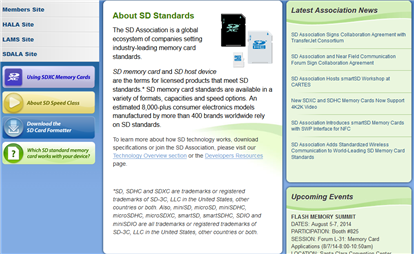
2. Download the SD card formatting utility from www.sdcard.org
 

image


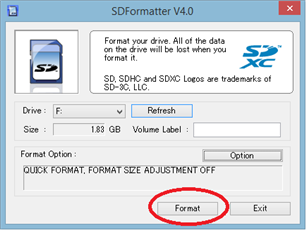
3. Insert your SD card into the computer's SD card reader, run SDFormatter, and format the SD card.
 

image


4. Copy the contents of the ZIP file you downloaded (NOOBS) to the SD card.


5. Insert the SD card into your Raspberry Pi and turn on the Raspberry Pi.


Follow all the instructions when you boot up. Install the OS blah blah blah, there's a million websites about starting up your Pi the first time. Get to a terminal window to perform the system update and upgrade


sudo apt-get update
sudo apt-get upgrade


Disable the serial console on the Raspberry Pi. What's this all about anyway? We'll the Raspberry pi by default has a UART connection (TX, RX) that it automatically sets up. The EnOCean Pi needs to claim these pins for itself, so you have to tell Raspbian that it can't have the console. That's done by using a nice script Andrew Scheller wrote:


sudo wget https://raw.github.com/lurch/rpi-serial-console/master/rpi-serial-console -O /usr/bin/rpi-serial-console && sudo chmod +x /usr/bin/rpi-serial-console
sudo rpi-serial-console disable


Now, REBOOT!

That's it, your Pi should be ready to go with the EnOcean gateway (hopefully by this time you've plugged in the EnOcean Gateway to your Pi).


The rest of the steps to get openHAB up and running are covered very well by other finalists, and I recommend reading Frederick's detailed instructions.


A few tips:

  • When inserting commands into the configuration files, don't forget to remove the # in front of the line. This is very important, as that # makes the line a comment and the command never runs.
  • Install openHAB to /home/pi/openHAB so you don't have to worry about user permissions when using the designer software.
  • I definitely recommend using the debugging setup Daniel Williams used so you can get your sensor IDs without installing FHEM.
  • You should definitely remove a lot of the extra jar files from the openHAB/addons folder. If you leave them all there the Pi gets bogged down. It takes forever to restart openHAB and you will be restarting a lot to get it debugged. I removed all the binding ones except enocean, serial, gpio, and cups.
  • If your smart phone does not have a new version of Android it will be best to use a web browser directed to http://192.168.xxx.xxx:8080/openhab.app?sitemap=demo to see the status of your smart home.


Good luck!

  • Sign in to reply

Top Comments

  • michaelwylie
    michaelwylie over 12 years ago in reply to fvan +1
    I suspect so as well Frederick, but I also suspect your blog post leveled the playing field so to speak. A lot of finalists, myself included, would have struggled a lot more to gather all the information…
  • fvan
    fvan over 12 years ago in reply to michaelwylie

    No problem image


    I'm sure we'll all be able to pick something up from the other finalists. I'm a software guy, so I feel comfortable wit this part. However, later on when moving to the hardware side of the project, I'll be able to use some help image


    Frederick

    • Cancel
    • Vote Up 0 Vote Down
    • Sign in to reply
    • More
    • Cancel
  • michaelwylie
    michaelwylie over 12 years ago in reply to fvan

    I suspect so as well Frederick, but I also suspect your blog post leveled the playing field so to speak. A lot of finalists, myself included, would have struggled a lot more to gather all the information together.


    So, thanks image

    • Cancel
    • Vote Up +1 Vote Down
    • Sign in to reply
    • More
    • Cancel
  • fvan
    fvan over 12 years ago

    Thanks for the reference Michael! image


    I suppose it's normal to have so many overlapping posts in the beginning, as most of us are using the same tools.

    However, once the real project execution starts, I suspect the posts' content will be much more varied.


    Frederick

    • Cancel
    • Vote Up 0 Vote Down
    • Sign in to reply
    • More
    • Cancel
  • mcb1
    mcb1 over 12 years ago in reply to michaelwylie

    I guess once you've set it all up, you could take an image of the card.

    Sadly you're asking the wrong person, my Linux skills could be written on the head of a pin. ... well thumbtack maybe.


    I don't have a problem with instructions that are clear (and most of these blogs have been), but most of the others seem to written by people already knowledgeable in the areas that beginners are struggling with.

    The automatic script is also fine, but it doesn't help with understanding what is going on ... and learning is about adding the various pieces into the jigsaw to increase the knowledge.


    My next blog is about setting up openhab, permissions and customising the sitemap, since its poorly documented and the designer software has few instructions for beginner's .... that I can find.

    I was hoping to have the EnOcean Pi to include a couple of other bits .... but we'll see.


    Mark

    • Cancel
    • Vote Up 0 Vote Down
    • Sign in to reply
    • More
    • Cancel
  • michaelwylie
    michaelwylie over 12 years ago in reply to mcb1

    I was wondering, shouldn't there be a way to image Raspbian and provide that as a download instead of going through all this?

    • Cancel
    • Vote Up 0 Vote Down
    • Sign in to reply
    • More
    • Cancel
<>
element14 Community

element14 is the first online community specifically for engineers. Connect with your peers and get expert answers to your questions.

  • Members
  • Learn
  • Technologies
  • Challenges & Projects
  • Products
  • Store
  • About Us
  • Feedback & Support
  • FAQs
  • Terms of Use
  • Privacy Policy
  • Legal and Copyright Notices
  • Sitemap
  • Cookies

An Avnet Company © 2026 Premier Farnell Limited. All Rights Reserved.

Premier Farnell Ltd, registered in England and Wales (no 00876412), registered office: Farnell House, Forge Lane, Leeds LS12 2NE.

Follow element14

  • X
  • Facebook
  • linkedin
  • YouTube