element14 Community
element14 Community
    Register Log In
  • Site
  • Search
  • Log In Register
  • Community Hub
    Community Hub
    • What's New on element14
    • Feedback and Support
    • Benefits of Membership
    • Personal Blogs
    • Members Area
    • Achievement Levels
  • Learn
    Learn
    • Ask an Expert
    • eBooks
    • element14 presents
    • Learning Center
    • Tech Spotlight
    • STEM Academy
    • Webinars, Training and Events
    • Learning Groups
  • Technologies
    Technologies
    • 3D Printing
    • FPGA
    • Industrial Automation
    • Internet of Things
    • Power & Energy
    • Sensors
    • Technology Groups
  • Challenges & Projects
    Challenges & Projects
    • Design Challenges
    • element14 presents Projects
    • Project14
    • Arduino Projects
    • Raspberry Pi Projects
    • Project Groups
  • Products
    Products
    • Arduino
    • Avnet & Tria Boards Community
    • Dev Tools
    • Manufacturers
    • Multicomp Pro
    • Product Groups
    • Raspberry Pi
    • RoadTests & Reviews
  • About Us
  • Store
    Store
    • Visit Your Store
    • Choose another store...
      • Europe
      •  Austria (German)
      •  Belgium (Dutch, French)
      •  Bulgaria (Bulgarian)
      •  Czech Republic (Czech)
      •  Denmark (Danish)
      •  Estonia (Estonian)
      •  Finland (Finnish)
      •  France (French)
      •  Germany (German)
      •  Hungary (Hungarian)
      •  Ireland
      •  Israel
      •  Italy (Italian)
      •  Latvia (Latvian)
      •  
      •  Lithuania (Lithuanian)
      •  Netherlands (Dutch)
      •  Norway (Norwegian)
      •  Poland (Polish)
      •  Portugal (Portuguese)
      •  Romania (Romanian)
      •  Russia (Russian)
      •  Slovakia (Slovak)
      •  Slovenia (Slovenian)
      •  Spain (Spanish)
      •  Sweden (Swedish)
      •  Switzerland(German, French)
      •  Turkey (Turkish)
      •  United Kingdom
      • Asia Pacific
      •  Australia
      •  China
      •  Hong Kong
      •  India
      • Japan
      •  Korea (Korean)
      •  Malaysia
      •  New Zealand
      •  Philippines
      •  Singapore
      •  Taiwan
      •  Thailand (Thai)
      • Vietnam
      • Americas
      •  Brazil (Portuguese)
      •  Canada
      •  Mexico (Spanish)
      •  United States
      Can't find the country/region you're looking for? Visit our export site or find a local distributor.
  • Translate
  • Profile
  • Settings
IoT on Wheels Design Challenge
  • Challenges & Projects
  • Design Challenges
  • IoT on Wheels Design Challenge
  • More
  • Cancel
IoT on Wheels Design Challenge
Blog BLOG 2 : NexTion - Enhanced Heven SbSr
  • Blog
  • Forum
  • Documents
  • Polls
  • Files
  • Events
  • Mentions
  • Sub-Groups
  • Tags
  • More
  • Cancel
  • New
  • Share
  • More
  • Cancel
Group Actions
  • Group RSS
  • More
  • Cancel
Engagement
  • Author Author: gsgill112
  • Date Created: 11 Oct 2017 6:42 PM Date Created
  • Views 1164 views
  • Likes 1 like
  • Comments 2 comments
  • sbsr
  • iotonwheels
Related
Recommended

BLOG 2 : NexTion - Enhanced Heven SbSr

gsgill112
gsgill112
11 Oct 2017

BLOG - II  imageimage

NexTion - Enhanced Heven

GS Gill - 11 October 2017

As usual please download the attached PDF for better formatting .

    PREVIOUS BLOG

    NEXT BLOG

image

Table of Contents


1. What is Nextion Display 

2. Getting Started With the Display

3. Project implementation  (Click here for Project Implementation Video)

4. Way forward


What is Nextion Display

From Nextion web : HERE


“Nextion offers a new and easy way to interface, help to make GUI easier. Available from 2.4″ to 7″ models, provides a analog touch screen operator interface with programmable function buttons, gauges, progress bars…etc., Nextion is an interface solution designed to complement your application needs. ”


But for us makers : It is a Display solution which makes GUI designing and Interfacing with the Main Embedded System so much easier, plus It Offloads the display subsystem to a co processor.


They are available in all sizes and capabilities image See the available option below image


I got the display from banggood.com HERE and it took about 20 Days to get delivered.


Key Benefits & Disadvantages

  • Offloads the entire Display programming, Image Conversion, Image Array storage, etc .. .. to the Nextion Display.
  • Easy to design GUI
  • Easy interface with UART, instead of I2C or SPI.
  • Inbuilt Graphics memory
  • Inbuilt 4-Wire Resistive touch and interface
  • Event based Programming
  • Inbuilt RTC & EPROM
  • 8 GPIO’s can offload Button Navigation Interface
  • And Many More.. .. ..
  • Power Hungry (Giving power to one more micro controller)
  • Only way to upload new GUI design is either Serial (Slow) or Via SD Card (repetitive)
  • Each time there is a rev in the GUI, The on board flash of the MCU has to be reprogrammed
  • Nextion Editor IDE Works only on Windows


That being said, lets look at the available options below ( Source : Click Here )
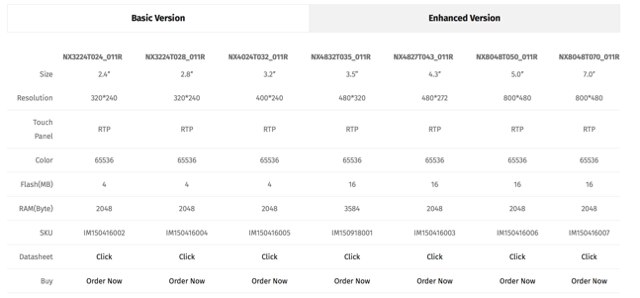
 

image

Getting Started

OK, So getting started with the display is as simple as  1, 2, 3, 4.. 5

and

Wooooo oo ooooo, Yaaaayyyyyyyy.   !!! !!! !!! !!!!


1.     Well first Lets get a Nextion Display (check the link below)

image

2.      Lets get the Nextion Editor (again Check the link below)
image

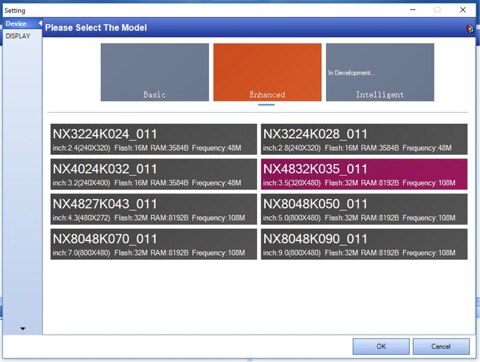
3.     Select your Display

image

4.     Make your design using GUI editor, Compile and copy the *.tft file from nextion built folder
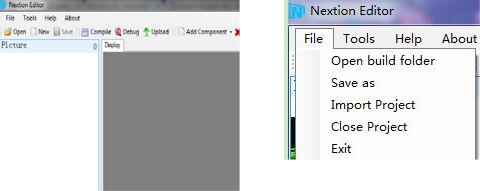
image

5.     Copy the *.tft into SD card, insert the SD card into the Display and power it on. Let it uploads the sketch onto the display’s memory and remove the SD card. Re-Power the display and Enjoy.

image


Project implementation

Here is a video of my implementation, any reviews and comments would be appreciated.


You don't have permission to edit metadata of this video.
Edit media
x
image
Upload Preview
image


Way forward

AS of now interface with the MCU is a huge ISSUE !!


Updates:-

30 Sep 17 UART Interrupt not working

01 Oct 17 Button Interrupt works

08 Oct 17 All Interrupts somehow stopped Working. image :’(

08 Oct 17 Since.. I HATE MBED


As the Rx Interrupt is not working and now even the TX button Interrupt is not working it is useless working with mbed platform .


Trying to download STM32 Openware to try my luck there . image


Links & References

1. Nextion Home Page

2. Nextion Buy Page

3. I got it from here

4. NX4024K032 Module Wiki

5. Nextion Instruction Set

6. And the New Instruction Set Page


    PREVIOUS BLOG

    NEXT BLOG

Attachments:
imageblog2_SbSr.pdf
  • Sign in to reply
  • gsgill112
    gsgill112 over 8 years ago in reply to DAB

    Sir I will try to cover it here but am thinking to keep it as a seperate video /post.


    As far as ease of setting it up.

    It took me couple of hours about 8-12 to get started and build the gui you see in the video including the tx seriAl commands.


    So it is really very simple and intuitive design.


    //Guri

    • Cancel
    • Vote Up 0 Vote Down
    • Sign in to reply
    • More
    • Cancel
  • DAB
    DAB over 8 years ago

    Nice honest update.


    I am curious of how easy it is to setup the display, the actual mechanics of setting up what information gets displayed and where, how you establish button space, how big, sensitivity, single tap or double tap, opaque, transparent, background, you know, the guts of the display.


    DAB

    • Cancel
    • Vote Up 0 Vote Down
    • Sign in to reply
    • More
    • Cancel
element14 Community

element14 is the first online community specifically for engineers. Connect with your peers and get expert answers to your questions.

  • Members
  • Learn
  • Technologies
  • Challenges & Projects
  • Products
  • Store
  • About Us
  • Feedback & Support
  • FAQs
  • Terms of Use
  • Privacy Policy
  • Legal and Copyright Notices
  • Sitemap
  • Cookies

An Avnet Company © 2025 Premier Farnell Limited. All Rights Reserved.

Premier Farnell Ltd, registered in England and Wales (no 00876412), registered office: Farnell House, Forge Lane, Leeds LS12 2NE.

ICP 备案号 10220084.

Follow element14

  • X
  • Facebook
  • linkedin
  • YouTube