element14 Community
element14 Community
    Register Log In
  • Site
  • Search
  • Log In Register
  • Community Hub
    Community Hub
    • What's New on element14
    • Feedback and Support
    • Benefits of Membership
    • Personal Blogs
    • Members Area
    • Achievement Levels
  • Learn
    Learn
    • Ask an Expert
    • eBooks
    • element14 presents
    • Learning Center
    • Tech Spotlight
    • STEM Academy
    • Webinars, Training and Events
    • Learning Groups
  • Technologies
    Technologies
    • 3D Printing
    • FPGA
    • Industrial Automation
    • Internet of Things
    • Power & Energy
    • Sensors
    • Technology Groups
  • Challenges & Projects
    Challenges & Projects
    • Design Challenges
    • element14 presents Projects
    • Project14
    • Arduino Projects
    • Raspberry Pi Projects
    • Project Groups
  • Products
    Products
    • Arduino
    • Avnet & Tria Boards Community
    • Dev Tools
    • Manufacturers
    • Multicomp Pro
    • Product Groups
    • Raspberry Pi
    • RoadTests & Reviews
  • About Us
  • Store
    Store
    • Visit Your Store
    • Choose another store...
      • Europe
      •  Austria (German)
      •  Belgium (Dutch, French)
      •  Bulgaria (Bulgarian)
      •  Czech Republic (Czech)
      •  Denmark (Danish)
      •  Estonia (Estonian)
      •  Finland (Finnish)
      •  France (French)
      •  Germany (German)
      •  Hungary (Hungarian)
      •  Ireland
      •  Israel
      •  Italy (Italian)
      •  Latvia (Latvian)
      •  
      •  Lithuania (Lithuanian)
      •  Netherlands (Dutch)
      •  Norway (Norwegian)
      •  Poland (Polish)
      •  Portugal (Portuguese)
      •  Romania (Romanian)
      •  Russia (Russian)
      •  Slovakia (Slovak)
      •  Slovenia (Slovenian)
      •  Spain (Spanish)
      •  Sweden (Swedish)
      •  Switzerland(German, French)
      •  Turkey (Turkish)
      •  United Kingdom
      • Asia Pacific
      •  Australia
      •  China
      •  Hong Kong
      •  India
      • Japan
      •  Korea (Korean)
      •  Malaysia
      •  New Zealand
      •  Philippines
      •  Singapore
      •  Taiwan
      •  Thailand (Thai)
      • Vietnam
      • Americas
      •  Brazil (Portuguese)
      •  Canada
      •  Mexico (Spanish)
      •  United States
      Can't find the country/region you're looking for? Visit our export site or find a local distributor.
  • Translate
  • Profile
  • Settings
Smart Spaces Design Challenge
  • Challenges & Projects
  • Design Challenges
  • Smart Spaces Design Challenge
  • More
  • Cancel
Smart Spaces Design Challenge
Forum NO connection to chips debug port on the MCXN236?
  • Forum
  • Projects
  • DC
  • Leaderboard
  • Files
  • Members
  • More
  • Cancel
  • New
Join Smart Spaces Design Challenge to participate - click to join for free!
Actions
  • Share
  • More
  • Cancel
Forum Thread Details
  • State Verified Answer
  • Replies 8 replies
  • Subscribers 40 subscribers
  • Views 375 views
  • Users 0 members are here
  • FRDM MCXN236
Related

NO connection to chips debug port on the MCXN236?

skruglewicz
skruglewicz 2 months ago

I’m still having problems with the MCXN236 . Can't find the probe 

CONSOLE log:

LinkServer RedlinkMulti Driver v25.6 (Jun 26 2025 19:34:05 - crt_emu_cm_redlink build 1017)
Found chip XML file in C:/nxp/workspace/frdmmcxn236_hello_world/Debug\MCXN236.xml
( 5) Remote configuration complete
Reconnected to the existing LinkServer process.
Connecting to probe 2 core 0 (using server started externally) reports:
'Ee(42). Could not connect to core.'
Retrying...
Reconnected to the existing LinkServer process.
Server OK but no connection to probe 2 core 0 (after 3 attempts) - Ee(42). Could not connect to core.
Failed on connect: Ee(42). Could not connect to core.
No connection to chip's debug port
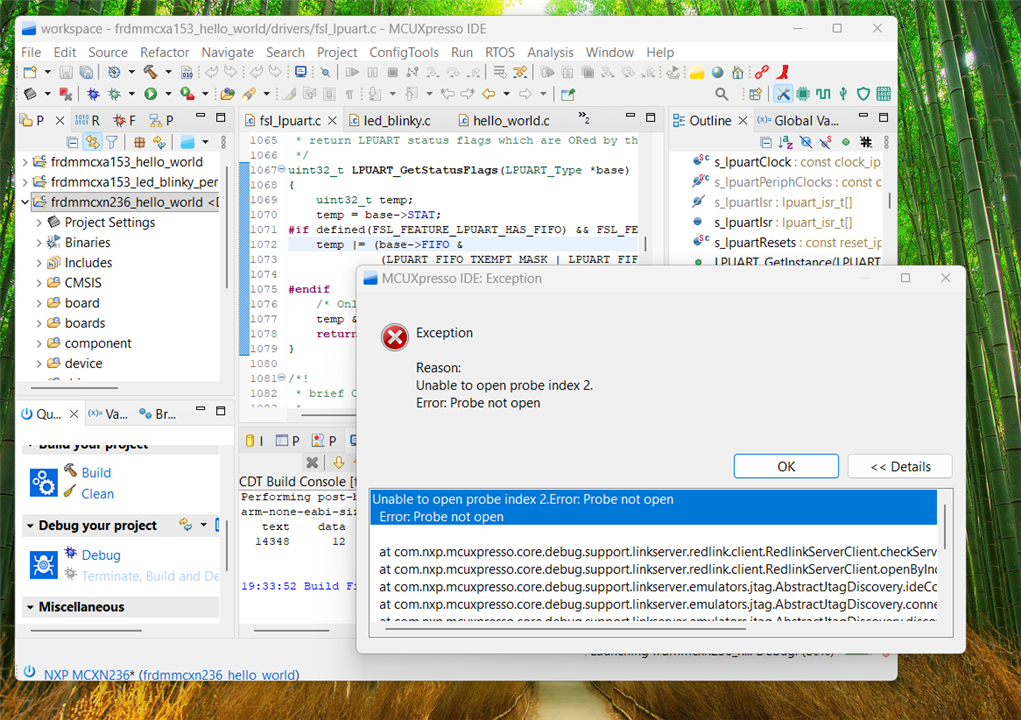
image

 I'm dead in the water with the MCXN236 and can not develop my project without it Does any one know why thus is happening? Is my board defective? 

any help here would be appreciated.

Thanks 

Steve K

  • Sign in to reply
  • Cancel

Top Replies

  • skruglewicz
    skruglewicz 1 month ago +3 verified
    UPDATE STATUS on the problem Success What was the reason? Turns out there were multiple versions of the MCU-Link firmware on my troubled PC. And as I found two Common Causes of Persistent Debugging…
  • skruglewicz
    skruglewicz 2 months ago +2
    skruglewicz said: I’m still having problems with the MCXN236 . Can't find the probe CONSOLE log: LinkServer RedlinkMulti Driver v25.6 (Jun 26 2025 19:34:05 - crt_emu_cm_redlink build 1017) Found…
  • balajivan1995
    balajivan1995 2 months ago +1
    1. Close every other projects, and select debug option. 2. Sometimes the IDE will hang trying to open the linkserver. In that case, close the IDE, locate the axf or hex file and flash it using standalone…
Parents
  • skruglewicz
    0 skruglewicz 1 month ago

    UPDATE STATUS on this problem

    It works on the new PC with a clean MCUXpresso + SDK install, so the board and probe are fine, and the root cause is almost certainly something broken or conflicting on the original PC’s toolchain/driver side rather than the hardware.

    Brief summary

    On a new PC I installed MCUXpresso (24.12) and the SDK (24.12.00), connected the FRDM‑MCXN236, built an example, and debug worked immediately. On the original PC I have MCUXpresso 25.6 with SDK 25.09.00, and despite reinstalling, updating LinkServer, trying LinkFlash, firmware updates, and ISP/bootloader mode, you still get Ee(42). Could not connect to core / No connection to chip's debug port.That confirms the FRDM‑MCXN236 and MCU‑Link firmware are good and isolates the problem to the original  Windows environment.

    Likely causes on the original  PC

    Most probable categories, given that the exact same board works elsewhere:

    • Corrupted or conflicting USB/debug drivers (MCU‑Link / CMSIS‑DAP / WinUSB) on the   original  PC, possibly from prior NXP, SEGGER, PE Micro, or other probe installs.

    • A stale or mismatched LinkServer instance or config on the   original  PC that the IDE keeps reusing, so the probe enumerates but SWD never actually connects to the target core.

    • Security/IT software (AV, endpoint protection, USB control) on the   original  PC interfering with USB enumeration or blocking the debug interface, while the new laptop is more “clean.

    • Leftover MCUXpresso or SDK fragments from original versions in different paths, causing the IDE to point at the wrong debug driver or XML/config for MCXN236 even though the latest SDK is installed.

    I have researched a few things I could try which I will and update this post. so stay tuned

    • Cancel
    • Vote Up +1 Vote Down
    • Sign in to reply
    • Verify Answer
    • Cancel
Reply
  • skruglewicz
    0 skruglewicz 1 month ago

    UPDATE STATUS on this problem

    It works on the new PC with a clean MCUXpresso + SDK install, so the board and probe are fine, and the root cause is almost certainly something broken or conflicting on the original PC’s toolchain/driver side rather than the hardware.

    Brief summary

    On a new PC I installed MCUXpresso (24.12) and the SDK (24.12.00), connected the FRDM‑MCXN236, built an example, and debug worked immediately. On the original PC I have MCUXpresso 25.6 with SDK 25.09.00, and despite reinstalling, updating LinkServer, trying LinkFlash, firmware updates, and ISP/bootloader mode, you still get Ee(42). Could not connect to core / No connection to chip's debug port.That confirms the FRDM‑MCXN236 and MCU‑Link firmware are good and isolates the problem to the original  Windows environment.

    Likely causes on the original  PC

    Most probable categories, given that the exact same board works elsewhere:

    • Corrupted or conflicting USB/debug drivers (MCU‑Link / CMSIS‑DAP / WinUSB) on the   original  PC, possibly from prior NXP, SEGGER, PE Micro, or other probe installs.

    • A stale or mismatched LinkServer instance or config on the   original  PC that the IDE keeps reusing, so the probe enumerates but SWD never actually connects to the target core.

    • Security/IT software (AV, endpoint protection, USB control) on the   original  PC interfering with USB enumeration or blocking the debug interface, while the new laptop is more “clean.

    • Leftover MCUXpresso or SDK fragments from original versions in different paths, causing the IDE to point at the wrong debug driver or XML/config for MCXN236 even though the latest SDK is installed.

    I have researched a few things I could try which I will and update this post. so stay tuned

    • Cancel
    • Vote Up +1 Vote Down
    • Sign in to reply
    • Verify Answer
    • Cancel
Children
No Data
element14 Community

element14 is the first online community specifically for engineers. Connect with your peers and get expert answers to your questions.

  • Members
  • Learn
  • Technologies
  • Challenges & Projects
  • Products
  • Store
  • About Us
  • Feedback & Support
  • FAQs
  • Terms of Use
  • Privacy Policy
  • Legal and Copyright Notices
  • Sitemap
  • Cookies

An Avnet Company © 2026 Premier Farnell Limited. All Rights Reserved.

Premier Farnell Ltd, registered in England and Wales (no 00876412), registered office: Farnell House, Forge Lane, Leeds LS12 2NE.

ICP 备案号 10220084.

Follow element14

  • X
  • Facebook
  • linkedin
  • YouTube