element14 Community
element14 Community
    Register Log In
  • Site
  • Search
  • Log In Register
  • Community Hub
    Community Hub
    • What's New on element14
    • Feedback and Support
    • Benefits of Membership
    • Personal Blogs
    • Members Area
    • Achievement Levels
  • Learn
    Learn
    • Ask an Expert
    • eBooks
    • element14 presents
    • Learning Center
    • Tech Spotlight
    • STEM Academy
    • Webinars, Training and Events
    • Learning Groups
  • Technologies
    Technologies
    • 3D Printing
    • FPGA
    • Industrial Automation
    • Internet of Things
    • Power & Energy
    • Sensors
    • Technology Groups
  • Challenges & Projects
    Challenges & Projects
    • Design Challenges
    • element14 presents Projects
    • Project14
    • Arduino Projects
    • Raspberry Pi Projects
    • Project Groups
  • Products
    Products
    • Arduino
    • Avnet & Tria Boards Community
    • Dev Tools
    • Manufacturers
    • Multicomp Pro
    • Product Groups
    • Raspberry Pi
    • RoadTests & Reviews
  • About Us
  • Store
    Store
    • Visit Your Store
    • Choose another store...
      • Europe
      •  Austria (German)
      •  Belgium (Dutch, French)
      •  Bulgaria (Bulgarian)
      •  Czech Republic (Czech)
      •  Denmark (Danish)
      •  Estonia (Estonian)
      •  Finland (Finnish)
      •  France (French)
      •  Germany (German)
      •  Hungary (Hungarian)
      •  Ireland
      •  Israel
      •  Italy (Italian)
      •  Latvia (Latvian)
      •  
      •  Lithuania (Lithuanian)
      •  Netherlands (Dutch)
      •  Norway (Norwegian)
      •  Poland (Polish)
      •  Portugal (Portuguese)
      •  Romania (Romanian)
      •  Russia (Russian)
      •  Slovakia (Slovak)
      •  Slovenia (Slovenian)
      •  Spain (Spanish)
      •  Sweden (Swedish)
      •  Switzerland(German, French)
      •  Turkey (Turkish)
      •  United Kingdom
      • Asia Pacific
      •  Australia
      •  China
      •  Hong Kong
      •  India
      • Japan
      •  Korea (Korean)
      •  Malaysia
      •  New Zealand
      •  Philippines
      •  Singapore
      •  Taiwan
      •  Thailand (Thai)
      • Vietnam
      • Americas
      •  Brazil (Portuguese)
      •  Canada
      •  Mexico (Spanish)
      •  United States
      Can't find the country/region you're looking for? Visit our export site or find a local distributor.
  • Translate
  • Profile
  • Settings
Upcycle It
  • Challenges & Projects
  • Design Challenges
  • Upcycle It
  • More
  • Cancel
Upcycle It
Blog Upcycle It - Funeka - The Skull #7 : Just Started to Speak!
  • Blog
  • Forum
  • Documents
  • Polls
  • Files
  • Events
  • Mentions
  • Sub-Groups
  • Tags
  • More
  • Cancel
  • New
  • Share
  • More
  • Cancel
Group Actions
  • Group RSS
  • More
  • Cancel
Engagement
  • Author Author: sakthi.1260
  • Date Created: 7 May 2017 9:24 PM Date Created
  • Views 651 views
  • Likes 4 likes
  • Comments 4 comments
  • python
  • upcycled_funeka
  • arduino
  • intel edison
Related
Recommended

Upcycle It - Funeka - The Skull #7 : Just Started to Speak!

sakthi.1260
sakthi.1260
7 May 2017

Hello guys,


Something terrible happened. My PC got crashed and almost lost all the files and softwares... Trying to get back into track for both Safe & Sound and Upcycle Challenges. Well for Upcycle I do have some stuffs in my tablet, worried about the Safe and Sound. image


Here comes this week's write up.. All about using eSpeak utility and trying to get mail and weather updates.


Carmelito Andrade has written a nice blog on setting up USB sound card and using eSpeak to get weather update using the Open Weather map API.


The setup


image


Circuit

If you need something Regarding the Amplifier connections Just check my previous blog.For now its plugged into the USB sound card.

image


The Code: Its actually 4 scripts, 1- Arduino and 3-Python. The Arduino program checks for Button Presses and calls the python scripts.

one of the scripts is for Unread Gmail count using IMAP, the other is for getting weather updates and the last is just to play a Intro music. I'm also looking for nice API that could fetch interesting facts in random.


The Arduino Code

int a,b;
void setup() {  
 pinMode(11,INPUT);
 pinMode(12,INPUT);
 system("python /intro.py"); //Command to call python script for the Linux
 }  
void loop() {
delay(100);
a=digitalRead(11);
b=digitalRead(12);
delay(100);
if(a==1)
{
  system("python /gmail.py");  
}
if(b==1)
{
  system("python /weather.py");
}
}


intro.py

import subprocess
subprocess.check_output(['aplay','/media/storage/Opening.wav']) #path of Audio File


gmail.py


import subprocess
def gmail_checker(username,password):
    import imaplib,re
    i=imaplib.IMAP4_SSL('imap.gmail.com')
    try:
        i.login(username,password)
        x,y=i.status('INBOX','(MESSAGES UNSEEN)')
        unseen=str(re.search('UNSEEN\s+(\d+)',y[0]).group(1))
        return (messages,unseen);
    except:
        return False,0
messages,unseen=gmail_checker('sakthi.1260@gmail.com','********') # your Gmail ID and Password
#print "%s messages, %s unseen" %(messages,unseen)
report = 'You have '+unseen+' un read e mails chief' #thought it would be better if it calls me Chief
subprocess.check_output(['espeak',report])


weather.py something similar to Carmelito Andrade's one,with a slight modification, to say "It's a hot day Chief" when temperature exceeds 28°C, need to improvise it to make it tell "Don't forget your Umbrella chief", if the forecast says its gonna rain.

import subprocess
import pyowm
import time
area = 'Chennai,IN'
key = 'xxxxxxxxxxxxxxxxxxx'
owm = pyowm.OWM(key)
obs=owm.weather_at_place(area)
w=obs.get_weather()
temp = w.get_temperature('celsius')['temp']
humidity = w.get_humidity()
report = 'The temperatur is' + str(temp) + 'degree Celsisus and Humidity is' + str(humidity) + 'Percenage'
subprocess.check_output(['espeak',report])
if temp > 28:
 subprocess.check_output(['espeak','Its a hot day Chief'])

Probaby if are the Batman, you can make it say "Master Bruce" instead of Chief image


So after uploading the Arduino program don't expect it to call the python scripts, no its not gonna happen, seems to be a unsolved problem .

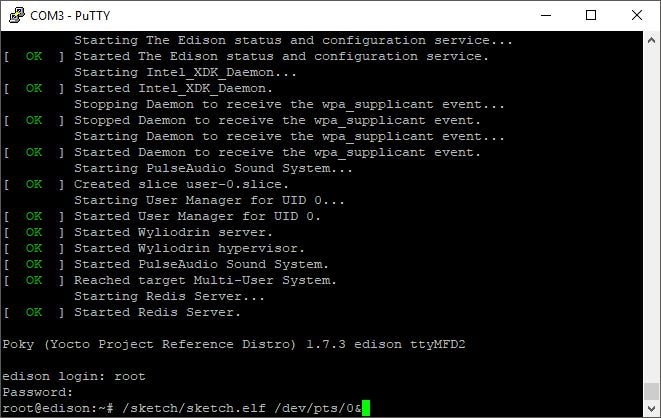
But if I run the script from the Linux side it works, the arduino sketch gets saved as sketch.elf,in /sketch directory.

just run it using the

/sketch/sketch.elf /dev/pts/0&
 

image


giphy.gif


You don't have permission to edit metadata of this video.
Edit media
x
image
Upload Preview
image


Cheers image

  • Sign in to reply

Top Comments

  • DAB
    DAB over 8 years ago +3
    Nice update. First rule of successful projects is backup, backup, backup. I had the misfortune to have several months of work destroyed when the "hardware" guys decided to swap out the development computer…
  • sakthi.1260
    sakthi.1260 over 8 years ago in reply to Workshopshed

    well some simple scripts like this does the job perfectly, wonder where the issue is.


    int buttonPin = 2;

    int buttonState = 0;

    int lastButtonState = LOW;

    void setup() {

      pinMode(buttonPin, INPUT);  

    }

    void loop(){

      buttonState = digitalRead(buttonPin);

      if (buttonState != lastButtonState and buttonState == LOW)

      {

        system("echo 'hello, world!' > /home/root/hello.txt");

      }

      lastButtonState = buttonState;

    }

    • Cancel
    • Vote Up 0 Vote Down
    • Sign in to reply
    • More
    • Cancel
  • sakthi.1260
    sakthi.1260 over 8 years ago in reply to DAB

    Yep Lesson learned, keep multiple copies

    • Cancel
    • Vote Up 0 Vote Down
    • Sign in to reply
    • More
    • Cancel
  • DAB
    DAB over 8 years ago

    Nice update.


    First rule of successful projects is backup, backup, backup.


    I had the misfortune to have several months of work destroyed when the "hardware" guys decided to swap out the development computer memory board and slip in a "flacky" board from their hardware.


    Nobody told me and it soon ate my software and corrupted both of my floppy disks.


    After that I learned to always backup on three disks.


    DAB

    • Cancel
    • Vote Up +3 Vote Down
    • Sign in to reply
    • More
    • Cancel
  • Workshopshed
    Workshopshed over 8 years ago

    Love the intro music.


    Your run on boot issue could be a path issue as you are using relative paths. It could also be permissions or timing.


    Perhaps use MRAA to check the inputs and run all your code in Python?

    • Cancel
    • Vote Up 0 Vote Down
    • Sign in to reply
    • More
    • Cancel
element14 Community

element14 is the first online community specifically for engineers. Connect with your peers and get expert answers to your questions.

  • Members
  • Learn
  • Technologies
  • Challenges & Projects
  • Products
  • Store
  • About Us
  • Feedback & Support
  • FAQs
  • Terms of Use
  • Privacy Policy
  • Legal and Copyright Notices
  • Sitemap
  • Cookies

An Avnet Company © 2026 Premier Farnell Limited. All Rights Reserved.

Premier Farnell Ltd, registered in England and Wales (no 00876412), registered office: Farnell House, Forge Lane, Leeds LS12 2NE.

ICP 备案号 10220084.

Follow element14

  • X
  • Facebook
  • linkedin
  • YouTube