

Milos takes his servo driven robot arm off the bench and turns it into a four wheel drive mobile platform built around the NXP FRDM RW612. The project combines an aluminium extrusion chassis, DC geared motors with L298N drivers, PCA9685 servo control, and wireless joystick input to tackle real challenges like torque, calibration, surface traction, and jitter. On the software side, he moves beyond joint by joint control into inverse kinematics and Cartesian motion, using simulation to validate behaviour before driving real hardware. The result is a modular robotics platform designed for learning, iteration, and future upgrades.
Watch the Robot Arm on Wheels
This project marks a natural but ambitious evolution of Milos’s earlier work on a desktop robotic arm. What began as an exploration of servo-driven motion, joint recording, and basic trajectory playback has now been transformed into a fully mobile robotic platform that combines mechanics, electronics, and software into a cohesive system.
Rather than treating the robot arm and the base as separate challenges, Milos approached this build as a single platform problem: how to create a robot that can move through space, manipulate objects with intent, and serve as a foundation for far more advanced autonomy in the future.
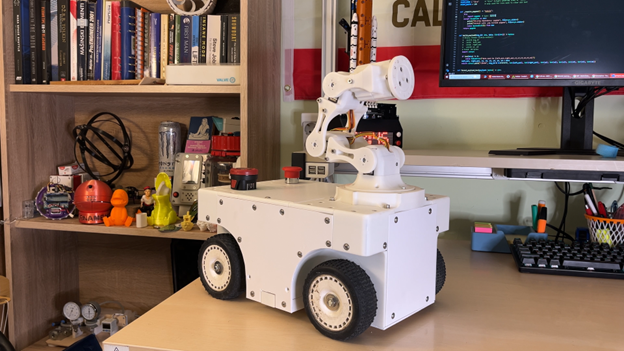
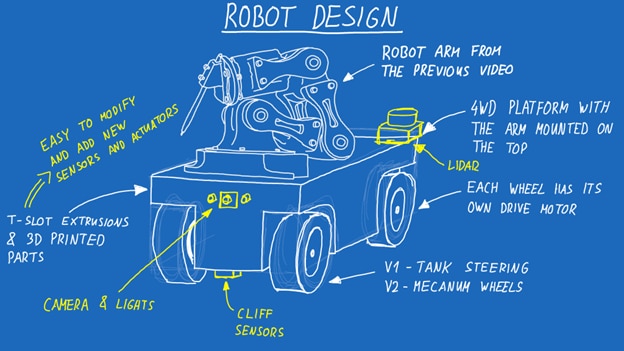
Idea and Plan
The starting point for this build was a clear limitation of the previous project. While the arm could replay learned movements, it was fixed in place and constrained to joint-by-joint control. As Milos puts it, the earlier version worked, “but in the end it’s just a robot arm.” The next logical step was mobility.
The core idea was to mount the arm onto a four-wheel-drive base and design everything around modularity. The arm would sit on top of a rigid chassis, with space below reserved for motors, power, and electronics. Two locomotion strategies were planned from the outset: a first version using skid-steer (tank-style) drive, and a second version that would later replace the wheels with mecanum wheels for true omnidirectional movement.
Crucially, Milos also decided that control needed to move beyond jogging joints or replaying recorded angles. Inverse kinematics would become central to the project, allowing the arm to be commanded in Cartesian space rather than micromanaged servo by servo.
Electronics and Heart of the Project
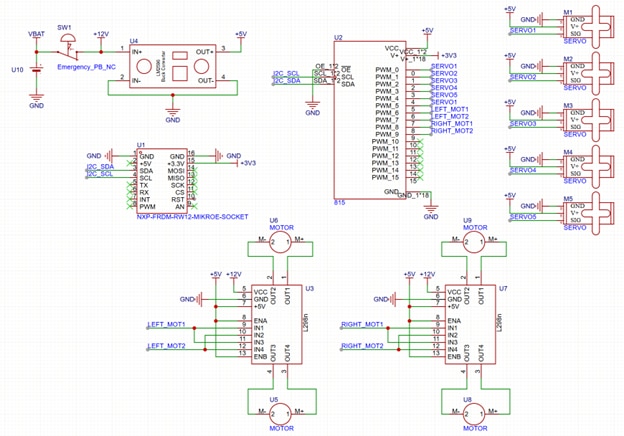
At the heart of the electronics is an NXP FRDM-RW612 development board. The choice was deliberate: the board offers ample GPIO, built-in Wi-Fi, and enough processing power that Milos notes he is “only scratching the surface with what this can do.” For this stage of development, Wi-Fi connectivity and I²C were the primary features in use.
Wireless control is handled via a Bluetooth gamepad connected to a laptop. Commands are sent over UDP to the robot, leveraging the board’s Wi-Fi to avoid additional communication modules. As Milos explains, “I want to send commands over UDP, so over the internet to the board… since the board already has built-in Wi-Fi, we’re going to utilize that.”
Motor and servo control is centralized through a PCA9685 PWM driver. This single module generates PWM signals for both the five servo motors in the arm and the brushed DC motors driving the wheels. Two L298N motor driver modules handle the four geared DC motors, giving the robot full four-wheel drive and, as testing later shows, a surprising amount of torque.
One subtle but important design decision involved PWM frequency. Servo motors and DC motor drivers prefer different operating ranges, but Milos settled on a compromise of around 300 Hz, noting that “at around 300 hertz everything will be happy, both the motor drivers and all of the servo motors.”
Power is supplied by a 12 V drill battery mounted at the rear of the robot. A robust DC-DC buck converter steps this down to 5 V for the servos and logic, while the drive motors receive the full battery voltage. An emergency stop switch doubles as a main power switch, an essential safety feature given the platform’s weight and torque.
Core Mechanics
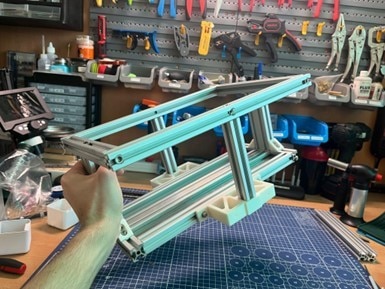
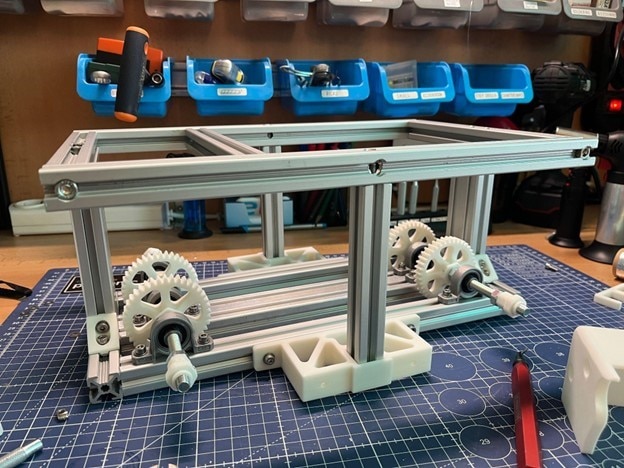
If there is one area where this project demanded the most effort, it was the mechanical design. Milos is candid about this, describing the mechanical side as “actually kind of complicated and a lot of work.” The challenge was to balance strength, accessibility, and flexibility.
The main chassis is constructed from standard 20×20 and 40×20 T-slot aluminum extrusions. These are fastened with machine screws to form a stiff, rectangular frame that resists twisting while remaining easy to modify. This choice was intentional: aluminum extrusions are widely available, easy to cut, and ideal for iterative projects.
Secondary structures, mounts, and brackets are 3D printed. PLA was used for this version, with the understanding that higher-performance materials such as PC or PA may replace it later, particularly for gears. This hybrid approach keeps the build approachable while still allowing custom geometry where needed.
To protect the motors from excessive radial loads, each wheel is mounted on its own axle made from an M8 bolt, supported by dual bearings. This design ensures that the bearings, rather than the motor shafts, absorb the mechanical stress. It also makes maintenance easier, since bearings are inexpensive and simple to replace.
The finished platform weighs around 7 kg, giving it a low center of gravity but also making power and traction critical considerations. Ground clearance is modest, and while the robot performs well on smooth surfaces, Milos observes that “it doesn’t like surfaces like the carpet because they are extremely grippy,” leading to wheel scrub and vibration.
Control and Software
On the software side, the project is split cleanly between the robot and the control computer. The microcontroller firmware focuses on receiving UDP packets, parsing a compact binary payload, and translating those values into PWM outputs. As Milos summarizes, “what the code for the MCU actually does is it just gets the data over UDP… and sends the PWM values through the PCA module to the motors or the servo motors.”
The more complex logic lives on the computer side, written in Python. Two main scripts handle this. One is responsible for reading the gamepad and managing UDP communication. The other implements the control logic that converts joystick inputs into meaningful robot commands.
For driving, the robot uses a differential (tank) drive model. The left joystick maps directly to forward motion and turning, with the software mixing these inputs into left and right motor commands. This makes the platform intuitive to drive while remaining simple to implement.
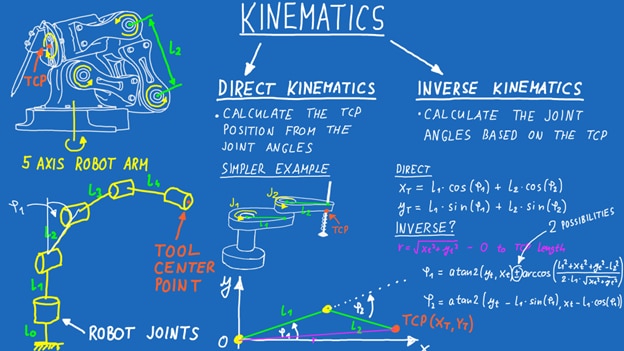
The arm control is where the project becomes significantly more advanced. Instead of commanding individual joints, the software implements both direct and inverse kinematics. Milos explains the motivation clearly: “If we want the robot arm to reach this point… how do we actually even know where the end effector is located? That’s called kinematics in robotics.”
Direct kinematics calculates the position of the tool center point (TCP) from known joint angles and link lengths. Inverse kinematics does the opposite, solving for joint angles that will place the TCP at a desired coordinate. Even for a simple planar arm, Milos demonstrates that inverse kinematics quickly becomes mathematically heavy, with multiple valid solutions such as elbow-up and elbow-down configurations.
Rather than reinventing the wheel, the software uses established solving techniques and provides flexibility in how solutions are chosen. Link lengths, joint limits, and servo pulse ranges are explicitly defined in code, ensuring that the mathematical model matches the physical hardware. Calibration data is stored in a JSON file, allowing the arm to be zeroed accurately after assembly. As Milos emphasizes, improper calibration “will just add up and there is just a function to actually calibrate the arm so you tell it where the actual zero position is.”
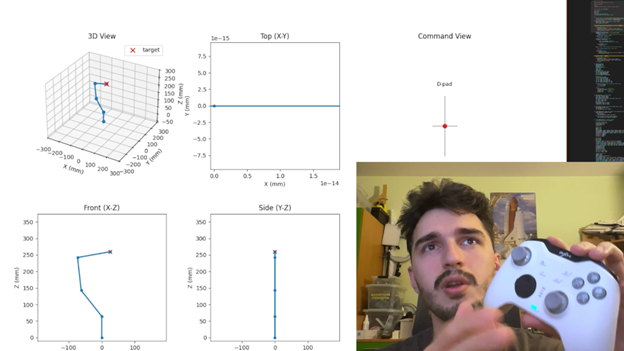
To make development safer and more intuitive, a visualization script simulates the arm’s motion in real time. This allows kinematic behavior to be inspected before applying commands to the real hardware, and it highlights issues such as jitter and singularities that will eventually need path planning to resolve.
The control system for the MR21 platform was designed around a clear separation of responsibilities. Low-level, time‑critical tasks run on the robot itself, while higher‑level interpretation, kinematic logic, and user interaction are handled externally. This keeps the embedded side predictable and responsive, while allowing the control logic to evolve rapidly without being constrained by microcontroller resources.
At the center of the system is a wireless control link. Commands are sent to the robot over Wi‑Fi using UDP, carrying both drive and arm control data in a single, fixed‑size packet. On the robot, the microcontroller’s role is intentionally narrow: receive the packet, extract values, and generate PWM outputs via the PCA9685 for the servo motors and motor drivers. As Milos describes it, the board “just gets the data over UDP and sends the PWM values to the motors or the servo motors.”
The packet itself is compact and structured to be easy to parse deterministically. It contains drive motor commands alongside pulse values for the arm servos, allowing the mobile base and arm to be controlled at the same time without additional synchronization logic:
# uint32 message ID
# int16 left drive motor
# int16 right drive motor
# uint16 servo_1 .. servo_6
# Total payload size: 20 bytes
This approach avoids the overhead of text-based protocols and ensures consistent timing, which becomes especially important once the arm is moving while the platform is driving.
For locomotion, the robot uses a differential drive model. Forward motion and turning are combined in software and translated into left and right motor commands. The mixing logic also normalizes the output so that neither side exceeds its allowed range:
def mix_diff_drive(forward, turn):
    left = forward + turn
    right = forward - turn
    max_mag = max(1.0, abs(left), abs(right))
    left /= max_mag
    right /= max_mag
    return int(left * 100), int(right * 100)
In practice, this gives the robot predictable handling: pushing the joystick forward drives all wheels forward, pushing it sideways causes the robot to rotate in place, and intermediate positions allow smooth combined motion. This becomes particularly noticeable during testing, where the platform’s high torque makes abrupt or poorly scaled commands immediately obvious.
Arm control is handled very differently. Instead of commanding individual joints directly, the software operates in Cartesian space using kinematics. The intent is not to tell each servo where to go, but to tell the arm where the tool should be. As Milos puts it, “if we want the robot arm to reach a point in space, the question becomes which joint angles get us there.”
To support this, the physical structure of the arm is defined explicitly in software. Link lengths and base offsets are encoded so the mathematical model matches the real hardware:
LINK1 = 100.0  # shoulder to elbow (mm)
LINK2 = 100.0  # elbow to wrist (mm)
LINK3 = 100.0  # wrist to tool (mm)
BASE_HEIGHT = 64.52
Joint limits are also defined for every axis, both in terms of angular range and the corresponding PWM values. This prevents the solver from generating solutions that the hardware cannot physically achieve and protects the servos from being driven into hard stops.
A practical challenge with this kind of system is calibration. Servos must be mounted at known reference angles during assembly, and even small errors at this stage affect every kinematic calculation that follows. To account for this, the software supports per‑joint offset values that can be adjusted and stored after assembly. These offsets are applied automatically whenever kinematic solutions are converted into servo commands, allowing the arm to be aligned accurately without repeated mechanical rework.
Before running movements on the real hardware, the same kinematic logic is also used in a visualisation tool. This renders the arm’s motion on screen and makes it easier to spot unreachable targets, singularities, or jitter in the solution. Some uneven motion remains, particularly near the limits of reach, which Milos notes is expected without additional path planning. At this stage, the focus is on correctness and clarity rather than perfectly smooth trajectories.
Taken together, the control software reflects a deliberate design philosophy. The robot executes commands simply and reliably, while the complexity lives where it is easier to debug, visualise, and extend. This structure not only makes the current platform easier to understand and reproduce, but also leaves a clear path toward future upgrades such as onboard computation, more advanced motion planning, or autonomous behaviours.
Practical Testing
With the electronics wired, software running, and mechanics assembled, the robot was finally tested as a complete system. Driving performance matched expectations: strong acceleration, the ability to turn on the spot, and enough torque to pull several kilograms, albeit with wheel slip.
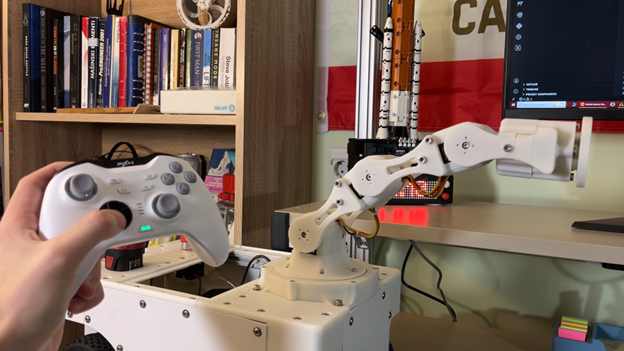
The arm and base can be controlled simultaneously, a key milestone that demonstrates the viability of the overall architecture. While movements can still be jittery—particularly along the Z-axis—the system behaves predictably once calibrated.
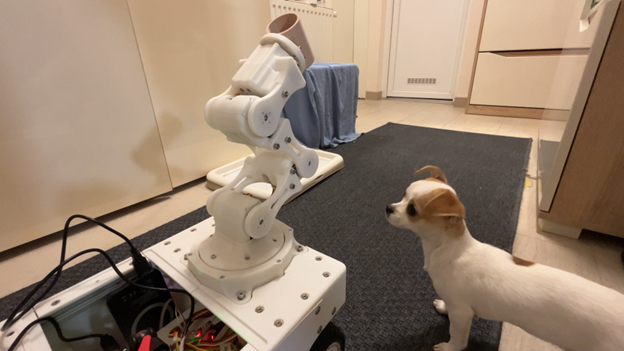
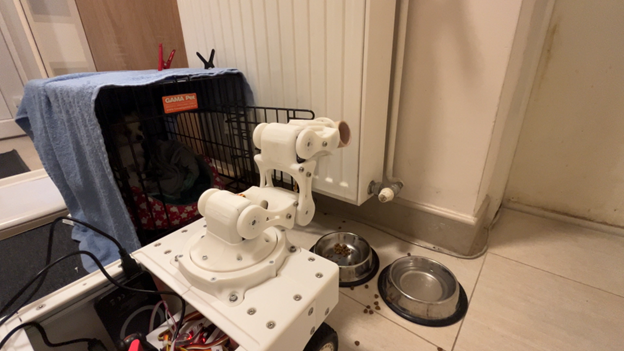
To cap off testing, Milos put the robot to a practical, if slightly humorous, task: feeding his dog. The experiment proved that the robot can manipulate objects in the real world, even if the results were messy. The verdict was mixed, but the demonstration underscored the platform’s potential.
Looking Ahead
This version of the robot is best described as a foundation. Future plans include replacing the wheels with mecanum wheels, adding sensors for mapping and navigation, and integrating an embedded computer such as a Raspberry Pi or NVIDIA Jetson. With that in place, running ROS or ROS 2 becomes a realistic next step.
As Milos notes, once mobility, perception, and higher-level planning are combined, “we’re going to have a rather nice platform.” This project does not aim to be a finished product, but rather a flexible robotics playground, one that invites iteration, experimentation, and continual improvement.
Supporting Links and Files
- Making a Stronger Affordable DIY Robot Arm with 3D Printing with Raspberry Pi Pico -- Episode 662
Bill of Materials
| Product Name | Manufacturer | Quantity | Buy Kit |
|---|---|---|---|
| DFROBOT SERVO MOTOR | DFROBOT | 5 | Buy Now |
| WHITE PLA 3D PRINTING FILAMENT | MULTICOMP | 3 | Buy Now |
| DC GEARED MOTOR - FIT0185 | DFROBOT | 4 | Buy Now |
| L298N MOTOR DRIVER | SEEED STUDIO | 2 | Buy Now |
| PCA9685 - SERVO MOTOR DRIVERr | ADAFRUIT | 1 | Buy Now |
| NXP FRDM-RW612 | NXP | 1 | Buy Now |
Additional Parts
| Product Name | Manufacturer | Quantity |
|---|---|---|
| M3, M4, M5, M6 Screws | ||
| Aluminum 20x20 profiles | ||
| M8 Bearing With Mount | ||
| M8 bolts and nuts | ||
| Small bearings | ||
| RC Wheels | ||
| T slot nuts | ||
| Strong Buck Converter for the robot arm | ||
| 12V Battery |
-

beacon_dave
-
Cancel
-
Vote Up
0
Vote Down
-
-
Sign in to reply
-
More
-
Cancel
-

milosrasic98
in reply to beacon_dave
-
Cancel
-
Vote Up
0
Vote Down
-
-
Sign in to reply
-
More
-
Cancel
-

beacon_dave
in reply to milosrasic98
-
Cancel
-
Vote Up
0
Vote Down
-
-
Sign in to reply
-
More
-
Cancel
Comment-

beacon_dave
in reply to milosrasic98
-
Cancel
-
Vote Up
0
Vote Down
-
-
Sign in to reply
-
More
-
Cancel
Children