element14 Community
element14 Community
    Register Log In
  • Site
  • Search
  • Log In Register
  • Community Hub
    Community Hub
    • What's New on element14
    • Feedback and Support
    • Benefits of Membership
    • Personal Blogs
    • Members Area
    • Achievement Levels
  • Learn
    Learn
    • Ask an Expert
    • eBooks
    • element14 presents
    • Learning Center
    • Tech Spotlight
    • STEM Academy
    • Webinars, Training and Events
    • Learning Groups
  • Technologies
    Technologies
    • 3D Printing
    • FPGA
    • Industrial Automation
    • Internet of Things
    • Power & Energy
    • Sensors
    • Technology Groups
  • Challenges & Projects
    Challenges & Projects
    • Design Challenges
    • element14 presents Projects
    • Project14
    • Arduino Projects
    • Raspberry Pi Projects
    • Project Groups
  • Products
    Products
    • Arduino
    • Avnet & Tria Boards Community
    • Dev Tools
    • Manufacturers
    • Multicomp Pro
    • Product Groups
    • Raspberry Pi
    • RoadTests & Reviews
  • About Us
    About the element14 Community
  • Store
    Store
    • Visit Your Store
    • Choose another store...
      • Europe
      •  Austria (German)
      •  Belgium (Dutch, French)
      •  Bulgaria (Bulgarian)
      •  Czech Republic (Czech)
      •  Denmark (Danish)
      •  Estonia (Estonian)
      •  Finland (Finnish)
      •  France (French)
      •  Germany (German)
      •  Hungary (Hungarian)
      •  Ireland
      •  Israel
      •  Italy (Italian)
      •  Latvia (Latvian)
      •  
      •  Lithuania (Lithuanian)
      •  Netherlands (Dutch)
      •  Norway (Norwegian)
      •  Poland (Polish)
      •  Portugal (Portuguese)
      •  Romania (Romanian)
      •  Russia (Russian)
      •  Slovakia (Slovak)
      •  Slovenia (Slovenian)
      •  Spain (Spanish)
      •  Sweden (Swedish)
      •  Switzerland(German, French)
      •  Turkey (Turkish)
      •  United Kingdom
      • Asia Pacific
      •  Australia
      •  China
      •  Hong Kong
      •  India
      •  Japan
      •  Korea (Korean)
      •  Malaysia
      •  New Zealand
      •  Philippines
      •  Singapore
      •  Taiwan
      •  Thailand (Thai)
      •  Vietnam
      • Americas
      •  Brazil (Portuguese)
      •  Canada
      •  Mexico (Spanish)
      •  United States
      Can't find the country/region you're looking for? Visit our export site or find a local distributor.
  • Translate
  • Profile
  • Settings
microbit
  • Learn
  • Learning Center
  • STEM Academy
  • microbit
  • More
  • Cancel
microbit
micro:bit Blog 10 BBC micro:bit Projects in 10 Days: Day Seven - Roll the Dice
  • Blog
  • Forum
  • Documents
  • Events
  • Polls
  • Files
  • Members
  • Mentions
  • Sub-Groups
  • Tags
  • More
  • Cancel
  • New
Join microbit to participate - click to join for free!
  • Share
  • More
  • Cancel
Group Actions
  • Group RSS
  • More
  • Cancel
Engagement
  • Author Author: jlucas
  • Date Created: 3 Jun 2016 11:44 AM Date Created
  • Views 5380 views
  • Likes 20 likes
  • Comments 9 comments
  • micro:bit
  • bbc micro:bit
  • microbit
  • beginner micro:bit projects
  • bbc microbit
  • ten bbc micro:bit projects
  • beginner_microbit_projects
  • bbc_micro:bit
  • 10projects10days
Related
Recommended

10 BBC micro:bit Projects in 10 Days: Day Seven - Roll the Dice

jlucas
jlucas
3 Jun 2016

About this project


This project turns the BBC micro:bit into an electronic dice, programming the device to display a random number from 1-6 on the LED array when shaken.


What you'll need


1 x BBC micro:bit

1 x Micro USB

1 x Computer or tablet

2 x AAA Batteries & Battery Holder


Project walkthrough


  • Go to the BBC micro:bit website, click 'create code' and begin a new Microsoft Block Editor project.


  • From the Input commands menu, drag in an 'if [shake] do' tile.


  • When the device is shaken, we want it to display a random number from 1-6. To do this, first we need to create a new variable.


  • Attach a 'set [item]' tile, and rename the variable to 'roll'.


  • Now go to the Math command menu and attach a 'pick random [0] to [4]' tile. Change the figure in the dialog box to 5, like so:


image

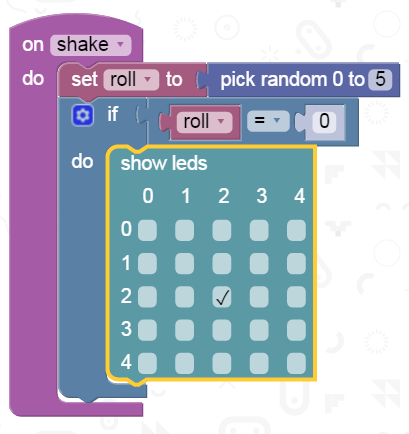
  • Because the roll has a range of 0-5 rather than 1-6, we have to tell the device to show the number one when it rolls a zero, the number two when it rolls a one, and so on.


  • Drag in an 'if/do' tile and, for 'if', attach a '[0] = [0]' tile from the logic menu. Drag a 'roll' variable into the left dialogue box.


  • For 'do', attach a 'show leds' tile and set it to display the 'one' side of a standard dice by lighting up a single bulb at the co-ordinate 2/2.
 

image


  • Click on the blue cog symbol in your 'if/do' tile and add an 'else if/do' option.


  • Use this to program your BBC micro:bit to display the 'two' side of the dice when the device rolls a one.


image


  • Using more 'else/if' and 'else' tiles, repeat the steps above so that when the roll is 2, 3, 4 5, the device shows a 3, 4, 5 and 6 dice side respectively.

image

image

  • You're done! Run your program to test it in the right-hand emulator, then click compile to download the script and transfer it to your BBC micro:bit.


When your students have mastered this project, what else can they do with the random command? Challenge them to develop different projects using the LED array, such as a dice that displays images rather than numbers, or a 'trick dice' that only rolls even numbers. Let us know what they come up with in the comments section below...

  • Sign in to reply

Top Comments

  • volly
    volly over 9 years ago in reply to vandia +3
    vandia https://www.youtube.com/watch?v=WK8jhupl7r0
  • volly
    volly over 9 years ago in reply to vandia +3
    vandia Shake Dice in Action: https://www.youtube.com/watch?v=1-Rdz9tb2bg
  • balearicdynamics
    balearicdynamics over 10 years ago +2
    Something that seems not yet noted ... The value added of this example is just Dice ... It sounds to me as random that is not a so obvious but useful feature in micro-controller small devices Enrico
Parents
  • balearicdynamics
    balearicdynamics over 10 years ago

    Something that seems not yet noted ... The value added of this example is just Dice... It sounds to me as random that is not a so obvious but useful feature in micro-controller small devices image


    Enrico

    • Cancel
    • Vote Up +2 Vote Down
    • Sign in to reply
    • More
    • Cancel
Comment
  • balearicdynamics
    balearicdynamics over 10 years ago

    Something that seems not yet noted ... The value added of this example is just Dice... It sounds to me as random that is not a so obvious but useful feature in micro-controller small devices image


    Enrico

    • Cancel
    • Vote Up +2 Vote Down
    • Sign in to reply
    • More
    • Cancel
Children
No Data
element14 Community

element14 is the first online community specifically for engineers. Connect with your peers and get expert answers to your questions.

  • Members
  • Learn
  • Technologies
  • Challenges & Projects
  • Products
  • Store
  • About Us
  • Feedback & Support
  • FAQs
  • Terms of Use
  • Privacy Policy
  • Legal and Copyright Notices
  • Sitemap
  • Cookies

An Avnet Company © 2026 Premier Farnell Limited. All Rights Reserved.

Premier Farnell Ltd, registered in England and Wales (no 00876412), registered office: Farnell House, Forge Lane, Leeds LS12 2NE.

Follow element14

  • X
  • Facebook
  • linkedin
  • YouTube