element14 Community
element14 Community
    Register Log In
  • Site
  • Search
  • Log In Register
  • Community Hub
    Community Hub
    • What's New on element14
    • Feedback and Support
    • Benefits of Membership
    • Personal Blogs
    • Members Area
    • Achievement Levels
  • Learn
    Learn
    • Ask an Expert
    • eBooks
    • element14 presents
    • Learning Center
    • Tech Spotlight
    • STEM Academy
    • Webinars, Training and Events
    • Learning Groups
  • Technologies
    Technologies
    • 3D Printing
    • FPGA
    • Industrial Automation
    • Internet of Things
    • Power & Energy
    • Sensors
    • Technology Groups
  • Challenges & Projects
    Challenges & Projects
    • Design Challenges
    • element14 presents Projects
    • Project14
    • Arduino Projects
    • Raspberry Pi Projects
    • Project Groups
  • Products
    Products
    • Arduino
    • Avnet & Tria Boards Community
    • Dev Tools
    • Manufacturers
    • Multicomp Pro
    • Product Groups
    • Raspberry Pi
    • RoadTests & Reviews
  • About Us
  • Store
    Store
    • Visit Your Store
    • Choose another store...
      • Europe
      •  Austria (German)
      •  Belgium (Dutch, French)
      •  Bulgaria (Bulgarian)
      •  Czech Republic (Czech)
      •  Denmark (Danish)
      •  Estonia (Estonian)
      •  Finland (Finnish)
      •  France (French)
      •  Germany (German)
      •  Hungary (Hungarian)
      •  Ireland
      •  Israel
      •  Italy (Italian)
      •  Latvia (Latvian)
      •  
      •  Lithuania (Lithuanian)
      •  Netherlands (Dutch)
      •  Norway (Norwegian)
      •  Poland (Polish)
      •  Portugal (Portuguese)
      •  Romania (Romanian)
      •  Russia (Russian)
      •  Slovakia (Slovak)
      •  Slovenia (Slovenian)
      •  Spain (Spanish)
      •  Sweden (Swedish)
      •  Switzerland(German, French)
      •  Turkey (Turkish)
      •  United Kingdom
      • Asia Pacific
      •  Australia
      •  China
      •  Hong Kong
      •  India
      • Japan
      •  Korea (Korean)
      •  Malaysia
      •  New Zealand
      •  Philippines
      •  Singapore
      •  Taiwan
      •  Thailand (Thai)
      • Vietnam
      • Americas
      •  Brazil (Portuguese)
      •  Canada
      •  Mexico (Spanish)
      •  United States
      Can't find the country/region you're looking for? Visit our export site or find a local distributor.
  • Translate
  • Profile
  • Settings
Personal Blogs
  • Community Hub
  • More
Personal Blogs
Ralph Yamamoto's Blog Raspberry Pi Zero 2 W - MotionEyeOS
  • Blog
  • Documents
  • Mentions
  • Sub-Groups
  • Tags
  • More
  • Cancel
  • New
  • Share
  • More
  • Cancel
Group Actions
  • Group RSS
  • More
  • Cancel
Engagement
  • Author Author: ralphjy
  • Date Created: 22 Nov 2021 4:44 PM Date Created
  • Views 41282 views
  • Likes 5 likes
  • Comments 13 comments
  • rpi camera v2.1
  • raspberry pi zero 2 w
  • video streaming
  • MotionEyeOS
  • motion eye
Related
Recommended

Raspberry Pi Zero 2 W - MotionEyeOS

ralphjy
ralphjy
22 Nov 2021

This is my first post on the new site, a follow-up to I've Got To Get Me One Of These!

I'll have to admit that navigating the new site software and structure has been challenging, so it will be interesting if this works out...

I naively had thought that I could swap Raspbian OS SD cards between a RPi Zero W and Zero 2W - and that does work if you start with a recent version of the OS that knows what a Zero 2W is.  Of course, I was trying an SD card from an older Zero W - so that did not work.

I also wanted to try the MotionEyeOS on the Zero 2W since I've used that with the Zero W.  Unfortunately, the latest released image version is from last year - 20200606 - and that did not work.  I had hoped to see if I could get about the same performance as an RPi 3.

There's a lot of info on how to build your own update to MotionEyeOS, but I wasn't up to the challenge.  There was also the suggestion to install MotionEye (non-OS on the RaspbianOS, but luckily I found that "jawsper" had built a version of MotionEyeOS that would run on the Zero 2W: MotionEyeOS_RPi_Zero_2W.   For my inaugural blog, I'm going to try that out.

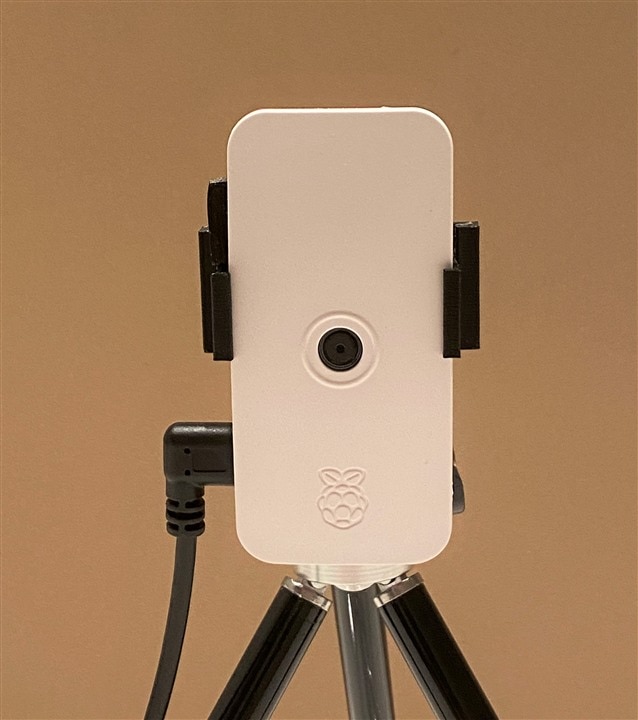
Here is the Zero 2W with the camera in the official Raspi case.  I 3D printed a clip so that I could tripod mount it.  The power to the microUSB is from a power adapter, but I think I'll use a USB power bank to make it portable.
image

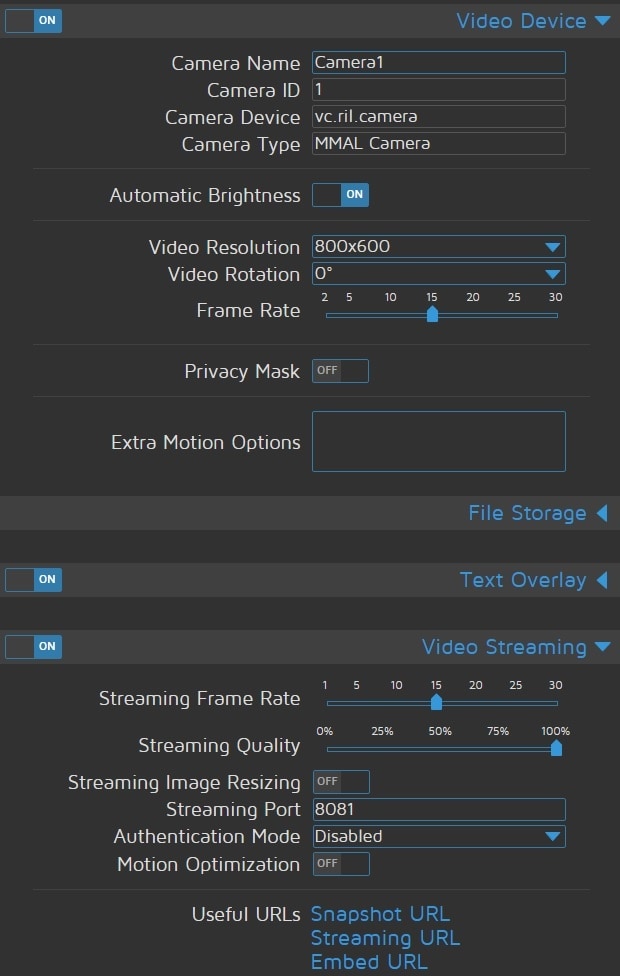
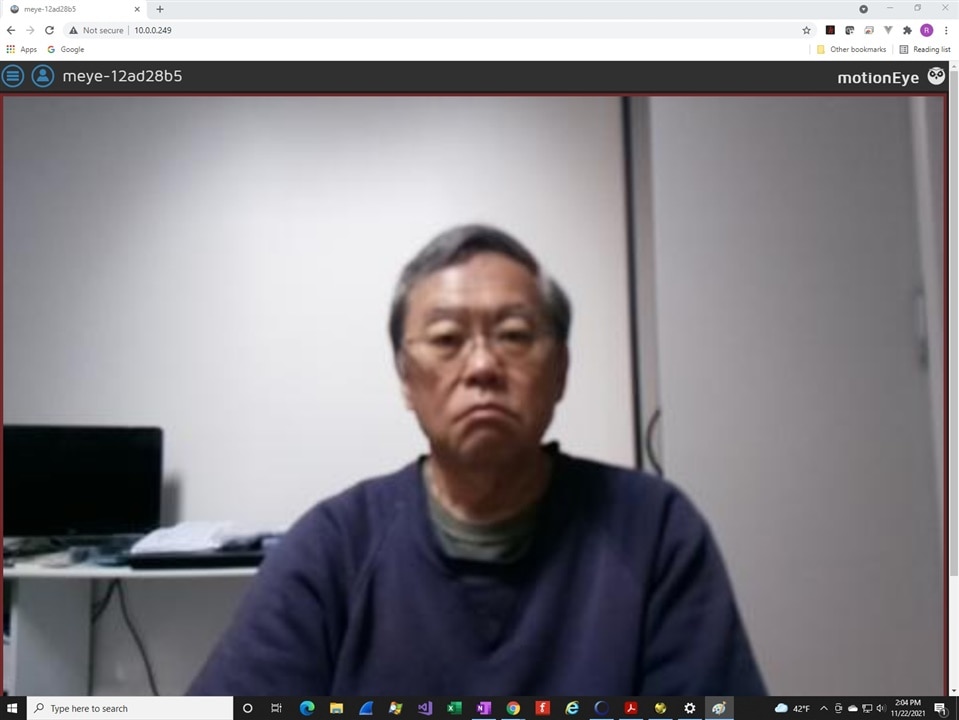
This is the MotionEye Console with the image preview and the video settings below that.  I set the resolution to 800x600 and the framerate to 15 FPS.
image

image

And a short video streaming to a different browser window - there is a slight bit of lag.  

You don't have permission to edit metadata of this video.
Edit media
x
image
Upload Preview
image

I'll post this and hope that the video converted ok.

  • Sign in to reply
  • Choquero
    Choquero over 3 years ago in reply to wpa_supplicant

    Yes I have the same problem. Raspberry Pi Zero 2 W not connect via wpa_supplicant.conf with Motioneyes OS - 20211113.

    • Cancel
    • Vote Up 0 Vote Down
    • Sign in to reply
    • More
    • Cancel
  • wpa_supplicant
    wpa_supplicant over 3 years ago

    Anyone having issues getting it to connect via wpa_supplicawpa_supplicant.conf?

    • Cancel
    • Vote Up 0 Vote Down
    • Sign in to reply
    • More
    • Cancel
  • steviep
    steviep over 3 years ago

    Thank you for sharing I've have it up and running with record video only 

    • Cancel
    • Vote Up 0 Vote Down
    • Sign in to reply
    • More
    • Cancel
  • ralphjy
    ralphjy over 3 years ago in reply to Selebele

    I assume that you are using the link that I referenced in the post: https://github.com/jawsper/motioneyeos/releases/tag/20211113 for the image to load onto the SD card.

    Not sure what version of MotionEye that you are using on the RPi3, but the settings menu should be obvious.

    When you connect to the RPi, at the upper left there are two icons, one for settings and one for users.

    image

    If you click on the settings icon it should open the settings menu (if you are logged in - won't open if not).  If you are not logged in you can click the users icon to login.

    image

    If you scroll down the settings menu, you should see the settings for File Storage, Still Images, and Movies:

    image

    If that does not work, I would try downloading the image again and rewriting the SD card.

    • Cancel
    • Vote Up 0 Vote Down
    • Sign in to reply
    • More
    • Cancel
  • Selebele
    Selebele over 3 years ago in reply to ralphjy

    https://kerberos.io This very good on pi3-4.  I can't find zero 2 w version :/

    In the MotionEye i I can't find a movie settings menu, motion detection.... I have rpi3 b+ . Original pi3  version, there is an movie option, good. (Just on pi3)

    I'm sorry, I don't speak perfect English

    • Cancel
    • Vote Up 0 Vote Down
    • Sign in to reply
    • More
    • Cancel
<>
element14 Community

element14 is the first online community specifically for engineers. Connect with your peers and get expert answers to your questions.

  • Members
  • Learn
  • Technologies
  • Challenges & Projects
  • Products
  • Store
  • About Us
  • Feedback & Support
  • FAQs
  • Terms of Use
  • Privacy Policy
  • Legal and Copyright Notices
  • Sitemap
  • Cookies

An Avnet Company © 2026 Premier Farnell Limited. All Rights Reserved.

Premier Farnell Ltd, registered in England and Wales (no 00876412), registered office: Farnell House, Forge Lane, Leeds LS12 2NE.

ICP 备案号 10220084.

Follow element14

  • X
  • Facebook
  • linkedin
  • YouTube