element14 Community
element14 Community
    Register Log In
  • Site
  • Search
  • Log In Register
  • Community Hub
    Community Hub
    • What's New on element14
    • Feedback and Support
    • Benefits of Membership
    • Personal Blogs
    • Members Area
    • Achievement Levels
  • Learn
    Learn
    • Ask an Expert
    • eBooks
    • element14 presents
    • Learning Center
    • Tech Spotlight
    • STEM Academy
    • Webinars, Training and Events
    • Learning Groups
  • Technologies
    Technologies
    • 3D Printing
    • FPGA
    • Industrial Automation
    • Internet of Things
    • Power & Energy
    • Sensors
    • Technology Groups
  • Challenges & Projects
    Challenges & Projects
    • Design Challenges
    • element14 presents Projects
    • Project14
    • Arduino Projects
    • Raspberry Pi Projects
    • Project Groups
  • Products
    Products
    • Arduino
    • Avnet & Tria Boards Community
    • Dev Tools
    • Manufacturers
    • Multicomp Pro
    • Product Groups
    • Raspberry Pi
    • RoadTests & Reviews
  • About Us
    About the element14 Community
  • Store
    Store
    • Visit Your Store
    • Choose another store...
      • Europe
      •  Austria (German)
      •  Belgium (Dutch, French)
      •  Bulgaria (Bulgarian)
      •  Czech Republic (Czech)
      •  Denmark (Danish)
      •  Estonia (Estonian)
      •  Finland (Finnish)
      •  France (French)
      •  Germany (German)
      •  Hungary (Hungarian)
      •  Ireland
      •  Israel
      •  Italy (Italian)
      •  Latvia (Latvian)
      •  
      •  Lithuania (Lithuanian)
      •  Netherlands (Dutch)
      •  Norway (Norwegian)
      •  Poland (Polish)
      •  Portugal (Portuguese)
      •  Romania (Romanian)
      •  Russia (Russian)
      •  Slovakia (Slovak)
      •  Slovenia (Slovenian)
      •  Spain (Spanish)
      •  Sweden (Swedish)
      •  Switzerland(German, French)
      •  Turkey (Turkish)
      •  United Kingdom
      • Asia Pacific
      •  Australia
      •  China
      •  Hong Kong
      •  India
      •  Japan
      •  Korea (Korean)
      •  Malaysia
      •  New Zealand
      •  Philippines
      •  Singapore
      •  Taiwan
      •  Thailand (Thai)
      •  Vietnam
      • Americas
      •  Brazil (Portuguese)
      •  Canada
      •  Mexico (Spanish)
      •  United States
      Can't find the country/region you're looking for? Visit our export site or find a local distributor.
  • Translate
  • Profile
  • Settings
Avnet Boards Forums
  • Products
  • Dev Tools
  • Avnet & Tria Boards Community
  • Avnet Boards Forums
  • More
  • Cancel
Avnet Boards Forums
ZedBoard Hardware Design How to change defaults values of hardware registers?
  • Forum
  • Documents
  • Members
  • Mentions
  • Sub-Groups
  • Tags
  • More
  • Cancel
  • New
Join Avnet Boards Forums to participate - click to join for free!
Actions
  • Share
  • More
  • Cancel
Forum Thread Details
  • State Not Answered
  • Replies 8 replies
  • Subscribers 353 subscribers
  • Views 1214 views
  • Users 0 members are here
Related

How to change defaults values of hardware registers?

Former Member
Former Member over 12 years ago

Hi.
I would like to change default FCLK and Ethernet clock source.
I need to set FCLK to 125 MHz and Ethernet clock source to EMIO.

What is the right way to do it? How can I check my new setting after Zedboard boots up?

  • Sign in to reply
  • Cancel
  • Former Member
    0 Former Member over 11 years ago

    In Vivado open your block design and then double click on the Zynq Processing System to change the settings. Open up the 'Clock Configuration', select FCLK you want, and then set the Requested Frequency to 125.  I don't believe that you can change the clock source of one of the internal Ethernet MACs in the Zynq Processing System (PS) section to EMIO independently of the other Ethernet interface signals. You can select the Ethernet MAC interface signals to be either all MIO or all EMIO. To change the signal interface to EMIO, while still in the Zynq Processing System Dialog, select the 'MIO Configuration' option in the Page Navigator, select and enable the ENET you want to use and then change the IO selection from MIO to EMIO.


    When you are done you will need to validate and save your block design and re-run the synthesis and implementation steps.


    -Gary

    • Cancel
    • Vote Up 0 Vote Down
    • Sign in to reply
    • Verify Answer
    • Cancel
  • Former Member
    0 Former Member over 11 years ago in reply to Former Member

    Hi Gray,
    thanks for help.
    I think you misunderstood me. I'm interested in the way of how to change System Level Control Registers of Zynq.
    GEM0_RCLK_CTRL uFFFC0x00000138
    GEM0_CLK_CTRL uFFFC0x00000140
    According to Technical Reference Manual some bits of these registers define clock source for Ethernet controller.

    • Cancel
    • Vote Up 0 Vote Down
    • Sign in to reply
    • Verify Answer
    • Cancel
  • Former Member
    0 Former Member over 11 years ago

    Look at the ps7_init.c that you exported from Vivado/ISE to your SDK project and you can see how the SLCR registers are being programmed. Ps7_init.html is the same information in a graphical format. You can program the register in the same manner as the ps7_init.c code does, but you should have a very good understanding of how all of the Ethernet and clock  control registers interact with each other before attempting this.


    I am not sure what you are trying to accomplish by directly writing these registers. If you have set the Ethernet MAC to use EMIO interfacing then all you need to do is connect the output of your clock source (Your FCLK I guess?) to the MII/GMII interface signals as described in the Technical Reference Manual (see section 25.6.2). If you want to use the PS based FCLK just configure it as described above. Alternatively you can use the resources in the Programmable Logic (PL) section of the Zynq to generate a clock source or provide one from an external pin.


    If you are trying to configure the Ethernet MAC in the Zynq Processing Subsystem (PS) to use the external RGMII PHY but substitute an internal clock source via the EMIO I am not sure how that would work.


    -Gary

    • Cancel
    • Vote Up 0 Vote Down
    • Sign in to reply
    • Verify Answer
    • Cancel
  • Former Member
    0 Former Member over 11 years ago

    Gary,
    here is description of what I'm trying to do.
    1. I have Zedboard.
    2. I have my own IP core which uses GMII interface to send/receive data. Standard IP/UDP packets are used.
    3. I'd like to redirect signals of Eth controller to PL so make a connection between PS and PL via GMII.

    I tried to just redirect signals according to this note http://zedboard.org/content/redirecting-peripherals-mio-emio

    But I doesn't help. I see packets from PS (linux) but PS (linux) doesn't see packets from my core.
    I suppose the problem is that Eth controller is still using clocks from PHY. So I'm trying to tell Eth controller to use clocks from EMIO.

    I would very appreciate if you help me with this problem.

    • Cancel
    • Vote Up 0 Vote Down
    • Sign in to reply
    • Verify Answer
    • Cancel
  • Former Member
    0 Former Member over 11 years ago

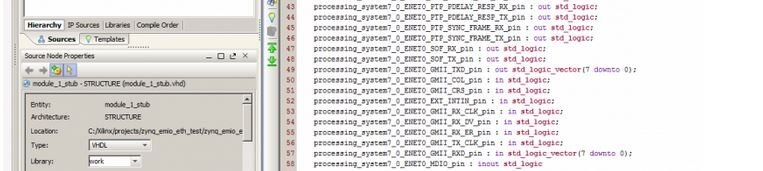
    If you follow the steps outlined in the note you refer to and then connect your clock sources to the 'exposed' GMII signals the Ethernet controller will be using your clocks and not the clocks from the PHY.


    image


    -Gary

    • Cancel
    • Vote Up 0 Vote Down
    • Sign in to reply
    • Verify Answer
    • Cancel
  • Former Member
    0 Former Member over 11 years ago

    The note just explain how to redirect signals.
    According to the figure 25-7, section 25.6.2 of the Technical Reference Manual Tx and Rx clocks have 2 possible inputs each (from MIO anf EMIO) trough programmable multiplexer.
    As I understand Ethernet controller by default gets clocks from MIO and switch it to EMIO registers GEM0_RCLK_CTRL and GEM0_CLK_CTRL should be written with new values (Appendix B: Register Details).

    • Cancel
    • Vote Up 0 Vote Down
    • Sign in to reply
    • Verify Answer
    • Cancel
  • Former Member
    0 Former Member over 11 years ago

    If you follow the steps in the note you referred to, the tools will take care of setting up the GEM0 register values for you in the generated ps7_init.c/ps7_init.tcl files. Unless you need to dynamically change the Ethernet clock source after Zynq device has booted there is no need to directly write these registers.


    -Gary

    • Cancel
    • Vote Up 0 Vote Down
    • Sign in to reply
    • Verify Answer
    • Cancel
  • Former Member
    0 Former Member over 11 years ago

    Hello! I have simillar problem with connection PS to PL via GMII(EMIO)

    PS part don't receives data from PL. But frames from PS pass via PL to PHY and I can see them with WireShark. I checked RX part with ChipScope and I do observe correct data on PS RX inputs. I checked MAC and SLCR registers, and I judge they are fine.

    I connected dead simple loopback - wired TX to RX, TX_CLK and RX_CLK are sourced with 125 MHz, Link is 1Gbit. No packet received.

    But when I just set loopback bit in GEM.net_ctrl register - I managed to ping self from U-boot, so I come with idea that it's matter of connection PL to PS. For now I've tryed bitstream made in Vivado 2014.2 and 2014.1, GEM0 and GEM1 and no luck.

    Any Ideas? Do you resolved your problem?

    - Thanks for attention.
    - Nikolay

    • Cancel
    • Vote Up 0 Vote Down
    • Sign in to reply
    • Verify Answer
    • Cancel
element14 Community

element14 is the first online community specifically for engineers. Connect with your peers and get expert answers to your questions.

  • Members
  • Learn
  • Technologies
  • Challenges & Projects
  • Products
  • Store
  • About Us
  • Feedback & Support
  • FAQs
  • Terms of Use
  • Privacy Policy
  • Legal and Copyright Notices
  • Sitemap
  • Cookies

An Avnet Company © 2026 Premier Farnell Limited. All Rights Reserved.

Premier Farnell Ltd, registered in England and Wales (no 00876412), registered office: Farnell House, Forge Lane, Leeds LS12 2NE.

ICP 备案号 10220084.

Follow element14

  • X
  • Facebook
  • linkedin
  • YouTube