element14 Community
element14 Community
    Register Log In
  • Site
  • Search
  • Log In Register
  • Community Hub
    Community Hub
    • What's New on element14
    • Feedback and Support
    • Benefits of Membership
    • Personal Blogs
    • Members Area
    • Achievement Levels
  • Learn
    Learn
    • Ask an Expert
    • eBooks
    • element14 presents
    • Learning Center
    • Tech Spotlight
    • STEM Academy
    • Webinars, Training and Events
    • Learning Groups
  • Technologies
    Technologies
    • 3D Printing
    • FPGA
    • Industrial Automation
    • Internet of Things
    • Power & Energy
    • Sensors
    • Technology Groups
  • Challenges & Projects
    Challenges & Projects
    • Design Challenges
    • element14 presents Projects
    • Project14
    • Arduino Projects
    • Raspberry Pi Projects
    • Project Groups
  • Products
    Products
    • Arduino
    • Avnet & Tria Boards Community
    • Dev Tools
    • Manufacturers
    • Multicomp Pro
    • Product Groups
    • Raspberry Pi
    • RoadTests & Reviews
  • About Us
  • Store
    Store
    • Visit Your Store
    • Choose another store...
      • Europe
      •  Austria (German)
      •  Belgium (Dutch, French)
      •  Bulgaria (Bulgarian)
      •  Czech Republic (Czech)
      •  Denmark (Danish)
      •  Estonia (Estonian)
      •  Finland (Finnish)
      •  France (French)
      •  Germany (German)
      •  Hungary (Hungarian)
      •  Ireland
      •  Israel
      •  Italy (Italian)
      •  Latvia (Latvian)
      •  
      •  Lithuania (Lithuanian)
      •  Netherlands (Dutch)
      •  Norway (Norwegian)
      •  Poland (Polish)
      •  Portugal (Portuguese)
      •  Romania (Romanian)
      •  Russia (Russian)
      •  Slovakia (Slovak)
      •  Slovenia (Slovenian)
      •  Spain (Spanish)
      •  Sweden (Swedish)
      •  Switzerland(German, French)
      •  Turkey (Turkish)
      •  United Kingdom
      • Asia Pacific
      •  Australia
      •  China
      •  Hong Kong
      •  India
      • Japan
      •  Korea (Korean)
      •  Malaysia
      •  New Zealand
      •  Philippines
      •  Singapore
      •  Taiwan
      •  Thailand (Thai)
      • Vietnam
      • Americas
      •  Brazil (Portuguese)
      •  Canada
      •  Mexico (Spanish)
      •  United States
      Can't find the country/region you're looking for? Visit our export site or find a local distributor.
  • Translate
  • Profile
  • Settings
Azure Sphere Starter Kit
  • Products
  • Dev Tools
  • Avnet & Tria Boards Community
  • Azure Sphere Starter Kit
  • More
  • Cancel
Azure Sphere Starter Kit
Blog Windmill monitor using Azure MT 3620 and Azure IoT Central
  • Blog
  • Forum
  • Documents
  • Events
  • Polls
  • Files
  • Members
  • Mentions
  • Sub-Groups
  • Tags
  • More
  • Cancel
  • New
Join Azure Sphere Starter Kit to participate - click to join for free!
  • Share
  • More
  • Cancel
Group Actions
  • Group RSS
  • More
  • Cancel
Engagement
  • Author Author: rxpanchal
  • Date Created: 1 Dec 2019 12:50 AM Date Created
  • Views 699 views
  • Likes 2 likes
  • Comments 0 comments
  • sensing the world project
  • sensingworldch
Related
Recommended

Windmill monitor using Azure MT 3620 and Azure IoT Central

rxpanchal
rxpanchal
1 Dec 2019

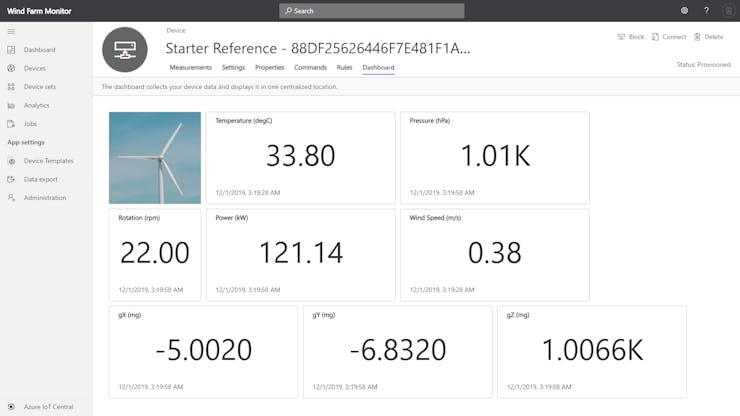
Actual values of Temperature, Pressure and simulated values of Rotation Speed, Power, Wind Speed. Alerts when rotation speed limit exceeds.

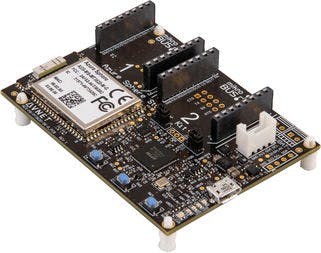
At the 1st step ordered Avnet's Azure Sphere Starter-Kit from the Element14 website and followed the tutorial to install the required software, claim device and connect with Azure IoT Central services.


image


After basic interaction to get more hands-on downloaded samples and started exploring the device. It is capable to interact integrated devices from cloud, It can sync data over the cloud in the most secure way and it is best suitable to manage remotely located devices.


This can be used to connect windmills and sync data over the cloud in the most secure way.

image


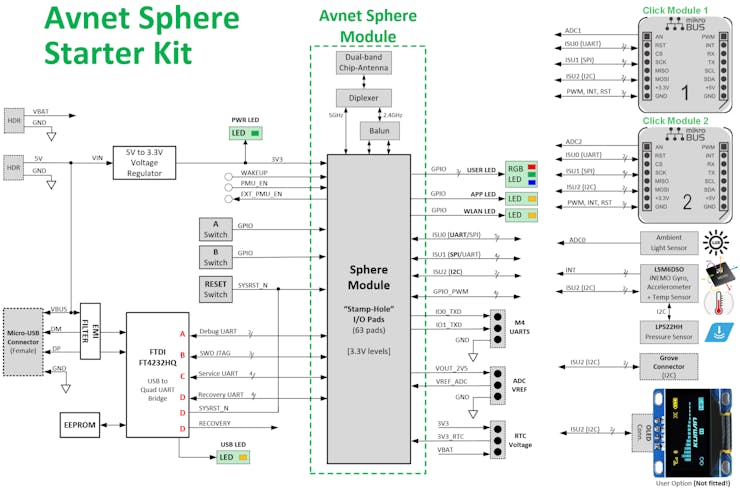
To demonstrate concept I have used Inbuilt temperature and pressure sensors that can provide a windmill condition. 3-Axis accelerometer and gyro can be used to determine direction. Further, we can connect to the turbines panel and extract the rotation speed, the power generated also it can connect with other sensors to get wind speed and oil pressure of the turbine.


image


These details can be transferred to the cloud via inbuild wifi or ethernet expansion board in a most secure way which can help to generate alerts, extract reports for analytics.

Let's get started dashboard configuration at the cloud.

Clone Sample project change app_manifest.json as per part 5 of tutorial and change code in i2c.c as per the attached code.

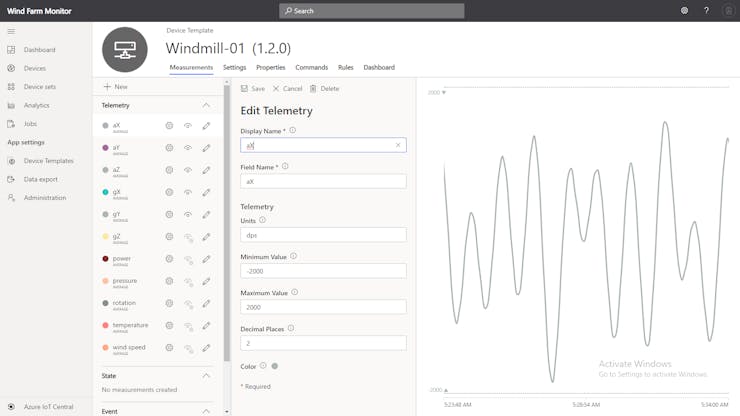
Parameters configuration at Azure IoT Central, Under Device Template, configure below as shown in the image.


image


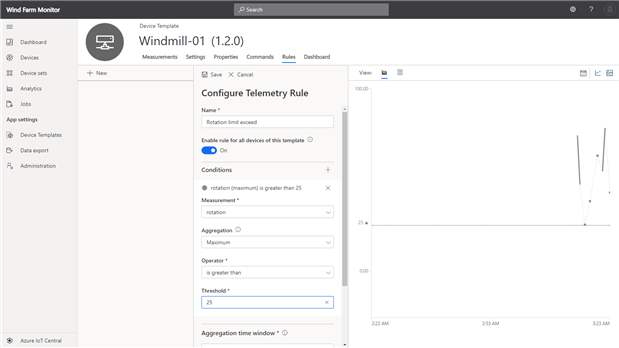
Alert Configuration

Under Rules add telemetry rule as described below, which will trigger the rule when rotation sped goes beyond 25 rotation per minute for a period of 5 minutes, then save and click on the action, select the email and provide the email address as described below.
image


Now Dashboard is ready to display details as below


image


     // We've seen that the first read of the Accelerometer data is garbage.  If this is the first pass
     // reading data, don't report it to Azure.  Since we're graphing data in Azure, this data point
     // will skew the data.
     if (!firstPass) {

          // Allocate memory for a telemetry message to Azure
          char* pjsonBuffer = (char*)malloc(JSON_BUFFER_SIZE);
          if (pjsonBuffer == NULL) {
               Log_Debug("ERROR: not enough memory to send telemetry");
          }

          // Here taking simulated Power and Speed. Can be integrated in future with the turbine system and wind sensor
          float simulatedPowerkW = 120, simulatedWindSpeedMps = 0.56, simulatedRPM = 18;

          // construct the telemetry message
          snprintf(pjsonBuffer, JSON_BUFFER_SIZE, "{\"gX\":\"%.4lf\", \"gY\":\"%.4lf\", \"gZ\":\"%.4lf\", \"pressure\": \"%.2f\", \"temperature\": \"%.2f\", \"aX\": \"%4.2f\", \"aY\": \"%4.2f\", \"aZ\": \"%4.2f\", \"powerkW\": \"%4.2f\", \"windspeedMps\": \"%4.2f\", \"RPM\": \"%4.2f\"}",
               acceleration_mg[0], acceleration_mg[1], acceleration_mg[2], pressure_hPa, lps22hhTemperature_degC, angular_rate_dps[0], angular_rate_dps[1], angular_rate_dps[2], simulatedPowerkW, simulatedWindSpeedMps, simulatedRPM);

          Log_Debug("\n[Info] Sending telemetry: %s\n", pjsonBuffer);
          AzureIoT_SendMessage(pjsonBuffer);
          free(pjsonBuffer);

     }

     firstPass = false;
Attachments:
i2c.c.txt.zip
  • Sign in to reply
element14 Community

element14 is the first online community specifically for engineers. Connect with your peers and get expert answers to your questions.

  • Members
  • Learn
  • Technologies
  • Challenges & Projects
  • Products
  • Store
  • About Us
  • Feedback & Support
  • FAQs
  • Terms of Use
  • Privacy Policy
  • Legal and Copyright Notices
  • Sitemap
  • Cookies

An Avnet Company © 2026 Premier Farnell Limited. All Rights Reserved.

Premier Farnell Ltd, registered in England and Wales (no 00876412), registered office: Farnell House, Forge Lane, Leeds LS12 2NE.

ICP 备案号 10220084.

Follow element14

  • X
  • Facebook
  • linkedin
  • YouTube