element14 Community
element14 Community
    Register Log In
  • Site
  • Search
  • Log In Register
  • Community Hub
    Community Hub
    • What's New on element14
    • Feedback and Support
    • Benefits of Membership
    • Personal Blogs
    • Members Area
    • Achievement Levels
  • Learn
    Learn
    • Ask an Expert
    • eBooks
    • element14 presents
    • Learning Center
    • Tech Spotlight
    • STEM Academy
    • Webinars, Training and Events
    • Learning Groups
  • Technologies
    Technologies
    • 3D Printing
    • FPGA
    • Industrial Automation
    • Internet of Things
    • Power & Energy
    • Sensors
    • Technology Groups
  • Challenges & Projects
    Challenges & Projects
    • Design Challenges
    • element14 presents Projects
    • Project14
    • Arduino Projects
    • Raspberry Pi Projects
    • Project Groups
  • Products
    Products
    • Arduino
    • Avnet & Tria Boards Community
    • Dev Tools
    • Manufacturers
    • Multicomp Pro
    • Product Groups
    • Raspberry Pi
    • RoadTests & Reviews
  • About Us
  • Store
    Store
    • Visit Your Store
    • Choose another store...
      • Europe
      •  Austria (German)
      •  Belgium (Dutch, French)
      •  Bulgaria (Bulgarian)
      •  Czech Republic (Czech)
      •  Denmark (Danish)
      •  Estonia (Estonian)
      •  Finland (Finnish)
      •  France (French)
      •  Germany (German)
      •  Hungary (Hungarian)
      •  Ireland
      •  Israel
      •  Italy (Italian)
      •  Latvia (Latvian)
      •  
      •  Lithuania (Lithuanian)
      •  Netherlands (Dutch)
      •  Norway (Norwegian)
      •  Poland (Polish)
      •  Portugal (Portuguese)
      •  Romania (Romanian)
      •  Russia (Russian)
      •  Slovakia (Slovak)
      •  Slovenia (Slovenian)
      •  Spain (Spanish)
      •  Sweden (Swedish)
      •  Switzerland(German, French)
      •  Turkey (Turkish)
      •  United Kingdom
      • Asia Pacific
      •  Australia
      •  China
      •  Hong Kong
      •  India
      • Japan
      •  Korea (Korean)
      •  Malaysia
      •  New Zealand
      •  Philippines
      •  Singapore
      •  Taiwan
      •  Thailand (Thai)
      • Vietnam
      • Americas
      •  Brazil (Portuguese)
      •  Canada
      •  Mexico (Spanish)
      •  United States
      Can't find the country/region you're looking for? Visit our export site or find a local distributor.
  • Translate
  • Profile
  • Settings
Autodesk EAGLE
  • Products
  • More
Autodesk EAGLE
EAGLE User Support (English) Wiring problem on Eagle
  • Blog
  • Forum
  • Documents
  • Events
  • Polls
  • Files
  • Members
  • Mentions
  • Sub-Groups
  • Tags
  • More
  • Cancel
  • New
Join Autodesk EAGLE to participate - click to join for free!
Actions
  • Share
  • More
  • Cancel
Forum Thread Details
  • State Verified Answer
  • Replies 15 replies
  • Answers 2 answers
  • Subscribers 179 subscribers
  • Views 3419 views
  • Users 0 members are here
  • eagle
  • wire to wire
  • symbol
Related

Wiring problem on Eagle

Former Member
Former Member over 9 years ago

Hello,

I got a problem because I can't wire to a component I created. First, I created a library for the component with Symbol, then Package and Device.

But when I am using this component on my schematic, I can't wire it. I used the same scale and grid for all the schematics and I updated libraries. But it is impossible to wire it.

If anyone has an idea to solve my problem ?

  • Sign in to reply
  • Cancel
Parents
  • autodeskguest
    0 autodeskguest over 9 years ago

    On 7/22/2016 11:42 AM, djib ty wrote:

    Hello,

    I got a problem because I can't wire to a component I created. First, I created a library for the component with Symbol, then Package and Device.

    But when I am using this component on my schematic, I can't wire it. I used the same scale and grid for all the schematics and I updated libraries. But it is impossible to wire it.

    If anyone has an idea to solve my problem ?


    --

    To view any images and attachments in this post, visit:

    https://www.element14.com/community/message/202123


    Hi Djib,


    I hope you're doing well. Make sure that the part was made to a 0.1"

    grid. Also in order to see the connection points clearly turn on layer

    93 Pins in the schematic. You will now see lots of green circles one for

    each pin. The center of those circles is the connection point, all of

    your nets must start and end on the exact center of these circles(this

    is why it's important to stay on a 0.1" grid). If you don't see green

    circles on your part then that means you didn't use the PIN command and

    you need to go back to your library and create pins. One final thing to

    check make sure you are using the NET command to create your connections.


    Let me know if there's anything else I can do for you.


    Best Regards,

    Jorge Garcia


    • Cancel
    • Vote Up 0 Vote Down
    • Sign in to reply
    • Verify Answer
    • Reject Answer
    • Cancel
  • Former Member
    0 Former Member over 9 years ago in reply to autodeskguest

    Hello Jorge,


    I turned on layer 93 Pins on the schematic and I can see green circles for each pin of my component.

    Unfortunately, I still can't wire it because the nets don't start or end on the exact center of the circles.

    Meanwhile, I used 0.1 inch grid for Symbol, Package and Device. Then, I updated libraries but it's the same problems with nets which can't connect in the exact center of the circles.

    • Cancel
    • Vote Up 0 Vote Down
    • Sign in to reply
    • Verify Answer
    • Cancel
  • autodeskguest
    0 autodeskguest over 9 years ago in reply to Former Member

    Am 25.07.2016 um 11:14 schrieb djib ty:

    Hello Jorge,


    I turned on layer 93 Pins on the schematic and I can see green circles for each pin of my component.

    Unfortunately, I still can't wire it because the nets don't start or end on the exact center of the circles.

    Meanwhile, I used 0.1 inch grid for Symbol, Package and Device. Then, I updated libraries but it's the same problems with nets which can't connect in the exact center of the circles.


    --

    To view any images and attachments in this post, visit:

    https://www.element14.com/community/message/202228


    Seems that your device is not on grid. Why don't you just place it here.

    A picture (eagle sch, brd or lbr) is better than 1000 words.


    --

    Mit freundlichen Grüßen / With best regards


    Joern Paschedag


    • Cancel
    • Vote Up 0 Vote Down
    • Sign in to reply
    • Verify Answer
    • Cancel
Reply
  • autodeskguest
    0 autodeskguest over 9 years ago in reply to Former Member

    Am 25.07.2016 um 11:14 schrieb djib ty:

    Hello Jorge,


    I turned on layer 93 Pins on the schematic and I can see green circles for each pin of my component.

    Unfortunately, I still can't wire it because the nets don't start or end on the exact center of the circles.

    Meanwhile, I used 0.1 inch grid for Symbol, Package and Device. Then, I updated libraries but it's the same problems with nets which can't connect in the exact center of the circles.


    --

    To view any images and attachments in this post, visit:

    https://www.element14.com/community/message/202228


    Seems that your device is not on grid. Why don't you just place it here.

    A picture (eagle sch, brd or lbr) is better than 1000 words.


    --

    Mit freundlichen Grüßen / With best regards


    Joern Paschedag


    • Cancel
    • Vote Up 0 Vote Down
    • Sign in to reply
    • Verify Answer
    • Cancel
Children
  • Former Member
    0 Former Member over 9 years ago in reply to autodeskguest

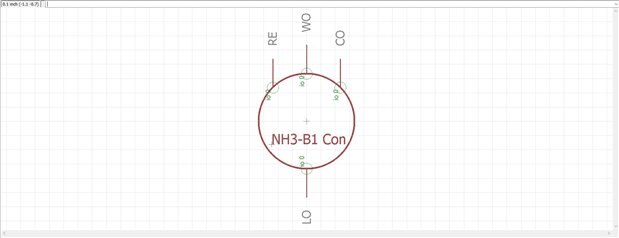
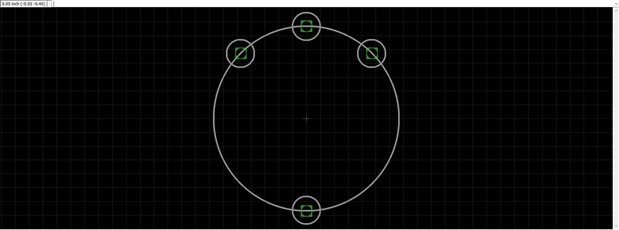
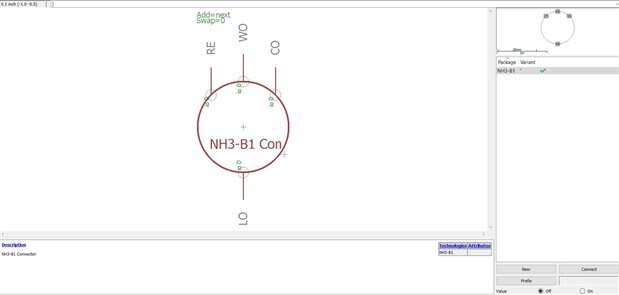
    Hello,

    Enclosed three pictures of the component I created in library. Symbol :

    image

    Package :

    image


    Device :


    image

    Yes, you are right, my component is not on the grid.

    Coordinates :

    RE pin : x= - cos(Pi/4)*8.5mm = - 6.01040764 mm

                   y= sin(Pi/4)*8.5mm = 6.01040764 mm

    CO pin :

                   x= -cos(Pi/4)*8.5mm = 6.01040764 mm

                   y= sin(Pi/4)*8.5mm = 6.01040764 mm


    WO pin : x=0

                   y = 8.5 mm

    LO pin : x=0

                   y = -8.5 mm

    • Cancel
    • Vote Up 0 Vote Down
    • Sign in to reply
    • Verify Answer
    • Cancel
element14 Community

element14 is the first online community specifically for engineers. Connect with your peers and get expert answers to your questions.

  • Members
  • Learn
  • Technologies
  • Challenges & Projects
  • Products
  • Store
  • About Us
  • Feedback & Support
  • FAQs
  • Terms of Use
  • Privacy Policy
  • Legal and Copyright Notices
  • Sitemap
  • Cookies

An Avnet Company © 2025 Premier Farnell Limited. All Rights Reserved.

Premier Farnell Ltd, registered in England and Wales (no 00876412), registered office: Farnell House, Forge Lane, Leeds LS12 2NE.

ICP 备案号 10220084.

Follow element14

  • X
  • Facebook
  • linkedin
  • YouTube