element14 Community
element14 Community
    Register Log In
  • Site
  • Search
  • Log In Register
  • Community Hub
    Community Hub
    • What's New on element14
    • Feedback and Support
    • Benefits of Membership
    • Personal Blogs
    • Members Area
    • Achievement Levels
  • Learn
    Learn
    • Ask an Expert
    • eBooks
    • element14 presents
    • Learning Center
    • Tech Spotlight
    • STEM Academy
    • Webinars, Training and Events
    • Learning Groups
  • Technologies
    Technologies
    • 3D Printing
    • FPGA
    • Industrial Automation
    • Internet of Things
    • Power & Energy
    • Sensors
    • Technology Groups
  • Challenges & Projects
    Challenges & Projects
    • Design Challenges
    • element14 presents Projects
    • Project14
    • Arduino Projects
    • Raspberry Pi Projects
    • Project Groups
  • Products
    Products
    • Arduino
    • Avnet & Tria Boards Community
    • Dev Tools
    • Manufacturers
    • Multicomp Pro
    • Product Groups
    • Raspberry Pi
    • RoadTests & Reviews
  • About Us
    About the element14 Community
  • Store
    Store
    • Visit Your Store
    • Choose another store...
      • Europe
      •  Austria (German)
      •  Belgium (Dutch, French)
      •  Bulgaria (Bulgarian)
      •  Czech Republic (Czech)
      •  Denmark (Danish)
      •  Estonia (Estonian)
      •  Finland (Finnish)
      •  France (French)
      •  Germany (German)
      •  Hungary (Hungarian)
      •  Ireland
      •  Israel
      •  Italy (Italian)
      •  Latvia (Latvian)
      •  
      •  Lithuania (Lithuanian)
      •  Netherlands (Dutch)
      •  Norway (Norwegian)
      •  Poland (Polish)
      •  Portugal (Portuguese)
      •  Romania (Romanian)
      •  Russia (Russian)
      •  Slovakia (Slovak)
      •  Slovenia (Slovenian)
      •  Spain (Spanish)
      •  Sweden (Swedish)
      •  Switzerland(German, French)
      •  Turkey (Turkish)
      •  United Kingdom
      • Asia Pacific
      •  Australia
      •  China
      •  Hong Kong
      •  India
      •  Japan
      •  Korea (Korean)
      •  Malaysia
      •  New Zealand
      •  Philippines
      •  Singapore
      •  Taiwan
      •  Thailand (Thai)
      •  Vietnam
      • Americas
      •  Brazil (Portuguese)
      •  Canada
      •  Mexico (Spanish)
      •  United States
      Can't find the country/region you're looking for? Visit our export site or find a local distributor.
  • Translate
  • Profile
  • Settings
Autodesk EAGLE
  • Products
  • More
Autodesk EAGLE
EAGLE User Support (English) ratsnest does not create GND plane
  • Blog
  • Forum
  • Documents
  • Events
  • Polls
  • Files
  • Members
  • Mentions
  • Sub-Groups
  • Tags
  • More
  • Cancel
  • New
Join Autodesk EAGLE to participate - click to join for free!
Actions
  • Share
  • More
  • Cancel
Forum Thread Details
  • State Suggested Answer
  • Replies 9 replies
  • Answers 2 answers
  • Subscribers 189 subscribers
  • Views 4218 views
  • Users 0 members are here
  • ratsnest
Related

ratsnest does not create GND plane

hennessey12
hennessey12 over 8 years ago

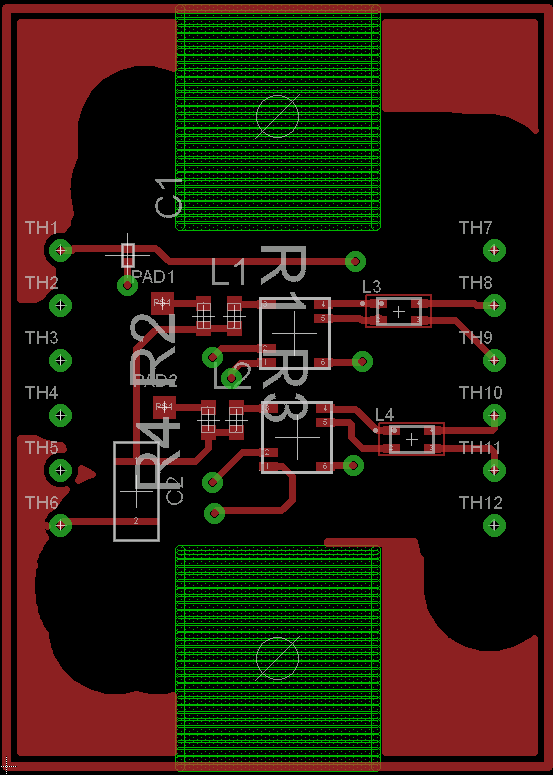
I am currently working on a board right now and I cannot make a GND plane. What am I supposed to do with the gnd terminals of the components of the board

Also, when I try to create a polygon and naming it GND it would still not create a gnd plane because when I click ratsnest it says there are airwires not connected so I connect the airwires using route then after I connected the GND terminals the ratsnest says there is nothing to do. Please help me!

  • Sign in to reply
  • Cancel
Parents
  • autodeskguest
    0 autodeskguest over 8 years ago

    Am 24.04.2018 um 06:17 schrieb Hennessey Balbin:

    I am currently working on a board right now and I cannot make a GND plane. What am I supposed to do with the gnd terminals of the components of the board

    Also, when I try to create a polygon and naming it GND it would still not create a gnd plane because when I click ratsnest it says there are airwires not connected so I connect the airwires using route then after I connected the GND terminals the ratsnest says there is nothing to do. Please help me!
     

    --

    To view any images and attachments in this post, visit:

    https://www.element14.com/community/message/238741


    Route the GNDs together, don't let ratsnest do it. (After that you can

    use ratsnest)

    Name your polygon the same name GND.

    In case of multilayer board your GND polygon must be on the same layer

    with the other GND connections. Provide a via if necessary.

    Possibly use command:SET POLYGON_RATSNEST ON

    (or OFF) the same way as written in capital letters.

    (I have both commands on keys in the board layout.)


    --

    Mit freundlichen Grüßen / With best regards


    Joern Paschedag


    • Cancel
    • Vote Up +1 Vote Down
    • Sign in to reply
    • Verify Answer
    • Reject Answer
    • Cancel
Reply
  • autodeskguest
    0 autodeskguest over 8 years ago

    Am 24.04.2018 um 06:17 schrieb Hennessey Balbin:

    I am currently working on a board right now and I cannot make a GND plane. What am I supposed to do with the gnd terminals of the components of the board

    Also, when I try to create a polygon and naming it GND it would still not create a gnd plane because when I click ratsnest it says there are airwires not connected so I connect the airwires using route then after I connected the GND terminals the ratsnest says there is nothing to do. Please help me!


    --

    To view any images and attachments in this post, visit:

    https://www.element14.com/community/message/238741


    Route the GNDs together, don't let ratsnest do it. (After that you can

    use ratsnest)

    Name your polygon the same name GND.

    In case of multilayer board your GND polygon must be on the same layer

    with the other GND connections. Provide a via if necessary.

    Possibly use command:SET POLYGON_RATSNEST ON

    (or OFF) the same way as written in capital letters.

    (I have both commands on keys in the board layout.)


    --

    Mit freundlichen Grüßen / With best regards


    Joern Paschedag


    • Cancel
    • Vote Up +1 Vote Down
    • Sign in to reply
    • Verify Answer
    • Reject Answer
    • Cancel
Children
  • hennessey12
    0 hennessey12 over 8 years ago in reply to autodeskguest

    Thank you for helping but when I do it the resulting ground plane looks like this. see attached photo plsimage

    • Cancel
    • Vote Up +1 Vote Down
    • Sign in to reply
    • Verify Answer
    • Cancel
element14 Community

element14 is the first online community specifically for engineers. Connect with your peers and get expert answers to your questions.

  • Members
  • Learn
  • Technologies
  • Challenges & Projects
  • Products
  • Store
  • About Us
  • Feedback & Support
  • FAQs
  • Terms of Use
  • Privacy Policy
  • Legal and Copyright Notices
  • Sitemap
  • Cookies

An Avnet Company © 2026 Premier Farnell Limited. All Rights Reserved.

Premier Farnell Ltd, registered in England and Wales (no 00876412), registered office: Farnell House, Forge Lane, Leeds LS12 2NE.

Follow element14

  • X
  • Facebook
  • linkedin
  • YouTube