element14 Community
element14 Community
    Register Log In
  • Site
  • Search
  • Log In Register
  • Community Hub
    Community Hub
    • What's New on element14
    • Feedback and Support
    • Benefits of Membership
    • Personal Blogs
    • Members Area
    • Achievement Levels
  • Learn
    Learn
    • Ask an Expert
    • eBooks
    • element14 presents
    • Learning Center
    • Tech Spotlight
    • STEM Academy
    • Webinars, Training and Events
    • Learning Groups
  • Technologies
    Technologies
    • 3D Printing
    • FPGA
    • Industrial Automation
    • Internet of Things
    • Power & Energy
    • Sensors
    • Technology Groups
  • Challenges & Projects
    Challenges & Projects
    • Design Challenges
    • element14 presents Projects
    • Project14
    • Arduino Projects
    • Raspberry Pi Projects
    • Project Groups
  • Products
    Products
    • Arduino
    • Avnet & Tria Boards Community
    • Dev Tools
    • Manufacturers
    • Multicomp Pro
    • Product Groups
    • Raspberry Pi
    • RoadTests & Reviews
  • About Us
  • Store
    Store
    • Visit Your Store
    • Choose another store...
      • Europe
      •  Austria (German)
      •  Belgium (Dutch, French)
      •  Bulgaria (Bulgarian)
      •  Czech Republic (Czech)
      •  Denmark (Danish)
      •  Estonia (Estonian)
      •  Finland (Finnish)
      •  France (French)
      •  Germany (German)
      •  Hungary (Hungarian)
      •  Ireland
      •  Israel
      •  Italy (Italian)
      •  Latvia (Latvian)
      •  
      •  Lithuania (Lithuanian)
      •  Netherlands (Dutch)
      •  Norway (Norwegian)
      •  Poland (Polish)
      •  Portugal (Portuguese)
      •  Romania (Romanian)
      •  Russia (Russian)
      •  Slovakia (Slovak)
      •  Slovenia (Slovenian)
      •  Spain (Spanish)
      •  Sweden (Swedish)
      •  Switzerland(German, French)
      •  Turkey (Turkish)
      •  United Kingdom
      • Asia Pacific
      •  Australia
      •  China
      •  Hong Kong
      •  India
      • Japan
      •  Korea (Korean)
      •  Malaysia
      •  New Zealand
      •  Philippines
      •  Singapore
      •  Taiwan
      •  Thailand (Thai)
      • Vietnam
      • Americas
      •  Brazil (Portuguese)
      •  Canada
      •  Mexico (Spanish)
      •  United States
      Can't find the country/region you're looking for? Visit our export site or find a local distributor.
  • Translate
  • Profile
  • Settings
Autodesk EAGLE
  • Products
  • More
Autodesk EAGLE
EAGLE User Support (English) Straition lines printing in filled areas
  • Blog
  • Forum
  • Documents
  • Events
  • Polls
  • Files
  • Members
  • Mentions
  • Sub-Groups
  • Tags
  • More
  • Cancel
  • New
Join Autodesk EAGLE to participate - click to join for free!
Actions
  • Share
  • More
  • Cancel
Forum Thread Details
  • State Not Answered
  • Replies 22 replies
  • Subscribers 181 subscribers
  • Views 3142 views
  • Users 0 members are here
  • lines
  • fill
Related

Straition lines printing in filled areas

Former Member
Former Member over 10 years ago

OS= Win 8.1

Eagle = 7.2


I have a direct to board print setup. That is, I print directly on the copper clad, straight out of Eagle. I have noticed that the fill lines are showing. I have found where others have had this issue, but I have not understood what to do to resolve the problem. This problem also occurs when I print the PCB to pdf format. I have read that it has to do with Eagle using lines to cover the filled area and that changing the line width and the fill style might be helpful. But, then, there are no instructions on how to do these operations and no feedback as to whether it worked, or not. Would someone please be so kind as to tell me the definitive cure and the steps to complete the task? I would be very grateful. Eagle files and libraries are attached. The problem is very clear in the pdf format. Thank you very much for your help.

Attachments:
Oscilloscope.zip
  • Sign in to reply
  • Cancel

Top Replies

  • clem57
    clem57 over 10 years ago +1
    Maybe you need to do a Polygon command setting the color. See PCB Creation with Eagle for Beginners : The Ground Plane There is more about polygon HOW-TO: Polygons and ground fills for PCBs in Eagle |…
  • balearicdynamics
    balearicdynamics over 10 years ago +1
    t1d I have downloaded the attached zip file and opened it on eagle checking for the schematics you included in PDF. The point is that the pdf is different than the schematics you attached, as in the image…
  • Bertl
    Bertl over 10 years ago in reply to balearicdynamics +1
    If you press the button "Ratsnest" (first one in the last button section, the one with the connected nodes), you will see that the area enclosed by the dashed line will fill up (flood) the free space around…
Parents
  • balearicdynamics
    0 balearicdynamics over 10 years ago

    t1d


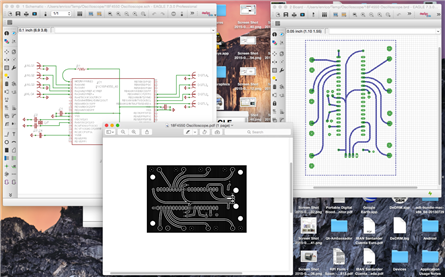
    I have downloaded the attached zip file and opened it on eagle checking for the schematics you included in PDF. The point is that the pdf is different than the schematics you attached, as in the image below. Maybe I am wrong interpreting the files? In eagle there is no polygon at all so the only thing I see is that you printed the PCB layout in negative At this point in your negative pdf I see that there are a couple of pads that has something that is not part of the eagle layout at all. No idea if your version of eagle make it automatically but it seems I am seeing two things.


    It is not clear what method or script are you using to generate this output layout.

    image


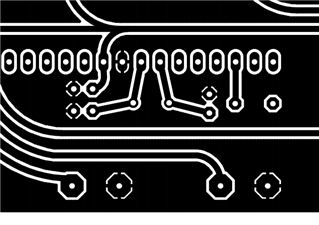
    My personal impression is that in the (program? script? some other else?) you are using to produce the printout generates the the disturb in the background because of some bug/issue in the script or in the settings. Initially the issue you mentioned I though maybe depending on the printer but then (see the screenshot above) you can see that seeing the image at this resolution also in the pdf the same issue appears. So it is not the printer but it is the generating application, AFAIK.image


    In the small detail you can see in this other screenshot I note that there are the pads that has a small straight connection to the rest of the background; this is what I means that the pdf output that you attached is different than the PCB layout. Should I suppose that this has been created by the program you are using for direct printing? Why? How?


    Anyway I have put on all the PCB layers and I have not saw this in the design at all.


    Take a look to the kind of image I have obtained exporting your pcb as I see it.


    image

    • Cancel
    • Vote Up +1 Vote Down
    • Sign in to reply
    • Verify Answer
    • Cancel
  • Former Member
    0 Former Member over 10 years ago in reply to balearicdynamics

    Thank you, Enrico, for your help. Wow, you have some great skills of merging text with pictures that I have never seen on a forum posting. Herbert is correct, when you open the board file within Eagle, you need to activate the RatsNest feature to fill the polygon. You can also use the layer function to manipulate the view, for other various purposes.

    • Cancel
    • Vote Up 0 Vote Down
    • Sign in to reply
    • Verify Answer
    • Cancel
Reply
  • Former Member
    0 Former Member over 10 years ago in reply to balearicdynamics

    Thank you, Enrico, for your help. Wow, you have some great skills of merging text with pictures that I have never seen on a forum posting. Herbert is correct, when you open the board file within Eagle, you need to activate the RatsNest feature to fill the polygon. You can also use the layer function to manipulate the view, for other various purposes.

    • Cancel
    • Vote Up 0 Vote Down
    • Sign in to reply
    • Verify Answer
    • Cancel
Children
No Data
element14 Community

element14 is the first online community specifically for engineers. Connect with your peers and get expert answers to your questions.

  • Members
  • Learn
  • Technologies
  • Challenges & Projects
  • Products
  • Store
  • About Us
  • Feedback & Support
  • FAQs
  • Terms of Use
  • Privacy Policy
  • Legal and Copyright Notices
  • Sitemap
  • Cookies

An Avnet Company © 2026 Premier Farnell Limited. All Rights Reserved.

Premier Farnell Ltd, registered in England and Wales (no 00876412), registered office: Farnell House, Forge Lane, Leeds LS12 2NE.

ICP 备案号 10220084.

Follow element14

  • X
  • Facebook
  • linkedin
  • YouTube