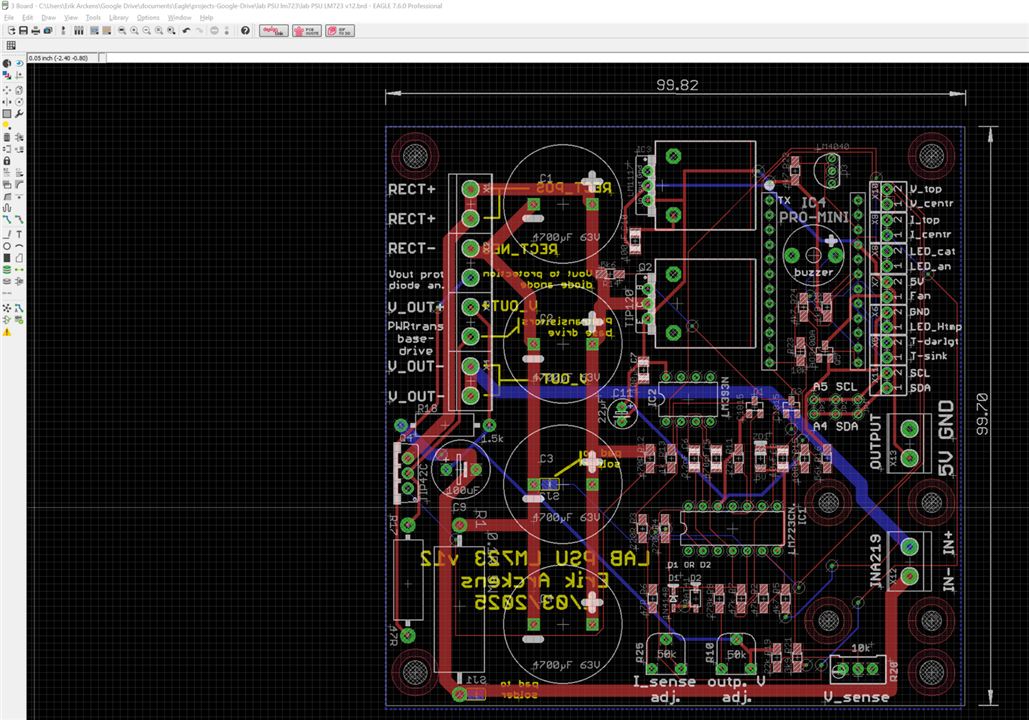
I need to get a bottom trace between two via's that currently are connected with an airwire.
However, when doing the trace at the bottom, the polygon does not cede to make way for that trace.
Using Eagle v7.6.0
How to solve?

I need to get a bottom trace between two via's that currently are connected with an airwire.
However, when doing the trace at the bottom, the polygon does not cede to make way for that trace.
Using Eagle v7.6.0
How to solve?

Hi,
1.) your routing traces are not very ideal as well some components.
-> rotate R7, R2,
-> the traces between R7 and R5 are very critical > go another way
2.) you can switch off the polygons
-> a.) click on a polygon (on the edge off this polygon, e.g top) with the right mouse button
b.) unroute this polygon
The same do it with the other (bot polygon)
Then they are switched off and you can route your traces.
3.) switch on the polygons
-> click on the ratsnest button on eagle
4.) routing - you can change the routing strategies because this what you use is not very optimal
because the trace walks from the LM_IC far down at 45 degrees.
Actually, I use the version 9.6.0 (all versions since 5.4.0) - Fusion 360 from Autodesk
I have installed the version 6.6.0 pro, the 7.6.0 in standard version (100x80mm), and the version 9.6.0 pro.
So, I can help you with the latest version, saving the schematics as well the PCB downgrading to the version 7.0.0
-> with this you can open it with your Eagle version
KiCad – so, yes and no…
Yesterday I installed version 9.0 (I already had version 8).
The big problem is that the traces get lost when I rotate a component, for example.
The traces are not a rubber band when I move a component or a track vertex.
So, I think that is a big problem. This can cause many other problems – like, tearing apart components to traces to labels, and many other things.
Especially where everything is very close together. This makes the technician very nervous.
"Try doing that when you have to route a multilayer. Well,,,,"
Can you show the complete PCB?
Regards
Gerald
---
Hi,
1.) your routing traces are not very ideal as well some components.
-> rotate R7, R2,
-> the traces between R7 and R5 are very critical > go another way
2.) you can switch off the polygons
-> a.) click on a polygon (on the edge off this polygon, e.g top) with the right mouse button
b.) unroute this polygon
The same do it with the other (bot polygon)
Then they are switched off and you can route your traces.
3.) switch on the polygons
-> click on the ratsnest button on eagle
4.) routing - you can change the routing strategies because this what you use is not very optimal
because the trace walks from the LM_IC far down at 45 degrees.
Actually, I use the version 9.6.0 (all versions since 5.4.0) - Fusion 360 from Autodesk
I have installed the version 6.6.0 pro, the 7.6.0 in standard version (100x80mm), and the version 9.6.0 pro.
So, I can help you with the latest version, saving the schematics as well the PCB downgrading to the version 7.0.0
-> with this you can open it with your Eagle version
KiCad – so, yes and no…
Yesterday I installed version 9.0 (I already had version 8).
The big problem is that the traces get lost when I rotate a component, for example.
The traces are not a rubber band when I move a component or a track vertex.
So, I think that is a big problem. This can cause many other problems – like, tearing apart components to traces to labels, and many other things.
Especially where everything is very close together. This makes the technician very nervous.
"Try doing that when you have to route a multilayer. Well,,,,"
Can you show the complete PCB?
Regards
Gerald
---
The 'issue' with the polygon I solved yesterday. No need to switch off the polygon, just trace the track across the polygon, do a refresh (ratsnest) and the polygon will have cleared a path for the added track.
I am not interested in 3D design features such as for libraries: mine do very well for me. And I do not want having to recreate every library in my folders.
Also, designing new packages never has been a problem for me, no issues with error codes. Eagle, for me, does what I want it to do: create schematics, libraries, and from there pcb tracing, all in a well flowing manner. To me Eagle just is a workhorse to make pcb's. Hundreds of them for over a decade.