element14 Community
element14 Community
    Register Log In
  • Site
  • Search
  • Log In Register
  • Community Hub
    Community Hub
    • What's New on element14
    • Feedback and Support
    • Benefits of Membership
    • Personal Blogs
    • Members Area
    • Achievement Levels
  • Learn
    Learn
    • Ask an Expert
    • eBooks
    • element14 presents
    • Learning Center
    • Tech Spotlight
    • STEM Academy
    • Webinars, Training and Events
    • Learning Groups
  • Technologies
    Technologies
    • 3D Printing
    • FPGA
    • Industrial Automation
    • Internet of Things
    • Power & Energy
    • Sensors
    • Technology Groups
  • Challenges & Projects
    Challenges & Projects
    • Design Challenges
    • element14 presents Projects
    • Project14
    • Arduino Projects
    • Raspberry Pi Projects
    • Project Groups
  • Products
    Products
    • Arduino
    • Avnet & Tria Boards Community
    • Dev Tools
    • Manufacturers
    • Multicomp Pro
    • Product Groups
    • Raspberry Pi
    • RoadTests & Reviews
  • About Us
    About the element14 Community
  • Store
    Store
    • Visit Your Store
    • Choose another store...
      • Europe
      •  Austria (German)
      •  Belgium (Dutch, French)
      •  Bulgaria (Bulgarian)
      •  Czech Republic (Czech)
      •  Denmark (Danish)
      •  Estonia (Estonian)
      •  Finland (Finnish)
      •  France (French)
      •  Germany (German)
      •  Hungary (Hungarian)
      •  Ireland
      •  Israel
      •  Italy (Italian)
      •  Latvia (Latvian)
      •  
      •  Lithuania (Lithuanian)
      •  Netherlands (Dutch)
      •  Norway (Norwegian)
      •  Poland (Polish)
      •  Portugal (Portuguese)
      •  Romania (Romanian)
      •  Russia (Russian)
      •  Slovakia (Slovak)
      •  Slovenia (Slovenian)
      •  Spain (Spanish)
      •  Sweden (Swedish)
      •  Switzerland(German, French)
      •  Turkey (Turkish)
      •  United Kingdom
      • Asia Pacific
      •  Australia
      •  China
      •  Hong Kong
      •  India
      •  Japan
      •  Korea (Korean)
      •  Malaysia
      •  New Zealand
      •  Philippines
      •  Singapore
      •  Taiwan
      •  Thailand (Thai)
      •  Vietnam
      • Americas
      •  Brazil (Portuguese)
      •  Canada
      •  Mexico (Spanish)
      •  United States
      Can't find the country/region you're looking for? Visit our export site or find a local distributor.
  • Translate
  • Profile
  • Settings
Altium CircuitStudio
  • Products
  • Manufacturers
  • Altium CircuitStudio
  • More
  • Cancel
Altium CircuitStudio
Altium CircuitStudio Forum PCB mittels vorhandener DXF-Datei erstellen
  • Blog
  • Forum
  • Documents
  • Events
  • Polls
  • Members
  • Mentions
  • Sub-Groups
  • Tags
  • More
  • Cancel
  • New
Join Altium CircuitStudio to participate - click to join for free!
Actions
  • Share
  • More
  • Cancel
Forum Thread Details
  • State Verified Answer
  • Locked Locked
  • Replies 7 replies
  • Answers 1 answer
  • Subscribers 90 subscribers
  • Views 1168 views
  • Users 0 members are here
Related
This discussion has been locked.
You can no longer post new replies to this discussion. If you have a question you can start a new discussion

PCB mittels vorhandener DXF-Datei erstellen

cseidel
cseidel over 7 years ago

Hallo,


ist es möglich, ein PCB mittels einer vorhandenen DXF-Datei zu ertsellen?


Für ein Projekt nutze ich ein Gehäuse von WAGO der Serie 2857. Die Konturen des für dieses Gehäuse benötigte PCB ist recht komplex. Bei der Firma WAGO kann man aber DXF-Dateien generieren lassen und diese dann downloaden. Doch wie kann ich diese DXF-Datei in Circuit Studio importieren und als Board shape deklarieren? Auch wäre es schön, daraus ein Templat zu erstellen um dieses PCB jederzeit wieder verwenden zu können. Hier mal ein Beispiel, wie so eine PCB ausehen muss:


https://www.reichelt.de/Hutschienengehaeuse/WAGO-2857-194/3/index.html?ACTION=3&LA=446&ARTICLE=163273&GROUPID=7718&artnr=WAGO+2857-194&SEARCH=wago%2B2857&trstct=pos_3


Wie geht man da vor? Für jeden Tip bin ich sehr dankbar!


Gruß Christian

  • Cancel

Top Replies

  • cseidel
    cseidel over 7 years ago in reply to bugrobotics +1
    Thanks a lot, now everything works fine! Regards Christian
  • bugrobotics
    0 bugrobotics over 7 years ago

    Hi Christian,

    1. Import the DXF in the PCB workspace (ensure it is a closed shape)
    2. HIghlight the imported DXF
    3. Select "Board Shape" > "Define from Selected Objects"
    • Cancel
    • Vote Up 0 Vote Down
    • Cancel
  • cseidel
    0 cseidel over 7 years ago in reply to bugrobotics

    Hi,


    thanks for the answer, but there is the problem. How to import the DXF in the PCB workspace? I only can import PCB-Files!? So it would be nice, if you can describe the steps, how to import the DXF-file and define it as the board shape step by step.


    Thanks again.


    Christian

    • Cancel
    • Vote Up 0 Vote Down
    • Cancel
  • e14softwareuk
    0 e14softwareuk over 7 years ago in reply to cseidel

    Hi Christian, the following links may be of some interest.

    Creating a board outline from DXF in CircuitStudio

    Why can't I import a DXF file into my PCB?

    https://www.element14.com/community/message/230595/l/re-dwgdxf-into-schematic-document#230595

    • Cancel
    • Vote Up 0 Vote Down
    • Cancel
  • bugrobotics
    0 bugrobotics over 7 years ago in reply to cseidel

    Hi Christian,

    Here is a brief overview.


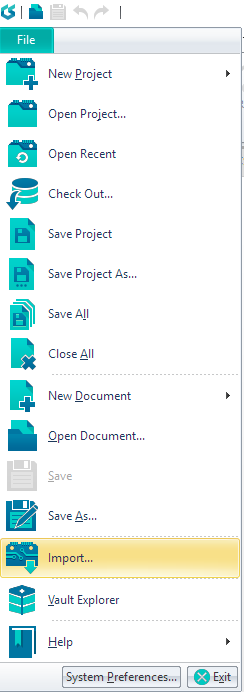
    1. Select "File" - "Import"

    image

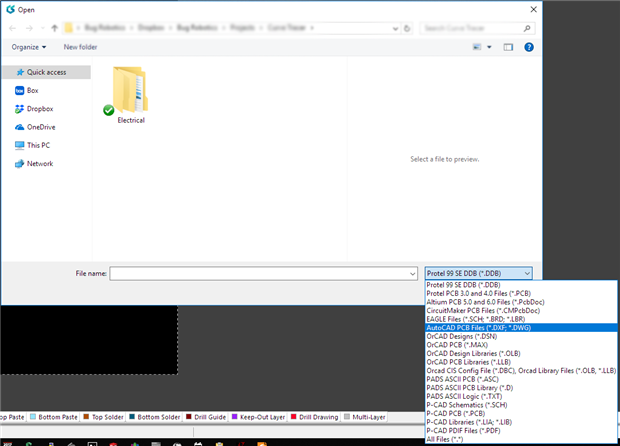
    2. Select "AutoCAD files" from the file type dropdown menu.  Browse to the DXF file you would like to use.


    image


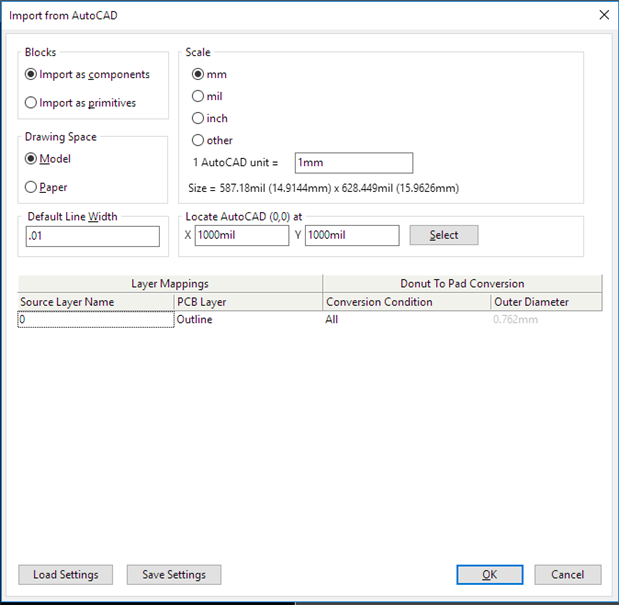
    3.  After selecting the file you need to configure the import settings.   Use the size to judge the correct Scale.

    image


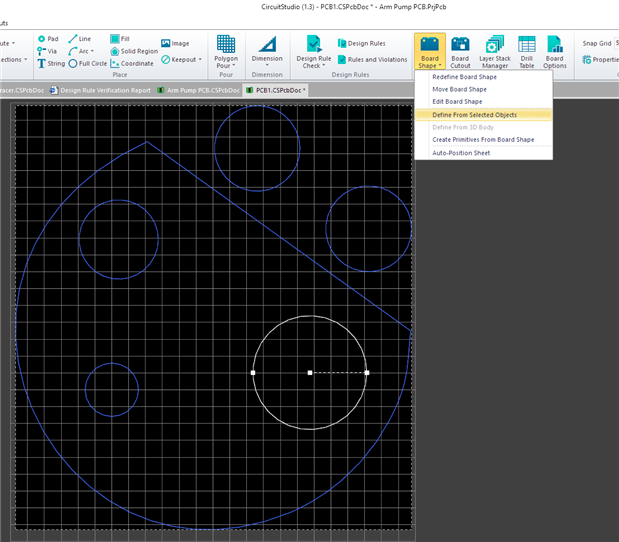
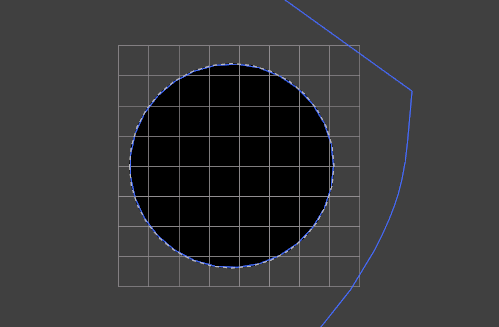
    4. The DXF will appear on the screen.  Highlight the area you would like to use for your board shape and select "Board Shape" - "Define from Selected Objects" in the ribbon toolbar.

    image


    5.  Your board shape should be defined by the DXF outline you selected.

    image


    Hope this helps.

    • Cancel
    • Vote Up 0 Vote Down
    • Cancel
  • cseidel
    0 cseidel over 7 years ago in reply to bugrobotics

    Thanks a lot, now everything works fine!


    Regards


    Christian

    • Cancel
    • Vote Up +1 Vote Down
    • Cancel
  • cseidel
    0 cseidel over 7 years ago in reply to bugrobotics

    Hello everyone,


    it seems to be, that only easy DXF-files are importable.

    I got an DXF-file from WAGO with a complex shape. Unfortunately is an import of this file not correct.


    Can someone check this please?


    Regards


    Christian

    • Cancel
    • Vote Up 0 Vote Down
    • Cancel
  • cseidel
    0 cseidel over 7 years ago in reply to bugrobotics

    Hello everyone,


    it seems to be, that only easy DXF-files are importable.

    I got an DXF-file from WAGO with a complex shape. Unfortunately is the import of this file not correct.


    Unfortnuately I can't upload a DXF-File!?


    Regards


    Christian

    • Cancel
    • Vote Up 0 Vote Down
    • Cancel
element14 Community

element14 is the first online community specifically for engineers. Connect with your peers and get expert answers to your questions.

  • Members
  • Learn
  • Technologies
  • Challenges & Projects
  • Products
  • Store
  • About Us
  • Feedback & Support
  • FAQs
  • Terms of Use
  • Privacy Policy
  • Legal and Copyright Notices
  • Sitemap
  • Cookies

An Avnet Company © 2026 Premier Farnell Limited. All Rights Reserved.

Premier Farnell Ltd, registered in England and Wales (no 00876412), registered office: Farnell House, Forge Lane, Leeds LS12 2NE.

ICP 备案号 10220084.

Follow element14

  • X
  • Facebook
  • linkedin
  • YouTube