element14 Community
element14 Community
    Register Log In
  • Site
  • Search
  • Log In Register
  • Community Hub
    Community Hub
    • What's New on element14
    • Feedback and Support
    • Benefits of Membership
    • Personal Blogs
    • Members Area
    • Achievement Levels
  • Learn
    Learn
    • Ask an Expert
    • eBooks
    • element14 presents
    • Learning Center
    • Tech Spotlight
    • STEM Academy
    • Webinars, Training and Events
    • Learning Groups
  • Technologies
    Technologies
    • 3D Printing
    • FPGA
    • Industrial Automation
    • Internet of Things
    • Power & Energy
    • Sensors
    • Technology Groups
  • Challenges & Projects
    Challenges & Projects
    • Design Challenges
    • element14 presents Projects
    • Project14
    • Arduino Projects
    • Raspberry Pi Projects
    • Project Groups
  • Products
    Products
    • Arduino
    • Avnet & Tria Boards Community
    • Dev Tools
    • Manufacturers
    • Multicomp Pro
    • Product Groups
    • Raspberry Pi
    • RoadTests & Reviews
  • About Us
  • Store
    Store
    • Visit Your Store
    • Choose another store...
      • Europe
      •  Austria (German)
      •  Belgium (Dutch, French)
      •  Bulgaria (Bulgarian)
      •  Czech Republic (Czech)
      •  Denmark (Danish)
      •  Estonia (Estonian)
      •  Finland (Finnish)
      •  France (French)
      •  Germany (German)
      •  Hungary (Hungarian)
      •  Ireland
      •  Israel
      •  Italy (Italian)
      •  Latvia (Latvian)
      •  
      •  Lithuania (Lithuanian)
      •  Netherlands (Dutch)
      •  Norway (Norwegian)
      •  Poland (Polish)
      •  Portugal (Portuguese)
      •  Romania (Romanian)
      •  Russia (Russian)
      •  Slovakia (Slovak)
      •  Slovenia (Slovenian)
      •  Spain (Spanish)
      •  Sweden (Swedish)
      •  Switzerland(German, French)
      •  Turkey (Turkish)
      •  United Kingdom
      • Asia Pacific
      •  Australia
      •  China
      •  Hong Kong
      •  India
      • Japan
      •  Korea (Korean)
      •  Malaysia
      •  New Zealand
      •  Philippines
      •  Singapore
      •  Taiwan
      •  Thailand (Thai)
      • Vietnam
      • Americas
      •  Brazil (Portuguese)
      •  Canada
      •  Mexico (Spanish)
      •  United States
      Can't find the country/region you're looking for? Visit our export site or find a local distributor.
  • Translate
  • Profile
  • Settings
Altium CircuitStudio
  • Products
  • Manufacturers
  • Altium CircuitStudio
  • More
  • Cancel
Altium CircuitStudio
Altium CircuitStudio Forum Cannot generate BOM
  • Blog
  • Forum
  • Documents
  • Events
  • Polls
  • Members
  • Mentions
  • Sub-Groups
  • Tags
  • More
  • Cancel
  • New
Join Altium CircuitStudio to participate - click to join for free!
Actions
  • Share
  • More
  • Cancel
Forum Thread Details
  • State Verified Answer
  • Locked Locked
  • Replies 17 replies
  • Subscribers 89 subscribers
  • Views 4926 views
  • Users 0 members are here
  • frontpage
Related
This discussion has been locked.
You can no longer post new replies to this discussion. If you have a question you can start a new discussion

Cannot generate BOM

myrek021
myrek021 over 6 years ago

Hello,


I have an annoying problem for which i need to find a solution quickly.

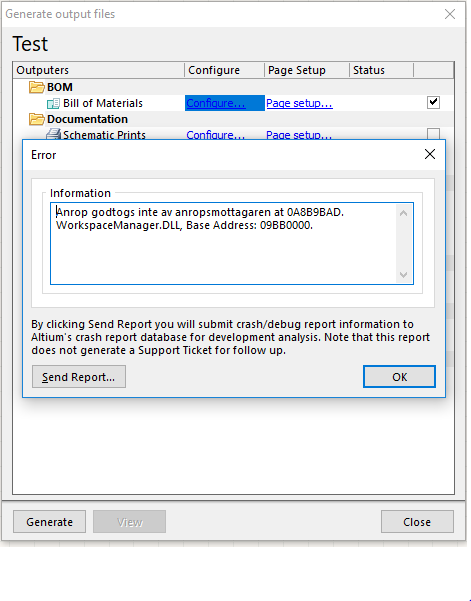
I cannot generate BOM on any of my existing or new projects. When I try to generate the bom or click "configure" I get the following error:
 

image

I recently moved from a win7 x64 system and have never experienced the problem on that machine.

Currently I'm running CS 1.4 on a win10 Professional X64 system. Could this problem be OS related?

I have tried reinstalling 1.4 version and also tried removing all preferences using the built in uninstaller but the problem remains.


I have just purchased an additional license renewal but the delivery time of 2-3 days for a license is a joke...


Any ideas on how to fix this issue would be much appreciated. Thanks!

  • Cancel
Parents
  • e14softwareuk
    0 e14softwareuk over 6 years ago

    Have you got Microsoft Office (32-bit) installed on the new computer? Is it possible you had it on your old computer but not on the new one?

    • Cancel
    • Vote Up 0 Vote Down
    • Cancel
  • myrek021
    0 myrek021 over 6 years ago in reply to e14softwareuk

    Yes, I have office365 32-bit installed on the new computer. I had the same version on the old computer.

    Perhaps it can be related to excel?

    • Cancel
    • Vote Up 0 Vote Down
    • Cancel
  • e14softwareuk
    0 e14softwareuk over 6 years ago in reply to myrek021

    If CS was installed before Office then I would suggest uninstalling and then reinstalling CS. If Office was installed first then might be worth trying to run the repair function.


    1. Open up the Control Panel on your PC (and show All Control Panel items, if necessary) and click on Programs, then Programs and Features.
    2. Find Microsoft Office 2016 in the list and highlight it.(Selection also say Microsoft Office 365)
    3. Click Change.
    4. Select Quick Repair and Repair then follow the prompts.


    • Cancel
    • Vote Up 0 Vote Down
    • Cancel
  • myrek021
    0 myrek021 over 6 years ago in reply to e14softwareuk

    Thanks for the suggestion.

    I have tried uninstalling CS several times. I also tried installing CS1.5 but I have not yet received the license key so i could not try to create the BOM.

    I changed back to CS 1.4 but the problem remains.


    I just tried to repair the office installation but it did not solve the problem.

    • Cancel
    • Vote Up 0 Vote Down
    • Cancel
  • e14softwareuk
    0 e14softwareuk over 6 years ago in reply to myrek021

    Is it definitely the 32-bit version of Office?

    • Cancel
    • Vote Up 0 Vote Down
    • Cancel
  • myrek021
    0 myrek021 over 6 years ago in reply to e14softwareuk

    Hi Peter,


    Yes, I just double checked word and excel. It is the 32-bit version.


    I have now installed CS1.5.1 and created a trial account. Still have the same problem image

    • Cancel
    • Vote Up 0 Vote Down
    • Cancel
  • e14softwareuk
    0 e14softwareuk over 6 years ago in reply to myrek021

    Not sure what else to suggest for now. As a quick workaround you can try generating the BOM in a different format (csv?) and not using a template - hopefully this should avoid needing Excel.

    • Cancel
    • Vote Up 0 Vote Down
    • Cancel
  • myrek021
    0 myrek021 over 6 years ago in reply to e14softwareuk

    Hi Peter,


    problem is I cannot export to any format. I get the error message shown in the first post immediately when i press the configure button.

    I also get the same message when i press generate.


    This is becoming a big problem as I have now spent several days trying to fix this issue and I have several boards where i need to send out the BOM.


    Any idea on how to get in touch with altium directly to solve this?

    • Cancel
    • Vote Up 0 Vote Down
    • Cancel
  • e14softwareuk
    0 e14softwareuk over 6 years ago in reply to myrek021

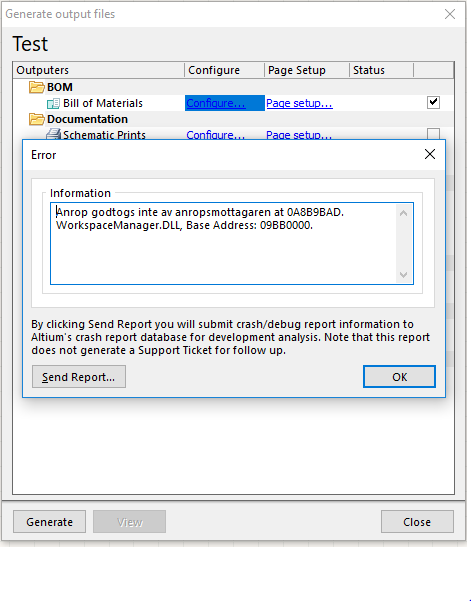
    Hi Mats. I will ask someone from Altium to make contact. It may help if you could update your post because what I presume would be a picture of the error message is not included or does not show. Knowing more details of the error would be helpful.

    • Cancel
    • Vote Up 0 Vote Down
    • Cancel
  • myrek021
    0 myrek021 over 6 years ago in reply to e14softwareuk

    Thank you,


    you cannot see the screenshot in the original post?

    What about now?


    image

    • Cancel
    • Vote Up 0 Vote Down
    • Cancel
Reply
  • myrek021
    0 myrek021 over 6 years ago in reply to e14softwareuk

    Thank you,


    you cannot see the screenshot in the original post?

    What about now?


    image

    • Cancel
    • Vote Up 0 Vote Down
    • Cancel
Children
  • e14softwareuk
    0 e14softwareuk over 6 years ago in reply to myrek021

    Thanks for the screenshot.

    • Cancel
    • Vote Up 0 Vote Down
    • Cancel
  • e14softwareuk
    0 e14softwareuk over 6 years ago in reply to e14softwareuk

    Over the weekend I got chance to try CS on a brand new installation of Win 10 Pro 64-bit (an ISO for October update from memory) that did not have MS Office installed (no office suite of any type). I was able to export a CSV BOM, in my testing I actually did this from the BOM Configure and then Export option.

    • Cancel
    • Vote Up 0 Vote Down
    • Cancel
  • myrek021
    0 myrek021 over 6 years ago in reply to e14softwareuk

    Hi Peter,


    I have now tried uninstalling office365 and this "solves" the problem. I do no longer get the error message and is able to export the BOM in .CSV or .TXT

    When i reinstall office365 32-bit or 64-bit the problem comes back.


    So this is not a fix since i need to have office and CS installed all the time but at least I know CS seems to have a problem with Office for some reason.


    Any ideas on what could fix it?

    • Cancel
    • Vote Up 0 Vote Down
    • Cancel
  • e14softwareuk
    0 e14softwareuk over 6 years ago in reply to myrek021

    Very interesting finding regarding office365. I will try and reproduce tonight on the clean Win 10 install I have. Is anyone out there successfully running offiec365 with CircuitStudio?

    • Cancel
    • Vote Up 0 Vote Down
    • Cancel
  • myrek021
    0 myrek021 over 6 years ago in reply to e14softwareuk

    I hope you are able to re-create this problem and find a solution.

    All my colleagues are running CS on win7 x64 so i cannot test it on any other machine here. Thanks

    • Cancel
    • Vote Up 0 Vote Down
    • Cancel
  • e14softwareuk
    0 e14softwareuk over 6 years ago in reply to myrek021

    Finished testing and I'm sorry to say it seems to work perfectly. Generated an Excel BOM using BOM Simple.XLT template from example project PCI Express 4 Port Serial Interface. Installation order was CS followed by Office.

    • CircuitStudio 1.5.1 (Build 13)
    • Windows 10 Pro 64-bit, Version 1809, OS build 17763.107
    • Excel for Office 365 MSO (16.0.11231.20164) 32-bit


    A couple of suggestions:

    • Delete (or move to another folder) your own OutJob file and then try configuring and generating BOM again
    • Try using the example project as I did above
    • Cancel
    • Vote Up 0 Vote Down
    • Cancel
  • myrek021
    0 myrek021 over 6 years ago in reply to e14softwareuk

    After investigating further I started uninstalling one program at a time until I got it working.

    It turns out it was kutools addon for excel that was the cause of this problem (at least i think so)

    Now Bom generation works again. Thanks for the time invested in this case.

    • Cancel
    • Vote Up 0 Vote Down
    • Cancel
element14 Community

element14 is the first online community specifically for engineers. Connect with your peers and get expert answers to your questions.

  • Members
  • Learn
  • Technologies
  • Challenges & Projects
  • Products
  • Store
  • About Us
  • Feedback & Support
  • FAQs
  • Terms of Use
  • Privacy Policy
  • Legal and Copyright Notices
  • Sitemap
  • Cookies

An Avnet Company © 2026 Premier Farnell Limited. All Rights Reserved.

Premier Farnell Ltd, registered in England and Wales (no 00876412), registered office: Farnell House, Forge Lane, Leeds LS12 2NE.

ICP 备案号 10220084.

Follow element14

  • X
  • Facebook
  • linkedin
  • YouTube