



element14 Community
element14 Community
    Register Log In
  • Site
  • Search
  • Log In Register
  • Community Hub
    Community Hub
    • What's New on element14
    • Feedback and Support
    • Benefits of Membership
    • Personal Blogs
    • Members Area
    • Achievement Levels
  • Learn
    Learn
    • Ask an Expert
    • eBooks
    • element14 presents
    • Learning Center
    • Tech Spotlight
    • STEM Academy
    • Webinars, Training and Events
    • Learning Groups
  • Technologies
    Technologies
    • 3D Printing
    • FPGA
    • Industrial Automation
    • Internet of Things
    • Power & Energy
    • Sensors
    • Technology Groups
  • Challenges & Projects
    Challenges & Projects
    • Design Challenges
    • element14 presents Projects
    • Project14
    • Arduino Projects
    • Raspberry Pi Projects
    • Project Groups
  • Products
    Products
    • Arduino
    • Avnet & Tria Boards Community
    • Dev Tools
    • Manufacturers
    • Multicomp Pro
    • Product Groups
    • Raspberry Pi
    • RoadTests & Reviews
  • About Us
  • Store
    Store
    • Visit Your Store
    • Choose another store...
      • Europe
      •  Austria (German)
      •  Belgium (Dutch, French)
      •  Bulgaria (Bulgarian)
      •  Czech Republic (Czech)
      •  Denmark (Danish)
      •  Estonia (Estonian)
      •  Finland (Finnish)
      •  France (French)
      •  Germany (German)
      •  Hungary (Hungarian)
      •  Ireland
      •  Israel
      •  Italy (Italian)
      •  Latvia (Latvian)
      •  
      •  Lithuania (Lithuanian)
      •  Netherlands (Dutch)
      •  Norway (Norwegian)
      •  Poland (Polish)
      •  Portugal (Portuguese)
      •  Romania (Romanian)
      •  Russia (Russian)
      •  Slovakia (Slovak)
      •  Slovenia (Slovenian)
      •  Spain (Spanish)
      •  Sweden (Swedish)
      •  Switzerland(German, French)
      •  Turkey (Turkish)
      •  United Kingdom
      • Asia Pacific
      •  Australia
      •  China
      •  Hong Kong
      •  India
      • Japan
      •  Korea (Korean)
      •  Malaysia
      •  New Zealand
      •  Philippines
      •  Singapore
      •  Taiwan
      •  Thailand (Thai)
      • Vietnam
      • Americas
      •  Brazil (Portuguese)
      •  Canada
      •  Mexico (Spanish)
      •  United States
      Can't find the country/region you're looking for? Visit our export site or find a local distributor.
  • Translate
  • Profile
  • Settings
Raspberry Pi
  • Products
  • More
Raspberry Pi
Blog An Industrial Enclosure for Raspberry Pi
  • Blog
  • Forum
  • Documents
  • Quiz
  • Events
  • Polls
  • Files
  • Members
  • Mentions
  • Sub-Groups
  • Tags
  • More
  • Cancel
  • New
Join Raspberry Pi to participate - click to join for free!
Featured Articles
Announcing Pi
Technical Specifications
Raspberry Pi FAQs
Win a Pi
GPIO Pinout
Raspberry Pi Wishlist
Comparison Chart
Quiz
  • Share
  • More
  • Cancel
Group Actions
  • Group RSS
  • More
  • Cancel
Engagement
  • Author Author: shabaz
  • Date Created: 26 Apr 2019 1:15 PM Date Created
  • Views 11094 views
  • Likes 20 likes
  • Comments 36 comments
Related
Recommended
  • rpi 4
  • raspberry pi 4b
  • rpi bc din rail housing for raspberry pi computers
  • pi 3 model b+
  • rpi-bc 107
  • raspberry pi 4 b
  • pi 3 b+
  • rpi-bc

An Industrial Enclosure for Raspberry Pi

shabaz
shabaz
26 Apr 2019

Note: The video shows a Pi 3 being used with this enclosure, but has also been tested with Pi 4, and it works fine. See photo further below for a Pi 4 inside the enclosure.


  • Introduction
  • What is it?
  • Is there a need for the Pi in industry?
  • Installing the Pi
  • Designing your own Circuits
  • Un-clipping the case
  • Using a Ribbon Cable
  • Using the Front Panel
  • Putting it Together: Raspberry Pi 4 and Custom Board
  • Summary


Introduction

Fed up of leaving my Pi’s exposed, I was on the lookout for a Pi enclosure that would have space for additional circuitry. I frequently need a decent enclosure that doesn’t look out of place in a factory, not only suitable for deployments in industrial control panels, but also for home use and general experimentation too.


I recently purchased a new Pi 3 Model B+, and it was a good opportunity to look for a suitable enclosure. The Phoenix Contact RPI-BCPhoenix Contact RPI-BC seemed attractive, because it was large enough to add custom circuitry inside it too! Also, it was surprisingly low-cost which always helps. There were some reviews of the RPI-BC a couple of years ago but I was not sure if the newer Pi 3B+ would fit it or not, and happily it is a perfect fit. The RPI-BC enclosure could be of great interest to engineers, since there is high demand for industrial edge computing. This short blog post shows some ideas on how to work with the case and Pi 3B+.


The case is intended for DIN rail fitting in industrial control panels. However, it could be used as-is too. It looks attractive enough to use elsewhere too, and the front panel could have a sticker with graphics attached, or it could be drilled out for custom controls.


For a three-minute video tour, see here:

You don't have permission to edit metadata of this video.
Edit media
x
image
Upload Preview
image


What is it?

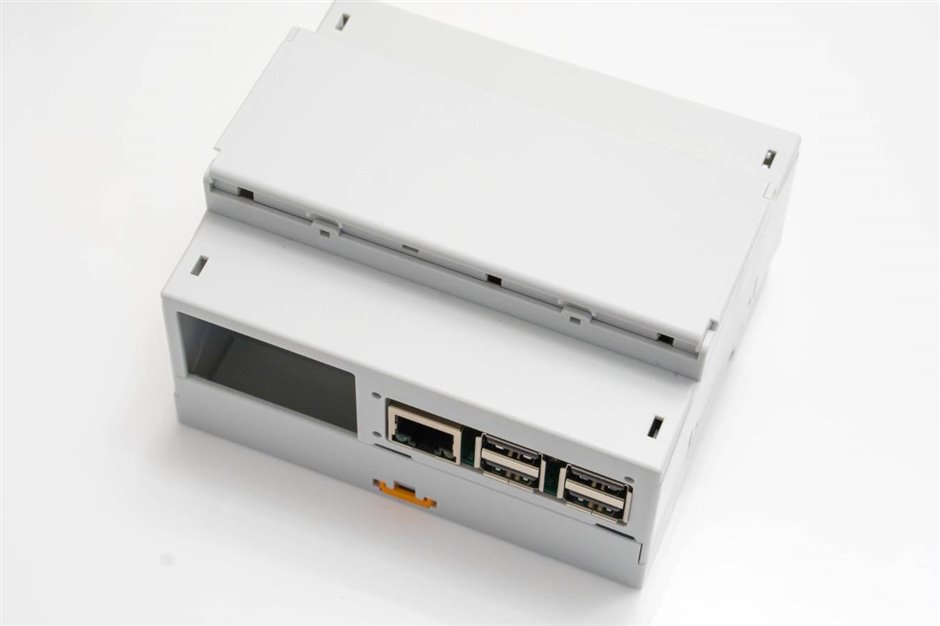
The RPI-BCRPI-BC is a plastic enclosure by Phoenix Contact, known for industrial automation components and solutions. The enclosure will allow you to design Pi software and add-ons that can clip together onto a DIN rail.
image


The case is not ruggedized (nor is it intended for dusty environments since connections are exposed) so those are some constraints that define where the enclosure could be deployed, i.e. it’s intended use is inside control panels or a cabinet/closet.


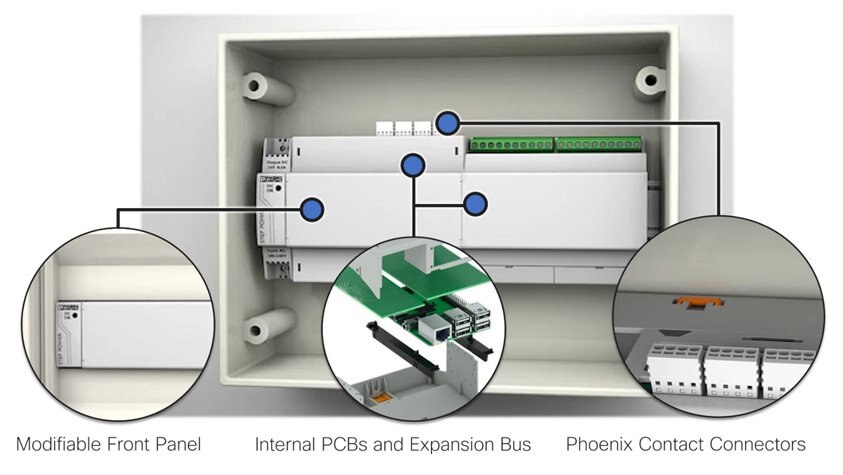
Phoenix Contact has built an ecosystem of individual components that make up the enclosure, front panels, and prototyping circuit boards, but the main parts are all available with a single order code, and that’s what is discussed here.


The shell has three main parts – two main halves, and a removable cover that could be drilled to accommodate LEDs or displays for instance, or even a camera. Inside, there is room for a couple of circuit boards, and an 18-way expansion connector if desired, to allow sideways linking with other enclosure modules on the same DIN rail. It’s a neat, attractive solution.

(Image source: adapted from several photos from the Phoenix Contact website)image
 

Is there a need for the Pi in industry?

I believe the answer is yes! The amount of compute power allows for many interesting things to be done in edge computing scenarios in an office or factory. I’ll touch on this more in a later article. However, it is plain to see there is growing interest in using low-cost hardware to do more intensive processing locally. There are many variants and custom builds of the Pi from sources such as Avnet and Hilscher. I’ve had first-hand experience in seeing a healthcare-related custom build of the BeagleBone Black (an ARM based computer similar to the Pi) as another example. The Linux operating system is highly attractive for creating a lot of functionality quickly into products, and manufacturers have taken steps at hardening the platforms and adding security to suit industrial use-cases.


Installing the Pi

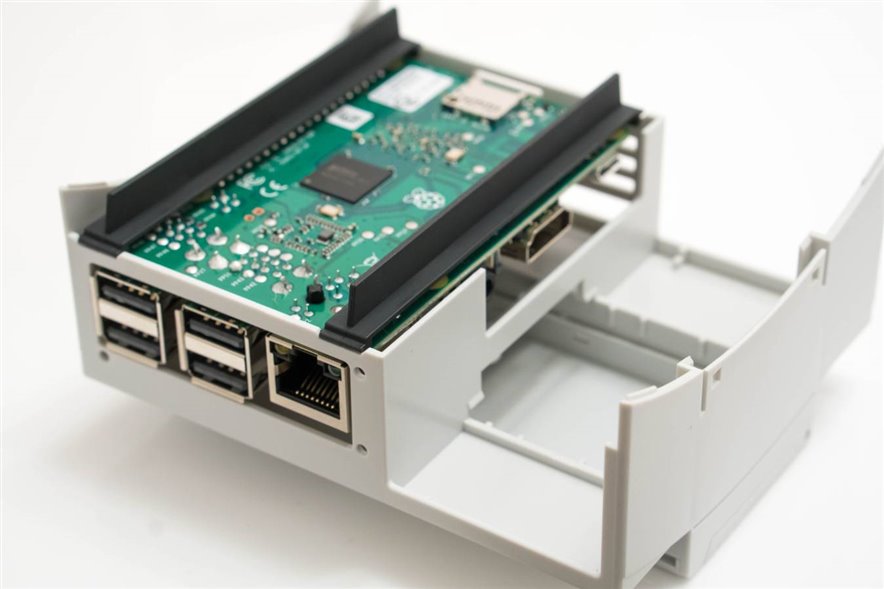
The RPI-BC uses a nice way of positioning and securing the Pi. There are a couple of black plastic rails that clip on to the Pi to act a carrier. There are lips that fit the shell of the case, and then the Pi is secured when the other half of the shell is attached. 

image


Once installed, the power supply micro USB connector and HDMI and audio connectors are accessible inside the enclosure which is great – they are unlikely to all need exposing outside, but cables can be routed in the empty space if needed.
image


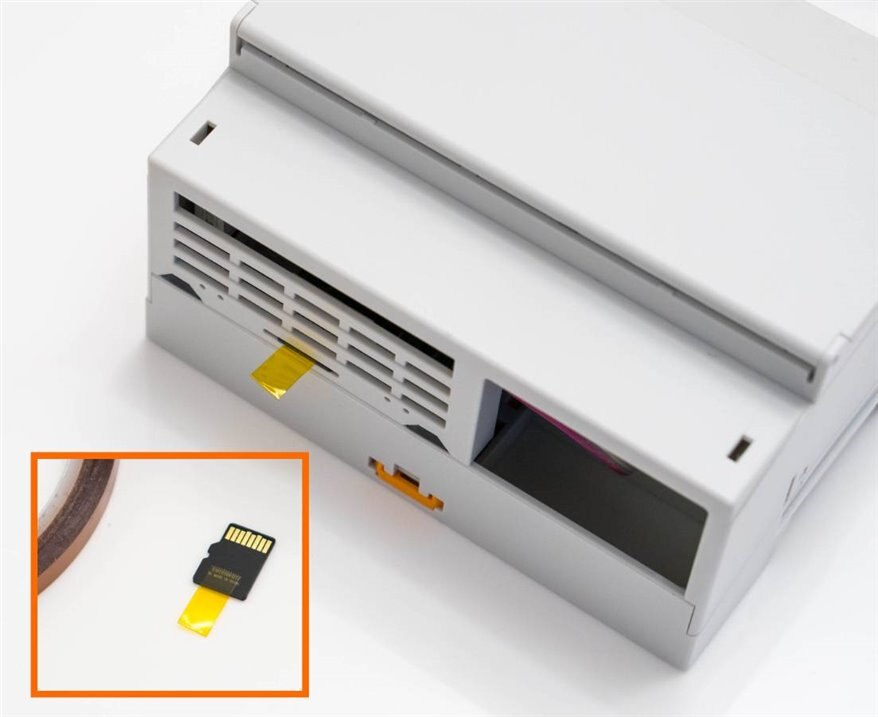
The carrier rails ensure that the Pi is very accurately positioned inside the case. That’s needed, so that the micro SD slot and LED holes are also positioned accurately. Incidentally since the Pi’s micro SD card is not ‘push to eject’ but is ‘pull to eject’, if the end user will need to remove the card with the enclosure closed, some tape on it helps.
image


Designing your own Circuits

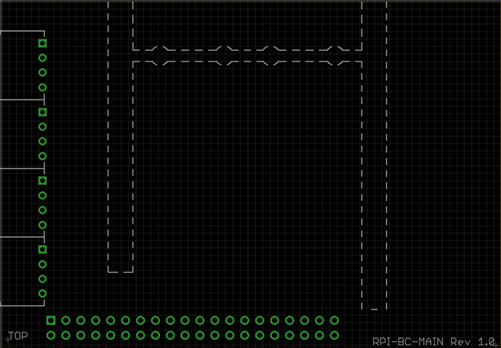
Some Phoenix Contact prototyping boards for the RPI-BC are available; one prototyping board plugs onto the Piprototyping board plugs onto the Pi, and another prototyping board fits the space to the sideprototyping board fits the space to the side. To make custom PCBs easier, so I took the dimensions, and made up an EAGLE CAD part (attached to the bottom of this blog post).
image


The parts required to assemble such a custom PCB are a 40-way connector strip40-way connector strip and optionally up to four 4-way connectors4-way connectors.


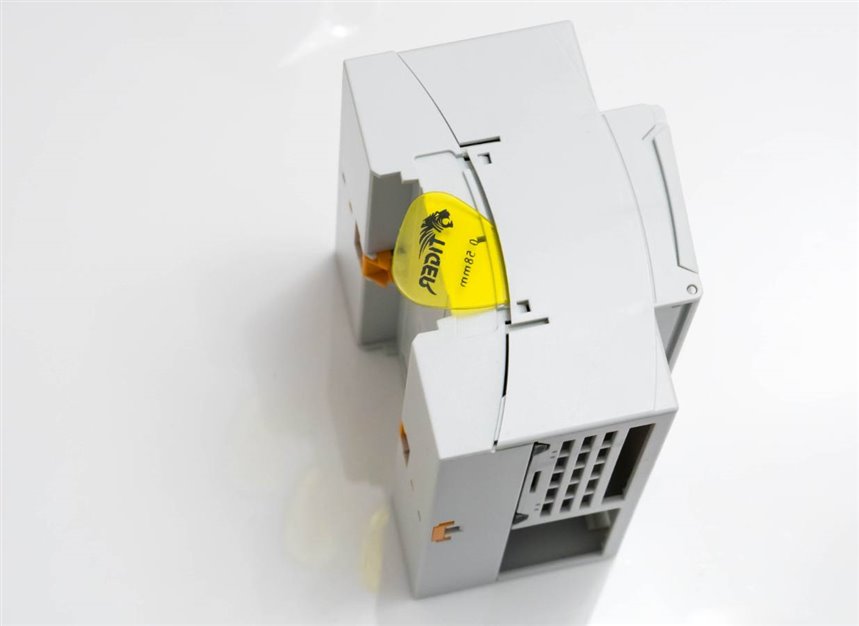
Un-clipping the case

The two main halves of the enclosure clip together. They are easy to disassemble using thin plastic such as a guitar pick.
image


Using a Ribbon Cable

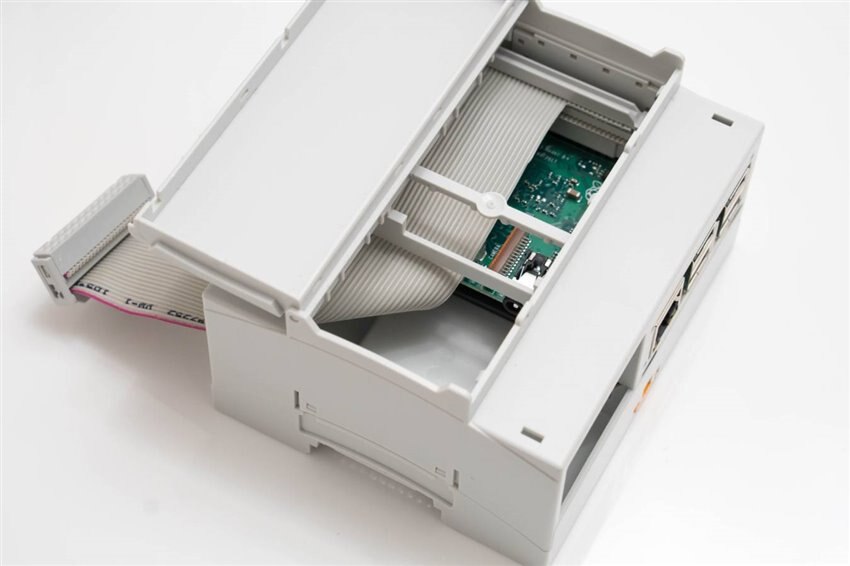
If you’re unsure what circuitry to attach, that decision can be left until later : ) by using a ribbon cable plugged onto the Pi instead of the previously-mentioned PCB. I used a 40-way insulation displacement connector40-way insulation displacement connector (IDC) and a 26 way connector26 way connector and 40 way ribbon cable40 way ribbon cable and the cable assembly can be left inside the case, or it can be brought out through the holes on either side of the enclosure. There’s enough space to make a small PCB in future that the 26-way connector can plug onto. To make the cable assembly, a 40-way cable was used and it was slit and cut. A vice can be used to close the IDC connectors.
image


Using the Front Panel

The front panel can have holes drilled for buttons and LEDs and so on, and it permanently clips onto the front of the enclosure, however it could be turned into a hinged flap if desired, by cutting out plastic in three areas before attaching it on (there is an optional front panel order code that doesn't need this manual modification).

image


Putting it Together: Raspberry Pi 4 and Custom Board

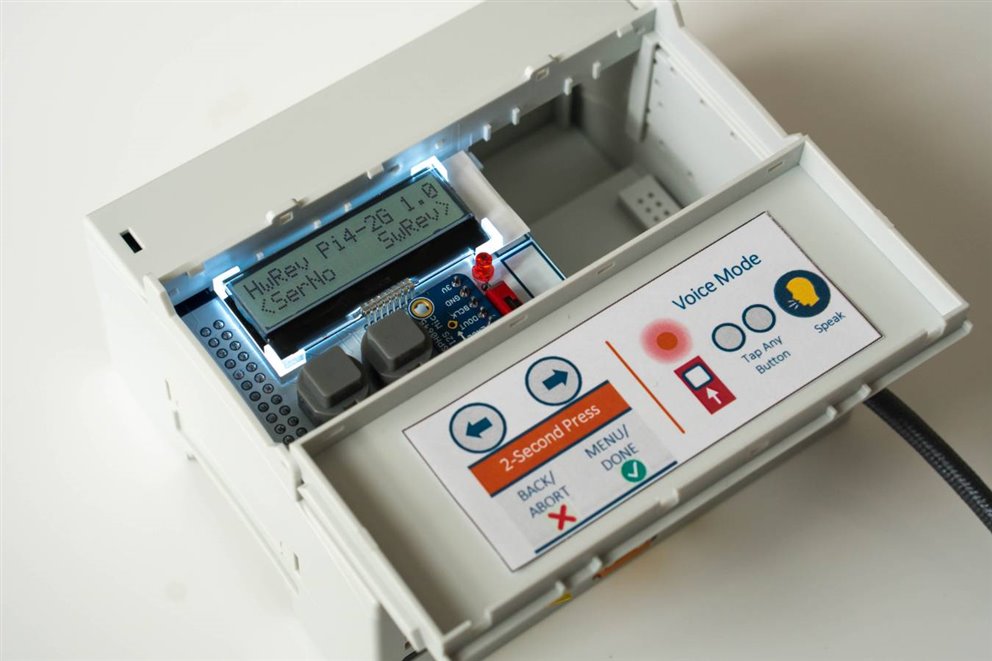
The photo here shows an example board designed with EAGLE CAD, installed along with the Pi 4, into the enclosure. The flap covers the display/controls and hinges open to reveal the user instruction sheet. The flap could be replaced with a 3D printed version with holes for the display and buttons if desired.
image


Summary

The RPI-BC enclosureRPI-BC enclosure is a perfect fit for the Pi 3B+ (and it also works with other Pi variants, such as the A+ models with an optional A+ adaptoroptional A+ adaptor). I really liked that it was easy to attach additional circuitry if required, and I’m looking forward to using it in multiple projects, using custom PCBs.


It’s low-cost, and very functional. Surprisingly, it is also excellent for brainstorming - having such a case and the ease to build things with it, opens up many possibilities for exciting new solutions with the Pi. if you develop any, or have ideas, it would be great to hear about them.

Thanks for reading!

Attachments:
RPI-BC EAGLE CAD library v1.1.zip
  • Sign in to reply

Top Comments

  • beacon_dave
    beacon_dave over 6 years ago in reply to shabaz +6
    Hi Shabaz, Yes it jumped out of the page when I saw it last night.
  • shabaz
    shabaz over 6 years ago in reply to balearicdynamics +6
    Finally I found some PDF on the Phoenix Contact website with a small image too, but I kept zooming in..:
  • beacon_dave
    beacon_dave over 6 years ago +4
    There's a variation on this case which accepts the official 7" touchscreen which may also be of interest: https://www.phoenixcontact.com/online/portal/us/?uri=pxc-oc-itemdetail:pid=1104781 Spotted it in…
  • shabaz
    shabaz over 6 years ago in reply to balearicdynamics

    Finally I found some PDF on the Phoenix Contact website with a small image too, but I kept zooming in..:

    image

    • Cancel
    • Vote Up +6 Vote Down
    • Sign in to reply
    • More
    • Cancel
  • shabaz
    shabaz over 6 years ago in reply to Jan Cumps

    Also, the MICA looks interesting, certain industries would love that.

    I like the circular more rugged connectors : ) I wish I'd applied at the time, but I saw it too late : ( Hopefully there's a RoadTest of more edge compute and gateways soon.

    • Cancel
    • Vote Up +1 Vote Down
    • Sign in to reply
    • More
    • Cancel
  • shabaz
    shabaz over 6 years ago in reply to Jan Cumps

    In the areas I end up working in, I've seen all sorts of edge compute, ranging from specific certified hardware, through ruggedised (sometimes repackaged hardware! sometimes worthwhile for certain industries) and custom variants (e.g. a custom BeagleBone, or custom Pi). Sometimes even Dell servers! with poor cooling collecting dust inside.. As you say, some of this couldn't meet the needs of some scenarios in production directly. Sony uses Pi's on the factory floor, but I don't know the use-case, it could be for monitoring equipment perhaps, or some functions offloaded to other devices. Sometimes it's the right hardware, sometimes it's very suboptimal. Also, sometimes it's easy to move the conversation to features, and once the customer is happy, then consider what hardware they require.


    Some scenarios need fast response, but not hard real time, such as (say) retail IoT where it may be detecting if a customer has arrived or left the premises, or if a shelf is empty, or in offices, checking for occupancy. There's a commercial product called NetBeez that has a standard Pi inside it, but for other scenarios that wouldn't be sufficient, and hardened in some way (e.g. electrically, or security related) third party variants, like the Hilscher or Avnet ones, or completely different hardware like MICA, or different architectures might be needed, or mandated due to standards. I've seen scenarios where compute is needed close to machinery, but no hard real-time requirement, since the low-level communication is done by a dumb appliance or traditional PLC, attached via Ethernet or serial for example - these are still industrial scenarios (an example is ships, to manage (say) oil filtering for the engine room.. as I understand all oil is recollected, filtered, perhaps centrifuged? and reused).


    Some customers are very price sensitive, but with software it's easy (easier) to show that specific hardware, or a different architecture, or redundant components, while costing more, will save costs. Then it's nice leaving the problem to the sales guys to work out the finances : )


    It's all a balancing act sometimes.. no-one wants to invest heavily to test the water, so sometimes we have to work around existing assets or go with solutions where hardware won't go to waste when they upgrade, i.e. they can re-purpose it - easier to do with open source.


    Depending on the deployment, often the real pain can be not just the spares cost or even effort to go and repair/replace something on-site, but the initial set-up, and ongoing costs with upgrading software or inserting cards etc.. each visit including the initial deployment one, costing upward of $800... so clever software that resolves all that can make a sale easier.. makes the cost of having high-end hardware, and redundancy, almost insignificant.


    However, some customers are really cost-sensitive as mentioned.. I'm always astonished at seeing the ancient computers on some retail store counters even at fancy locations, sweating their assets to the last drop! But even those types of customers are waking up to seeing the massive potential when they've got decent edge compute capabilities. They still want the software features, and also nowadays need a check-list of security related items (some of which are tied to the hardware) - depending on the customer, and the location (physically and logically) where they're deploying.

    • Cancel
    • Vote Up +3 Vote Down
    • Sign in to reply
    • More
    • Cancel
  • stevesmythe
    stevesmythe over 6 years ago in reply to Jan Cumps

    See my comment above - there is an English language version image

    • Cancel
    • Vote Up +3 Vote Down
    • Sign in to reply
    • More
    • Cancel
  • Jan Cumps
    Jan Cumps over 6 years ago in reply to geralds

    Yes, geralds, the white paper evaluates what is available in 2017 - they haven' made predictions.

    We've seen several initiatives since then to build Pi versions that are more resilient (also for the beaglebone, they seem to be on a similar path).

    The initiatives that I've seen for sale lately will survive a prototyping - test gig setting, I believe.

    For deployment in a dusty, moist (or in my business, acid-involved) production environment, I haven' t seen a certified Pi incarnation yet.


    The main reason while Harting sees big value in the prototype stages and  limited value in a real industrial setting is related to the hardware used and the lack of industrial certification + protection/hardening/vibration measures.

    I've checked shabaz' auto-translated version - it unfortunately didn't translate the comparison table. I may do a manual translation of the Pi findings ...

    As a Pi fan, I generally agree with Harting's verdict.

    • Cancel
    • Vote Up +2 Vote Down
    • Sign in to reply
    • More
    • Cancel
<>
element14 Community

element14 is the first online community specifically for engineers. Connect with your peers and get expert answers to your questions.

  • Members
  • Learn
  • Technologies
  • Challenges & Projects
  • Products
  • Store
  • About Us
  • Feedback & Support
  • FAQs
  • Terms of Use
  • Privacy Policy
  • Legal and Copyright Notices
  • Sitemap
  • Cookies

An Avnet Company © 2026 Premier Farnell Limited. All Rights Reserved.

Premier Farnell Ltd, registered in England and Wales (no 00876412), registered office: Farnell House, Forge Lane, Leeds LS12 2NE.

ICP 备案号 10220084.

Follow element14

  • X
  • Facebook
  • linkedin
  • YouTube